Hello Team,
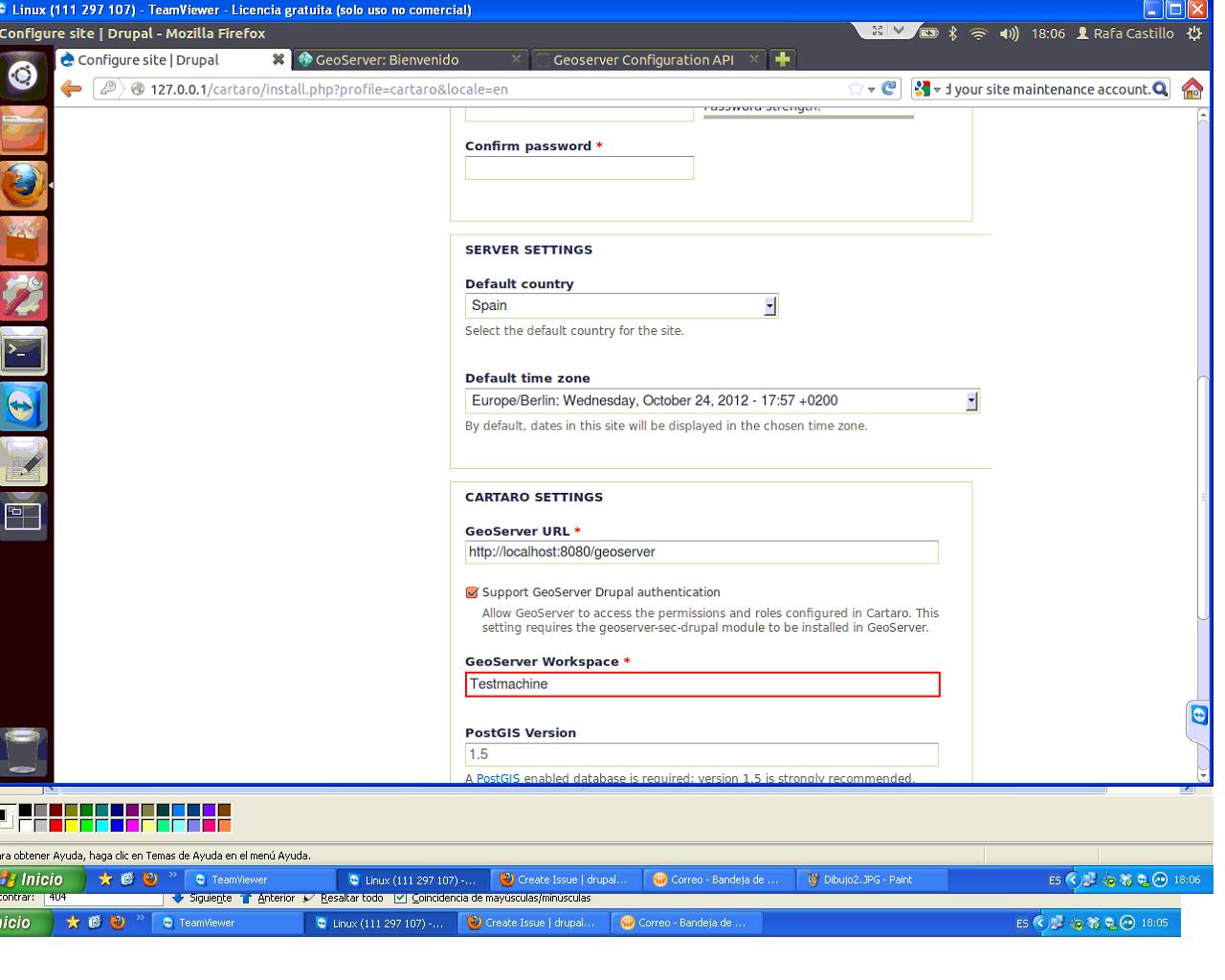
I have the following problem when installing cartaro following instructions and requirements from cartaro.org:
Could not create GeoServer workspace: %Access to http://localhost:8080/geoserver/rest/workspaces.json returned HTTP status code 404.
Do you have any clue why this could happen?? (Please see attachment for details)
As you can see the Workspace is the problem, but I created it and set it as default (Please see attachment for details)
Any help would be appreciated.
Many thanks and best regards,
Rafa



Comments
Comment #1
augustus.kling commentedYour picture shows that you've chosen “Support GeoServer Drupal authentication” during Drupal installation. This means that Drupal will send all user names prefixed with an instance identifier (which currently equals the workspace name) to GeoServer. GeoServer in turn makes use of this prefix to chose the component which is responsible for verifying credentials.
We probably should change the wording so that the meaning of the checkbox becomes more obvious.
In order to judge whether the combination of GeoServer and Drupal is correctly configured, we should have screenshots showing GeoServer's security related screens (especially “Seguridad → Settings” and the authentication provider for Drupal).
Further you could set GeoServer so that it uses verbose logging and then provide its log file. Make sure to check the neither the screenshots nor the log contain sensitive data such as passwords before posting them.
Note that Cartaro will create its workspace automatically during installation and you do not need to create it manually.
Comment #2
kingkastle4004 commentedThanks Augustus for your reply,
Please find attached my Geoserver configuration. As you can see the name is "Test machine", I tried this too in the Geoserver workspace field but same result.
Hope this helps!, I'm quite a bit stuck with this
Thanks for the help
Rafa
Comment #3
augustus.kling commentedIn the exception fragment from the PDF it says that the database user used by GeoServer is “cartaro” but in your last screenshot it is called “root”. Please verify that the configurations for authentication provider and user group service are the same – this includes their names.
You did not chose to use prefixes in GeoServer by not checking “Usernames are prefixed” but opted for prefixed user names in Drupal by checking “Support GeoServer Drupal authentication”. Check both checkboxes if you want to share a GeoServer with multiple Drupal instances but uncheck both if all your Drupal instances should use their own GeoServer.
If that does not yet help, verify that the credentials used by GeoServer to connect to PostgreSQL are accepted for connections from localhost (that is without using sockets).
Comment #4
kingkastle4004 commentedThanks Augustus for your response,
Regarding the configuration for autentification provider and user group service, yes both are configured similarly using as user "root".
Regarding checkboxes, I did check both as you suggest.
Regarding the credentials used to connect Geoserver to PosgreSQL, I'm sorry for my ignorance but I didn't even know I had to do that, so I went to: "Store"->"Add"->"Post GIS" and fullfil everything with the credentials for user used in autentification provider and user group service.
Doing so, now the problem I have is different:
"GeoServer login failed: Wrong user credentials. Please check the GeoServer URL and your site maintenance account."
And the logs shows (see bellow), that the it's using "cartaro" as user!!, while I can swear God I use "root" as user.... . Regarding postgres tables I also included at the end the database I have configured, again the user is "root".
Any clue??
Thanks in advace for your time Augustus
at org.cartaro.geoserver.security.drupal.DrupalDatabaseConnector.accquireConnection(DrupalDatabaseConnector.java:68)
at org.cartaro.geoserver.security.drupal.DrupalDatabaseConnector$1.run(DrupalDatabaseConnector.java:50)
at java.util.TimerThread.mainLoop(Timer.java:534)
at java.util.TimerThread.run(Timer.java:484)
2012-10-26 18:42:39,164 WARN [geoserver.security] - Cannot connect to database of configuration Test machine
org.postgresql.util.PSQLException: FATAL: password authentication failed for user "cartaro"
at org.postgresql.core.v3.ConnectionFactoryImpl.doAuthentication(ConnectionFactoryImpl.java:291)
at org.postgresql.core.v3.ConnectionFactoryImpl.openConnectionImpl(ConnectionFactoryImpl.java:108)
at org.postgresql.core.ConnectionFactory.openConnection(ConnectionFactory.java:66)
at org.postgresql.jdbc2.AbstractJdbc2Connection.(AbstractJdbc2Connection.java:125)
at org.postgresql.jdbc3.AbstractJdbc3Connection.(AbstractJdbc3Connection.java:30)
at org.postgresql.jdbc3.Jdbc3Connection.(Jdbc3Connection.java:24)
at org.postgresql.Driver.makeConnection(Driver.java:393)
at org.postgresql.Driver.connect(Driver.java:267)
at java.sql.DriverManager.getConnection(DriverManager.java:620)
at java.sql.DriverManager.getConnection(DriverManager.java:222)
Postgres database:
List of databases
Name | Owner | Encoding | Collate | Ctype | Access privileges
---------------+------------+----------+-------------+-------------+-----------------------
cartaro_db | root | UTF8 | es_ES.UTF-8 | es_ES.UTF-8 |
Comment #5
ranelpadon commentedI've successfully configured the Cartaro using these setups:
1.) XAMPP 1.8.1 (Apache 2.4.3, PHP 5.4.7) + Cartaro (beta2) + OpenGeo Suite 3 CE (PostgreSQL 9.1, PostGIS 2.0, GeoServer 2.2)
2.) WAPP 5.3.17 (Apache 2.2.23, PHP 5.3.17, PostgreSQL 9.1.5, PostGIS 1.5.5) + Cartaro (beta2) + GeoServer 2.2
I've encountered also that error, the easiest way to solve it is to uncheck the 'Support the Geoserver Drupal authentication' installation option, and use the Site Username: 'admin' & Password: 'geoserver' (see the attached screenshots). These are the default Admin credentials of GeoServer, aside from the 'root' user (which will cause a lot of issues). Also, my DB Username is 'postgres' & password is 'postgres'. After installation, I could log-in to Cartaro with Username: 'admin' and password: 'geoserver'. Then, as you become familiar with the installation of Cartaro, you could attempt to install it with the 'Support the Geoserver Drupal authentication' option, in which amazingly, the admin-geoserver username-password credentials also work.
Last thing, the workspace must be created by Cartaro, so just specify a simple workspace name (not a URL!) in the installation page & let Cartaro do the automatic workspace configuration (in the Geoserver) for you. In short, the workspace must be non-existent in GeoServer before the installation. Actually, the more important & trivial requirement is to create a new 'cartaro' spatial database, then the rest is the task of Cartaro.
Comment #6
kingkastle4004 commentedThanks Vision for your feedback,
However I'm still trying to install with the option checked 'Support the Geoserver Drupal authentication' .
So, I reinstall everything but changed the user 'root' to be 'drupal'. Now watching the logs I se things now are different (and looks better), however I keep having a error:
"Could not create GeoServer datastore in workspace: %Access to http://127.0.0.1:8080/geoserver/rest/workspaces/conexion/datastores.json returned HTTP status code 404."
I attach my log report ( with password erased for security), for me it is still unknow the reason, but the log provides plenty of info.
Any help would be appreciated,
Many thanks in advance
Rafa
Comment #7
augustus.kling commentedThe log shows that your user is accepted and the proper roles are assigned. So the login is fine.
Afterwards Cartaro tries to access the workspace which is not there. This is also okay because Cartaro will create the workspace if not there. The creation of the workspace is failing however (as message during installation shows). This shows up as POST request in the logs.
The workspace creation should not fail however but still does and you are stuck. I'm getting back to you with instructions about getting forward once I can reproduce this behaviour.
Comment #8
kingkastle4004 commentedThanks Augustus,
Just for clarifications: I didn't do anything except the instructions I found at cartaro.org, so in case there are extra configurations in geoserver or postgres, I didn't do any of them.
Thanks for your help.
Rafa
Comment #9
augustus.kling commentedI can't remember that something else would be needed. Beside that the instructions on cartaro.org need to be correct and will be updated accordingly if they should be incomplete.
Comment #10
kingkastle4004 commentedHello Augustus,
I include a screen shot with my Postgres configuration, in case it helps
Rafa
Comment #11
stropharis commentedSuscribe.
Comment #12
ranelpadon commentedActually, I've encountered also this access error before -> Error 404 @ http://127.0.0.1:8080/geoserver/rest/workspaces/conexion/datastores.json.
What I did, I opened a new tab in a web browser & pasted the URL ( http://127.0.0.1:8080/geoserver/rest/workspaces/conexion/datastores.json). Then, it prompted with a username & password credentials. First, I've tried using the 'root' username & its corresponding password, but it didn't work. However, I tried using the 'admin' username and 'geoserver' password, and to my surprise, it worked. That's why I'm using the 'admin' and not the 'root' account, for my configurations.
You may want to try to open a new tab in a web browser & paste the problematic URL and see what you could do from there. :)
Comment #13
augustus.kling commentedCreate a database and make sure PostGIS is available there. Refer to http://postgis.refractions.net/documentation/manual-1.5/ch02.html in case of problems.
Install GeoServer 2.2 with geoserver-sec-drupal-2.2.jar as detailed in http://cartaro.org/documentation/using-drupal-users-and-roles-geoserver
I've used Tomcat 7 but that should not matter.
Log into GeoServer's web GUI with user root to set the Role Service. Add Authentication Provider and activate it in the provider chain list below. Add User Group Service. Make sure to check “Usernames are prefixed” for Authentication Provider and User Group Service.
The environment should now be ready to install Drupal.
When queried for the “Site Maintenance Account” choose whatever you like – it does not need to match anything in GeoServer. Make sure to check “Support GeoServer Drupal authentication” because “Usernames are prefixed” was checked in GeoServer previously.
Type the same thing in “GeoServer Workspace” that was used as name for the Authentication Provider and User Group Service in GeoServer. Do not create the workspace manually.
Restart GeoServer to rewrite rule paths (visible in Security → Data in GeoServer). I think this is the missing bit in the instructions. Hopefully this restart can be obsoleted in one of the following releases of geoserver-sec-drupal-2.2.jar.
You can now (after the GeoServer restart) proceed with the Drupal installation. Confirming the form should create the workspace and prepare a working Drupal installation that integrates GeoServer. Go to Structure → GeoServer in Drupal and verify the workspace is listed in the select box to be sure everything went well.
Comment #14
kingkastle4004 commentedHi Augustus,
I just complete the installation, I restart again the whole installation process. The changes that I did regarding the previous "buggy installation" was in the postgres database:
As I used as database owner ("drupal" in my case) I assigned him: superuser roles and modify the file: /etc/postgresql/9.1/main/pg_hba.conf line:
local all postgres peer
to
local all all md5
(PD: As vision commented at #5, if you uses as database owner "postgres", make sure you define a password for him as md5 method requires it)
Apart of this, I did one more thing in Geoserver regarding what described in the manual: In Security->Data->Rules for the data name I used for the Authentication Provider and User Group Service (in my case "conexion") I selected: demo and administration roles (please see screen shot attached).
Doing so allowed me to complete the installation.
Thanks Augustus and others for the help
Rafa
Comment #15
augustus.kling commentedGlad to hear you managed to complete the installation, now. I hope your further experience with Cartaro is smoother from now on. Strange though that you had to select the roles by hand because those should be selected on the GeoServer restart (as stated in comment 13).
Regarding the PostgreSQL configuration: It does not matter how the database user is called but obviously the database needs to be set up to grant permission and accept the login. The latter is a bit tricky in PostgreSQL because it allows for fine control which is hard to get right when doing the first PostgreSQL setup.
Another note for those who try to use a user called root without using prefixes. There is a hard-coded user root in GeoServer called root which takes precedence. Having a user root in Cartaro is therefore ignored in GeoServer. Further details: http://docs.geoserver.org/stable/en/user/security/root.html
Unless you are familiar with GeoServer or using prefixes, it is thus recommended not to call a Cartaro user root.
Comment #16
augustus.kling commentedComment #17
milos.kroulik commentedI still experience error mentioned in original description using Geoserver 2.2.5. on Tomcat 7 and latest Cartaro. I tried to strictly follow rules in help.
kingkastle4004: Can you, please, briefly explain, what have you changed to proceed with installations? If you need, I can post my configuration.
Comment #18
milos.kroulik commentedNever mind. I was able to reinstall Cartaro using correct settings.
Comment #19
alibama commentedto confirm i set the admin password from in geoserver ie went to myaddress.com:8080/geoserver and initially log in with the root password inside the /var/lib/tomcat7/webapps/geoserver/data/security/masterpw.info file - on ubuntu 12.04 at least - and then it was fine...
Comment #20
milos.kroulik commentedalibama, please do not reopen old issue. If you think, that something should be added to documentation, open new issue for it.
Comment #21
kosmos890 commentedI have the same problem.
Could not create GeoServer workspace: Access to localhost:8080/geoserver/rest/workspaces.json returned HTTP statusI follow exactly the instructions from here :
Cartaro Installation
Geoserver : Using Drupal rules and users
I read also the configuration from here :
GitHub : geoserver-sec-drupal
I tried the solution of post #14 but it didn't work.
In post #13 augustus.kling uses postgis-1.5.8. I use postgis-1.5.3 and I can't install the new version.
Please have a look in my screenshots.
I will appreciate any help.
Comment #22
dafreak commentedFollowed all directions, but Cartaro is not able to create my Workspace after I have created it as per instructions.
Furthermore when I remove the workspace and try again I get a 404 error.
not available.
Apache Tomcat/7.0.26
I FIGURED IT OUT! :-)
I realized it seemed like the REST service wasn't working. So in Geoserver Authentication I moved the REST authentication in the filter chain so that it was after Web and Web Login then removed the security on the REST service. Not sure if I should reactivate security on that filter though. Also I checked HTTP method and the Check Method boxes and activated all the methods. Not sure if that's correct but I'll figure that out. At least I got past the install screen. Phew!
Comment #23
Anonymous (not verified) commentedHi dafreak,
thanks for sharing your solution. It looks like as you have fully deactivated the security for GeoServer REST - maybe that is not what you want. Normally it is not necessary to change the filter chain. The default settings are the correct ones. I am going the review the changes you made and check the impact on security.
Best regards,
phaf
Comment #24
Anonymous (not verified) commented