

 Come together with the global Drupal community in Rotterdam, 28 Sept – 1 Oct 2026. Sessions, contribution, connection, and Early Bird savings until 8 June.
Basically what happens is, I go to the create content page. Works fine when I click on 1 content type. Then I click on another content type, works fine again. I click on the 3rd content type (could have been the same as the previous 2) and I get an error. This leads me to the screenshots.
error01 is what the error looks like when I click on a content type. As you'll notice in the URL, this content type is "image".
error02 is what the screen looks like after i click "OK". Again, notice the URL. At this point, I must click back twice to get back to the "create content" page. This is consistent for every page that has the popup error.
error03 is the error on the create book page screen.
error04 is an example of what the page looks like when it happens to load. Note I wanted to highlight that the page looks somewhat OK, except for the drop down for the menu settings, Signup setting, etc. They do not open. This may point us in the direction of a javascript error.
error05 is the error on the create page screen.
error06 is proof of how inconsistent these error messages are. error03 showed the error pop up when creating a book page, but doesn't show up when creating a book page again in error06. The same issues noticed in error04 apply.
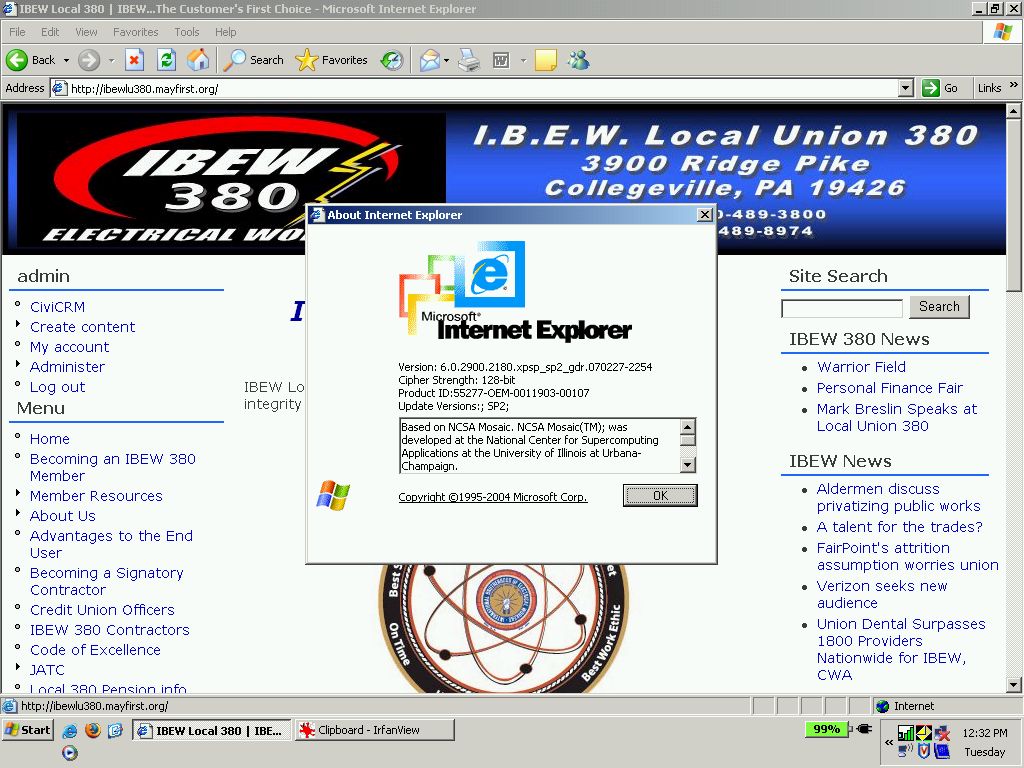
error07 is the screen shot of the IE6 version and build number for future reference.
The issues of drop downs not opening up also comes up on IE7 as well.
| Comment | File | Size | Author |
|---|---|---|---|
| #6 | lu380 - error07.jpg | 165.05 KB | jswaby |
| #5 | lu380 - error06.jpg | 141.38 KB | jswaby |
| #4 | lu380 - error05.jpg | 86.94 KB | jswaby |
| #3 | lu380 - error04.jpg | 139.41 KB | jswaby |
| #2 | lu380 - error03.jpg | 87.04 KB | jswaby |



Comments
Comment #1
jswaby commentederror 02
Comment #2
jswaby commentederror 03
Comment #3
jswaby commentederror 04
Comment #4
jswaby commentederror 05
Comment #5
jswaby commentederror 06
Comment #6
jswaby commentederror 07
Comment #7
jswaby commentedThis issue still exists with the newest (2007-Oct-12) version of the dev release.
Comment #8
jswaby commentedThe error is now more prevalent in IE7. Is anyone else getting these errors?
Comment #9
zoo33 commentedNo one else reports this problem, so it's hardly a critical bug. Unfortunately I have no idea what may be causing your problems. Hope you work them out.
Comment #10
sun@bboyjack: Please update your Image and Image Assist modules to the latest versions. If this bug still occurs, please try the development snapshots of both modules. Be sure to read and follow upgrade instructions of both modules.
If you still encounter an error, please try to supply an (javascript?) error message. Also try to disable all other modules temporarily to make sure the bug is not caused by another module.
Comment #11
jswaby commentedI've updated the modules to the dev version (read the upgrade instruction for both modules).
drwxr-xr-x 4 dmccabe1 dmccabe1 4096 Oct 28 20:04 image
drwxr-xr-x 4 dmccabe1 dmccabe1 4096 Oct 11 20:03 img_assist
The error still occurs. This time it happens right away. There is no need for me to click around from page to page before the error shows up. The screen shots are still accurate and those are the (javascript?) error message I receive. If they were more helpful, I may have been able to figure out what the problem was.
Complete list of contributed modules I have are:
drwxr-xr-x 4 dmccabe1 dmccabe1 4096 Oct 19 17:05 cck
drwxr-xr-x 5 dmccabe1 dmccabe1 4096 Oct 19 17:05 event
drwxr-xr-x 3 dmccabe1 dmccabe1 4096 Oct 19 17:05 eventrepeat
drwxr-xr-x 3 dmccabe1 dmccabe1 4096 Oct 19 17:05 forms
drwxr-xr-x 6 dmccabe1 dmccabe1 4096 Oct 19 17:05 gmap
drwxr-xr-x 4 dmccabe1 dmccabe1 4096 Oct 28 20:04 image
drwxr-xr-x 4 dmccabe1 dmccabe1 4096 Oct 11 20:03 img_assist
drwxr-xr-x 6 dmccabe1 dmccabe1 4096 Oct 19 17:05 location
drwxr-xr-x 2 dmccabe1 dmccabe1 4096 Oct 19 17:05 loginmenu
drwxr-xr-x 2 dmccabe1 dmccabe1 4096 Oct 19 17:05 mimemail
drwxr-xr-x 3 dmccabe1 dmccabe1 4096 Oct 19 17:05 notify
drwxr-xr-x 3 dmccabe1 dmccabe1 4096 Oct 19 17:05 send
drwxr-xr-x 3 dmccabe1 dmccabe1 4096 Oct 19 17:05 signup
drwxr-xr-x 3 dmccabe1 dmccabe1 4096 Oct 19 17:05 simplenews
drwxr-xr-x 3 dmccabe1 dmccabe1 4096 Oct 19 17:05 survey
drwxr-xr-x 3 dmccabe1 dmccabe1 4096 Oct 19 17:05 taxonomy_access
drwxr-xr-x 5 dmccabe1 dmccabe1 4096 Oct 19 17:05 tinymce
drwxr-xr-x 4 dmccabe1 dmccabe1 4096 Oct 19 17:05 views
I don't think anything here is out of the ordinary.
I disabled the img_assist module, and then I was able to create and edit content.
Comment #12
jswaby commentedComment #13
jswaby commentedVersion 5.x-1.5 does not fix the problem.
Comment #14
jswaby commentedVersion 5.x-1.5 does not fix this problem
Comment #15
smk-ka commentedGoogling "Internet Explorer Operation aborted" returns some interesting results about the cause for this error:
It seems that it is caused by inline(?) JavaScript trying to modify the DOM, especially when modifying or appending elements to
document.body.However, I'm not familiar enough with img_assist to tell you if it is the cause for your error (since this error doesn't occur for most of us). It's merely meant as a hint what to search for.
Comment #16
jswaby commentedFound this fix, but I don't have the knowledge of the module to implement it.. Maybe this makes it a bug and not a support request?
http://support.microsoft.com/default.aspx/kb/927917
If anyone feels differently, please change it back to a support request.
Comment #17
jswaby commentedhttp://techflock.blogspot.com/2007/03/internet-explorer-operation-aborte...
Comment #18
sunJust FYI: similar report, probably unrelated to this one or Image Assist at all: http://drupal.org/node/184170
Comment #19
jswaby commentedNewest version of Image and Image Assist modules do not have this problem.
Comment #20
sunComment #21
(not verified) commentedAutomatically closed -- issue fixed for two weeks with no activity.