

 The 2026 Drupal Business Survey is open. Your response will help shape the future of the Drupal business ecosystem.
I use Display Suite a lot throughout my site because it works well for me.
I have installed Profile2 and use it to allow users to enter a variety of personal information on a page other than their account page.
Although both pages (account page and profile page) show in the DS layout, changes made to the layout (like 3 columns instead of one) do not display and all fields remain in a single column.
Is this due to a lack of integration?
Any pointer on what I do wrong, or what I need to do to display 3 columns?
Thanks.
:)
| Comment | File | Size | Author |
|---|---|---|---|
| #18 | Screenshot from 2014-07-23 14:28:59.png | 37.27 KB | jmary |


Comments
Comment #1
embaixador commentedI have exactly the same problem.
User form seems ok but profile2 not. When displayed profile2 looks OK with my trhree column config, but the form doesn't render OK with the 3 column config.
Thanks
:)
Comment #2
Triumphent commentedComment #3
Triumphent commentedSince others seem to have the same problem, I am changing this from support request (unanswered) to bug report.
Comment #4
Richard_1618 commentedSame problem, I can't use DS or Pages/Panels to manage the fields and display. Only views is working to display the fields.
But nothing seems to work to manage the edit form.
Comment #5
swentel commentedJust because two modules don't work nicely together, that doesn't mean it's a bug report.
Comment #6
Triumphent commentedSorry, but this is NOT a feature request as it is reasonable to expect that the module would work with other contributed modules. Therefore, it is a bug. However, it is possible that the bug is in another module (Display Suite in this instance.)
Comment #7
swentel commentedSorry, this is a feature request.
Comment #8
Triumphent commentedOK, then if you insist. Let's make it a feature request that this module works! LOL
Comment #9
agileox commentedA link to (Profile) content in a View takes visitor to a page displaying the Default Display of the Profile. You must make your layout settings on the Default display mode. It appears that DS Layout settings to the [Profile Type Name] display mode are ignored.
Comment #10
ailgm commentedIt's also not using the DS layout settings on the registration form. I've specified a "Fluid two column stacked" layout for the default display, but fields appear in a single column, ignoring the layout.
Whether the issue is in Display Suite or Profile 2 is unclear to me.
Comment #11
gaofeng commentedI am having the same problem. Profile 2 and Display suite don't work well together. (just like to add that, since the aim would be that all modules work together, it should probably be considered a bug)
Comment #12
R-H commentedFor me DS is handling the layout of my Profile2 page fine, no problems. It isn't handling the layout of the registration page in a form. That would be nice.
My 2 cents: swentel has created an really amazing module for us. Let's not badger him with if it's a bug or not. Keep up the good work!
Comment #13
MihaiMiculescu commentedThere's also the issue of the user picture field not available in Profile 2.
I try desperately to make the picture the user loads in the account side (under /user) show up on his profile 2 profile ... no luck ...
Tried to use DS for that matter. I created a code field in DS and have no clue what code to put in it. Tried the good old "img" tag, but I cannot find the way to retrieve the correct data for the "src", "width" and "height" attributes of this tag. Maybe some PHP ?
No other thread in drupal.org solves this.
To me it makes sense to let the user load/replace his picture on the account side and let it show up automatically on his profile 2 page, rather than forcing him to re-upload the same/other picture on the profile side, since there is no other way to deal with this, as it happens now. It's somewhat ridiculous ... :)
Comment #14
Anonymous (not verified) commented@MihaiMiculescu I solved this same issue a year or so ago. Can't remember all the details but the bottom line is that I used this neat little module to capture a user picture on registration, then used a view or the Author pane widget to display it.
Module: "user picture field"
It works almost perfectly, the only problem I have noted is when a user registers using Facebook and I set it to import the facebook photo. That ends up in the old user account picture "field" and is lost.
I tend to switch back and forth from displaying the profile2 page and the user/%1 user account page, which can be somewhat styled with panels & views. I preferred to use the user/%1 account page in the past as so many views, etc default to this display, making it a pain to avoid. I have also used a "rule" to redirect users who edit their profile2 content back to user/%1 when they save the changes.
Bottom line is that this is a general mess and does not seem to have much to do with Display Suite, it is a profile2 vs account user page issue at least for me.
Finally, I have found that some of me node/add forms, custom pages, etc respond better with Display Suite and others with Panels layout. I suggest trying both for the node/add form and the display, you never know what will work.
Comment #15
MihaiMiculescu commented@ trainingcity Thanks 4 the answer! I was aware of this module, but it's more like a workaround than a solution ... We are forced to patch the facade of the building instead of putting the bricks right. Other core modules use [user:picture] (as they should) and, because Profile 2 doesn't, we are forced to use all kinds of exotic solutions instead of seeing the Profile 2 fixed.
I agree that this is a Profile 2 issue.
DS works like a charm producing the User Picture field wherever I need it, except in Profile 2, where it simply doesn't show up. So, it's not a DS issue, but a Profile 2 one. Possible cause here: https://drupal.org/node/1129724
Unfortunately, the fixes for this module are unlikely to show up in the near future, unless somebody steps in to become a co-maintainer ... :(
Comment #16
janes_p commentedAfter having read this trail and numerous others I came to the conclusion that Profile2 has quite some limitations when it comes to Display Suite integration. After some more research I found a blog article, which inspired me to solve my task through ECK and Inline Entity Form - not quite the same functionality as Profile2, but enough Display Suite flexibility to solve my issue. Of course I would be happy if Profile2 would integrate more seamlessly with Display Suite one day as Profile2 has some really nice features!
Comment #17
Triumphent commentedIf your problem is only one of layout, you can use css to move things around and achieve a similar result as DS.
Comment #18
jmary commentedA nice way to deal with that is to temporarily get out of profile2 rendering way. What I explain here works also for the input form.
1 - Enable the field_collection module.
2 - Create your fields collections.
3 - Then you can arrange the field collection display, including for the form.
4 - You replace your fields in profile 2 with the field collections.
5 - Enable the overlay module (not mandatory), at the bottom of each field collection you can now see add and edit buttons.
Now your fields collections are rendered as you wanted, including for profile2 form.
This is a "good to go" workaround as can be seen on the screenshot.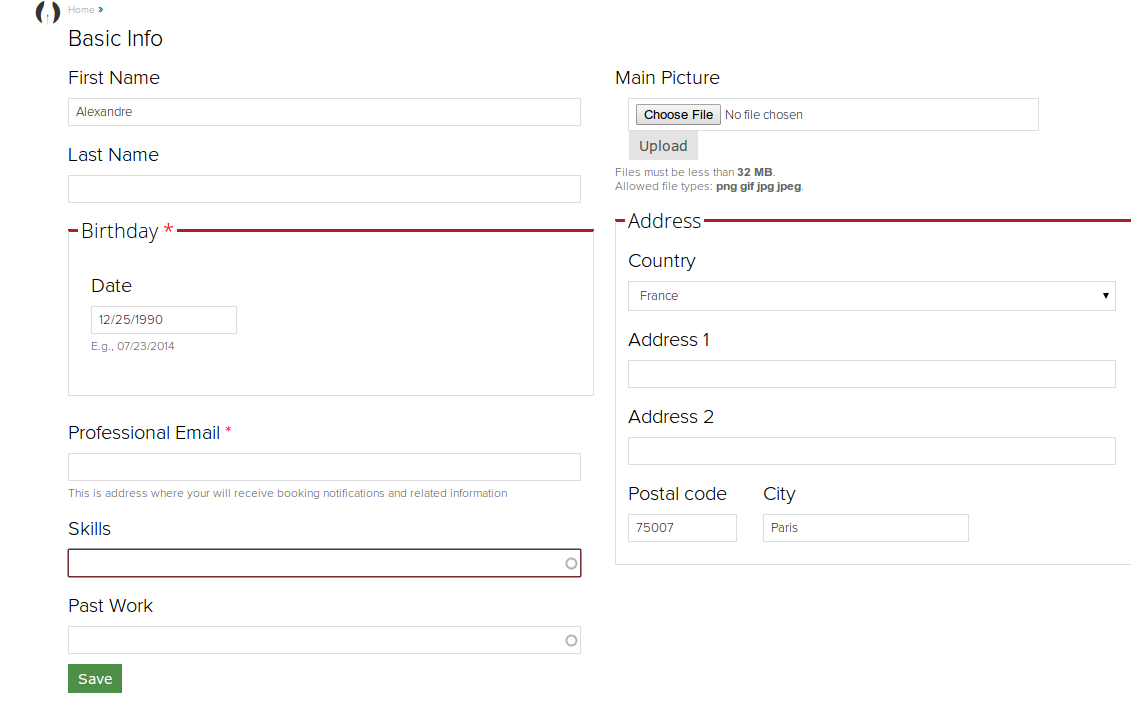
Comment #19
myDrupal2014_846824658246 commentedI have this problem to.
The weight of the field is used to generate the array position but whatever I do it remains one colum :-(
@swentel, thank you for the enormous contribution of all the work you do. I hope you are able to make some time free for this issue. For you it is a feature request, for me it is a bug :-) I just want to present a nice form for my site members.
Ciao
Comment #20
jmary commentedOn my screenshot, you see two columns. But it is actually one. Two columns display suite rendering of of one field collection are embedded into one profile2 column.The two columns are made at the field collection display level. Not at profile2 level.
Profile2 has this bug. Not only with DS, but also Panels. It doesn't integrate well with Drupal rendering system. And the maintainer of profile2 seems to have abandoned any will to fix it or to share insights to give directions to fix it. He can call it a feature request if he wants, let's not play with words, something is just not working as wished.
I believe that it is the rendering level that profile2 is not giving the hand to drupal rendering system, that it is more about something to remove than something to add but I haven't investigated this furthermore.
However, the field collection workaround explained above does the job and provides a nice UX.
I have 8 years of experience with Drupal, I have built very complex projects with it, but different minds have different approach. An awesome source of inspiration is to install some distributions, play with them, look at how the guys did this or that, some are very very very polished stuffs. Commerce Kickstart is one of them, but also recruiter, among many. Open atrium is another one, and I'd like to quote managing news. Even if that last one is a D6 project. The guy who had the idea of the managing new project was inspired, it's showing a vision of what I'd like to call web 3.0 : the agregation of features from other sites into one site.
Drupal has that versatility, the LEGO box, with which anything can be done. And so far, even if profile2 has this bug, it can be fully replaced with a smart use of entity relationship, rules and workflow, so far it is another option. But profile2 aimed at providing the possibility to avoid this complexity, the fact that at the rendering level, it fails, make it to be 95% finished.
That's pity, because the developer of profile2 did a very awesome work. Indeed. However, I change the status to critical and bug report, because that bug, is likely to make people fly away from this project. When a client wants something in a precise way ... you can't say : it is not possible. At the end of the day, you have to provide what your client wants, that's the base of business, and if you can provide better, so you are good to go. But providing less is never an option.
Sorry for this long digression. I believe that the maintainer will be upset about the status change, but I would like to offer my support. I can fix this bug, but I don't want to lose time in investigations, I'm to busy and I believe he knows very precisely where the problem is. So it is better he is giving insights in place of debating about if it is a feature request or a bug. Period. Just let do it.
Comment #21
SalmanEagle commentedHere are the steps I used on Drupal 7 to successfully edit the look of a Profile2 user page with fields. For example, to change the text into italic for a field label you would:
1. Download and enable Display Suite (including Display Suite Extras, and Display Suite UI).
2. Go to Structure > Display Suite.
3. Click on "Extras" besides the X that closes Drupal windows.
4. Select "Enable Field Templates", and then choose "Expert" in the dropdown under 'Default Field Template'. Save configuration.
5. Click again on Structure > Display Suite. Select "Manage Display" for 'Main Profile' in the list.
6. To edit the look of a field, click on the gear icon on the right of each field.
7. For my purposes I wanted to make a field's label red coloured and italic. To do this, enter "DIV style=color:red;font-style:italic" (without inverted commas) in the Element area for Label Wrapper after enabling the latter.
8. Hit Update, and MAKE SURE TO also Save.
Thats it.
Salman,
www.saltanatoflove.org
Comment #22
jmary commentedDoing that you don't edit the profile2 profile. But the main profile. This is known to work with DS.