This patch adds support to enter a wildcard into the from path.
For instance, if you have pathauto set up to create image nodes at photos/[author-username]/[node-title], then you might want to create a redirect from:
photos/<*>
which would redirect to a View displaying a tab at
user/<*>/photos
I've chosen to use <*> as the wildcard because * by itself is a valid URL character, however < and > are not. Therefore, we're guaranteed that this will never conflict with a valid path.
Some points for discussion:
Right now we're limited to one wildcard and it has to be a distinct path segment (delimited by /). For instance, you can't redirect from user<*> or our_old_legacy/url/<*>.html. The reason for this is below.
For performance reasons, I've opted NOT to use the SQL "LIKE" selector to match the path. My feeling is that this would be too heavy of a query to impose on every page load (including those with page caching enabled). However this point is open for debate. Additionally, we'd kind of need to to the LIKE query in reverse, because the wildcards are in the database and we're matching to the known path value. However if we could get it to work (and we felt like it wasn't a performance problem), we could gain much more complex selectors.
Right now, the query is built by building an array of the possible path matches (substituting the wildcard in each segment position) and then using the IN selector to do an exact match on the (indexed) path column. So for instance, visiting node/3/edit builds this query:
SELECT path, redirect, query, fragment, type FROM path_redirect WHERE path IN ('node/3/edit','<*>/3/edit','node/<*>/edit','node/3/<*>') LIMIT 1
We're okay with "IN" on Postgre, right? And LIMIT?
Another nice bit is that you can use <*> not only in the normal to path, but you can also use it in the query or the fragment. So you could redirect user/<*> to userlist#<*> or userlist?user=<*>. Makes for some interesting possibilities.


Comments
Comment #1
HorsePunchKid commentedSubscribing; very cool. I double-checked, and this worked fine in Postgres 8.1.9:
SELECT nid, title FROM {node} WHERE nid IN (3,1,4) LIMIT 2Comment #2
hawkdrupal commentedThis improvement is MUCH-NEEDED.
But...
I applied the patch. But I can't save a redirection with <*> in the destination field. This error is displayed: "The redirect to path does not appear valid."
Checking the code, it seems to be lacking a way to allow this non-standard URL content (much as it allows ?).
Comment #3
jjeff commentedOop. Yes. I have a fix for this. Will upload soon.
-j
Comment #4
deviantintegral commentedWith a site I'm working on, I encountered a situation where we essentially need mod_rewrite with user permissions. My solution for this problem was to use preg_replace and to allow the user to put in a regular expression. This works really well because it allowed us to do more complex patterns such as:
Source URL -> Destination URL
categories/services/(.+) -> $1 // Allows us to redirect taxonomy pages to the service page, so we don't have to change any taxonomy URL's
(.+/courses/.+)/20[0-1][0-9]-[0-9][0-9]-[0-9][0-9] -> $1 // Redirects users from a specific course date to the course info page.
This presumably gets around the issues you mentioned above (every page load is just a SELECT src, dst...) and the heavy work is done in PHP's preg_replace.
The biggest problem with this approach is that ATM it's possible for an admin to break things by putting in a regex which won't compile. I suppose that could be fixed if PHP4 supports try{} catch{}, but I need to find that out.
Anyways, I've attached my module for reference in case you find anything that's useful. "As is" it works without conflicting with path_redirect, but I'd much rather integrate this functionality here :)
Thanks,
--Andrew
Comment #5
deviantintegral commentedBleh. I can't upload a tgz or upload multiple files apparently. Here's the rest of the module.
Or not. I apparently can't upload a .module either. Here's a link to the zip file: http://www.cs-club.org/~andrew/files/url_redirect-10182007.tar.gz
Comment #6
john bickar commentedI think the attached patch fixes this, but it's my first attempt, so go easy on me :)
Patch is against the 11.05.07 5.x-1.x-dev version.
Comment #7
HorsePunchKid commentedI'll reroll this against the latest 5.x dev version, hopefully incorporating hawkdrupal's related request.
Comment #8
casey commentedI suggest to store wildcards in the database as spaces since their charactercode is the
lowest possible (32). Exclamation-marks (charactercode 33) is, according to
[RFC1738](http://www.faqs.org/rfcs/rfc1738.html) allowed in URLs. Spaces aren't
allowed and will be encoded as %20 or +. This means we can use spaces for
wildcards without problems. When using "ORDER path DESC" in queries wildcards
will come hindmost.
And when adding a weight to redirects you also can override this.
Comment #9
luti commentedI've installed the latest 5.x-1.x-dev version (December 16th), and there is no visible differences in admin interface. Wildcards are also not accepted.
I've checked the code - it seems path_redirect-5.x-1.x_i18n_15.patch (which, as I understand, shall resolve also the Add Wildcards to Redirect Paths issue I am mainly concerned about) was not applied. I've applied it to this latest version, but there are still no noticeable changes (paths are displayed as before, altough some differencies are announced - to see URLs as saved in the database; if I enter an asterisk - as only * or as <*> - it is not accepted, only the error complain is displayed...).
I am also quite confused now about which patch shall resolve which issue (there are 3 or 4 "active" now). Maybe it would be good to more clearly define which issues will be resolved by which approach - or each issue separately with a patch provided there, or all together (if like mod_rewrite will be used to resolve also the Add Wildcards to Redirect Paths and/or Obscuring true paths of redirects is confusing and buggy issue(s))? Just for us to know which issues to follow looking for a solution needed (I find now mainly references to patches attached to some other issues, but from there more or less at the end only references to some other issues etc.).
So, about my problem - is there any code (patch or a new development version) ready, which shall enable the use of wildcards? If yes, what exactly shall be used (or, done to enable it)? If it shall already work, how exactly to enter the wildcard character (I would suggest to put this info into the "Enter a Drupal path or path alias to redirect" text displayed to add (or, edit) a redirect.
Comment #10
HorsePunchKid commentedThanks for keeping this issue active, LUTi! Here is a patch against the very latest dev version, which as of this posting probably isn't quite available for download yet. (They're generated every 12 hours, I believe, so you should be able to get it soon!)
I haven't tested the patch extensively, but it appears to basically work. The only significant change I made from the previous patch was to have the "test" link in the admin interface still work by having it replace the wildcard with the string
test.Comment #11
HorsePunchKid commentedFor what it's worth, my thinking is that 5.x-1.1 should come out very soon, but without the wildcard feature. I'm eager to get 1.1 out because Postgres is fixed in dev but still broken in beta1.
I have some changes I need to port to 6.x dev, too; I'm sure we'll have a stable release ready by the time D6 is out!
Comment #12
luti commentedHorsePunchKid, thank you for a patch provided.
I've downloaded the latest version of module (1.3.2.16 2007/12/21) from CVS first, and applied the patch to it. When I try to use the wildcard <*> in "From:" only, but not in "To:" as well (to redirect all partially saved paths to a single page, informing the visitor that such URL doesn't exist...), such a redirect can not be saved - I get the message "The redirect to path does not appear valid." only.
So, I would suggest:
1. To allow many URLs to be redirected to a single URL only (= use of a wildcard in "From:" field only)
2. To make wildcards work as in filesystem paths (to respect other characters in a path segment and to have a single character wildcard as well)
I need a second feature for partially cut URLs (paths as http://.../image123.jpg, http://.../image234.jpg, http://.../image345.jpg etc. wrongly saved by some robot(s) as http://.../image123, http://.../image234, http://.../image345 etc.), which I would like to redirect to a single page with a message (mainly to prevent filling my logs with errors, but possibly also to inform the administrator over there about his errors). Of course I have to keep links to images - so in my example, I would need to redirect http://.../image???, but not http://.../*.
Or, to introduce another field with exceptions - redirect http://.../*, but not http://.../*.jpg and http://.../*.png and http://.../*.gif (or, at least http://.../*.*). Maybe to simply use regular expressions would be the best, but probably there would be quite a lot of users not familiar enough with them (I am the first one like that), so there should be a good help with typical examples practically a must.
I am aware I ask quite a lot (with the 2nd suggestion), but by my opinion wildcards would expand the possibilities (usability) of this module really significantly.
In any case, could you implement at least the 1st suggestion soon, please.
Comment #13
yngens commentedi tried to apply patch #10 against today's dev version and it gives:
patching file path_redirect.module
Hunk #3 FAILED at 212.
Hunk #4 succeeded at 214 (offset -11 lines).
Hunk #5 FAILED at 298.
2 out of 5 hunks FAILED -- saving rejects to file path_redirect.module.rej
[root@host path_redirect]#
Comment #14
HorsePunchKid commentedThank you for the reminder; I'll try to get this patch updated to apply to the 1.1 release within the next couple of days. If anybody else would like to help with this feature, have at it!
Comment #15
HorsePunchKid commentedHere is some grease for the squeaky wheel.
:)This should apply cleanly to the latest dev version and stands a good chance of applying to the 1.1 release, too. Get it while it's hot!
Comment #16
yngens commentedpatch worked this time. but, unfortunately, did not solve my problem described also on http://drupal.org/node/195853#comment-677007
current patch makes it possible to redirect paths with only one single wildcard in the url. for example this works:
Drupal URL: 'articles/<*>'
Redirect path: 'http://oldversion.mysite.com/articles/<*>'
only in case if wildcard <*> replaces a single word.
But it does not work, if you try to replace path with several sections in between symbols '/'. For example, this kind of addresses from my pre-drupal site are not possible to redirect: http://oldversion.mysite.com/articles/2006/06/16/greenline
I also tried:
Drupal URL: 'articles/<*>/<*>/<*>/<*>/<*>'
Redirect patch' 'http://oldversion.mysite.com/<*>/<*>/<*>/<*>/<*>'
Unfortunately, it did not work.
I am looking forward to find a way to redirect thousands of old urls on my site like: http://www.mysite.com/articles/[year]/[month]/[day]/[shor_title] to http://old.mysite.com/articles/[year]/[month]/[day]/[shor_title]
Can you, please, advice what is the best way?
Comment #17
HorsePunchKid commentedIt sounds like you need mod_rewrite. I don't think this module will ever duplicate all of the functionality of mod_rewrite; I'm not sure what the point would be.
Comment #18
niklp commented+1 subscribing, and waiting until this thread pans out into something simpler for my tiny mind to read :)
Comment #19
Dimm commented+1
Comment #20
stefan vaduva commentedAny news about this patch? When will be applied? It was applied?
Thanks
Comment #21
dlx commented+1
Comment #22
xano+1. I'd very very very much like to see this feature make it into the D6 version as well.
Comment #23
john bickar commentedNot sure if I should file this as a separate bug report, but this feature is not working for me in the 5.x-1.2 version (it has worked for me with various patches in the past). I can confirm that the wildcard code is present in path_redirect.module, but when I enter:
foo/<*>in the from field and
bar/<*>in the to field, I get the error message:
The redirect to path does not appear valid.
Comment #24
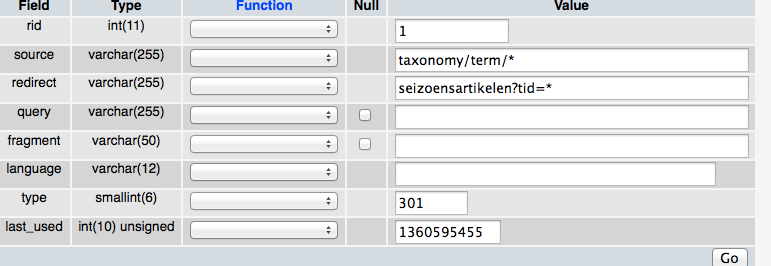
xanoI suggest using '%' for wildcards rather than '<*>' for more consistency with hook_menu().
Comment #25
chromix commentedI'd like to resurrect this issue. I could really use this feature on a site I'm working on, but I'd rather not downgrade to the old version to use this patch. Can someone give a status update? Is this feature going to be included in a future version?
Comment #26
geodaniel commentedMarked #291504: Redirect wildcard and #312708: "Templated" redirection as a dup of this issue. Existing code from #306475: Regular Expression Path Matching may also be useful.
Comment #27
drein commentedplease.....
Could someone post the latest working module for drupal5 with wildcards support? it is good also if it works partially.
I attemped to patch the 5.1.2 but code is changed, obviously.
Thanks in advance.
Comment #28
gmenzel commentedsubscribing
Comment #29
fumbling commentedIs there a patch for D6?
Comment #30
dave reidNot yet. If this gets in, it will be accepted for 6.x-1.x only. I don't use Drupal 5 myself anymore so I don't have motivation to fix anything in 5.x besides bug fixes. If someone provides a patch that backports the change from 6.x-1.x, I'll review it.
Comment #31
fp commentedHey -
I needed a quick fix for the D6 version and - doh - I didn't look at the issue queue before patching it myself against 6.x-1.0-beta1.
So, here's what I have done. I hope it doesn't confuse the readers of this thread.
I promise to have a look at merging/working in the code/ideas expressed above shortly...
Cheers
fp
Comment #32
k74 commentedThere is a patch for the beta 3??
Comment #33
fp commentedbeta 1
Comment #34
kjv1611 commentedThis thought would be great for me as well. Though it's not a big deal for me yet, so not worth patching my copy, but I'm excited to see that this may be in future releases! Yay!
Comment #35
design.er commentedHey, this is great.
Is it possible to implement token support?
Somehing like redirect from user/profile/[realname] to user/[realname] would be great.
Case-study: I use core.profile for birthday.module functionality and content profile because of cck fields, taxonomy etc. I merged both in one content profile and would like to redirect automatically from core.profile to content profile.
That would be great!
Regards,
Stefan
Comment #36
ferrangil commentedSubscribing.
Comment #37
nicholas.alipaz commentedJust subscribing and adding my two cents.
I think this would be great to have as a feature. I would prefer regular expressions over wildcards personally. That mirrors a bit better the typical way of doing it with the .htaccess. Additionally allowing users to specify weights in some situations may be useful. That way someone could override one particular rewrite being done through a regular expression with one that is done through a written out path.
Comment #38
comicsonline commentedI'm VERY interested in this functionality as well. I currently run Drupal 6.12 but I'm coming over from an old PHPNuke site. according to my site traffic stats, I'm losing a ton of traffic when people are clicking on links to URLs that were previously valid on the PHPNuke site before I moved to Drupal when my old ISP suddenly made changes that broke my old site.
Anyway, I've put up the corpse of my old site as well, but instead of:
http://www.whatever
it's now located at:
http://old.whatever
To give a more specific example, I want to redirect incoming requests for:
http://www.comicsonline.com/modules.php?[wildcard]
to:
http://old.comicsonline.com/modules.php?[wildcard]
so that:
http://www.comicsonline.com/modules.php?name=News&file=article&sid=1205
and
http://www.comicsonline.com/modules.php?name=Forums&file=viewtopic&t=60
redirect to:
http://old.comicsonline.com/modules.php?name=News&file=article&sid=1205
and
http://old.comicsonline.com/modules.php?name=Forums&file=viewtopic&t=60
...respectively. Will fp's module at http://drupal.org/files/issues/path_redirect-182512-6.x-1.x.patch do this or will I need to do more to it or wait for that functionality to be implemented?
Comment #39
niklp commentedI'm half-guessing, but from first glance it looks like you should be able to do this with mod_rewrite rules in htaccess - indeed it may be more appropriate to do it that way. Find a rewrite expert and get a second opinion.
Comment #40
zorroposada commentedI created a patched module based on latest dev version.
Files patched:
path_redirect.intall
path_redirect.module
path_redirect.admin.inc
See attached:
Comment #41
vt.dave commentedI 2nd the Perl style regular expressions!! That would provide me total control over the URI's coming into drupal as well as prevent me from mucking with the .htaccess file.
Thanks!
Comment #42
ronnbot commentedHere is a patch that accepts wildcards with minimal changes to the module by utilizing REGEXP (mysql).
If the admin adds the redirect, from=drupal* and to=http://drupal.org*, a user will be directed like so...
q=drupal/node/182512 to http://drupal.org/node/182512
q=drupalnode to http://drupal.orgnode
q=drupal to http://drupal.org
If the admin adds the redirect, from=drupal* and to=http://drupal.org, a user will be directed like so...
q=drupal/node/182512 to http://drupal.org
q=drupalnode to http://drupal.org
q=drupal to http://drupal.org
If the admin adds the redirect, from=drupal and to=http://drupal.org, then it is the default behavior.
Tested in Drupal 6.14 and is in a live site with no problem.
We initially have the redirections in the .htaccess as rewrite rules (see below), but it was getting a pain to manage, etc.
RewriteRule ^drupal(.*)$ http://drupal.org$1 [R=302,L]Comment #43
luti commentedronn,
thanks for sharing the code.
Unfortunately, it doesn't seems to work for my case, where I would need to redirect from:
http://<mywebsite>/catalogue/current*
to
http://<mywebsite>/catalogue/2009/english*
where * shall cover also everything after a ? as for example URL:
http://<mywebsite>/catalogue/current?item=100&colour=1
(should be redirected to: http://<mywebsite>/catalogue/2009/english?item=100&colour=1)
I've tried to put an asterisk into To field or into a ? field (destination), without a success.
Comment #44
ronnbot commentedI did not take into account the query strings, only paths - it did not even execute the changes because of the check for query strings.
Anyway, this patch should work to do the above, but you may have to revert path_redirect.module back before applying this patch.
Then, you just set the following url redirect:
from=catalogue/current*
to=http://site.com/catalogue/2009/english*
?=
#=
Let me know if you still have problems.
Comment #45
ronnbot commentedAttached has an important tweak in the regxp query. So please use this one instead of the previous two.
Comment #46
luti commentedSorry to report, that (after applying #45), it still doesn't quite work.
The first issue I am noticing is that instead of (URLs are entered as that):
from=catalogue/current*
to=catalogue/2009/english*
the following is saved in Drupal (URLs are listed like that later):
from=catalogue/current*
to=catalogue/2009/english%2A
(but, don't know if it has anything to do with the issue below).
And, while URL: http://site.com/catalogue/current seems to work (redirected to http://site.com/catalogue/2009/english),
as soon as there should be replacements, I get "Page not found" ERROR instead; probably because URL:
http://site.com/catalogue/current?item=100
is converted into:
http://site.com/catalogue/2009/english%3Fitem%3D100
instead of:
http://site.com/catalogue/2009/english?item=100
Comment #47
ronnbot commentedThe query (item=100&...) was being pass to drupal goto function incorrectly. Sorry about that.
This patch should fix that.
Comment #48
luti commentedThanks, ronn. Works like a charm now.
Comment #49
luti commentedronn,
maybe a couple of "cosmetic" issues should be fixed before consider your patch as just great (at least from my point of view, I've really needed that functionality):
1. In the list of redirects, source "From" URL is listed OK (catalogue/current*) while "To" URL still contains %2A instead of asterisk (catalogue/2009/english%2A); not only that it doesn't look nice and is a bit of confusing, it should probably be fixed also as a basis for issue Nr. 2 (below)
2. Clicking to a "From" (as well as "To"...) URL in the list of redirects doesn't work well (as URL contains asterisk, and such page of course doesn't exist...) - probably it would be a good idea to simply cut away the asterisk from the URL if there is nothing after it (right to it)?
Everything is functional also as it is now, but that would make this solution really complete.
At the same moment, I suggest to include this patch (functionality) in the new development version (and, the next final version, of course).
Comment #50
ronnbot commentedThanks for the comment. I was thinking of updating the admin panel a bit too but didn't have time.
Anyway, here is the patch to tweak the admin panel the way you suggested; the patch also includes path_redirect_regex.3.patch changes in it as well.
Comment #51
luti commentedI'm glad to confirm that it seems to work perfectly now. Thanks again, ronn.
Comment #52
nick johnson commentedWorking for me so far, as well, on 6.14.
Testing on pre-prod site.
Great job!
Comment #53
Anonymous (not verified) commentedLove the patch from #50. Hoping this gets integrated into the module itself.
Comment #54
dave reidSorry, that query is not validate with SQL-99 and does not work on PostgreSQL.
http://developer.mimer.com/validator/index.htm
Comment #55
luti commentedWhich query, Dave? I can't find any query in the patch from #50...
Comment #56
dave reid@LUTi: There's not a direct query since it's actually performed in path_redirect_load(), but the query that is generated by the patch contains
(path like '%%*' AND '%s' REGEXP CONCAT('^', path)))which is not cross-DB compatible.Comment #57
stacysimpson commentedSubscribing
Comment #58
mfer commentedI believe the specific issue is the 'REGEXP CONCAT'. Concat is not supported in Postgresql and pattern matching works differently. To keep this style there will need to be a check against the global $db_type to see if it's mysql/mysqli or postgresql and create the appropriate queries.
@Dave Reid - Do you know what the correct part of the query for postgresql would be?
Comment #59
mfer commentedI think this needs something like:
Comment #60
alanburke commentedSubscribe - useful feature
Comment #61
luti commentedNew version (1.0-beta5) of "Path Redirect" seems to be much different from the previous one, so the patch #50 is not useful anymore... :-(
Comment #62
luti commentedI've made a patch, which implements not only the functionality of #50, but enables admin also to enter wildcards (*) at the beginning and/or in the middle of "From:" and "To:" redirect strings (Redirect URL is "calculated" so that the first * in "To:" is replaced with the match for the first * in "From:", and so on till the end of both...; there should be at least as much wildcards in "From:" as in "To:", otherwise some of the wildcards in "To:" would remain undefined...; if there are multiple wildcard characters in the "From:" unseparated, they are considered as only one single *, since they all together match something, but we dont know which one of them matches which part of that...).
By default, this patch doesn't change anything. This extra functionality has to be explicitely enabled in the "Settings" screen by admin, and this can be done only if underlying database is not PostgreSQL (maybe "only if it is MySQL" would be more appropriate, but this is easy to change...) - otherwise, this option is grayed out.
Even if this functionality is enabled, there is always the check if the database is not PostgreSQL, before it is actually used (in case this variable would somehow be set despite it is unavailable in admin screen...).
It seems to work for me, so I am sharing it with you...
Any code improvements are more than welcome, of course! ;-)
Comment #63
promesSubscribing
Comment #64
v8powerage commentedLUTi, which version of path_redirect have You patched, because newest alpha doesn't work with it at all.
Comment #65
luti commented6.x-1.0-beta6, the recommended release at the moment...
Which alpha are you talking about?
BTW, I've manually patched the present 6.x-1.x-dev release, and it still seems to work for me. Are you sure you are trying to use it in the right way? What exactly is not working for you?
Comment #66
luti commentedHere is a patch for 6.x-1.x-dev (February 1st 2010) release, you can try that one.
Comment #67
Frank Steiner commentedHi,
great patch, thanks a lot! Definitely needed in this module. Has the problem from post #56 been solved? Anything else that keeps the patch from beeing added?
I've one problem though. Maybe I've missed the solution when reading through this thread. I want to redirect
xxx/~username -> xxx/project/AAnd of course all subpages, too. When I create the redirection as
xxx/~username* -> xxx/project/A*then ~username as well as ~username/ and ~username/whatever are redirected correctly.But if I have another user where the first is a prefix (e.g. users Jon and JonDoe), then ~usernametwo is now redirected to xxx/project/Atwo which is of course wrong. But then I define the redirection as
xxx/~username/* -> xxx/project/A/*then ~username and ~username/ are redirected to xxx/project/A/*, so there is really the wildcard in the URL.Any way to get around this? If the source wildcard matches the empty string, the target wildcard should be removed I guess...
Comment #68
Frank Steiner commentedAnother bug: Whenever we edit and save a node, we get the following error message:
But only right after saving a node, never else...
Comment #69
Frank Steiner commentedOh, sorry, just realized that was due to the beta6 of path_redirect which I installed because I thought I would need it for your patch. Sorry :-)
Comment #70
luti commentedFrank,
you say:
"But if I have another user where the first is a prefix (e.g. users Jon and JonDoe), then ~usernametwo is now redirected to xxx/project/Atwo which is of course wrong."
It is not wrong, it matches! ;-)
It is a problem of multiple matches (both redirects match an URL...), and an algorythm to decide which one to use is needed in such a case (and, the longest first part match can be one criteria, altough maybe not the only option, and always the best - for instance where more wildcards would be used before a username part of an URL...).
Try to remove both redirects, and than re-enter usernametwo* redirect first, and username* after - so they should be in a database table in this order (I am not an expert for MySQL, but it could maybe work in this case as you wish, since the longer match should probably be returned first...). If it resolves your issue, maybe it is the simpliest way for an admin to control the order of redirects to be applied in such rare cases, where multiple redirects match...
About:
"But then I define the redirection as xxx/~username/* -> xxx/project/A/* then ~username and ~username/ are redirected to xxx/project/A/*, so there is really the wildcard in the URL.
Any way to get around this? If the source wildcard matches the empty string, the target wildcard should be removed I guess..."
Are you sure it works like you say (I am not sure I understand exactly your issue here...)?
If URL contains only ~username, it shall not match at all, so the redirect should not be applied!
If URL contains ~username/, it shall be redirected to xxx/project/A/ (so, the final wildcard is empty...)
If URL contains ~username/whatever, it shall be redirected to xxx/project/A/whatever (so, the final wildcard is not empty...)
Redirect target can not contain more wildcards as redirect source, as the last wildcard(s) would not be defined in this case (it doesn't make sense...). Redirect source can however contain 1 wildcard more as redirect target, meaning "redirect whatever to a single target" - for instance redirect node/* to under_construction.php (in case of an "empty" web site, any node is simply redirected to under_construction page...).
Comment #71
greta_drupal commented@design.er
Better than a redirect, you can accomplish this with the PathAuto module. Using PathAuto, configure your desired URL format for content type. Then, use Drupal core content management to bulk rebuild the URLs.
Comment #72
Frank Steiner commentedHi LUTi,
I expected the match to work like the "-w" option of grep, but I see that apache is doing the same thing, i.e., matching for substrings and not word boundaries, so I guess this is fine. Just unexpected for me :-)
Then problem is that you cannot control when a user might add a new URL at some point, and if that contains a prefix for which a redirection has been setup earlier. Therefore, I'd prefer to define all redirections ending with a / or "/*".
About the other problem:
> If URL contains only ~username, it shall not match at all, so the redirect should not be applied!
It definitely works different at our site. You can test that by going to http://www.bio.ifi.lmu.de/~vorolign
The redirection defined is
~vorolign/* -> http://www2.bio.ifi.lmu.de/~vorolign/*but you will be redirected to http://www2.bio.ifi.lmu.de/~vorolign/*
Unfortunately, I cannot add a second redirect for
~vorolign -> ...because then I'm told that the URL ~vorolign is already directed.I'm using the patch from #66 on drupal 6.15 with the beta6 version of path_redirect.
Comment #73
luti commentedHi Frank,
it is interesting...
Which is / are redirect(s) that your link shall match?
Sorry, I see - it is the same path, just different server... I will try to see what is going on.
Comment #74
Frank Steiner commentedLooking at the query in path_redirect_load_by_source the lase OR case does match. Doing it manually shows:
So "bla" is matched against "bla/*" due to the REGEXP CONCAT.
Anway, assuming that "bla" should not be matched here:
What can I do if I want to redirect "www/teaching" as well as "www/teaching/*" to e.g. a new server? I cannot set up two redirects, but each redirect for either teaching or teaching/* will miss one of the cases. But I think that's a very usual case. In apache terms it would be "the directory 'teaching' and all files and directories in it".
Comment #75
luti commentedFrank,
your issue made me dig a bit more in that. It was not very easy, but I've made (quite) some changes, and here it is...
It is important that the longer redirect (more restrictive match - in your case: "~vorolign/*") is entered before the shorter one (more general match - in your case: "~vorolign*"), so it is matched first (it is one of the limitations, that admin have to take care about the order n which all redirects are added - first defined shall be matched first...).
A redirect "www/teaching" can be also before "www/teaching/*", as "www/teaching/" will not match "www/teaching" now.
MySQL query is now much more simple, and an array of redirects (containing an exact match together with all redirects that contain at least one wildcard) is always returned (and, further processed after...). I know it is not nice, and introduces (relatively) quite some additional load, but hey - I don't have time (at least at the moment) to improve a query system. Any improvements are welcome though ;-)
Wildcards should be supported also in redirects with a queriy part (I haven't tested much, but it should work...), but be careful with it. There can be a query part specified for "Redirect To", and another query carried to a "calculated" redirect from source URL (through a wildcard match). In such a case, redirect is skipped, as we don't know how exactly to use (merge?) such a redirect. So, be very careful with redicects which have a query part in "Redirect From" and in "Redirect To" part together with wildcards!
An attached patch is for current DEVELOPMENT VERSION (2010-01-10), not for BETA 6!
Comment #76
mrfelton commentedsubscribing. Really need this.
Comment #77
blueblade commentedsubscribe
Comment #78
BawlmerMag commentedsubscribing.
Comment #79
bpeter commentedPatch #75 failed to apply to current development version.
Comment #80
luti commentedThis one should do the job.
Comment #81
mbiddlecombe commentedsubscribe
Comment #82
Fidelix commented+1 for this feature.
subscribing.
Comment #83
nlambert commentedsubscribe :-)
Comment #84
beifler commentedIt looks like the April 24th patch also fails to apply to the DEV version. - Please re-roll. (Is it planned to be applied to a future version of path?)
Comment #85
dave reidSetting to postponed as:
1. A lower-level server solution will always be better at wildcard behavior. I still believe this will open up more edge-cases and make the module harder to support.
2. Solution still only works for MySQL only.
Comment #86
iantresman commentedI think this would be an excellent addition to Path Redirect. For example, if I move a site to a new location, and need to redirect a directory and all its content. While it could be done in .htaccess, using Path Redirect has advantages for those who (a) do not have server access to .htaccess (b) Can't figure out the necessary mod_rewrite.
Comment #87
Starminder commentedSubscribe - this is MUCH needed.
Comment #88
itserich commentedA primary goal for me is to prevent browsing nodes chronologically.
Comment #89
develcuy commentedThis functionality brings a lot of power at a middle level, of course a rewrite engine would be more convenient for those with the power to do it, but rewrite rules in .htaccess are not always allowed. Also that seems to be a solution for Apache only, what about IIS or another web server?
I see Drupal as an standard layer between user and the big diversity of infrastructure, 2% of the Internet will thank you ;)
Comment #90
mdorrell commented+1
Comment #91
luti commentedI've made a patch for the most recent 6.x-1.x-rc2 release (for my needs), but cannot attach it due to #240777: Attach: An HTTP Error 0 occurred (on file upload). I will try again, if Drupal team resolves this issue.
Comment #92
Fidelix commentedLUTi, try using a different browser...
Comment #93
luti commentedWeird - seems to work with M$IE, but not with Firefox (didn't have any problems till now with it...).
Anyhow, here is a patch for RC2.
Comment #94
opdaviesThanks so much! :D
Hopefully this will be added into the next release of the module!
Comment #95
patrickmichael commentedHi, any help appreciated.
I have a catalogue site where the product nodes' alias is set to african-artifacts/[term-raw]/[title-raw]
This has been changed to african-artefacts/[term-raw]/[title-raw] and i need to redirect the old alias to the new.
Yes, i can go into each node and add a redirect but that will take a while.
I have tried a .htaccess rewite rule RewriteRule ^/african-artifacts/(.*)/(.*)$ /african-artefacts/$1/$2 [R] but this does not seem to work.
Will this patch help with my issue, if so if someone could help with what i would need to input as the from and to paths? If not if i could be pointed in the right direction to a solution..
Once again thanks
Comment #96
luti commentedThe purpose of this patch is exactly to help in case as yours... ;-)
So, if you create a redirect:
From: african-artifacts/*
To: african-artefacts/*
it should work...
Comment #97
patrickmichael commentedThanks LUTi for your input, i will give it a try.
Comment #98
dave reidUsing the following rewrite rule worked fine for me:
Comment #99
XiaN Vizjereij commented@ #95
RewriteRule ^african-artifacts/(.*)/(.*)$ /african-artefacts/$1 [R=301,L]Should work for you. Dave you had one
]to many and one/(.*)to less in your rule :)Subscribing and big +1
Comment #100
carvalhar commentedI used the patch on #93 and it's working only when the path alias doesn't actually exists...
I found these bugs:
- aliased term pages aren't being redirect.
- a url like anything/* is being redirect to otherthing/* but if you have a node with a url like anything/me-aliased the redirect doesn't work.
I couldn't understand why.
Also, when i deleted the url redirect, this error occurred:
warning: Invalid argument supplied for foreach() in /my-site.com/sites/all/modules/path_redirect/path_redirect.module on line 131.
131 - foreach ($redirects as $redirect) {
Just a quick remember: you need to check "Enable use of wildcards (*) in redirects ("From:" and "To:" fields)." at admin/build/path-redirect/settings
Wildcards are pretty useful, should be included at this module. +1
Comment #101
carvalhar commentedI found a solution to line #131 bug:
// added this line
if (!is_array($redirects)){ $redirects =array($redirects);}
foreach ($redirects as $redirect) {
[...]
Comment #102
baff commentedsubscribe
Comment #103
pindaman commentedGreat patch thanks,
was just looking for this solution because I had to change the multilingual setup from preset, to domain.
This way I can 301 all existing nodes that are currently in Google.
Comment #104
luti commented@carvalhar,
I'm not sure I understand you exactly.
How aliased terms are not redirected? I have for example a redirect /catalogue/current* -> /catalogue/2011* and it works as expected, altough /catalogue/2011 is an alias for some node...
About aliased terms which match some redirects with wildcards not being actually redirected (2nd line) - it is not the bug, it is more a feature.
If you try to add a redirect for an existing node, you get: "You cannot add an existing alias as a redirect as it will not work. You must delete the alias first.". So, you can not redirect an existing address (alias) by design. I agree it could be desirable sometimes to temporary redirect visitors to something else instead of the original (existing) target, but this should be another issue...
What is incomplete here is only that you shouldn't be able to add such a redirect in one hand (to be consistent), but on the other hand, you don't know what the request will be (not everything can be considered as existing; for example, if you have a node /test/unallowed and you add redirect /test/un* -> /whatever, you'll get /test/unallowed, but if you want to visit /test/unexisting, you should get /whatever instead...).
Please note that I am not a maintainer (or whatever such), I've just adapted (#62) some version of this very useful module (patched already, thanks to ronn abueg) to suit my needs, and adapted later a bit according to the needs of some other users (-> #75) - of course within my limited knowledge... ;-)
Wildcards are very delicate thing, as you can have a lot of different combinations (situations), and we should define very percisely what to do in which case (having all possible scenarios defined first). Therfore, I've left a lot of responsability on redirects admin shoulders. For example, that possible redirects matches are evaluated in the order as they've being entered, not as displayed. This could be quite confusing, but it would make things very complicated (at the stage this patch today is) if I would like to make this more straightforward (I intentionally don't say useful, as maybe a different order wouldn't fit to someone else...). As it is now, at least there is always a possibility to enter such redirects again in the particular order someone needs (in normal circumstances you shuldn't have too many of such redirects anyway, or you'll probably have a mess in any case...). Maybe with some weight added or so it would be more comfortable for some maintainers, but maybe also more complex and consequently less stable. And, in any case I don't have so much time to play with it at the moment. ;-)
What I want to say is I am aware, there is really a lot of space for improvement in this patched version! You all should be as well... :-)
So, I suggest, before using this patched version in some not very basic / more challenging way, to read also some comments in this thread (how it is expected to work and what are the limitations...). Any suggestions for improvement are however welcome. Any work on that even more! ;-)
Comment #105
dave reidNow that git has been deployed, this is more appropriate for a sandbox project, since after so long we still haven't found an acceptable solution and we are not likely to do so ever.
Comment #106
zazinteractive commentedLUTi thank you so much. The wildcard feature is extremely useful
Comment #107
zazinteractive commentedIs there a way to check where a path redirect link is going? I just want to test the feature
From: http://google.com/* To: http://drupal.org/*
and verify that the From wildcard is being used on the To wildcard
Comment #108
luti commentedI'm not sure I understand you, zazinteractive. There is a way, of course - just apply the patch, and check / test the feature... ;-)
Comment #109
tronathan commentedBasic support for wildcards + specific url alias overrides would be fantastic.
Often when a new site is deployed, the old site needs to have 301 Redirects added to maintain link equity (Google Juice).
Typically this is done with mod_rewrite, but that's more challenging to do in a Drupal Multisite environment and requires filesystem access.
Giving Drupal the ability to do wildcard-based path redirects (with asterisks only, in typical Drupal form, no fancy regexes) would solve this for the 90% use case.
I would propose no regex suppoort and no wildcards in destinations. This solves the majority need, which is a very common need.
Subscribing.
Comment #110
Fidelix commentedThe majority has conditions to access the filesystem.
If this is to be done, let it be done right. Not some quick-fix rewriting emulation as you are proposing.
Redirects to destinations are vital for this issue, IMO.
Comment #111
stacysimpson commented@Dave Reid. I understand your perspective about leaving complex redirection to the webserver; however, I would also like to see simple redirection (I.e. single wildcard) included in the module.
The patch in #93 works for us.
Comment #112
zazinteractive commented@LUTi Seems like the wildcard in the To: field does not work. I got a * character in the url when it should have been replaced
Comment #113
luti commentedAs much as I was able to test, it should work...
What exactly have you entered in From and what in To fields?
Comment #114
stacysimpson commented@LUTi, I ran across a minor issue that you may want to look into.
Setup a simple wildcard redirection:
From: /apples/*
To: /oranges/*
Someone had previously bookmarked a URL within the apples subtree before we had enabled clean URLs, so the following query:
/?q=apples/foo
results in an Drupal error that says there are "too many redirections".
Comment #115
zazinteractive commentedThis was what I entered
/go/drupal/* to http://www.glumbo.com/hey?sid=*
Comment #116
bogdanru commentedIt seams it dosen't work with query
Changes in db: removed query, and added the full url to redirect. Check image.
Comment #117
AntiNSA commentedsub
Comment #118
AntiNSA commenteddoes this patch from #93 work on current dev?