

Closed (won't fix)
Project:
External Links
Version:
7.x-1.12
Component:
Code
Priority:
Major
Category:
Support request
Assigned:
Unassigned
Reporter:
Created:
30 Oct 2012 at 21:05 UTC
Updated:
23 Mar 2015 at 03:59 UTC
Jump to comment: Most recent, Most recent file



Comments
Comment #1
quicksketchJust like any variable in Drupal, you can translate this variable using i18n module's Multilingual Variable feature.
Comment #2
fraweg commentedHello,
Thanks for your fast answer but this is not fixed for me. The Link you added seems to be for drupal 6 but I install the variable tranlation modul for drupal 7. I see no variable to translate the body of "Pop-up warning text-field". Any Idea what is wrong? Have I to do additional configuration?
Best regards
Frank
Edit: So that we do not misunderstand. I wont translate the title "Pop-up warning text-field". I want to translate the body ( for example "you will leave the site")
Comment #3
quicksketchThe multilingual variables module is built into the D8 i18n module. Just follow the instructions on the link above to add the external link variable to your settings.php file. The variable directly in the External Links UI becomes translatable when you switch between the languages on your site.
Comment #4
fraweg commentedHello,
thanks for your answer.
Does you mean the i18n drupal 8 module? I work with drupal 7.
I did not find the variable in the gui. So can you tell me how the name of the variable is to put it into the "settings.php" file?
Best regards
Frank
Comment #5
quicksketchSorry yes I meant "D7 i18n module".
Look at the HTML source of the page, and use the "name" attribute on the form element to identify what the name of the variable is internally.
Comment #6
fraweg commentedHello thanks for your support!
But the problem is the message in the popup. How can I figure out this variable? And is this not always the same variable?
Best regards
Frank
Comment #7
quicksketchOkay, one step at a time here:
- Go to /admin/config/user-interface/extlink on your site.
- Look at the HTML source.
- See that the "name" attribute on the "Pop-up warning text" field is "extlink_alert_text".
- Open sites/default/settings.php. Put this at the bottom of the file:
- Go to /admin/config/user-interface/extlink. Change your language to whatever language you need to translate the message into.
- Enter the warning text for that language.
- Switch back to the original language, see that the two values are different when you switch languages.
Comment #8
fraweg commentedHello,
thanks for your fast and your detailed answer.
I will show you what I have done with screen-shots:
Bildschirmfoto-1.png (added the line into the settings.php)
Bildschirmfoto-2.png (control the name in the HTML-Code)
Bildschirmfoto-4.png (change the language to German an change the message)
Bildschirmfoto-5.png (control it in the English website and see the German language on the English website)
So the issue is still there :-(
Do I something wrong?
Best regards
Comment #9
quicksketchI forgot to mention you must also have http://drupal.org/project/i18n installed (just the main i18n module needs to be enabled). When set up properly, it will add "This is a multilingual variable." to the description text of variables you have set up as translatable.
Comment #10
fraweg commentedhmm..
I had the Internationalization module already installed. you can see it in the screnshots. Also, the module variable translation is enabled. Do I need to configure anything special?
Best regards
Frank
Comment #11
fraweg commentedHello,
no more Idea in that? For me this issue is not fixed and should be set to active...Is it a problem to make it string translatable like other modules handle it?
Best regards
Frank
Comment #12
quicksketchI'm sorry, at this point you'll need to figure this out on your own. External Links is no different than other modules in translating it's variables. My instructions indeed were for Drupal 6, but the situation hasn't changed much in Drupal 7. I don't run any multilingual sites in D7.
Comment #13
fraweg commentedThat makes me really unhappy. Why is not this simple string translatable as well as works with other modules(for example Heartbeat)?
Best regards
Frank
Comment #14
Treidge commentedActually setting $conf['i18n_variables'] will not work in Drupal 7, because support for this method is dropped in D7 version of i18n.
Now module developers should declare their variables with hook_variable_info() to make them translatable with i18n (as seen on http://drupal.org/project/variable project page).
Now I'm building a multilingual web-site and it is indeed pretty frustrating to not have an ability to translate this simple piece of text. This module is not an exception, and I have to deal with this kind of issue with some other ones. I hope this will be fixed. Quite fortunately, it is pretty simple thing to do.
I'm not a module developer, so the solution below this line may be not the best one. Still works like a charm for me :)
Create a file inside the module directory and name it
extlink.variable.incPut inside it the following piece of code:
Flush the cache. Now go to admin/config/regional/i18n/variable and enable the "External Link Pop-up warning text" variable under the Other tab. Save the form, go to admin/config/user-interface/extlink and look for "This is a multilingual variable" mark under the pop-up warning textbox. If you see it - then it's working and now can be translated. Just switch back and forth between your languages and fill the text, it should remain separately for each language.
Of course, it's will be best if something like this can be tested and commited to the module code.
Comment #15
Samucia commentedCode works for me with Drupal 7, thank you very much Treidge!
Comment #16
jieyyal commentedHi Samucia
Does the alert real translated?
I followed the step on my site.
The variable translate worked. But the js alert not work.
Do I something wrong?
Comment #17
jieyyal commentedHey guys,
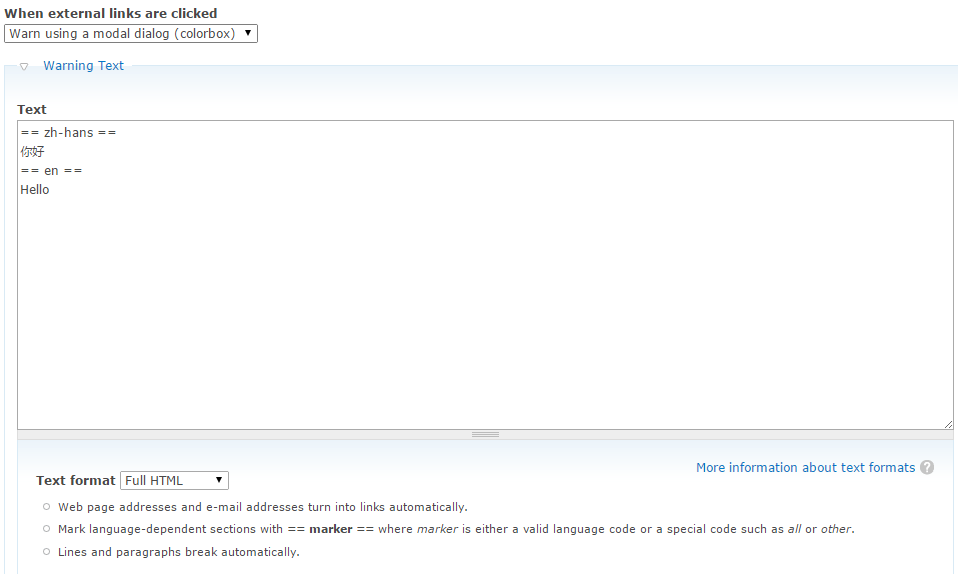
I used extlink, extlink_extra, colorbox, language_sections modules.
Finally walked through the pop-up could not be translated issue.
Done
