

Closed (fixed)
Project:
Make Meeting Scheduler
Version:
7.x-2.x-dev
Component:
Code
Priority:
Critical
Category:
Bug report
Assigned:
Unassigned
Reporter:
Created:
22 Nov 2012 at 22:36 UTC
Updated:
28 Oct 2015 at 13:04 UTC
Jump to comment: Most recent, Most recent file

Comments
Comment #1
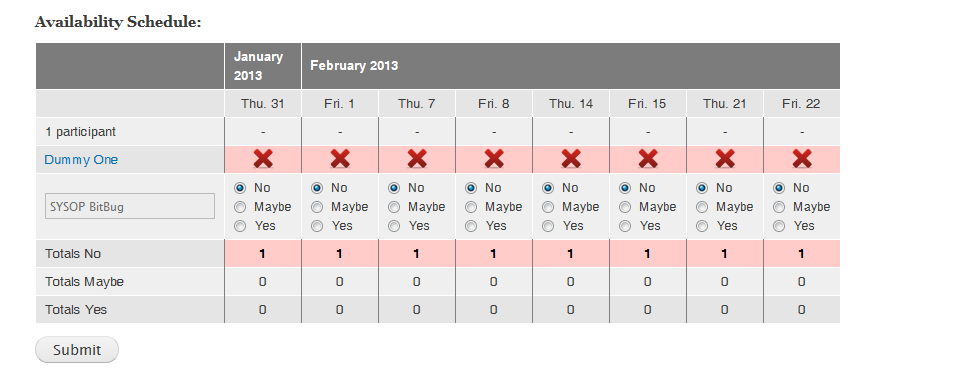
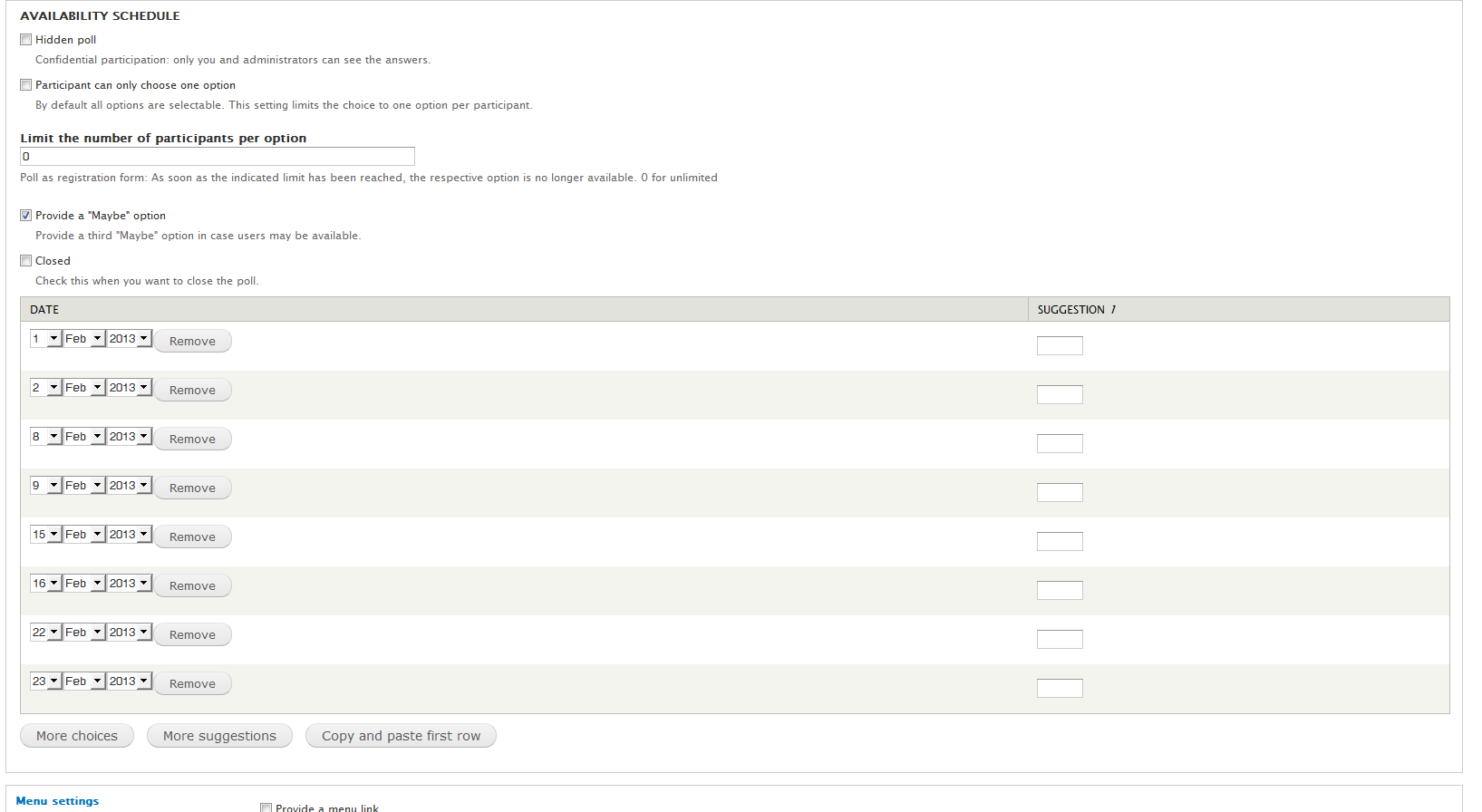
BitBug commentedI have looked at this a bit more and it appears the dates are off by one day. In the example above 2/1 is displaying in the Make Meeting table as 1/31. 2/2 is displaying as 2/1. 2/8 is displaying as 2/7 and so on.
Comment #2
SebCorbin commentedSeems like it is related to the timezone. Can you try this patch?
Comment #3
BitBug commentedI am happy to do so. This would be my first patch in Drupal though, so if you could point me to documentation on how to apply the patch it will help me be more successful. I did search the site quite a bit for solutions, but I am finding a lot of variety on how to proceed. I am in a Windows 7 environment running DAMP for my Development. Also have a WAMP stack. I'm intermediate code literate (PHP, JavaScript, jQuery, etc.) and I am fairly comfortable working from the command prompt if needed. Hope I can help you out! Thx.
Comment #4
BitBug commentedEnded up doing a manual patch since it was only a few lines of code. FYI the @@ line numbers didn't match what I had, but I am confident I replaced the right code. Just in case, attached is a copy of the modified file as a txt file. I assume it was just a change the code and save the file type thing. I didn't need to re-install the module or anything like that, right?
This did not appear to work. I looked at both the existing makemeeting content posts and also created new makemeeting posts. No joy in either scenario.
Let me know if I can be of further assistance.
Comment #5
BitBug commentedSorry, forgot to update the status. noobie me... :o)
Comment #6
SebCorbin commentedI'll look into that ASAP
Comment #7
SebCorbin commentedAlthough you've been a great help with your feedback, I'm still pretty sure it's a problem with timezone handling, could you provide me these few info:
Comment #8
BitBug commentedNo worries. We will get there.
The answer to all three questions is America/Los Angeles time zone.
This is happening on the local DAMP Development Environment (i.e. my desktop) where I am the site, author and viewing user.
It also have the exact same issue on the Production Site (www.westsidegamers.us) where I have everything setup the same as the development site where I have authored the content and have been the one viewing it and seeing this issue. The Production site is far from live. In fact, the makemeeting is about the only thing on it while we sort the this.
As there is no info on the live site and it is really nothing irreplaceable, if it helps you I am happy to let you have access
I have confirmed again, just now, that both sites are set to the America/Los Angeles time zone.
Comment #9
SebCorbin commentedHere's another patch, tested with your configuration (it may not be backward compatible with already existing content though)
Instructions on how to apply a patch are available here http://drupal.org/patch/apply
Comment #10
BitBug commentedIs this patch in place of the previous patch, or in addition to it?
Comment #11
SebCorbin commentedIn place, but don't bother testing it: after a little look at the impact of this patch, I'll need to convert all existing dates to UTC in order to not break every existing makemeeting form.
Comment #12
BitBug commentedAny projected timeline on this?
I am not trying to bug you. Just want to plan if I need to find an alternate solution to move forward with this section of my site or not. Makemeeting is my first choice, but I need to move forward soon.
Thanks for all you do with this module!
Comment #13
SebCorbin commentedI'd better be honest with you then: I think I won't be able to roll out a bugfix for this in the upcoming weeks, so you should take a look at other modules. If you don't find what you need, come back with a whip! :D
Comment #14
BitBug commentedAppreciate the honesty. I'll go play with some other options for fun and see if I can get something that will work temporarily, but I will be back with whip in hand :o) I like this module the best due to its easy, straightforward use and easy of readability at a glance.
Comment #15
BitBug commentedAny ETA on this fix?
Thanks!
Comment #16
SebCorbin commentedAfter really looking into this matter, I guess that I'll need to stick to doodle.com way of handling timezones
I.e. let the user choose either date or both date and time (with optional timezone handling)
There is much work to do and testing as well :/
Comment #17
syscrusher commentedHi!
Great module, and will be very useful. Thanks!
I just wanted to report that I can replicate this bug in U.S. Eastern time zone, and that this happens whether or not I have the site set to allow users to choose their own timezones. I happened to be testing it on a virgin installation, with no production content, so I took advantage of the chance to give that setting change a try. Hope that helps.
Comment #18
brightboldSame problem here, also America -NYC timezone and I tried it with both user-specific timezones and with that setting turned off (and the cache cleared). I employed your patch since this was the first Make Meeting I'd created so I didn't have any old forms to break. Hopefully there will be a more permanent solution soon.
Thanks for this module — my site users are going to be really excited about this!
Comment #19
brightboldComment #20
BitBug commentedI have changed the priority to critical as this affects several users now who have verified the issue and it makes the module unreliable for use as dates are off by a day resulting in incorrect data being displayed and reported. This makes the schedule inaccurate and without accurate dates the module becomes unusable as designed.
Comment #21
pomliane commentedPatch in #9 seems to work well here: a makemeeting survey I created before applying the patch and which had erroneous date display looks ok now.
A new survey created after the patch behaves and displays correctly too.
Added bonus: in edit mode, the day of each newly added option is now correctly incremented—providing a really better user experience.
Patch might need a new review?
Comment #22
SebCorbin commentedHuh, so this actually works... I think it only works for sites that have set a global timezone though, timezone handling is still not handled per user.
Comment #23
brightboldThis patch works great for me, and I agree with BitBug that it's critical — if the dates the admin sets up for the meetings don't match the dates people are responding to, the module is really unusable. (And to make it more confusing, the times don't change since they're in a text field. So it's not obvious that the meeting dates are wrong as it would be if some of the suggested times were at 3am or 11pm!)
Also, for the benefit of other people who might be having this problem, if you upgrade the module and forget to reapply this patch, the results of your previous surveys will disappear (presumably because there are no results that match the displayed dates). Once the patch is reapplied, the results reappear.
Comment #24
socialnicheguru commentedthis works
Comment #25
brightboldSo can this be committed? Or do you still feel you need to take a different approach. Just did my third application of this patch in the last two years (because if I don't reapply every time I upgrade, all my meetings break), so it would be great to get this bug fixed!
Comment #27
SebCorbin commentedOk so I committed this patch but I'm keeping in 7.x-2.x-dev for a while so that people have a chance to test before making a new release
Comment #28
brightboldThanks!