

 The 2026 Drupal Business Survey is open. Your response will help shape the future of the Drupal business ecosystem.
By sun on
Change record status:
Published (View all published change records)
Project:
Introduced in branch:
8.x
Issue links:
Description:
Previously, all submit buttons in a form were treated of equal importance and implications.
Drupal 8 provides a new Form API property for submit buttons and corresponding CSS classes, as well as CSS styles (in core themes) to visually denote the primary form submit button (e.g., "Save") and buttons that have destructive implications (e.g., "Delete").
Read http://www.lukew.com/resources/articles/PSactions.asp to learn about the visual interface concept.
For a wider range of sophisticated examples of this concept, have a look at Bootstrap's button styles.
Drupal 7
Drupal 7 does not have this concept. However, Drupal 7 previously used the #button_type property as an internal Form API property to control the form submission process.
Drupal 8
The internal #button_type Form API property has been renamed to #is_button. Since this was an internal property, no code should be affected.
The new #button_type property for submit buttons allows to specify a string value, which should map to one of the button types of this concept, and which is automatically translated into a corresponding CSS class on the button on output.
Usage
$form['actions']['submit'] = array(
  '#type' => 'submit',
  '#value' => t('Save'),
  '#button_type' => 'primary',
);
$form['actions']['preview'] = array(
  '#type' => 'submit',
  '#value' => t('Preview'),
);
$form['actions']['delete'] = array(
  '#type' => 'submit',
  '#value' => t('Delete'),
  '#button_type' => 'danger',
);
It will result like this
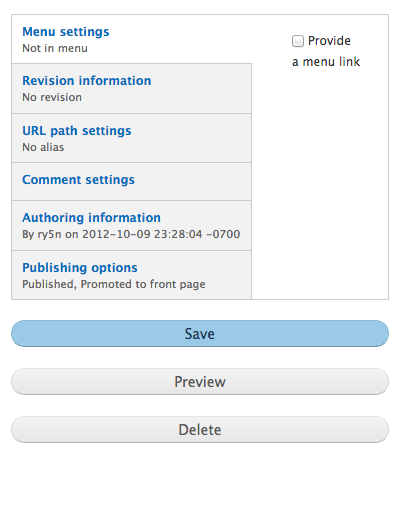
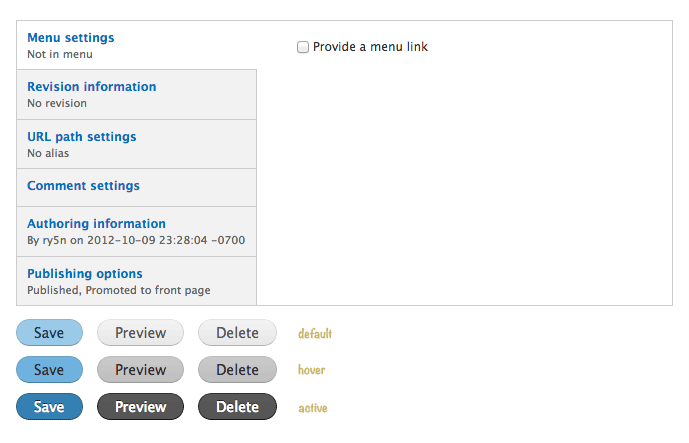
Interface Guidelines
-
Not every form has to have a primary submit button.
-
A button should only be marked as primary if it truly completes the form submission.
I.e., the "Save" button can be primary, but do not make the "Preview" button primary.
-
If there is no clear primary button in a form, do not mark any button as primary.
-
Submit buttons in filter forms, search sidebar forms, etc. should not be marked as primary button, since they are not part of the main page interaction.
-
Any kind of destructive button (e.g., "Delete") should NEVER be marked as primary button (even when it is the primary button).
-
Only mark a destructive button with "danger" if it appears as an alternative option within a set of other buttons.
Impacts:
Module developers
Themers

Comments
Updated link to Bootstrap docs
For a wider range of sophisticated examples of this concept, have a look at Bootstrap's button styles.
--
http://drupaltees.com
80s themed Drupal T-Shirts