

Closed (fixed)
Project:
Drupal core
Version:
8.0.x-dev
Component:
views_ui.module
Priority:
Major
Category:
Task
Assigned:
Unassigned
Issue tags:
Reporter:
Created:
23 Nov 2012 at 17:52 UTC
Updated:
29 Jul 2014 at 21:34 UTC
Jump to comment: Most recent, Most recent file


Comments
Comment #2
damiankloip commentedd8.views-add-primary-button.patch queued for re-testing.
Comment #3
dawehnerIf we really want to make continue & edit the primary button then it should be on the left side. I think save & exit is currently consider as the primary one.
Comment #4
dasjoi think "continue & edit" should be the primary option and on the left side.
Comment #5
damiankloip commentedIn the change notice (http://drupal.org/node/1848288) - "If there is no clear primary button in a form, do not mark any button as primary.". Which does sound sensible.
In light of that, maybe we should just remove the primary button type and make the continue and edit button first?
Comment #6
dawehnerI think we can't decide that unless someone from the UX team has a proper oppinion.
Comment #7
Bojhan commented@dawehner I am sure you have plenty of proper opinions too :P. This is a special snowflake, and within the UX-Team we havn't really figured out what to do with two 50/50 usecase buttons. I would for now opt for just keeping both gray, untill that is figured out.
In this case, I am even more worried - because I don't think having the two buttons, make much sense. We need different entry points for creating a wizard based view and advanced edit mode view.
Comment #8
dawehnerJust in general i think the wizard is a perfect starting point even for the so called advanced site builders.
For example the wizard is setting annoying settings like content: published, so it feels odd to split them up completly.
Comment #9
damiankloip commentedYeah, I agree with @dawehner. The wizard is a good starting point for creating your view, but using the wizard and editing a view a tied.
By far, the most common use case is using the wizard to start your view and then clicking 'Continue & edit' to edit this further. Regardless of whether this is a simple or complex view.
So I don't think this is a 50/50 use case (imo), this is more like a 90/10 use case in favour of 'Continue & edit'.
For me, the patch in #5 is how it should be :)
Comment #10
Bojhan commentedI am not convinced, its 90% for those in this issue. But if its 90% for the world out there too, then we shouldn't even be offering a save & exit.
Comment #11
damiankloip commentedok, maybe 90/10 was too much :) I think both options are valid, but continuing to edit the view is definitely the most common (not just us in this issue).
The patch in #5 makes them both grey, and puts the Continue & edit button first.
Comment #12
Bojhan commentedOk, lets do that.
Comment #13
Bojhan commentedtag be gone
Comment #14
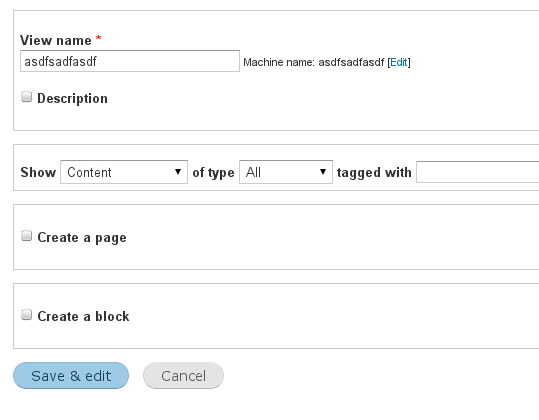
dawehnerWhile we talked about this issue on the sprint and came to the conclusion that if we have contine & edit as the primary action,
that there is no real point in having an actual save & exit link.
At the same time we realized that you want to have continue & edit behave like continue save and edit so what about 'save & edit'
and just a single button marked as primary.
@bojhan
If you agree with it conceptually this can be done during the sprint.
Comment #15
dawehnerLet's see whether all the wizard tests have been changed.
Comment #17
aspilicious commentedor "save and configure"
Comment #18
Bojhan commentedI definitely prefer, one button over two. However I am not really sure, I understand the rationale?
Comment #19
dawehnerComment #20
dawehnerRemove the assignment.
Comment #21
sunPatch looks good.
Not entirely sure though on the complete removal for "Save" (only) — wasn't the initial Views wizard screen supposed to basically act as a replacement for http://drupal.org/project/simpleviews - i.e., allowing novice users to just get their basic listing done, without entering the full-blown cockpit?
Regardless of that, could we rename the button label to "Save and edit"?
To my knowledge, we do not use the "&" sign elsewhere in the core UI. (That said, I think the only other place we have this pattern is on
/admin/structure/types/add, which allows to directly hop to the Manage fields screen after saving a new content type [in case Field UI is enabled].)Comment #22
dawehnerIt's a matter of indentation vs. actual usage. but I think we can't tell anything useful, unless we have proper data: https://views_wizard.webform.com/form/4321
Afaik & was used to safe some space.
So you agree with saving the view? That's good to know.
Comment #23
Bojhan commented@dawehner I see no point, of a survey to establish this. There is no quantitative significance, to polling core contributors + those closely acquainted with core contributors for this.
"Save and edit", would definitely be the way to go.
@sun You are right the rationale for this change is missing, why do we think removing "Save & exit" is good? One reason is simply, that two "Save" buttons are confusing. You see this in content type editing too, we give beginners a 50/50 game they get the right option, slightly effected by how brilliantly we label it. I'd be interesting to know how well this performed in usability testing of views.
Comment #24
damiankloip commentedConfusing for who? New users?
There seems to always be too much biased on usability for "new users" IMO. Like "new users get confused by this" or "views admin page is too confusing" etc.. Sometimes it is difficult to make complex things easy. If I was learning to use views again, I would expect some sort of learning curve, by nature it's a relatively complex animal.
So there would be no value in asking people that use Drupal all the time what they think about this? I would say that can't hurt.
Comment #25
sunLet's go ahead and do this. We can still re-introduce a pure "Save" button, if we find out that it makes sense and is needed later on.
And yeah, I had to manually test the views wizard for some other patch just yesterday and found it quite confusing that the current Continue button does not actually save the view and that you have to make sure to manually do that in the second step. So, saving the new view directly before moving on to the edit UI definitely makes sense.
(That said, essentially, I think that basically makes the entire purpose of the "wizard" obsolete for this case, since the Add screen is turned into a simple form that saves a new view [using a UI that wires up the view differently], and redirects to the edit page after saving. We probably want to create a follow-up issue to clean up and remove some unnecessarily complex wizard code there.)
Thus, I think we're fine here after renaming the button from "&" to "and".
Comment #26
Bojhan commentedAgreed, I have asked the researcher involved in the testing earlier to chime in. But I am also oke, moving forward.
@damiankloip This functionality is primarily for those who do not need the cockpit, and create rather "simple" views. Thus primarily aimed at beginners, polling the expert group for this would be a little silly. Although I am sure experts also use this, we often hear their voice in the issue queue, we then bias our research methods towards beginners as we did not cover that data point. I'd love to always user research both, but with our limited resources we are often left with extracting expert data points from the issues and beginner data points through user research. So its not that we don't value the expert data point, its that we for the most part already have it through discussions in issue queues/camps/peers etc. I'd also like to point to the fact ever since we started doing user research in 2009, we always included intermediate/experts into our pool of participants.
Comment #27
dawehnerWe could also consider to use "Add view" or just "Add".
@Bojhan
You are probably right the result of the survey could be really biased.
Comment #28
sunThanks! (Please wait for green light.)
Comment #29
damiankloip commentedYep, this is looking cool to me.
Comment #30
dries commentedThanks. Committed to 8.x.
Comment #31
David_Rothstein commentedThe above needs to be addressed or this is a major UI regression.
Suggestion: Keep the single "Save and edit" button, but when you get redirected to the edit screen there should be a big, prominent message at the top that says something along the lines of "Don't care about any of the advanced settings below? Click here to see the view you just created" - with appropriate adjustments for the case of views that don't have a page display. (For inspiration, I'm thinking here of those airfare websites where you're just trying to buy an airline ticket, but during the purchase process they have all these extra screens where they try to sell you hotels and rental cars too; but at least they're usually nice enough to put a "skip this step and continue with your checkout" button near the top of the page...)
Comment #32
damiankloip commentedYeah, that's a really good plan IMO.
Comment #33
damiankloip commentedHere's a patch for this. Should work ok, but the message needs some tlc :)
Comment #34
tim.plunkett1) Nope, though we should
2) is only valid for page displays. And, all page displays in the advanced UI do have a button to view it, but it is not prominent enough.
3) Yes, that's a huge problem that should be covered by #1831894: Users miss "save" button and can't distinguish "editable" and "preview" areas
Comment #35
Bojhan commented@David_Rothstein I would agree with the idea of making "Go to the view" more prominent, however as these turn into blocks instead of all pages - I am not yet sure how possible that is? Ideally part of this is solved by #1831894: Users miss "save" button and can't distinguish "editable" and "preview" areas, and we figure out how to make location more prominent. I am not very keen on using messages for this purpose, we have a UI that should allow you to quickly go to the thing you made.
I did ask the original Views team to chime in, but I think its a busy time at Acquia. However I do not agree with stating this is a UI regression, removing functionality is not necessarily a regression it is a decision that favors a certain usecase. I think its a dangerous line of thought, I see in other issues too - as we add things, we will also occasionally remove things when we think it improves the main usecase.
Comment #36
David_Rothstein commentedRemoving the button is a decision, but it can still have consequences (unintended side effects) that are regressions. There is no use case for "I'm on step 2 of a two-step form with no clue where to go next" :)
Maybe I'm missing something but I don't see how #1831894: Users miss "save" button and can't distinguish "editable" and "preview" areas is related? That's about people not noticing the Save button when it's on the screen. I'm talking about a situation where the Save button isn't on the screen at all (introduced, during the "add new view" workflow, by this patch - previously it would never happen when adding a new view).
Shouldn't we have both? I think the point here is that when you're in the middle of creating a new view, there should be some kind of messaging displayed that signals to you that your view was just created, and now you're on step 2 but you can skip step 2 if you want to. Whether that should be styled like a normal message I'm not sure, but overall it's pretty message-ish. There could be a prominent link to the view in addition to that elsewhere (that would be displayed always), but that's a separate issue.
If the view has no page display, I think the link would just go to admin/structure/views (like the redirect did before)?
Comment #37
Bojhan commentedI will visualize what I mean.
Comment #38
dawehnerPing bojhan :)
Comment #39
Bojhan commentedSorry, went on vacation :) Will still do this
Comment #40
dawehnerNeeds work means there is a patch.
Comment #41
tim.plunkettThis was committed December 19th 2012.
I think if this is still a concern, it should be a follow-up.