Closed (fixed)
Project:
Web Links
Version:
5.x-1.9
Component:
Code
Priority:
Critical
Category:
Bug report
Assigned:
Reporter:
Created:
19 Oct 2007 at 17:26 UTC
Updated:
18 Jul 2008 at 05:42 UTC
Jump to comment: Most recent file


Hi
Big problem much time so
-Create a web link, assign it at least one "Web Links" group in which to show up
-Save the new web link
-Edit said web link
No "Web Links" are pre-selected indicating which "Web Links" categories it is currently in
-Save the link, former "Web Links" assignments are lost, that web link now shows up as "Unclassified"
The interface should pre-select the existing "Web Links" categories.
The screen show:
warning: Illegal offset type in /home/todosida/public_html/includes/common.inc on line 1310.g
Web links doen'st work
Thanks you
Regards
| Comment | File | Size | Author |
|---|---|---|---|
| #18 | Weblinks_grab.jpg | 110.1 KB | hbar |
| #7 | nid.jpg | 159.78 KB | aitala |
| #1 | Immagine.gif | 16.77 KB | charly71 |


Comments
Comment #1
charly71 commentedI've the same problem, but no error message on the screen...
Comment #2
hbar commentedSame problem here. No categories displayed on input form. No error message.
Web Links 5.x-1.8
Drupal 5.7
PHP 4.4.2
MySQL 4.1.21
Comment #3
aitala commentedI think I am having similar problems with a similar Drupal 5.7 setup, but its hard to tell since I migrated my data over from Post-Nuke.
Eric
Comment #4
aitala commentedI seem to have found a fix - maybe. I removed all of the 5.x-1.8 Weblinks module. I installed the 1.7 version and added a few categories and links. I then checked to see if everything functioned correctly.
The I upgraded to 1.8 and now the module seems to be working.
Eric
Comment #5
hbar commentedHi Eric,
Thanks for posting a possible solution. When you did it, did you lose your existing weblinks or categories, and have to manually re-enter them?
Oh, and which Drupal version are you running?
Thanks,
Jim
Comment #6
aitala commentedHi,
No, I did not lose anything when I did the weblinks upgrade from 1.7 to 1.8. Am running Drupal 5.7...
Eric
Comment #7
aitala commentedDrat, now it is broken again!
Things were working fine - I added a few links with no problem. Then I added some non-weblink nodes.
Now when I post a link, the node is created but no row is created in the weblinks table.
The term_node table has the correct nid & tid for the node to be a weblink, the term_data table has the right tid & vid for the categories..
But in the weblinks table, what should the vid be? The node revision or the vocab id?? In my table the vid=nid...
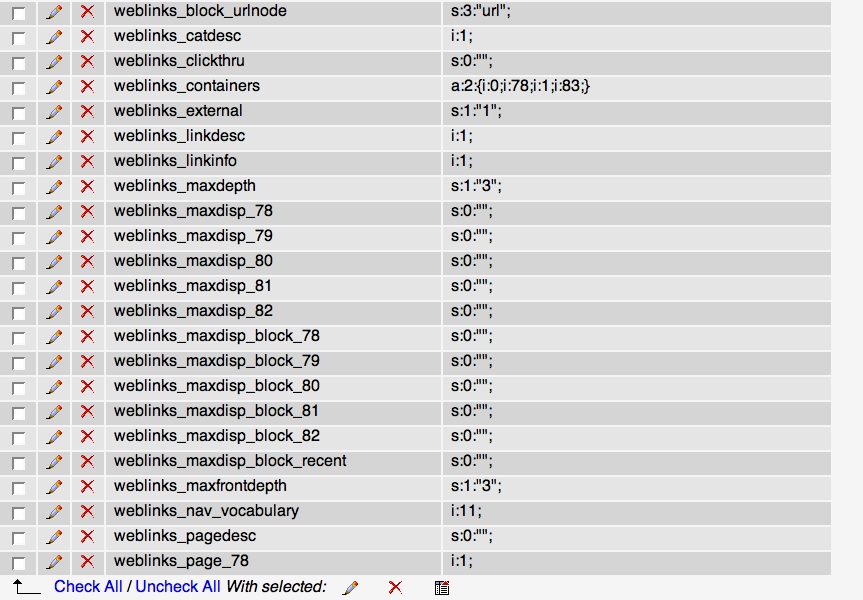
Hmm... this looks odd. Any idea why these rows are in the variables table? Never saw them before... see attach.
This is really frustrating.
Comment #8
hbar commentedDagnabbit! But thanks for the info anyway. I'm not really familiar with the database workings, so can't really offer any insight there. :-\
Hope the Web Links developer is still around...
Cheers,
Jim
Comment #9
rmiddle commentedAre you still seeing this issue? I have seen reference to this else where but I can't repeat. I would like more info on your setup so I can try and repeat to try and fix the issue.
Thanks
Robert
Comment #10
hbar commentedHi Robert,
Thanks for looking at this. I'm still getting the same problem when I try to create a new Weblink: no categories. There's no error though, unlike some of the other posters. The Weblinks I created before this issue appeared are still displayed correctly.
My setup:
Please let me know if you need any more info. :-)
Jim
Comment #11
rmiddle commentedI wonder if some php5 only or mysql 5 only code has slipped into the module? Mysql 4 and php 4 are pretty rear. I need to see if I can get a build setup to test that.
Thanks
Robert
Comment #12
hbar commentedThanks again, Robert.
I hope the solution is something simple(?) like that. I've not been able to add any new Weblinks for months, and have been thinking of coding a static "Links" page, if Web Links remains disfunctional.
I didn't know that MySQL 4 & PHP 4 are rare. I've got a shared hosting account, that's just what they provide. They have promised a future upgrade to MySQL 4/ PHP 4, but that hasn't materialised yet...
Anyway. Thanks for looking into it! :-)
JIm
Comment #13
rmiddle commentedMistake
Comment #14
rmiddle commentedNo Major Linux Distro ships with php4 / mysql 4 at this time.
The development team of PHP announced the End-Of-Life of PHP 4. There will be no more releases of PHP 4.4 after Dec 31, 2007. Critical security fixes will still be released on a case-by-case basis until August 08, 2008.
Mysql 5 is much better then mysql 4 but I am guessing the issue is more php4 then mysql4.
Thanks
Robert
Comment #15
rmiddle commentedIts not. Found a box with php4 4.4.4-8 and mysql 5 and it works fine. Now looking for a box with mysql 4.
Thanks
Robert
Comment #16
rmiddle commentedhbar
Can you take a screen shot of the screen that isn't working. I want to make sure I am not missing something this module has so many menus that I just might not be looking at the right one.
Thanks
Robert
Comment #17
rmiddle commentedComment #18
hbar commentedHi Robert,
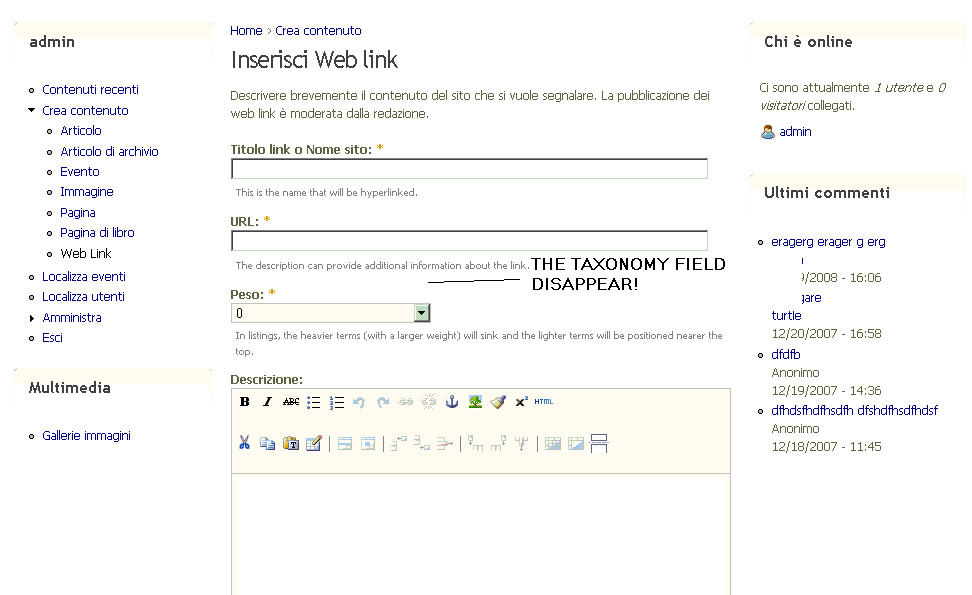
Here's a grab of my "Create Weblink" page. No categories displayed. Hope this helps. And thanks again for investigating... :-)
Jim
Comment #19
rmiddle commentedhbar,
I was looking at the code an realized we have made several changes to the code that could effect this problem and that 1.8 no longer represented the latest code base so I released 1.9 doesn't include everything I wanted in 1.9 but try and see if this cleans up your issue.
Thanks
Robert
Comment #20
hbar commentedRobert,
Thanks for the update. Unfortunately, the problem still exists. :-(
Actually, it seems not to be a MySQL 4, PHP 4 problem. I also installed your update onto my local test site which is running MySQL 5.0.41 and PHP 5.2.3. The categories were nowhere to be seen.
Thanks for looking at it anyway! :-)
Jim
Comment #21
rmiddle commentedJim,
Can you go to /?q=admin/content/taxonomy/ and confirm that "Web Links" existings and that items are listed under the group.
Thanks
Robert
Comment #22
rmiddle commentedThis is wired as I can't dupe but I have seen a few reports.
Thank
Robert
Comment #23
hbar commentedMan, you solved it! I went to the page you said, and sure enough, Weblinks was listed. Then I went to the Edit vocabulary page for the Weblinks category. In the Types section, there was nothing ticked, even though there was a little red asterix indicating a selection is required (I guess). I enabled Weblinks and saved.
Now it's working! Tested on MySQL/PHP 4 & 5.
So maybe something in Web Links or Drupal changed? I really don't recall deselecting Weblinks in the Types section, or selecting it, for that matter! Is that page new, somehow?
Whatever, this is great! I hope it works for other users. This is what I did, again:
1) Go to /?q=admin/content/taxonomy/
2) Click on Edit vocabulary for your Weblinks category
3) Enable Weblinks in the Types section
4) Save
Thanks again Robert, I really hope this does prove to be the culprit. :-)
Jim
Comment #24
rmiddle commentedJim,
I am glade we found the issue. The install script creates the term and assigns it to weblink types but you can remove the check and that would cause the taxonomy vocabulary to disappear. I should have checked this 1st. Glad you are now able to add items into your list.
Thanks
Robert
Comment #25
rmiddle commentedComment #26
nancydru