

 The 2026 Drupal Business Survey is open. Your response will help shape the future of the Drupal business ecosystem.
Hi,
Is it possible to have the following:
* In the profile, I've added a field that user selects his working units CM or Inch.
* I'd like to have a filter that can handle something like [cm=1|inch=2.54]. The filter will need to check the settings from the profile, and act accordingly (i.e. show 1cm, or 2.54'').
| Comment | File | Size | Author |
|---|---|---|---|
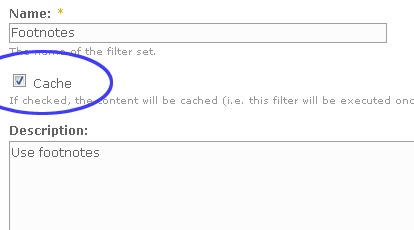
| #23 | cache.png | 6.24 KB | arhip |
| #16 | Snap1_20.png | 13.2 KB | amitaibu |
| #13 | workingunits.txt | 3.89 KB | arhip |
| #5 | Untitled-1_5.jpg | 53.44 KB | arhip |



Comments
Comment #1
arhip commentedYes, it is possible. You can get the unit being used from table {profile_values}. We need two parameters, fid and uid. uid can be retrieved using global variable $user->uid. fid can be retrieved from table {profile_fields}.
Below is the pattern & replacement code. First you must create a filterset, and create a new filter under that filterset. At line 13, $fieldname should be assigned to field name.
Pattern:
Replacement (with PHP code):
Comment #2
amitaibuThanks a lot! I'll check it and report back :)
Comment #3
amitaibuSilly question, but what is the syntax that I should write?
Comment #4
amitaibuOk, seems to be a problem there:
When I type "This is 90cm", I get only "This is" and an error:
Can't it be because in my profile working units appear as CM and Inch (i.e. case sensitive)?
Comment #5
arhip commentedI think so.
Maybe you should change the line 34-37 into:
to convert all units processed into lowercase.
Comment #6
amitaibuDude, what a great module!
Here's my final version, for everybody to enjoy...
Name:
Pattern (that will except 1inch, 1 inch, 1.5 inch):
Replacement text:
And the PHP code enabled.
Cheers!
Comment #7
amitaibuOne problem, though...
Some users have CM in their profile and some Inch. I'd like the created content to show the values for every user according to their preference.
Is this module supposed/ can do this, or should I hack the theme?
Comment #8
arhip commentedIf I don't misunderstand, you want the content displayed like this:
Some title
User's working unit: CM
Some text some text some text some text some text some text some text some text some text some text some text some text some text some text some text some text some text some text some text some text some text some text some text some text
We can use ^ to insert the text we want at the top. ^ matches the beginning of the string. So you can create a new filter with this configuration:
Pattern:
Replacement:
with PHP Code checked.
Create this new filter under the same filterset you're working on, and make sure to set it's weight more than Working units filter, since $vars->units won't be recognized before Working units filter executed.
But I think it would be nicer if you put this working unit information in a block.
Comment #9
amitaibuI actaully mean something a bit different.
Title: hello world
body:
Some text some text some text 1 Inch some text some text
Now, I'd like the users who have CM defined in their profile to see the text like this:
body:
Some text some text some text 2.54 cm some text some text.
Comment #10
arhip commentedOh, I'm sorry to misunderstand.
I'm sorry again to say that it is not possible (as long as I know) to do that only using this module. Since a filter will be executed once after we submit the content, we cannot change the content every time the content displayed. And since the current user's settings could affect a content only if the filter executed again, then there is no possible way to do that.
But I think we can get this effect by 2 way:
I'm trying each of this ways. I'll report you if any of these works.
Comment #11
amitaibuOh man, thank you so much for your help! waiting to see your results..
Comment #12
amitaibuNot a developer, but I'm thinking maybe it's possible to use your filter to add for example
<div class="working units>, that later will be replaced with to correct working units.Comment #13
arhip commentedI think we can't use
<div>s nor javascripts, because we need to get $user->uid to know which user is being logged, and we can only do this on the server. The PHP filter solution does work, because it will be executed on the server. I attach the sample working units filter (as plain text file).For this filter to work, you need to turn on PHP Filter in the input format, and make sure it weights more than working units filter, so the PHP script produced could be executed.
The filter works like this:
The customfilter module lacks the function to turn off cache, so that filters will run only when a content submitted. If only this module could turn cache off for particular filterset, then the code you submit on #6 will work as you wish. I'm working on the patch version. Thanks for your question, it really helps me to improve this module.
Comment #14
amitaibuSound interseting. One problem, though, is probably security - allowing user to use PHP. You think any posibble way not to use PHP filter for that?
Comment #15
arhip commentedYes, it is very vulnerable, unless we can create a filter that strips any
<?php ... ?>before our filter executed. I have added option 'cache' in the filterset edit page. The development release should be available soon (within 12 hours - the tarball created every 12 hours). You can try it when available. Using this fixed module, you don't need PHP filter. I've tried your code #6 with cache turned off, and it worked. Note that you should refresh the Input Format for the filter work properly (by saving the configuration again).Comment #16
amitaibuAri,
I've imported configuration from #13, but something seems to be written wrong there. Checkout the snapshot - all text is replaced with
Comment #17
arhip commentedOh, it seems that the PHP evaluator wasn't executed. Please check the:
Comment #18
amitaibuIt works great! but the fact that I've enabled PHP evaluator doesn't mean that there is a security threat? How can I make sure users doesn't use PHP on my site?
Comment #19
arhip commentedYou can define a new filter that will flush all
<?php ?>. This filter must be executed first, because we don't want any php code get into PHP evaluator.Filterset: UnPHP
Filter: Strip PHP code
Pattern:
/\<\?php(.*?)\?\>/sReplacement: <code type="php">$1</code>
And you should rearrange the input format in this order:
So that any PHP from users cannot reach PHP evaluator, while PHP produced by Working Units can.
Comment #20
amitaibuWhat will happen if user enters
<? php <?php print ('hello'); ?> ?>- does this replace it properly?Comment #21
arhip commentedNo, that would be converted into
But I think that's ok, that broken code wouldn't be executed. I think you'd better use the cache option (#15) instead of PHP filter.
Comment #22
amitaibuDidn't understand this part
p.s. welcome back :)
Comment #23
arhip commentedCustomFilter 5.x-1.2 supports cache option in filterset edit operation. When Drupal saves a content, it can be cached, so that any filter applied to the input only calculated once and then the result cached. Or, we can turn off cache, so that any filter applied to the input will be calculated every time the content viewed.
For working unit case, we can turn off this option, because every unit written should be calculated every time the content viewed. If you're going to use this method, then you can just use your filter in #6, and turn off cache option in the filterset settings.
Comment #24
avpadernoi am setting the report as fixed because it got an answer.
Comment #25
avpaderno