I'm curious as to why you're using input tags for the buttons. I'm using Font Awesome (http://fortawesome.github.com/Font-Awesome/) in a custom admin theme I'm creating and it would be cool if I could write html when using text buttons to use the fontawesome glyphs among other things.
I ask because I tried changing this line in bueditor.js:
html += '<input type="'+ type +'" alt="'+ alt +'" title="'+ title +'" accesskey="'+ key +'" id="bue-%n-button-'+ i +'" class="bue-button bue-'+ btype +'-button editor-'+ btype +'-button" '+ attr +' tabindex="'+ (i ? -1 : 0) +'" />';
to:
html += '<img alt="'+ alt +'" title="'+ title +'" accesskey="'+ key +'" id="bue-%n-button-'+ i +'" class="bue-button bue-'+ btype +'-button editor-'+ btype +'-button" '+ attr +' tabindex="'+ (i ? -1 : 0) +'" />';
and everything still worked brilliantly which led me to believe the actual html tag doesn't matter at all. So currently I've hacked my local code to be like this:
// Text button
if (!isimg) {
  // (1) Just set 'attr' = 'icon' as we either have text or html.
  // and want to output it directly.
  //type = 'button', btype = 'text', attr = 'value="'+ icon +'"';
  type = 'button', btype = 'text', attr = icon;
}
else {
  type = 'image';
  // Sprite button
  if (sprite) {
    // (2) To make this work with image buttons we need to add the actual <img> tag.
    //btype = 'sprite', attr = 'src="'+ sx1 +'" style="background-position: -'+ (s * sunit) +'px 0;"';
    btype = 'sprite', attr = '<img src="'+ sx1 +'" style="background-position: -'+ (s * sunit) +'px 0;" />';
    s++;
  }
  // Image button
  else {
    // (3) To make this work with image buttons we need to add the actual <img> tag.
    //btype = 'image', attr = 'src="'+ tpl.iconpath +'/'+ icon +'"';
    btype = 'image', attr = '<img src="'+ tpl.iconpath +'/'+ icon +'" />';
  }
}
alt = title + (key ? '('+ key +')' : '');
title += access && key ? ' ('+ access +' + '+ key +')' : '';
// (4) This can probably be any tag but an anchor seemed appropriate.
// We wrap 'attr' which can be text, html or an image with the anchor tag so it doesn't really matter what 'attr' is, it'll work either way.
//html += '<input type="'+ type +'" alt="'+ alt +'" title="'+ title +'" accesskey="'+ key +'" id="bue-%n-button-'+ i +'" class="bue-button bue-'+ btype +'-button editor-'+ btype +'-button" '+ attr +' tabindex="'+ (i ? -1 : 0) +'" />';
html += '<a href="#" alt="'+ alt +'" title="'+ title +'" accesskey="'+ key +'" id="bue-%n-button-'+ i +'" class="bue-button bue-'+ btype +'-button editor-'+ btype +'-button" tabindex="'+ (i ? -1 : 0) +'" >' + attr + '</a>';
As you can see I've only made 4 small changes marked with (1) through (4).
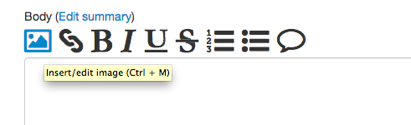
See the attached example image for how it looks currently.
I haven't thoroughly tested this, but it's working well for me from what I can tell.
Edit: This all happens in bueditor.js around line 104, sorry. :)


Comments
Comment #1
twiik commentedMy actual settings page looks like this now (see attached image).
Comment #2
PCateNumbersUSA commentedWould love this as well.
Comment #3
ufku commentedThe input element can be both text and image. This provides a simple standard structure for all buttons without any need for nested elements.
Those who want to change the html structure can override the BUE.theme method in their theme's script.js
Comment #4
ufku commentedSorry, won't fix.
Comment #4.0
ufku commentedForgot to mention the actual file and line number.