Currently testing out beta 5 on several installations/computers and found that auto config. is failing on this computer:
- Gallery 2.2.2
- Drupal 5.3
- PHP 5.1.6
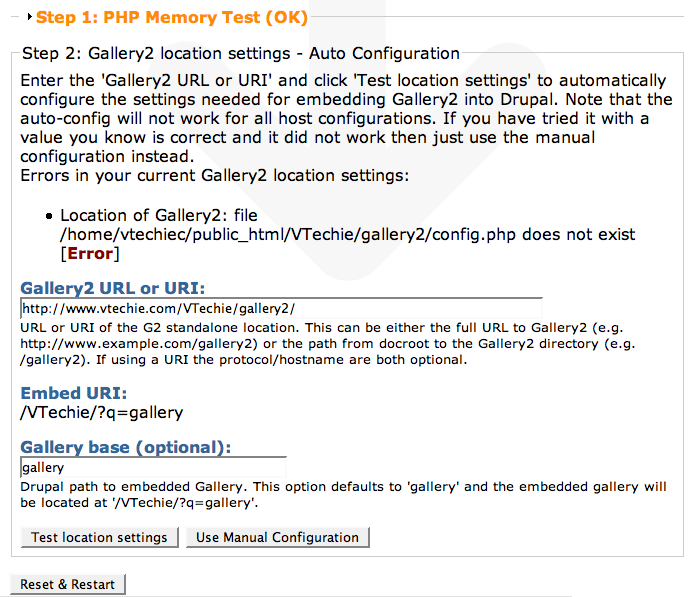
URI of Gallery2: file /var/www/websites/tbsk/test/drupal5/embed.php does not exist
The error message is correct. The file is located in
/var/www/websites/tbsk/test/drupal5/gallery2/embed.php
gallery2 directory inside Drupal-root is a symbolic link:
gallery2 -> /var/www/websites/tbsk/test/gallery2-druapl5/gallery2/
The standalone Gallery2 is running just fine on:
http://drupal5.tbsk.no/gallery2/main.php
How can I help you with tracking down this bug (if it is a bug)?
--
Stein Magne


Comments
Comment #1
profix898 commentedSorry, I didnt have time to look at this, but hopefully tomorrow ...
Comment #2
steinmb commentedThats just fine.
Tomorrow I'm attending a Drupal 6 hackathon tomorrow here in NZ :) We'l try helping out removing the most critical issues from the upcoming release and probably shearing some beers later on ;)
Cheers!
Comment #3
profix898 commentedI can't reproduce. Seems to work fine for me. Does this only happen if the gallery2 directory is a symlink? What does this installation have in common with your other test installations? In other words is there anything special about this configuration?
Edit: And how was the D6 hackathon? I imagine it was fun, right?
Comment #4
steinmb commentedHmm tested some more today:
Pressing Reset & restart give the same error everytime (as reported) and this is strange.Leaving the error message like that and then clicking "/admin/settings/gallery" the autodetect is working!
If I go back and click "Reset & Restart" autodetect fails again..... And if I check my galler after the installation, is it running, I'm able to view the mail album, add images, but not able to open subalbum. It is changing the URL correct but no error-messages pls test http://drupal5.tbsk.no/gallery
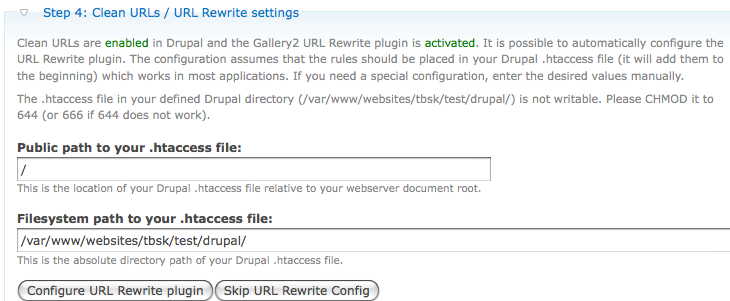
Checked .htaccess in drupal-root and did not find any rewrite rules from the gallery installation.
What is different:
- This Drupal instal. have more modules installed
- Had a older G2 module installed, with clean URL off and Gallery2 installation outside drupal-root I then upgraded to this version and turned clean URL on.
No I have not yet removed the symlink and tested directly.
The D6 hackathon was fun and social. It is really nice been able to see and discuss problem and solution with other eye2eye. We made a few patches RTBC and had some discussion on the latest changes in the themeing system and OpenID implementations. We also started setting up NZ Drupal site. http://drupal.net.nz/. Nothing there really yet.
--
Cheers
Comment #5
steinmb commentedBump
Comment #6
profix898 commentedSorry, but I'm still unable to reproduce the problem. I have tried on different machines and with various configurations (including symlink, update from old module, with/without short urls, etc.). Seems to work fine.
Maybe you could check the calls to
G2EmbedDiscoveryUtilities::getG2EmbedPathByG2Uri...()in gallery_install.inc (line 810+) to see what call fails and why!? Otherwise I'm not sure what I can do :(Comment #7
profix898 commentedComment #8
steinmb commentedThanx for your answer. I almost gave this up but here we go again:
I have now installed the last stable version, and before install I deinstalled the old version just to be on the safe side. I still have the same problem. I then removed the symlink and moved gallery2 into drupal-dir but still the same problem.
I'm not a code ninja (yet) but followed your tip to gallery_install.inc. Here is what I found out:
Pressing "Reset & Restart" This fuction is always failing in finding the Gallery2 location. If I then insted of providing a URL in the form I just press "Test Location setting"
Returns " string(1) "/" " that is correct and the error message is saying
URI of Gallery2: file /var/www/websites/tbsk/test/drupal5/embed.php does not exist
If I enter something silly in the form like gallery3 I get:
string(10) "/gallery3/" and "/var/www/websites/tbsk/test/drupal5/gallery3/embed.php does not exist" Look like this is working and entering the correct value gallery2, I get an OK: /var/www/websites/tbsk/test/drupal5/gallery2/
This code seems to work correctly, but I was not able to find any of the code in line 810+ getting executed when pressing "Reset & Restart". Where do I go to debug this?
--
Stein M. Bjorklund
Comment #9
steinmb commentedComment #10
toch commentedHello Everyone,
I seem to have a similar problem on my site after upgrading from Drupal 5.x to 5.5. I already had my Gallery-Configuration up and running for a while, so it worked fine before the update.
I updated the gallery module in drupal as well to the latest stable version 5.x-2.0.
I didn't change the Gallery2-Installation though.
The Gallery2 as such is working fine, but the integration in drupal is not working.
The Error Message i get:
Gallery Init: Everything seemed OK, but the Gallery could still not be initialised. Perhaps a manually entered value is incorrect. [Error]
The paths received are correct:
Gallery2 filesystem path:
/www/htdocs/flyhigh/data/gallery2/
Embed URI:
/index.php?q=gallery
If I try to set the values manually, i get the following error:
Location of Gallery2: file /data/gallery2/embed.php is restricted by PHP open_basedir [Error]
Yesterday it showed me "embed.php does no exist" although i cold see the file in this location through the ftp-program.
I'm confused...Any ideas?
I don't know what kind of information could be useful to resolve this issue, but i'd be glad to provide any details needed.
Merry Christmas by the way ;)
toch
p.s.: posted as well as a reply to a similar issue on the drupal integration forum on the gallery website:
http://gallery.menalto.com/node/72521
Comment #11
SueCarlson commentedI have the same problem, how do we resolve this, even when I created the pages manually it isn't taking.
Comment #12
profix898 commented@steinmb and SueCarlson: Are you seeing any open_basedir restrictions as well?
This problem seems to exist only for G2 data being located in a separate directory outside the Drupal root folder (or even outside of the webroot path). I havent thought of this before, buts its totally possible that detection or verification of the G2 installation fails because PHP cant access the files properly due to the webserver restrictions. I'm not sure how a symlink is handled internally, but I guess it simply resolves to the original location, right?
Comment #13
steinmb commentedProfix898: No I have never had that problem. open_basedir I only had if I forgot to copy Gallery2 inside the drupal dir or the symlink was missing in drupal dir (Gallery outside drupal dir). I only have have a problem with the "auto detection", telling the installer where my Gallery2 have always solved my installation.
--
Stein Magne
Comment #14
SueCarlson commentedBack to this again. I did install in the drupal directory, even tried the /sites/all/modules directory and each individual mod I wanted to use it with. Still to no avail. IN fact, I totally gave up on the whole Idea and moved on to something else that I am having issues with installing. Might be a good Idea for you all to describe how to do all this like we were all IDIOTS, cuz I can't figure most of these mod additions out, even after reading the readme.txt several time WHILE I am doing it.
Guess I am just brain Dead, but still really really like this program.
www.ohs77.suesman.net
www.forum.suesman.net
www.grandparentproject.suesman.net
www.sueswebdesign.suesman.net
www.wildlifecamchat.com
Comment #15
steinmb commentedSueCarlson: Have you read and follow the instruction/manual on the wiki? http://codex.gallery2.org/Integration:Drupal. If so, can you pls be more specific about what you have done during the install, what's working and not? Address to the page with problems on could also help. To make sure that you don't have problem with clean URL, turn it off.
--
Stein Magne
Comment #16
profix898 commented@SueCarlson: Is this discussion somehow related to http://drupal.org/node/204102. Actually I cant really follow. As steinmb said, you should try to be more specific on your problem ...
Comment #17
steinmb commentedProfix898: Back to #8 could you pls. point me in the right direction?
--
Stein Magne
Comment #18
SueCarlson commentedI no longer have an issue as I stopped working on it, will come back to it later when I have learned a bit more.
And Yes I did read the instructions, and I did turn off the clean urls.
And Yes it is the same issue.
Comment #19
jwenning commentedI just wanted to add that I'm watching this thread as I'm having the exact same issue.
Comment #20
greekman commentedDon't want to repeat here,but same problem.
If developers get attention to this bug,I am open to test and report.
Comment #21
modguru commentedI have same issue.
Have install Gallery at http://www.jaigupta.com/gal/
Drupal is at http://www.jaigupta.com/
Gallery2 URL or URI: http://www.jaigupta.com/gal/
Gallery2 filesystem path: /var/www/vhosts/jaigupta.com/httpdocs/gal/
Embed URI: /index.php?q=gallery
I am getting Everything seemed OK, but the Gallery could still not be initialised. Perhaps a manually entered value is incorrect.
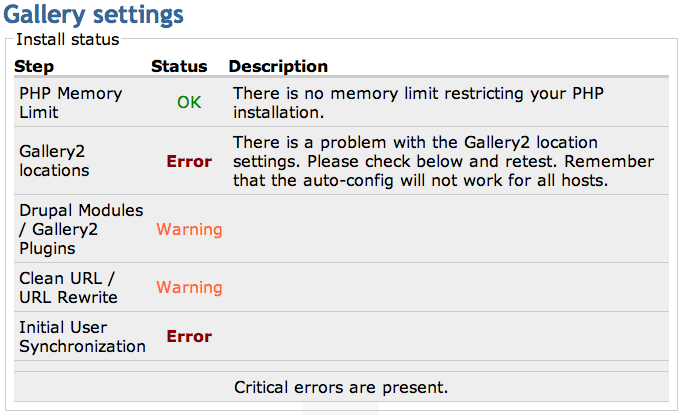
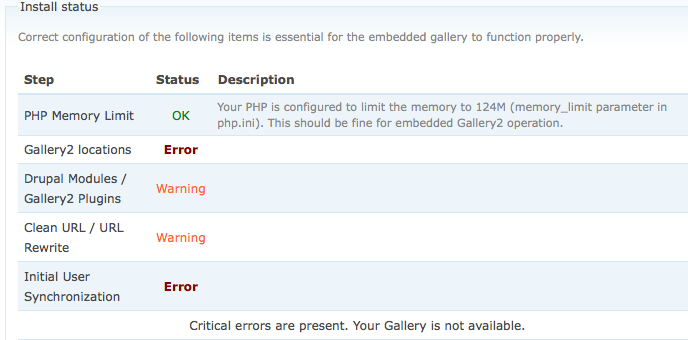
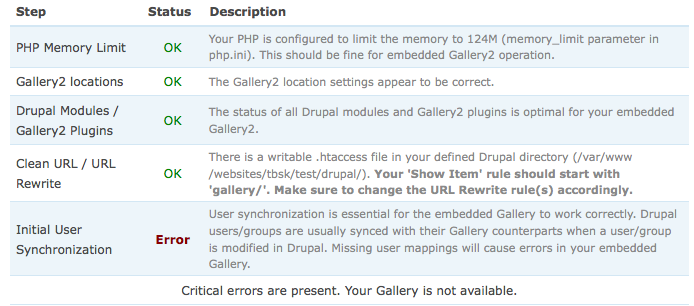
Gallery2 locations Error There is a problem with the Gallery2 location settings. Please check below and retest. Remember that the auto-config will not work for all hosts.
Drupal Modules / Gallery2 Plugins Warning
Clean URL / URL Rewrite Warning
Initial User Synchronization Error
Critical errors are present.
Have tried to disable clean url in both Drupal and Gallery. Have tried both auto and manual ways.
Comment #22
modguru commentedwas able to solve it by updating with latest svn code.
svn checkout https://gallery.svn.sourceforge.net/svnroot/gallery/trunk/gallery2
Comment #23
profix898 commented@greekman: Developers already know about this, but as mentioned above I am unable to reproduce. So we are basically collecting information/details of the problem to learn more about it.
@ALL: Does it make any difference if you provide the Gallery URL/URI relative to your root directory (of the domain), for example "/sites/default/gallery" instead of "http://yourdomain.net/sites/default/gallery"? Doing some research on a client's server revealed that in some cases, where embed.php is not accessible directly for public, auto-detect fails to locate it. But if you change the path to be relative to your root folder, i.e. omitting the "http://..." part, it works.
I plan to tag a bugfix release next week and I was hoping to fix this issue by then.
Comment #24
Starbuck commentedI'm having the same issue. D6 rc4. The release I just downloaded a couple days ago has the following in gallery.info. Is this telling us the code doesn't have your most recent 6.x changes?
Maybe this is a documentation issue. Can someone very clearly explain exactly what we are supposed to use for the fields
I know it looks obvious but apparently we're missing something. Here is my setup:
The G2 core is here /home/me/apps/gallery224/gallery2/install
Drupal mods are here: /home/me/portals/test01/modules/gallery
The path to the G2 multi-site home is /home/me/galleries/test01/config.php
The URL to D6 is http://test01.portals.mydomain.com
The URL to the G2 home is http://test01.av.mydomain.com
OK, so tell us what goes where, I'll try it and report back immediately. I will even work with one of the developers over a GoToMeeting session so they can see my installation and look at the paths and code if necessary. Send me a note with availability and I'll start the meeting. Skype welcome too...
Thanks for the ongoing effort!
Comment #25
cvgeldern commentedIs this anyhow related to this (http://gallery.menalto.com/node/73536) problem?
-Drupal 6.0
-Gallery2 2.3.x
-Gallery module 6.x-1.x-dev (2008-Feb-11)
(But also with older versions/combinations)
Comment #26
profix898 commentedWhat makes you think that? There is no D6 release available yet, its only a development snapshot and your download contains all the changes as of Feb-11. I have a couple of changes/bugfixes in my local sandbox that I plan to commit on Sunday/Monday. For an official release we will need to 1. stabilize the D6 gallery code (shouldnt be too bad right now) and 2. wait for Gallery 2.3 to be released (because the D6 version requires this latest version).
Are you planning to use G2 standalone as well? If not, you should move your multi-site G2 folder into/below the Drupal root (a typical choice is the /sites/yoursite/gallery path or /sites/default/gallery for single-site Drupal). The G2 codebase and multi-site "g2data" folder shouldnt matter. I'm not sure whether the embedded config verification routines - not to speak of auto-detection - will work with Drupal and G2 being on different domains. You should definitely try to specify the "Gallery2 URL/URI" relative to your Drupal installation (masking the G2 domain), i.e. "/../../galleries/test01/" (hope I derived that correctly without actually trying). The "Gallery2 filesystem path" is "/home/me/galleries/test01/" and "Embed URI" is "/index.php?q=gallery".
P.S.: I will not be working on the module (or be available on Skype etc.) for the next 3 days.
Comment #27
steinmb commentedDrupal 5.6
Gallery 2.2.4
Gallery module 5.2.x latest devel snapshot
These two issues look like two different bugs to me.
--
Stein Magne
Comment #28
zachmac commentedI am having the same issue.
Comment #29
cvgeldern commentedThis problem in D6 was fixed with latest nightly builds of Gallery2(.3) and the Gallery module (D6-dev). Both auto an manual are working for me now.
Comment #30
steinmb commentedThis is good news! A many users seems to have/had problems with this.
- Any idea about the release date on Gallery 2.3?
- Is the fix in the Gallery module going to be backported into the D5-version?
Cheers!
Stein Magne
Comment #31
profix898 commentedThere is nothing to backport from the D6-version as the routines to check location settings are identical (unless I am missing something). Can anyone confirm the D6 code working?
Comment #32
jwenning commentedI also no longer have this issue after upgrading Gallery
Comment #33
steinmb commentedDid you upgrade to Gallery 2.3.dev?
Comment #34
steinmb commentedClosed due to inactivity