

Closed (won't fix)
Project:
Drupal.org security advisory coverage applications
Component:
module
Priority:
Normal
Category:
Task
Assigned:
Unassigned
Reporter:
Created:
5 Jan 2013 at 20:30 UTC
Updated:
3 Aug 2013 at 08:17 UTC
Jump to comment: Most recent file



Comments
Comment #1
h3rj4n commentedPlease fix all the Drupal Code Standard issues: http://ventral.org/pareview/httpgitdrupalorgsandboxjaniskrauklis1876352git-master.
Please remove the master branch and move to a specific Drupal version branch.
Edit \
The URL to the sandbox project: https://drupal.org/sandbox/janis.krauklis/1876352
For the lazy people the clone command:
git clone http://git.drupal.org/sandbox/janis.krauklis/1876352.git name_day_reminderThe one provided in the initial post has a username in front of it. Git requires password to get the code.
Comment #2
abhijeetkalsi commentedManual Review :
1) Please rename you readme.txt to README.TXT (uppercase) as it not recogonised by ventral.org.
2) Do not use ?> dilimiter a end of file, it handle by PHP's prepend.inc
3) Name you module with module name 'nameday' and also rename all file with name 'nameday'.
4) Remove your empty hooks
mymodule_install() & mymodule_uninstall(). Add them only if you add come code to it. Also your module name is "nameday" not "mymodule".5) Use l() function to make your links in line no: 163, 236 in .module file.
6) Please add more informaiton in nameday_help().
Comment #3
janis.krauklis commentedThank you guys for your comments. It's my first module, maybe that's why so many fixes needed.
I fixed your recommendations. Maybe is there anything more, what I have to fix? What is the next step to publish module? What I have to do next?
Comment #4
klausiProject applications are tasks, and this is not fixed? See http://drupal.org/node/532400
We are currently quite busy with all the project applications and I can only review projects with a review bonus. Please help me reviewing and I'll take a look at your project right away :-)
Comment #4.0
janis.krauklis commentedUpdating git and version information
Comment #5
darwoft commentedHello. I run the module on my local enviroment and note two problems:
1) When i entered an Api key, a div shows me that the api key was OK and my data configuration was saved.
In the same screen I also can see another div with the legend: Invalid Api key!
Also note that the country list is empty.
See picture attached number 1.
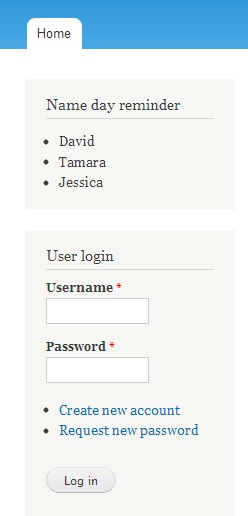
2) When you add the block to somewhere and you don't have selected a country yet, the block advise you with a legend:
Something went wrong, contact administrator! . Anyway, in the log report you can see two messages:
- Notice: Undefined variable: country in nameday_block_view() (line 50 of C:\wamp\www\drupal718\sites\all\modules\custom\name_day_reminder\nameday.module).
Notice: Undefined variable: api_key in nameday_block_view() (line 50 of C:\wamp\www\drupal718\sites\all\modules\custom\name_day_reminder\nameday.module).
I think that avoid this two errors is not difficult.
Comment #6
h3rj4n commentedYou should change it back to 'needs work'.
Comment #7
a_thakur commentedManual review
1. nameday.module file: Line #7 to line #9
Change this to
2. Similarly for line# 28 to line#30
Change this to
3. In nameday.install file
Change Implements nameday_schema to
3. Place the administrative form for the module in nameday.admin.inc. So the corresponding change in nameday.module file would be
So the function nameday_form should go into this file..
More review later...
Comment #8
a_thakur commentedRead the comment #4 by klausi..get review bonus :)
Comment #9
janis.krauklis commentedThank you guys for comments. I fixed your recommendations and I`ll try get review bonus, to speed up review process.
Comment #10
aw030 commentedReview:
*Automated review: OK, only minor warnings.
*Manual review:
- Install a fresh drupal 7 (localhost)
- Move the module folder to sites/all/modules
- Install module
- Following the configure link and getting the Api key via this link: "Get API Key here!!"
- Signing up and got the api key via email (Signup domain abc.de (fake, to get the api key,
because entering "localhost" not worked) / used my real email, where i got the key correctly)
- Fill-in the key in the form-field
- Same problem exists like mentioned above: Configuration has been saved,
but is not reflected in the message when returning to the form (there is still the
message: "Invalid api key!" and "Get API Key here!!")
- Assigning the block to a region
- Block appears as expected, but with following content:
"Something went wrong, contact administrator!"
Is perhaps something wrong with the key or is the domain checked against?
Comment #11
janis.krauklis commentedThanks for your review. Module can`t be used on localhost. Only live on existing domain.
Comment #12
AolPlugin commented1. After first enabling the module, and going to the config page, it gives me a warning: "Invalid api key", even though I didn't get to actually enter the API Key. (Should maybe check if empty)
2. I've seen you use
file_get_contentsfor web requests. This requires thatallow_url_fopenis enabled in php.ini. I'd suggest cURL, as it is enabled on most servers, and can easily be installed. Also you should add it in the requirements.Edit: like the comment below mine says,
drupal_http_requestshould be the way to go.Also, the module can be used on a local environment if you create a virtual host (like say local.drupal.org) and pointing local.drupal.org to 127.0.0.1 in your hosts file.
Comment #12.0
AolPlugin commentedUpdating git information
Comment #13
aw030 commentedInstead of file_get_contents you can perhaps use
drupal_http_request ( http://api.drupal.org/api/drupal/includes!common.inc/function/drupal_htt... )
Comment #14
janis.krauklis commentedThanks for comment!
1. I hide that message when API Key field is empty.
2.
file_get_contentsnow is changet dodrupal_http_request.Comment #15
brycefisherfleig commentedHi Janis!
Here's what I found:
Major Issue
I'm having the same problem as #10. Once I entered the API key, I saw this error on admin/config/content/nameday:
I'm running this module on a subdomain of the API key's registered domain. How is the API key validated?
Minor Issues
While this is not directly related to the module code, I had difficulty getting an API key at first. It didn't accept my subdomain. Once I tried my main domain I was able to get an API key. If NameDayReminder.com is under your control, it might be nice to give an example on that page of how to handle subdomains.
I was unsure what a "Name Day" was, but this was very interesting to learn about. At first I was wondering if this module's use case was providing birthday reminders for friends and family. For folks like me who are not "in the know," it could be helpful to briefly explain what a Name Day is, or perhaps just link to the wikipedia article from your project page (http://en.wikipedia.org/wiki/Name_day).
I found a couple of minor spelling issues as well, with my recommendations in bold:
nameday.module, line 13:
change to:
nameday.info, line 2:
change to:
README.txt, line 13:
change to:
README.txt, line 22:
change to:
Best of luck!
Comment #16
janis.krauklis commentedThanx for your comment.
I fixed the issues you send me.
Sorry for my spelling mistakes.
You should generate api key also for subdomains.
I added explanation for Name Day in my module description.
Comment #16.0
janis.krauklis commentedUpdate language list
Comment #17
brycefisherfleig commentedComment #18
yanniboi commentedHey Janis,
I haven't actually seen your module working because I am testing stuff on localhost and cant get the API key to accept, but I've done a manual code review.
Minor Issues
In your module file line 8
return '<p>' . t("This solution provides access to a cloud of Name Days. You can show in your drupal site the Name Days for today and inform your visitors!") . '</p>';This line is too long. Drupal standards limit lines to 80 characters so maybe break it up into readable pieces.
In nameday.admin.inc
line 43
$postdata = http_build_query(array('body' => '{"jsonrpc" : "2.0","method" : "CheckApiKey","params" : {"user" : "","domain" : "' . $domain . '","apiKey" : "' . $api_key . '"},"id" : "' . $uid . '"}'));change to this for readability
line 73 and line 176
change similarly to line 43
line 190
again is quite a bit longer than 80 characters so could do with splitting up.
Other than that, looking good!
Comment #19
d34dman commentedManual Review:
Point 1
I went through your code and saw you created a table just for 1 row entry.
If you want to store just four variables you should be using variable_set(), variable_get() and variable_del functions.
( Correct me if my assumption that you require only one row of the table is wrong).
Point 2
Also i came across this code in more than one place in your module
$result = db_query('SELECT * FROM nameday LIMIT 1', array(':nid' => $uid));Why have you passed the second parameter into db_query()? (which appears to be redundant to me.)
Point 3
Your hook_block_info defines cache per role
Please provide a rationale why you have chosen to use cache per role.
Since you need to recreate content every day at least, i would strongly recommend using DRUPAL_NO_CACHE in nameday_block_info and implementing some sort of cache in your block view using drupal's cache_set() and cache_get() functions.
Comment #20
d34dman commentedComment #21
PA robot commentedClosing due to lack of activity. Feel free to reopen if you are still working on this application.
I'm a robot and this is an automated message from Project Applications Scraper.
Comment #22
sajt commentedThere is an other module named Nameday. With some similar knowing :) But if your service is better I can use it in somehow. PLease contact me, if you want it.
Comment #22.0
sajt commentedName days explanation.