

Closed (works as designed)
Project:
QuickTabs Field Collection
Component:
User interface
Priority:
Normal
Category:
Support request
Assigned:
Reporter:
Created:
29 Jan 2013 at 18:08 UTC
Updated:
2 Mar 2013 at 05:37 UTC
Jump to comment: Most recent file







Comments
Comment #1
steven.wichers commentedI think a step has been missed, or there is a misunderstanding of what this module does.
This module will take a an existing field collection and allow you to use one of the fields as a tab label, and one of the fields as the body, via QuickTabs. I just went through the configuration process on a brand new site and took some screen shots along the way:
Step 1: Field collection creation
Step 2: Field collection configuration
While technically not required the field collection field you create should be set to contain unlimited values.
Step 3: Add field collection fields
The field collection can contain any number of fields, but the module only supports the display of two: a label, and a body. These two fields can be of any type (they are run through the Drupal render system), but a text type is recommended for the tab label.
Step 4: Field collection field settings
These fields should be set to contain a single value. You can set these to unlimited, but only the first value will be used.
Step 5: Set the formatter
Now that the field collection has fields added to it the instance of it on your node needs to be set to use the QuickTabs renderer.
Step 6: Formatter configuration
There are several options available on the formatter, but only the tab label and body source fields are required. The fields available in these dropdowns are the fields on the field collection entity. The tab label will always be run through check_plain, whereas the body field can contain markup.
Step 7: Adding tabs
This is what editing a node looks like with the above configuration. It's pretty straightforward with a spot for a label and a spot for the tab content.
Step 8: End result
This is the result of following the above steps: Two (unstyled) tabs.
And just to show that a textarea does not need to be used for the tab body, here is an example of a list field being used as the tab body:
Because of the way the tab body is retrieved you can use complex Drupal types (even field collections) in order to build tabs that contain more than text.
Is this more-or-less the same path you took when configuring the module on your site? The errors you posted suggest that the settings were never saved for the QuickTabs formatter. Did you select the formatter without configuring the field sources?
I can get rid of those warnings fairly easily, but it won't solve your problem. I need a bit more information on how you're using the module (screenshots of settings would be great).
Comment #2
kaizerking commentedThanks for giving a detailed how to,
from this what i understand is
1. you can use any field value as label
2.You MUST create one field preferably Long text type in field collection to use it as anchor/renderer for all the other fields.
What i wanted was , from your example
the 'QUICK TAB EXAMPLE' it self as tab label.This is not a big issue i can create text field, and use rule set value to populate the field name as text value. but if module it self does that without depending on other modules will be good
I have created an extra body field in field collection and used it,
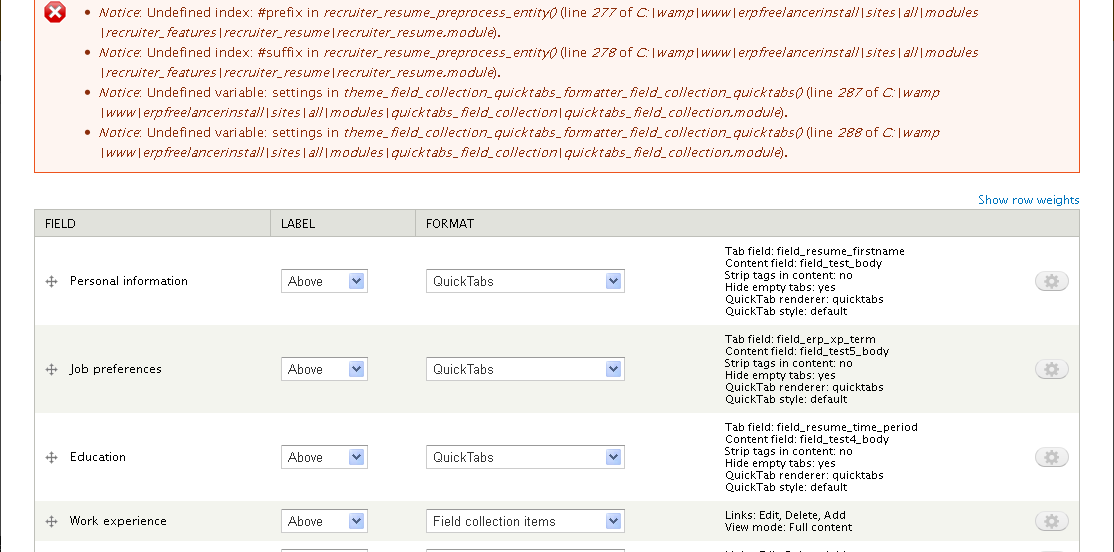
Still i get the errors pl see the screen shot
Comment #3
kaizerking commentedChanged the title to better represent the issue
Comment #4
steven.wichers commentedIn your screenshot... Would you be expecting the tab's label to be "field_resume_firstname", "Personal Information", or something else?
While, yes, you must use one field as the body content it does not have to be a long text. You can use a field collection of other fields instead. I think this is the functionality you're trying to get. If you want users to fill out more than one field and show that in the tab then create a field collection with those fields, and use that newly created field collection field as the source of the tab's body. Presto, bango, a complex set of data gets shown in the tab instead of simple text.
The prefix/suffix warnings are because the other module assumes any field has that set on it. It's safe to ignore (it's just a PHP warning that a variable is being accessed that is not set). It's lines 277 and 278 here.
I suspect that this module is also doing something else to get the tab fields to show without being passed in any settings, but I will try to reproduce the error on my demo site.
Comment #5
steven.wichers commentedFound the issue. It was pointed out that my settings variable had a different name in certain spots (remnants from when I renamed it). This should be fixed now.
Comment #6
steven.wichers commentedI've done a lot of rework (and testing) on the settings implementation and have not encountered any errors. If you update the module to the latest version on the repository you should have new options available to you to configure the different renderers. Until you re-configure the field formatter and save those new settings there will be warning messages (since the way the settings are stored is different).
Comment #7
kaizerking commentedI wanted the "Personal Information" as the tab name.it should be in the option list or a check box ,'use field name as tab name'
I haven't yet tested the improved version. ill revert after testing
Comment #8
kaizerking commentedI think something is wrong or either i am too dumb to get it
How you can get a field value as tab name before even it is created?
I mean i should have the tab first to select then and fill in the fields then only the tab name can be one of the field value if desired.
I think that is the reason the tabs are not visible
pl see the screens
Comment #9
steven.wichers commentedAh, okay I see where some confusion is coming in to play between us.
You are trying to use this module to present the end-user with a way to enter content. I come to your page, fill out some information, click the tab, fill out more information, etc.
Is that correct?
If so, the module wasn't really meant for that. In fact, it's overkill for that sort of functionality. I would recommend checking out Field Group instead. It will allow you to create tabs (with labels) and put fields under each tab. It's a good module, and I believe more suited for what you are trying to do.
This module is more designed for presenting content that was entered on the backend.
Comment #10
kaizerking commentedOh!,I am aware of field group .Since i am using a install profile i am kind of restricted to use field collection.
Why i wanted field collections as tabs is: some field collections are multi value field collections.
So when user fills out the resume form it grows to unbelievable length,
So wanted to format them as tabs. when a field collection which is multivalued can be formatted as accordion. that is my idea.
There are many people who wants this.because it is very hard to get this thing using views.
I think this wont be overkill, but jewel for field collection.
Ok thanks and apologies for bugging you on this.
Comment #11
steven.wichers commentedSo you're saying that each value a user enters would be one "tab"? I click "Add" and fill out the form. If I click "Add" again, the data I entered originally collapses down into an accordion tab and I can enter new information. This process repeats until I am finished, so the end result is something like this:
If I clicked on one of the sections, I would get:
Is that correct?
This module definitely doesn't do that. It can do that for field collection data that is already there, but not as a way to take input from the user.
Comment #12
kaizerking commentedYes, Ok
ill share later the way we can do that in 'views' using 'field collection views' module, 'views accordion' module' i did it once.it may help in some way
Comment #13
kerrycurtain commentedThis module is exactly what I want, but cannot get quick tabs to show in the display format options - stuck at this point.
Have installed entities, quick tabs and quick tabs collection. Can you please advise.
Comment #14
steven.wichers commentedWhat field type is the field you are trying to use QuickTabs on?
What options do you have for the field renderers?
Are you sure you are not looking at the field widget options?
Comment #15
kerrycurtain commentedThanks for your reply Steven..In response to your questions, I am in 'manage display' of a custom content type. Looking at format options (definitely not looking at widget). Options are:
Links to field collection items
Field collection items
Fields only
hidden
Following the steps provided at http://drupal.org/node/1902254#comment-7000450 did successfully result in the creation of the tab title and body but of course without QT's it is not rendered.
I have now combed through the documentation for entity API, field collection and QuickTabs to find a way to enable QuickTabs as a formatter but cannot locate this info - hence still stuck. Keen to get a solution and move forward. Pls advise.
Comment #16
kaizerking commentedField collection views module will be more helpfull for you
Comment #17
steven.wichers commentedJust to be sure, have you enabled this module? It's not "QuickTabs" it's "QuickTabs Field Collection". There's really nothing that should stop it from showing if it's enabled.
Can you try clearing your Drupal cache?
Can you list the specific versions of the following:
Comment #18
kerrycurtain commentedThanks for your replies
Field collection view looks like it will do the trick thanks kaizerking will play around with it.
Steven you have cast some light on the problem identifying the module as QTFC. I have 'Field Collection' installed and have been thinking it uses Quick Tabs.
Versions as follows:
Drupal 7.18
QuickTabs 7.x-3.4
Field Collections 7.x-1.0-beta5
Yes have cleared cache
Cannot locate the download for the QTFC module itself. This is probably the solution can you pls direct me to the download.
Comment #19
steven.wichers commentedThis module is QuickTabs Field Collection. It's the one that lets Field Collections and QuickTabs work together.
Comment #20
steven.wichers commented