
 The 2026 Drupal Business Survey is open. Your response will help shape the future of the Drupal business ecosystem.
Step 3: WYSIWYG configuration
You are browsing documentation for an older version of Drupal, which is not supported any longer, and the information may not be correct. See current documentation for Contributed modules
Currently module fully supports integration only with CKEditor (v3). Next roadmap steps will be performed around integration with in-place editing option (Edit module) in terms of Spark project.
Evaluation of integration with TinyMCE and Aloha editor is in progress, feel free to request this integration in Issue tracker or post you code snippets that would introduce this integration.
Configure CKEditor
Follow instruction provided here to install and configure CKEditor module.
As soon as configuration was accomplished, navigate to Administration > Configuration > Content authoring > CKEditor and for each Profile, that should support Asset input (for example, Full and Advanced), in Editor appearance configuration activate Asset plugin and appropriate buttons.


By default set of Asset plugin buttons includes:
- one button per activated Asset type
- button to access Search interface
The detailed contributor instructions are available here.
PS: An alternative way to search and contribute assets is to use an Advanced asset widget, described here.
Configuring CKEditor 4
Get CKEditor 4 library using custom build
Choose Full package, add plugins:
Table resize
IFrame Dialog Field
Add needed languages.
Download, extract, put into sites/all/libraries directory.
Configure WYSIWYG modes
If you have module field_ui enabled, you can configure view modes, which will be available in WYSIWYG body.
Go to the admin/structure/assets/manage/ASSET-TYPE/display page, and you will see this fieldset.
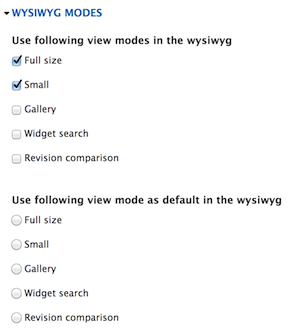
By default full and small modes are enabled. You can enable some additional view modes and see result in override or edit popup of embed asset in WYSIWYG.

Help improve this page
You can:
- Log in, click Edit, and edit this page
- Log in, click Discuss, update the Page status value, and suggest an improvement
- Log in and create a Documentation issue with your suggestion
