Closed (fixed)
Project:
Media Mover
Version:
5.x-0.3-6
Component:
Code
Priority:
Normal
Category:
Task
Assigned:
Unassigned
Reporter:
Created:
12 Nov 2007 at 10:31 UTC
Updated:
28 Apr 2008 at 13:12 UTC
Jump to comment: Most recent file


We're using media mover to move audio files to S3, using a very simple custom harvesting module to integrate with the Audio module. The problem is that media mover seems to be getting stuck in the 'running' state, which means that on every subsequent cron run media mover fails to do anything, leaving the message 'Media mover detected another media mover process running' in the logs.
| Comment | File | Size | Author |
|---|---|---|---|
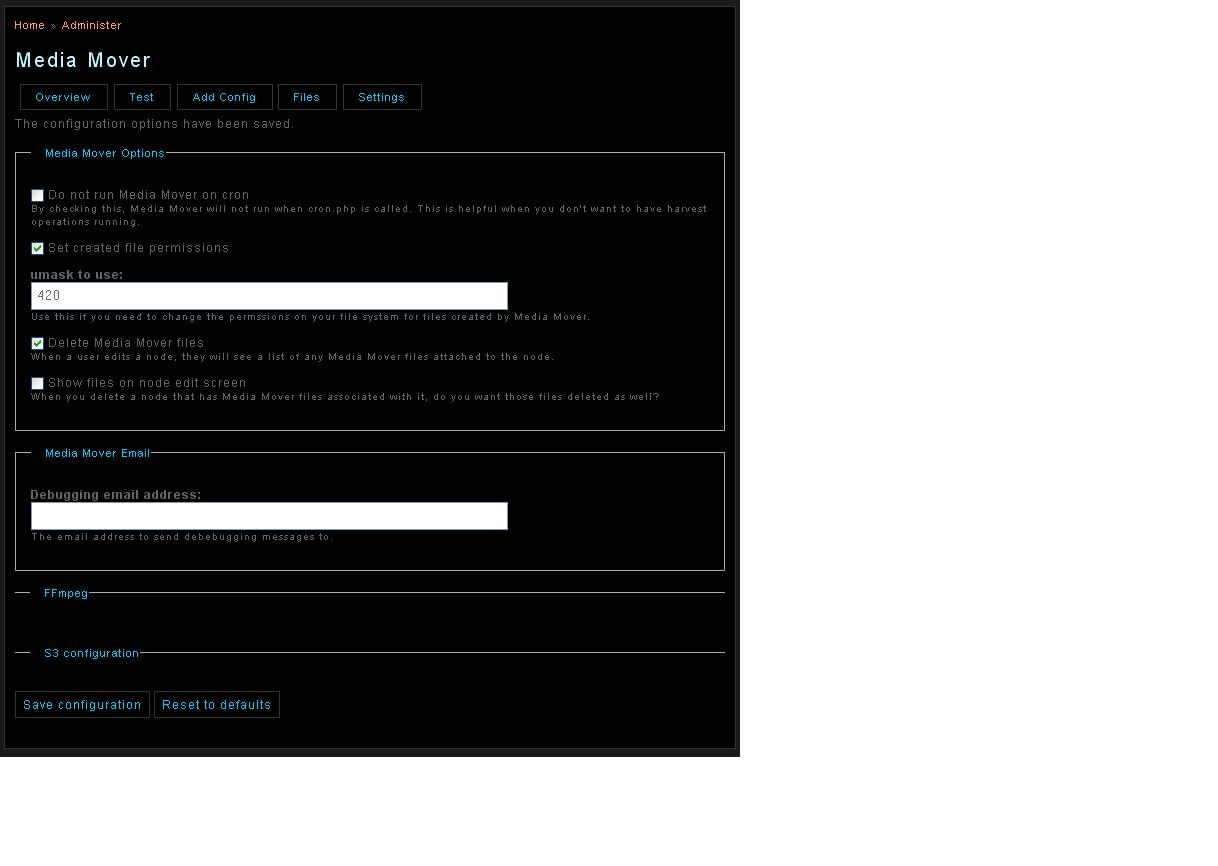
| #15 | amazon s3 settings...JPG | 66.06 KB | chris33 |
| #2 | media_mover_api.module.patch | 872 bytes | robin monks |

Comments
Comment #1
arthurf commentedHi Rob-
Can you let me know what version of MM you're using? There were some problems in the CVS branch recently, but to my knowledge I resolved them. It maybe that I need to some cleanup on the S3 module itself (my development of late has not been focused on it)
thanks!
Comment #2
robin monks commentedI was having the same issue with a recent 5.x release. It seems to crash and burn and not have the chance to set the "stopped" status.
The attached patch was my solution to the problem. Basically, it will set any config to "stopped" if it's been "running" for more than 10 minutes, this effectively unplugs the queue.
Patch sponsored by Code Positive.
Robin
Comment #3
arthurf commentedHey Robin-
Thanks very much for the patch. There is actually a fix in CVS for this- see: http://cvs.drupal.org/viewvc.py/drupal/contributions/modules/media_mover... look at line 733.
I wanted to avoid doing the auto stop because I actually have some video conversion jobs that take more than 10 minutes (maybe I need better hardware). There is also an admin configuration that sets when the alarm goes off.
Please let me know if that's sufficient for you- I'd be happy to implement something else, but I'd also make sure that large job queues can be handled. Ultimately, I think I have change how harvesting works so that processing can be multi threaded, but I think I'm going to need some assistance for that.
thanks!
arthur
Comment #4
bdragon commentedarthurf: One of the things I'm working on in HEAD is decoupling processing.
I was thinking, only harvest needs to actually run all at once. Once we have the initial media_mover_files row with the harvest fields filled in, the rest of it can be processed later...
What if the states were more like this:
harvesting: Working on harvesting the files. Can't be interrupted.
processing: Somewhere in the processing stage. If it gets stopped, it can be continued by querying the database for the set of mmfids that have harvest data but not process data.
(This makes it restartable but not reentrant...)
storing: Somewhere in the storing stage. If it gets stopped, it can be continued by quering the database for the set of mmfids that have harvest and process data but not storage data.
And the same for complete.
Alternatively, a system of job tickets would work well... Something like job_queue.module does...
Comment #5
arthurf commentedbdragon- I think this is a good approach. My main concerns are that we make sure that we're locking both the harvesting operations and the subsequent processing operations. So this might look something like this:
Harvest run
1) Check to see that the harvest table isn't locked
2) Lock table, harvest, set status of each harvested mmfid to "harvested"
3) unlock table.
Everything else run
1) Check media_mover_files table where cid = this cid and status = harvested
2) Set a lock (maybe need a new db col in media_mover_files for this) on this mmfid
2) process, store, complete file
3) repeat 1
It might make sense to break things out as you identify between processing, storage, and completion. In fact, doing it the way you suggest might make it possible to abstract the steps other than harvesting... not sure. It also has potential to tie into actions, but I'm getting ahead of myself :)
I like your idea of job tickets- I'd be intersted to hear how you see that playing out.
Anyway, do you want to start working with me on trying to implement this new system? Perhaps it should be the mile stone on the 0.5 release?
thanks!
Comment #6
arthurf commentedOk, I've done a first pass at faux multi threading here. Code has been committed to the DRUPAL-5 branch (bdragon, didn't want to disturb your work in head just quite yet). Basically the functionality is as follows:
* run harvest op, keep configuration locked while harvesting
* make records of all harvested files
* unlock configuration
Now processing can happen:
* select all files which have been harvested for this configuration
* lock this individual file, process file, set status to process complete
* repeat with all files
And the same happens for storage and complete with appropriate status. The benifits that this should allow is that long processing jobs don't prevent other processing jobs from being fired off on subsequent cron runs, thus the que getting stuck issue is a voided, though a system for identifying files which are in a nether-state probably ought to be implemented.
Comment #7
bdragon commentedNo problem, been meaning to do something similar in HEAD (regarding the "lock during harvesting, let the rest happen whenever").
It's possible to make the individual processing of items "safe" by registering a shutdown function and doing some quick cleanup if we run out of execution time.
Comment #8
arthurf commentedThat sounds like a good plan- do you want to base that off what I've already written, or just give me some hints for doing that?
Comment #9
buddaWhere can we download the latest changes (apart from going via CVS) ?
I cannot see anything from 2008 listed on http://drupal.org/node/106431/release
Comment #10
arthurf commentedhttp://cvs.drupal.org/viewvc.py/drupal/contributions/modules/media_mover...
I haven't released the code yet as I need to do more testing, but it's actually running on at least 2 sites that 3 know of with no issues to date :)
Comment #11
JacobSingh commentedI had this problem on the DRUPAL-5 branch as well.
I was trying to debug some code, and threw a die() into a harvest routine, now I can't run it again.
Is this the branch you put the faux multi-threading in? I'm thinking that it really shouldn't lock it if the harvest fails somewhere. It could fail for many reasons like network slowdown, connection problems to external sources, etc. At the very least, perhaps a "clean all locks" button to aid in development?
Best,
J
Comment #12
JacobSingh commentedNever mind, I'm stupid, there is a stop button. Sorry.
Comment #13
chris33 commentedI am using this media mover, the problem is, I need to upload a video files then it stores automatically to Amazon S3 without hitting the "run" button. Please advise.
Comment #14
arthurf commentedYou need to have cron setup properly. As long as it, media mover will do this for you
Comment #15
chris33 commentedI think I setup cron properly based on the attached image. The video file will be stored in Amazon S3 when I click "run" in my configuration. This is not what I want, when I upload video file, it automatically stores to Amazon S3 without hitting the "run" button. The run button will be found in the "overview". Please help.
Comment #16
chris33 commentedI now understand about cron setup. Thanks Arthur for your help and advise.
Comment #17
Anonymous (not verified) commentedAutomatically closed -- issue fixed for two weeks with no activity.