

Active
Project:
Commerce Bank Transfer
Version:
7.x-1.x-dev
Component:
Code
Priority:
Normal
Category:
Feature request
Assigned:
Unassigned
Reporter:
Created:
27 Feb 2013 at 08:58 UTC
Updated:
4 Dec 2019 at 09:09 UTC
Jump to comment: Most recent, Most recent file


Comments
Comment #1
frederickjhHi!
I have the same problem and since it affects some other payment modules it makes me wonder if it is actually the Commerce sub-module Payments that actually should be making this translatable. I am therefore moving this to the Commerce issue queue. I am also changing this from a support request, as it is not possible without coding this in, to a feature request.
I poked around in the code but did not come to a definite conclusion, so if this is not a Commerce payment module issue please move it back, possibly with a point in the right direction on how to make it translatable.
My temporary fix is to enter a multi-lingual message, but this will be a bit much when we have more than 2 languages. Here is how it looks on the check-out page:
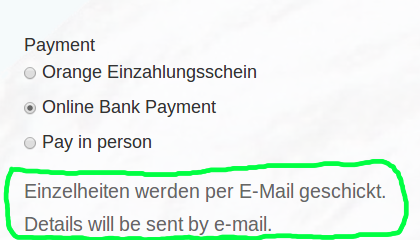
Here is how the settings field to enter the payment Instruction appears in the Commerce store configuration:

I hope that it will be possible to make this translatable in the Commerce Payment module or that the Commerce developers will be able to point the different payment module developers in the right direction to make their modules payment instructions translatable.
God Bless!
Frederick
Comment #2
frederickjhActually getting this into a real issue queue by entering the full project name of Drupal Commerce.
Frederick
Comment #3
rszrama commentedNope, there's nothing for the core Payment module to do here to facilitate translation. I've seen that the http://drupal.org/project/i18n project has a Rules translation sub-module - I'm not sure how that works, though. It may just be translating Rules meta data and not the actual parameters of things like this.
This module can facilitate translation of the string using i18n's string translation API, but it's a bit out of scope for Commerce itself to be trying to accommodate that for payment method modules.
Comment #4
inventlogic commentedTo translate the payment instructions i changed the following line in the commerce_bank_transfer.module
Line 234
wrapped $pm['settings']['policy'] within t().
Patch attached.
Comment #5
rszrama commentedModules should not be wrapping variables in t(); translation of interface text should be facilitated through integration with the i18n module instead.
Comment #6
selfirian commentedHi,
In case some-one is wondering I managed to translate this using string overrides module. Since I couldn't get the rules translation submodule to work.
What I tried is this, added an translate action before the
Enable payment method: Bank Transfer action.
Gave the text I needed to be translated and gave it a recognisable variable name.
Doing so, when trying to translate the field I got the possibility to actually enter a translation for the payment details field, but the translation didn't show... I'm sure I got halfway there, so if anybody know how to manage this using the i18n rules submodule, feel free to post your solution here.
I couldn't find a way to link the translated variable to the actual field as described in the other thread.
If not string overrides often saves the day...
Comment #7
screon commentedSelfirian, how did you get this working with string overrides? It's not working with me.
On the project page for string overrides, it says: "Easily replace anything that's passed through t()".
Since this form element isn't passed through t(), string overrides can't work here.
Or am I wrong?
Comment #8
fugazi commentedsame question
Comment #9
fugazi commentedI've got it, it translates the string, it must be run only once before. Select sales channel bank transfer, then the string in the translation is displayed.
Comment #10
screon commentedFugazi, can you clarify please? What do you mean with "Select sales channel bank transfer" ?
Comment #11
fugazi commentedSorry for my poor explanation.
you have to go a purchase way and select a payment option bank transfer once. Then the string is inserted at me, and I could translate it.
this is just my test system, it should be the standard language only, then the translation.
Comment #12
frederickjhI realize that I commented on this issue before but the problem I was having was with another project. I thought I had used this module but I had actually used the Commerce pay in person module and then change the module name and labels as our bank payments are made using a reference number that is currently sent to the customer by email.
However, it does appear that this module has the same problem, in that it gathers the Payment instructions using the same input type of text format.
I took another try at making this work. I think that we are missing 1 thing that is the ability to use a variable as the Payment instructions. Changing the input from text format to a rules data selector would make this possible.
I used a translate text action along with a show message on on the site to show that the translation part does work. The red box below is around the translated text and the green is around the original English.

See the issue that I filed in the Commerce pay in person issue queue #2374151: Payment instructions translation for a more detailed explanation, screenshots and exported rule.
I hope this helps this issue to get handle properly. The other option is to do like the Paypal module does and hard code the message and wrap it in a t().
God Bless!
Frederick
Comment #13
sergio morais commentedmy 5 cents to the problem... just clone the payment method and use a condition rule to display according to the pretended language. One payment method for each language.
Comment #14
mariskath commentedThis last comment is a great solution! Thanks.
Best regards,
Mariska.
Comment #15
bunset commentedMy 5 cents too!!!
This is how I have done and it works very well :):
Don't fill in any text in payment instructions field in bank transfer rule. Do this method instead:
- Install module commerce_extra_panes
- create a new checkout pane (follow instructions in module page)
and you could now translate the pane (with this module an extra pane is a normal node) in the languages you want.
- drag your new pane to the section "Completed" in checkout setup.
- create a rule to hide this pane if payment method<>bank transfer:
Rule details:
event: Process change to a checkout pane
condition: Selected payment method comparison
value: bank transfer
negate
action: change pane properties (you need module commerce_rules_extra for this kind of extra rules)
id of pane to change: your new extra pane
enabled: false
save
save changes
Done.
This is usefull exercise, you don't have to hack or program, and you could use this method with any payment method, with more extra panes, and with very different and more complex conditional rules.
Kind regards,
David
Comment #16
sano commentedAs H.L. Mencken is known to have uttered:
"There is always an easy solution to every human problem - neat, plausible, and wrong."
...so, thank you @inventlogic. Your patch works like a charm :-)