This applies to the released version and dev version. I am using this awesome module along with twitter bootstrap theme and discovered that when enabling the bootstrap theme, the autocomplete deluxe widget is broken and contains two fields with strange behavior.
I did some tracing to the codes and noticed that bootstrap changes the html for the elements which makes autocomplete deluxe not to recognize the parent tags or something like that. I am not sure if I should raise this issue in the bootstrap theme but as far as I think its better to be handled here.
Here is the targeted bootstrap function:
/**
 * Returns HTML for a form element.
 */
function bootstrap_form_element(&$variables) {
  $element = &$variables['element'];
  // This is also used in the installer, pre-database setup.
  $t = get_t();

  // This function is invoked as theme wrapper, but the rendered form element
  // may not necessarily have been processed by form_builder().
  $element += array(
    '#title_display' => 'before',
  );

  // Add element #id for #type 'item'.
  if (isset($element['#markup']) && !empty($element['#id'])) {
    $attributes['id'] = $element['#id'];
  }

  $exclude_control = FALSE;
  $control_wrapper = '<div class="controls">';
  // Add bootstrap class
  if (isset($element['#type']) && ($element['#type'] == "radio" || $element['#type'] == "checkbox")){
    $exclude_control = TRUE;
  }
  else {
    $attributes['class'] = array('control-group');
  }

  // Check for errors and set correct error class
  if (isset($element['#parents']) && form_get_error($element)) {
    $attributes['class'][] = 'error';
  }

  if (!empty($element['#type'])) {
    $attributes['class'][] = 'form-type-' . strtr($element['#type'], '_', '-');
  }
  if (!empty($element['#name'])) {
    $attributes['class'][] = 'form-item-' . strtr($element['#name'], array(' ' => '-', '_' => '-', '[' => '-', ']' => ''));
  }
  // Add a class for disabled elements to facilitate cross-browser styling.
  if (!empty($element['#attributes']['disabled'])) {
    $attributes['class'][] = 'form-disabled';
  }
  $attributes['class'][] = 'form-item';
  $output = '<div' . drupal_attributes($attributes) . '>' . "\n";

  // If #title is not set, we don't display any label or required marker.
  if (!isset($element['#title'])) {
    $element['#title_display'] = 'none';
  }
  $prefix = isset($element['#field_prefix']) ? '<span class="field-prefix">' . $element['#field_prefix'] . '</span> ' : '';
  $suffix = isset($element['#field_suffix']) ? ' <span class="field-suffix">' . $element['#field_suffix'] . '</span>' : '';

  // Prepare input whitelist - added to ensure ajax functions don't break
  $whitelist = _bootstrap_element_whitelist();

  switch ($element['#title_display']) {
    case 'before':
    case 'invisible':
      $output .= ' ' . theme('form_element_label', $variables);
      // Check if item exists in element whitelist
      if (isset($element['#id']) && in_array($element['#id'], $whitelist)) {
        $output .= ' ' . $prefix . $element['#children'] . $suffix . "\n";
        $exclude_control = TRUE;
      }
      else {
        $output = $exclude_control ? $output : $output.$control_wrapper;
        $output .= ' ' . $prefix . $element['#children'] . $suffix . "\n";
      }
      break;

    case 'after':
      $output = $exclude_control ? $output : $output.$control_wrapper;
      $variables['#children'] = ' ' . $prefix . $element['#children'] . $suffix;
      $output .= ' ' . theme('form_element_label', $variables) . "\n";
      break;

    case 'none':
    case 'attribute':
      // Output no label and no required marker, only the children.
      $output = $exclude_control ? $output : $output.$control_wrapper;
      $output .= ' ' . $prefix . $element['#children'] . $suffix . "\n";
      break;
  }

  if ( !empty($element['#description']) ) {
    $output .= '<p class="help-block">' . $element['#description'] . "</p>\n";
  }

  // Check if control wrapper was added to ensure we close div correctly
  if ($exclude_control) {
    $output .= "</div>\n";
  }
  else {
    $output .= "</div></div>\n";
  }
  return $output;
}


Comments
Comment #1
Sylense commentedI'm experiencing the same issue. Until there's a solution to this I have temporarily commented out that particular function. Maybe when I have more time I can take a look and come up with a fix.
Comment #2
operations commentedI also commented it out for the moment and didn't find any difference J
Comment #3
trenttati commentedCommenting out the function changed some of the styling of form elements on my site, so I instead opted to load node-add pages with the administrative theme in an overlay.
Comment #4
adam clarey commentedI've attached a patch that makes the js more reliable and compatible with other themes that wrap form elements in additional divs.
I've tested this on 2 different themes that generate different markup for fields and it works fine on both.
Patch attached
Comment #5
therobyouknow commentedApplied the patch in #4 and this still does not work for bootstrap - the specific theme in question in the title of this issue - i.e.: "Incompatible with Bootstrap theme"
...and was one of these themes that you tested bootstrap - the theme that this issue is about?
If not, which other theme were they (and was autocomplete_deluxe not working with them before your patch fix was applied to the module, does your fix work)?
People here have raised an issue specifically with the Bootstrap theme - can your solution and testing be focused on that, please.
Comment #6
therobyouknow commentedIf the root cause problem of the problem is that the form elements are in more nested divs with bootstrap than in other themes as suggested in #4 then the other options might be to create a subtheme off of bootstrap and override the function mentioned in the original post of the issue report above or use one of the markup controlling modules such as display suite (which can control markup of input fields) , fences or semantic fields.
Comment #7
therobyouknow commentedGood news (I think) - I've:
1) applied the patch in #4 from rabbit_media (thank you)
AND
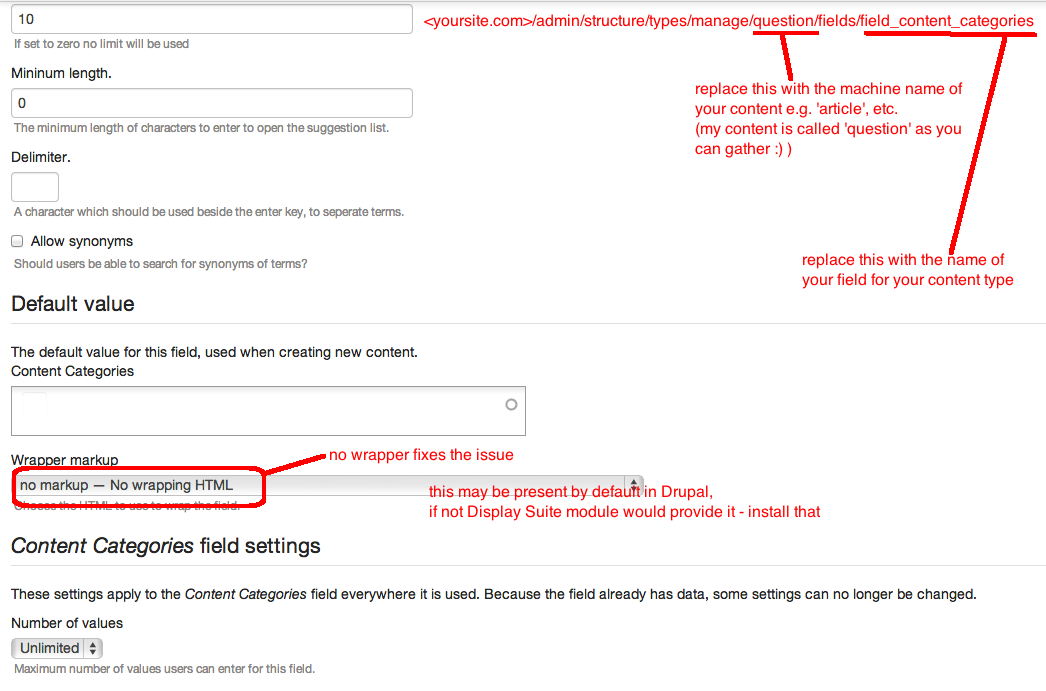
2) turned off any wrapper markup in the field settings for the taxonomy/tag field in the content type. This capability may be present out of the box or if not would be provided by the display suite module. The location of the settings page that I am talking about is here on your admins page: admin/structure/manage/[insert your content type machine name here]/fields/[name of your field for your taxonomy]
These steps solve the problem for me in that the taxonomy tags added are now remembered and there is no extra field shown beneath the taxonomy field.
See also screen shot:
So if you follow my 2 steps above I'd hope that they solve it for you too. However, to make my solution more precise, I would:
- see if the patch is necessary - just do step 2)
- see if step 2) is possible with drupal out-of-the-box or if display suite is required (no worries if it is, just nice to know exactly what one needs to fix the problem, no more no less)
I would say that whether or not the patch is necessary, I would like to thank you to rabbit_media for their efforts with the patch and analysis i.e. for the clues that extra wrapping might be the issue - without which I wouldn't have come up with this solution.
Comment #8
emorency commentedI have the same issue but the previous patch did not solve my problem. From what I was able to trace with FireBug, the first time that the form is loaded, the function that registers the submit action on an autocomplete textbox is not called. I can trace it back to autocomplete.js
In my scenario, I use it for an autocomplete that can have multiple values. If I "Add another item" the function "attach" is called and autocomplete works as expected afterwards...
I also did the test by using a previous version of jquery-ui (1.9.2) and it works. I'll try patching autocomplete deluxe so the attach function is called the first time the page loads...
Comment #9
therobyouknow commented@emorency - Nice deductions in #8 and hopefully your solution works for you!
Did you also try my suggestion in #7 to omit containing DIVs?
Comment #10
bennos commentedPatch in #4 works fine
Comment #11
operations commented@rabbit_media , @therobyouknow Thanks for the patch and the workaround , I will re-test and confirm if its working soon.
Comment #12
sepgil commentedCould someone post a correct diff? The patch from #7 is a diff from drupal core or so...
And please use the correct naming convention for your patches: https://drupal.org/patch/submit
Comment #13
sepgil commentedComment #14
mkhamash commentedI have formatted a patch with attribution to rabbit_media, would like to see that committed.
Comment #15
kruser commentedI found that it's an issue with Jquery Update (since you need a higher jquery version to run bootstrap) and applied the patch here which worked for me: https://www.drupal.org/node/1300028
Comment #16
sepgil commentedCommitted the patch #14 as it generally improved the modules stability. Thanks for the contribution.
Comment #17
twooten commentedThanks for the research, patch and commit guys! 7.x-2.x-dev is working on my bootstrap theme.