

Closed (fixed)
Project:
Image Assist
Version:
5.x-1.5
Component:
Code
Priority:
Critical
Category:
Bug report
Assigned:
Unassigned
Reporter:
Created:
22 Nov 2007 at 20:02 UTC
Updated:
10 Jul 2009 at 05:40 UTC
Jump to comment: Most recent file



Comments
Comment #1
sunAre you using public or private files method?
Comment #2
toma commentedI have the same problem, i am using also image cache and image field, public files
Comment #3
cwittusen commentedI'm using public files method.
Comment #4
smallfluffykat commentedI have just upgraded from Drupal 4.7.4 to Drupal 5.5. I am currently running Img_Assist -dev version but have also experienced this problem with Img_Assist 5.x-1.5. I am using the private files method and have done since my site went online. The only image related modules I am using are 'Image' and 'Img_Assist'.
After upgrade I noticed that thumbs were not displaying. After going through all my images and asking to 'rebuild thumbnails' (this was after getting many 'Derivative images were regenerated for xxx' messages) this issue appears to be resolved hence me attributing this to the 'Image' module and therefore believeing that this current issue is to do with the 'Img_Assist' module.
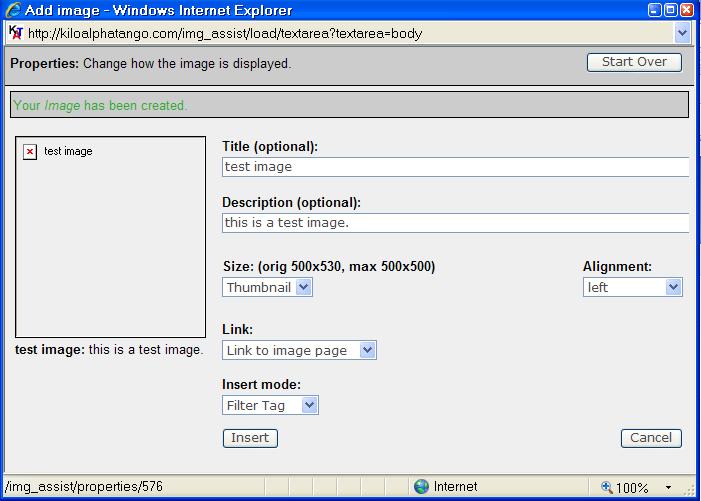
Img_Assist seems not to be picking up the thumbnails correctly. Thumbs inserted using the filter code do not show up even though the code appears correct. If you try to insert a new image using 'Img_Assist' you get a dialogue box which appears to retrieve a list of the correct pictures but cannot find the right thumbnail to go with them (see 'screen1.jpg'. On clicking one of the pictures listed in 'screen1.jpg' you get the dialogue shown in 'screen2.jpg'. The resulting inserted filter code is shown in 'screen3.jpg'.
Any help that you can give would be greatly appreciated.
Marked as 'Active' after I've provided more information. Also marked as 'Code'. If you need more info let me know. Kat.
This could be related to issue http://drupal.org/node/156246 but to be honest, it appears that there are so many different issues inside it that I am unsure whether it is the same or not.
Comment #5
smallfluffykat commentedFurther update:
Interestingly, the old 'Img_Assist' filter links where it used the fid instead of the nid still work (I think this was in the 3.x branch when it was being maintained by a different team?). The fid filters still show the full-size image as was the previous functionality.
Comment #6
zoo33 commentedsmallfluffykat: Are you saying that you fixed the issue by rebuilding the derivative images?
All: If you examine the image nodes outside of img_assist (/node/X), do they have all their derivative images there? Is there a difference between if you add an image through the Image assist popup or through Add content >> Image?
Please make sure you have the Image module working properly before troubleshooting Image assist. Thanks!
Comment #7
smallfluffykat commentedzoo33: Thanks for the reply. Sorry for the late reply back but I am not currently near my normal computer and hence my ability to connect to the internet is sporadic at best! ;-)
I believe that rebuilding my thumbnails has fixed any problems that the 'Image' module was contributing to. After rebuilding the thumbs they correctly show up in the image galleries and if an image node is promoted to the front page it displays correctly with a thumb that links to the image node in full view as per my settings.
I believe that my remaining problems are due to the 'Img_Assist' module.
As I said before, the images outside of 'img_assist' all seem to be behaving normally.
If I add an image using the upload function within 'img_assist' it appears to be added normally into the galleries. A proper image node is created with a correct thumbnail created and displayed when viewed through the galleries. If you then try to insert this image into say a blog node using 'img_assist' you see the same behaviour as when you try to insert an existing node with the thumbnail not displaying properly (see attached screen grab).
I tried inserting the test image using both the filter code and the HTML (making sure that I had the appropriate input filters applied in both cases) and there is no difference between the behaviour in both cases.
Is 'img_assist' just not picking up the the right location for the thumbs? If you allow it to insert a title and description the resulting link within the inserted image is correctly linked to the image node. Given the fact that the thumbnails had to be rebuilt on upgrade maybe there is a new way of 'placing' the image nodes within the Drupal system by the 'image' module that is tripping up the 'img_assist' module?
If I can get some more time on the computer to play I will do. If I can provide any more information in order to help troubleshoot this then please let me know and I'll try to provide it.
Many thanks for your help so far, Kat.
Comment #8
sun@all: Please post the image file paths and hyperlink URLs from the resulting HTML code. Do not post full HTML pages and please indicate, which parts of these URLs are wrong.
Example:
/files/imagesmight be wrong here.Comment #9
micahw156It is possible that the problem with the popup window described in this issue is related to #176196. I noticed similar problems with the popup window while dealing with the other issue regarding similar issues.
Anyone who is still having this issue may want to try 5.x-1.x-dev dated 2008-Jan-10 or later, and post a follow up to let the maintainers know if that patch fixed this issue for you as well.
Comment #10
zoo33 commentedComment #11
smallfluffykat commentedIf you try to insert the image with HTML code rather than the filter the output is:
The pathauto has placed the inserted image at http://kiloalphatango.com/sonicbiplanepapercraft.
Images are stored in http://kiloalphatango.com/files/images
Inside the /files/images folder there exists the files:
ksp_080112_0001.img_assist_properties.JPG
ksp_080112_0001.JPG
ksp_080112_0001.thumbnail.JPG
Does that help? If not let me know and I'll try to provide better information.
Many thanks in advance, Kat.
Comment #12
sun@smallfluffykat: You have private files storage method enabled. Like micah suggested, you should try the latest development snapshot of Image Assist, until there is a new official release. Please report back if that worked out for you.
Comment #13
smallfluffykat commentedHi sun,
As suggested I have just upgraded to the 10 Jan 2008 dev snapshot. Everything seems to be working perfectly as far as I can see. If you are happy I think that this issue is now closed / fixed (not sure which is the correct status).
Many thanks for everyones help. Kat.
Comment #14
mariagwyn commentedBefore this is closed... I am having a similar problem with images displaying, though I am not sure it related to the issue that started this.
I am upgrading, and now running:
Drupal 5.6,
Image 5.x-2.x-dev and
Image Assist 5.x-1.x-dev
When I originally installed image assist, I used the html input rather than the image assist filter. I am in the process of updating all my code so it reflects the filter rather than html, which I have done by manually updating the table (it is field in a unique content type). However, two problems, the first being much more serious:
1. When I insert an image using image assist, it creates the following image source code:
"http://mariagwyn.com/snqclean/system/files/images/malex.img_assist_custo...." (I am using the private download method). Note if you put this into your browser, you will get a 'page not found' error. HOWEVER, if I remove 'img_assist_custom' from the source, you will see the original image, malex.jpg. If I remove this bit from the node, the image also appears, appropriately re-sized. What makes this very strange is that if I look in the files folder itself, I see two images which I presume are created by image assist: "malex.img_assist_custom.jpg" and "malex.img_assist_properties.jpg." They just don't seem to show up at all.
When I manually updated this node, I received the following error: "Duplicate entry '6-img_assist_custom' for key 1 query: INSERT INTO image (nid, image_size, fid) VALUES (6, 'img_assist_custom', 19880) in /home/mgwynm/public_html/drupal/includes/database.mysql.inc on line 172." This error is consistent anytime I manually reinsert an image into a node.
2. The second problem is that the "alt" tag is outputting BOTH 'title' and 'desc,' which makes for a very long alt tag is some cases. I thought it was supposed to only output the 'title'. Is there a way to change this?
If you would like to see the actual node, go to: http://mariagwyn.com/snqclean/journal/art/3.4.3 (this is a development site, there may be other issues).
The only other piece that may be relevant is that I am overriding the img_assist theme function in my template.php, simply in order to change some of the CSS output. I have made very minimal changes to the function. However, if I can use the function to override the 'title' and 'desc' issue, I would be happy to do so if it is considered core to the module, I just need to know how. I also am happy to NOT have custom images created, but simply use a html resize.
Many thanks,
Maria
Comment #15
zoo33 commented1) So there are images in your files/images directory that are not accessible through system/files/images/filename.jpg. Unless these images are corrupted (you can check by downloading them through ftp) there has to be some kind of problem with the file handling in your installation.
That said, there are also some problems with the custom size feature. I personally never use either that or the Properties size in Image assist, only sizes that the Image module generates. See also #176517. We need someone to take a look at that.
2) See issue #68661.
Sorry that I can't be more helpful, good luck anyway!
Comment #16
mariagwyn commentedZoo33: thanks for the suggested nodes. I have posted on both.
Do you have any sense on why I am getting the error everytime I update an img_assist? Unfortunately, I use this module very heavily (practically every node), and if I can't upgrade it with drupal 5, I am in trouble.
Thanks,
Maria
Comment #17
sunSetting status to fixed since original issue has been solved.
Comment #18
Anonymous (not verified) commentedAutomatically closed -- issue fixed for two weeks with no activity.
Comment #19
jessicakoh commentedI had a similar problem. Check your /tmp folder. Go to "File System", check for any error there.
My problem was /tmp folder was not writable. Solve by putting /tmp in files folder. Set the right permission for /tmp.