

 The 2026 Drupal Business Survey is open. Your response will help shape the future of the Drupal business ecosystem.
I've been attempting to get Media Gallery to work for a while now. I finally fixed an issue that was causing about 12-15 lines of looped errors, and now that i've got it "working", I've run into another issue.
I successfully created a gallery, and added some pictures to it, but the issue is that the media browser opens twice - once in full and a second time over the fully opened media browser. The second media browser however, doesn't have an exit button, and opens below the other media browser, and sometimes leaves buttons off the bottom of the web page. Scrolling doesn't work to get to the buttons, and if i hit escape to get the second media browser off of the screen and go back to the main media browser, the buttons work, but it takes me to a blank white page and doesn't upload the picture.
If i go over and use the library tab, The submit button doesn't work either - it looks like a placeholder button that never got put into work.
Running: Drupal 7.21, Media 7.x-1.3, Media Gallery 7.x-1.0-beta8
| Comment | File | Size | Author |
|---|---|---|---|
| Drupalbugreport.jpg | 94.02 KB | Menkis |

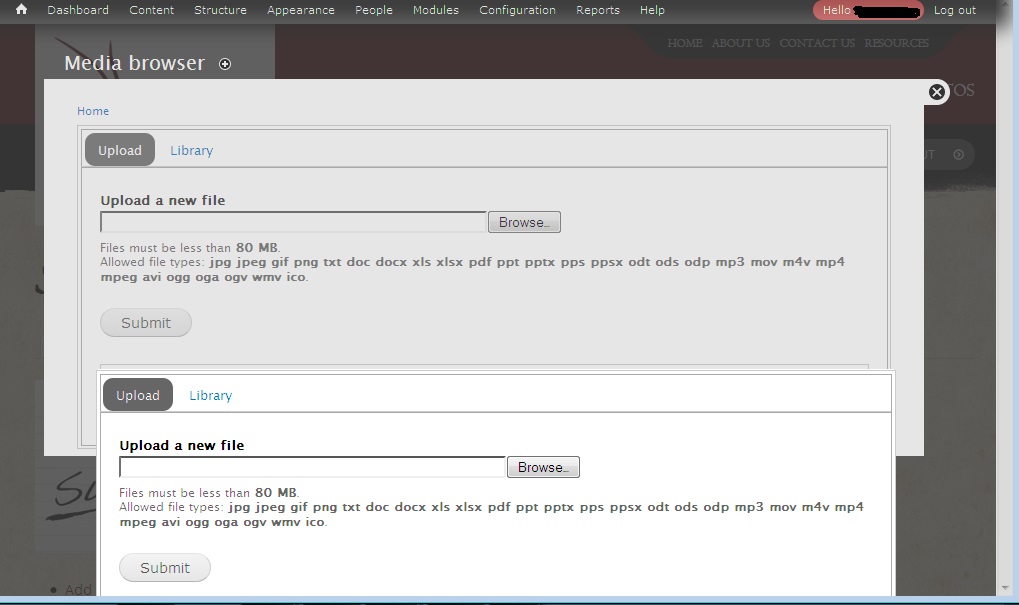
Comments
Comment #1
spaxdavis commentedi also have the same problem
drupal 7.14 media gallery 7.x-2.0 media 7.x-2.0
pliz help
Comment #2
Menkis commentedSomeone a while back said it was an interference with Plupload - they put it in the plupload issues section - I've tried it with plupload uninstalled, installed/disabled, and enabled. Nothing has affected it.
Comment #3
Menkis commentedI've found that with Plupload - After clicking "Add Gallery" and getting both popups, If I click the back button, the popup in back vanishes and I can scroll to use the top add window normally. That at least makes it usable, though a nuisance.
Comment #4
mrpauldriver commentedThe patch mention below, fixes this problem
http://drupal.org/node/1939186#comment-7165574
Comment #5
Bernsch commentedThe patch for 2.x fix also the bug in 7.x-1.0-beta8: #1939186: Two media browsers
I mark this entry as duplicate.
Comment #6
spaxdavis commentedi got that fixed by matching media version with the right entity