

 Come together with the global Drupal community in Rotterdam, 28 Sept – 1 Oct 2026. Sessions, contribution, connection, and Early Bird savings until 8 June.
Make watermark text "Hello World!" to be multilingual variable. I'm using drupal multilingual installation thanks https://drupal.org/project/i18n and multilingual watermark text would be nice feature.
| Comment | File | Size | Author |
|---|---|---|---|
| #4 | drupal1.jpg | 50.88 KB | jasom |
| #4 | drupal2.jpg | 70.69 KB | jasom |


Comments
Comment #1
dman commentedThat's pretty simple.
We'd appreciate a multilingual test if you want to go through the strings currently shown in the UI! I don't think that's been reviewed fully at any time, and we do update the help text quite a bit.
Anyway, I've put a t() around the 'hello world' and also updated the default settings so that you can preview a result a bit quicker.
[7.x-1.x 52c2099] Add translation option to the sample text. https://drupal.org/node/1967544 . Updated the text effect default settings so that it gives a visible result out-of-the-box. Changed vertical alignment so it actually shows. Upsized text so it shows on the normal 'preview' thumbnail. Pre-fill the ttf font file path from the test module.
Comment #2
fietserwinIf you only mean to translate the sample text, it is OK. But, if you are looking for a real and useful multilingual watemark text you need to do more. To start with, you must extract the language from the path as getting it from the user will only work for the first user for whom the derivative gets created. For later visitors the created image gets served by the web server.
Comment #3
dman commentedOh right, heh.
I didn't even imagine someone would by trying to translate the text that they entered in there themselves. As you say, that creates the 'different derived image for different people' problem that remains impractical.
I was probably unclear on the difference between a translatable variable and a multilingual variable.
From the OP, it said it was talking about the "hello world" text, and yes, it is an English string in the code that didn't have t() around it. Sorta a really trivial place to start on translation support :-) but no reason why not to.
Comment #4
jasom commentedI downloaded raw version of http://drupalcode.org/project/imagecache_actions.git/commit/52c2099 and did several test. It didn't work.
After installation there was a string "Hello world!" aviable to translation in Translate interface (site.com/admin/config/regional/translate/translate). But when user from site.cz add new node, there was still Hello world! watermark even if string was translated.
Also when I changed string "Hello world!" to my site name (SITE.com as watermark) in Translate interface was still just string "Hello world!" aviable for translation.
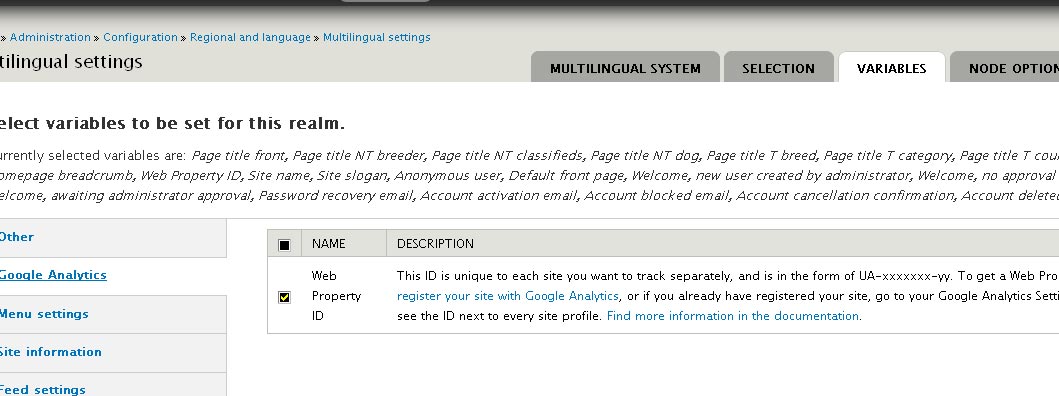
My suggestion is creating international watermark text as multilanguage variable using same feature as module google analytics or page title using this small module #3 #4 #5 can do.
Comment #5
dman commentedOK.
I've completely misunderstood the challenge of what was being asked here.
#642048: No, you can't pass 'arguments' to imagecache_actions. Here's why
"images" are not going to be served differently depending on your contextual "language". Sorry, that can't happen in the current upstream process (AFAIK).
The OP asked to change the "Hello world" text, which was possible, but not very useful really.
If you actually want to change the user-defined text on-the-fly, that's another task, and one which (I think) we can't solve without doing a language check on every image file request.
This can only be left open if there is a practical way to meet the challenge without having significant performance impact. Code patches are open, but metrics will be needed. image(cache) has already been hit with alleged DOS vulnerabilities, and so far we can't fix upstream performance issues from within the image(actions) process stream very well.
Code is gold, contributed patches can be evaluated.
Comment #6
jasom commentedWhat I want is to add watermark depending on current language.
I don't need change language watermark by every image request. I can have czech watermark when image is viewing through english version of site if it belongs to node added through czech version.
Comment #7
fietserwinI'm still not sure I get what you want. You are talking about adding a node, but this module is about creating image derivatives without having any knowledge about the context (or contexts!) where it may be displayed now or in the future (when the image already exists and this module or Drupal at all won't even be bootstrapped).
Guessing that you have an image field within a given content type that you want to display with a text overlay, where that text depends on the language of the node, you could try the following:
- Display the text in a different field and use CSS to position it over the image.
- Create a different image style per language. To use the correct image style you should then write your own field formatter. Field formatters are language aware, ie. the language gets passed in. So I think writing your own formatter that selects the image style based on the language passed in might do the trick
- Use a custom action. custom actions get context passed in (if existing) so could be used to determine language as well.
Comment #8
jasom commentedGreat, thank you for suggestions.