I am using the Administration Menu module version: 7.x-3.0-rc3 http://drupal.org/project/admin_menu This module allows the top admin menu to provide drop downs to administrative sub sections.
I have a role configured and I gave that role access to 2 menus, "Main Menu" and a menu I created called "Site Hierarchy".
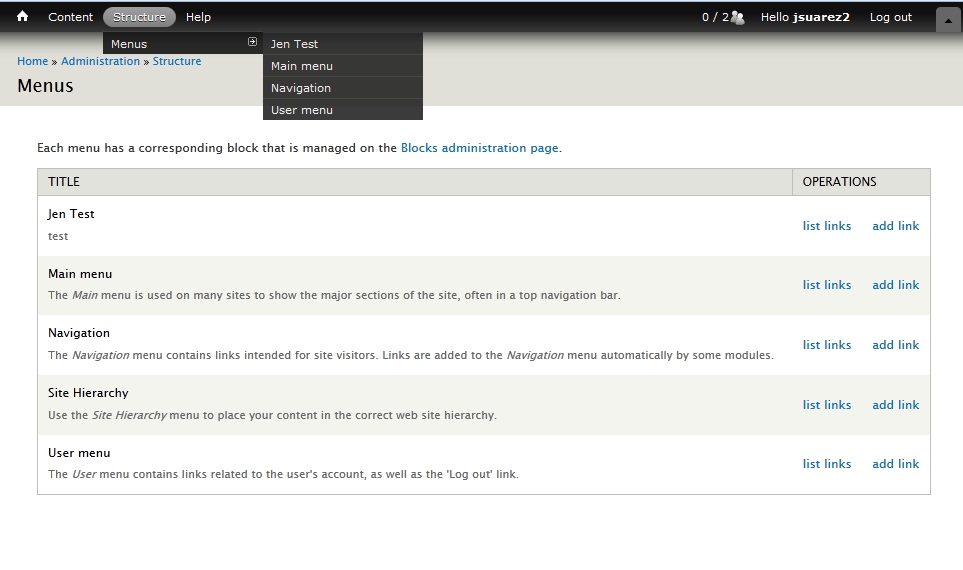
When I navigate directly to admin/structure/menu URL I see that I correctly have access to those two menus. However, when in the admin menu drop downs only "Main Menu" is shown as a menu I can access. I expected to see both menus listed in the drop down/fly out.
I've attached a photo in case I didn't explain this well.



Comments
Comment #1
ladybug_3777 commentedAdditional information for you (I just noticed this). The menu that doesn't display ("Site Hierarchy") was created using the "Features" module, version 7.x-1.0. http://drupal.org/project/features
It seems that other user created menus DO show up. So the bug may be directly related to that type of menu.
Comment #2
ladybug_3777 commentedFor clarity I wanted to add another screen shot showing a mix of "out of the box" drupal menus (Main Menu, Navigation, User menu), user created menu (Jen Test), and user created menu via Features (Site Hierarchy).
The menu created with Features is the only one that is not being displayed in the admin menu drop downs.
note: Before using this module I used the default setting "Administer menus and menu items" and all of my menus do display fine in the drop downs regardless of how they were created.
Comment #3
anrikun commentedI don't know much about the Features module.
Have you tried to post an issue in this module's queue too?
Comment #4
ladybug_3777 commentedI haven't, but I will do that to see if they may be able to provide some insight.
The features module (for a very simple/high level explaination) allows drupal to package up items such as Content Types, Menus, Image Styles, Views, etc and it stores these objects in code vs their default storage in the database. This allows developers to easily move items between development, staging, and production enviroments without having to recreate everything by hand on each server.
After I get a post added to their page I'll come back and leave a link to it for easy reference.
Comment #5
ladybug_3777 commentedI created a Support Request in the Administration Menu module page: http://drupal.org/node/1977802
And I also created a Support Request on the Features module page: http://drupal.org/node/1977814
Comment #6
Anonymous (not verified) commentedI also had this problem, however I wasn't using Features to create my custom menu - I created it programatically using menu_save().
I worked out that the difference between creating a custom menu programatically using menu_save() and through Drupal's UI is that the UI also calls menu_link_save() (see: menu_edit_menu_submit()).
This creates a link to the custom menu in the Management menu.
Once I added a call to menu_link_save(), my custom menu started showing up properly in the admin menu.
I'm guessing the Features module needs to do something similar.
Closing this issue as Menu Admin Per Menu isn't to blame.
Comment #7
kyuubi commentedI'm having this exact issue.
I have menus created with features that do not appear in admin menu (when using menu admin per menu).
Can anyone point me in the right direction?
Comment #8
justanothermark commentedI believe the bug is with Features and have added a patch to #1977814: Menu created with Features - compatibility issue (patch based on info in #6 and issue created in #5). Could you apply the patch in that issue and see if it fixes your problem?
Closing this again so that the discussion can stay in the Features issue queue where the fix is required.
Comment #9
joelstein commentedThis issue has nothing to do with Features, but is caused because Admin Menu only adds the direct links to menus if the user has the "administer menu" permission. See admin_menu.map.inc:
All that's needed is to implement this same hook, check for the opposite of what Admin Menu looks for, and add the links if the user doesn't have access to "administer menu". Even if the user has no access to edit direct links to menus, they won't see these links in the main menu. But for users configured to edit one or more menus, they will see the links.
The attached patch accomplishes this.
Comment #10
ladybug_3777 commentedI'll have to run some tests but that patch doesn't make sense to me. Perhaps I am missing something though.
First, I believe this patch assumes that admin_menu is installed. I don't think we ever want to assume both these modules are being used together. (even though that is the case in this problem)
Secondly, I may have a mix of roles, some of which DO have the "Administer menus and menu items" permission turned on (such as my administrators or my super user account) and these users may not have all individual menus selected in the "Menu admin per menu" section. It seems like this patch would cause those users to get zero menu links because of your return statement.
Again, I haven't installed and fully tested your patch, but I will as soon as have a free moment to do so. I wanted to get my thoughts added to the thread though in case someone else has a chance to try it out first.
Comment #11
ladybug_3777 commentedOK it was bugging me so I gave it a go and the patch appears to be working. My concerns about there being no menu links for the administrator role was incorrect as those links are already being added in another location and not effected by this.
I don't like the fact that this is using a hook to a module that may not be installed, but maybe that's not a big deal.
I guess I'm a little confused though as to how the two different solutions work. How is it that only featured menus are affected by this permissions problem? If it's truly a permissions issue than I would expect (prior to using the patch) that none of my menus would have shown up because I never had the "Administer menus and menu items" permission turned on for the affected role. Yet non featured menus show up just fine.
I still feel like something is off with this but I can't seem to put my finger on it. I do appreciate your contribution though so please don't mis-understand. I just want to understand how it's working.
Comment #12
joelstein commentedYeah, at first it seems counter-intuitive. But basically, in menu_admin_menu_map() the links are not added if a user cannot administer all menu items (hence the need for this module). So what we do is invoke a hook that Admin Menu provides to essentially add those links, but not if they were already added.
Another approach would be to write a patch to Admin Menu to remove that 'if' statement, but that would probably be harder than simply hooking in here.
And you don't have to worry about adding code that's only useful if Admin Menu is enabled. It won't cause any problems for sites that don't have Admin Menu. That's why hooks are so useful, and it's perfectly appropriate to add code to one module which has conditional logic based on what other modules are enabled.
Comment #13
ladybug_3777 commentedI still don't understand why this only effects menus created via features or programmatically though. What am I missing there?
Comment #14
joelstein commentedI don't think it only affects menus exposed by Features. On my test site, I have menus which were created through the UI and in an enabled Feature module, and in both cases, the links appear for the right people, according to the permissions.
Comment #15
ladybug_3777 commentedHm, I am seeing a difference for sure. I just re-tested it and i still have the same behavior originally reported above if I do not apply the feature patch and do not apply your patch. It can be hard to re-create if you create AND feature the menu on the same machine. It's more obvious when you enable a feature that contains a menu and that menu did not exist on the machine prior to installing the feature.
Another good way to test this if you only have one main drupal install is to create a menu, feature it, but do NOT install the new version of that feature, just download it so you have a copy of it. Next manually delete the newly created menu, THEN apply the feature you saved, this will cause the menu to re-appear. Since the menu was created through features only it will not show up as a link in admin menu. (again assuming you have not applied any patches)
Comment #16
henrijs.seso commentedWorks.
Comment #17
awolfey commentedI can confirm the behavior reported by @ladybug_3777. The patch works for me too. RTBC.
Comment #18
drupalfan2 commentedIs this patch still necessary for latest Drupal 7 version?
Comment #19
awolfey commentedYes, the patch is still needed. It would be great to have it committed.
Comment #20
chris matthews commentedWould it be possible to tag a 7.x-1.2 release that includes this fix?
thanks,
Comment #21
nedjoThe original patch is correct in that we need to implement the hook from
admin_menu. The version inadmin_menuadds links for all menus since users with theadminister menupermission have admin access to all menus. Here however we want links only for the specific menus the user has admin access to.Revised patch attached. Calls
_menu_admin_per_menu_get_perm_menus()to get the menus the current user has access to.