

 The 2026 Drupal Business Survey is open. Your response will help shape the future of the Drupal business ecosystem.
I can't believe this hasn't been asked before, but I couldn't find it in the issues list.
This is happening on several modules, so I'm sure I"m doing something wrong, but I don't know what it is. It is also probably a CVS issue, but I don't know where else to ask this. I admit to being CVS-challenged.
I have created an official 5.x-1.0 release before I start coding bug fixes. As I commit the bug fixes, it appears that they are being applied to the official release rather than the -dev release.
More specifically, here's what I want to do.
1) Create the original release (-dev) for initial testing.
2) Fix the first few bugs, if any.
3) Create an official 1.0 release; this should be a non-changing base release.
4) Roll any additional fixes into 1.x-dev which will eventually become 1.1
For a major feature request, I'd like to do much the same, except creating a 2.x-dev, which will eventually become 2.0.
There is something wrong with the way I'm doing things because it isn't working the way I thought I understood the process.
| Comment | File | Size | Author |
|---|---|---|---|
| #14 | cvshistory.png | 44.31 KB | keith.smith |

Comments
Comment #1
dwwWhat you describe is how it's supposed to work.
Can you include links to projects and release nodes where you don't think this is happening? Can you include specifics about "As I commit the bug fixes," -- what are you doing? are you using CLI or a GUI? what CLI commands? what GUI?
Thanks,
-Derek
Comment #2
nancydruOkay, then how do I make the changes after the official release go into a -dev version?
I'm using TortoiseCVS.
A good example is the Glossary module. If you look you'll see that the -dev version has not been changed but I have committed a bunch of fixes. They've all gone into the official release.
Spam_tokens is at 5.x-2.0, but the -dev is 5.x-1.x-dev.
I'm sorry for bothering you with my confusion, but maybe this issue will help others who are also CVS-challenged..
Comment #3
dwwhttp://drupal.org/handbook/cvs/introduction#branches-and-tags
http://drupal.org/handbook/cvs/branches-and-tags/contributions
http://drupal.org/handbook/cvs/releases/types
5.x-2.0 is an official release, from a tag.
5.x-1.x-dev is a snapshot release, from a branch.
CVS won't let you commit changes "to a tag". You can only commit changes to a branch.
If you want the full picture, you should listen to the audio for this:
http://badcamp07.org/07/sessions/how-develop-and-maintain-your-drupal-co...
which has nice notes about it and time references here:
http://drupal.org/node/197823
Good luck,
-Derek
Comment #4
nancydruThanks, Derek.
I had already read the first three references and I guess I'm just really dense about CVS because they still don't make a lot of sense to me. I will check out the video.
I think I fixed Spam-tokens now.
But Glossary doesn't want to do the same thing. I'm sure I'm reading this wrong, but I AM committing changes to the official release (tag) and not the the -dev release (branch).
Comment #5
trk_nair commentedComment #6
dwwCan you be specific with release nodes and branch/tag names? Thanks.
Comment #7
nancydru5.x-1.1 http://drupal.org/node/197587
First released: December 3, 2007 - 22:58
Last updated: December 3, 2007 - 23:00
5.x-1.0 http://drupal.org/node/196889
First released: December 1, 2007 - 12:24
Last updated: December 1, 2007 - 12:25
5.x-1.x-dev http://drupal.org/node/141609
First released: May 5, 2007 - 09:08
Last updated: May 6, 2007 - 19:12
December 4, 2007
* Commit #90215 by nancyw at 10:47
Glossary: /modules/glossary/glossary.module 1.115
#197711 - changed default icon path
* Commit #90214 by nancyw at 10:39
Glossary: /modules/glossary/glossary.module 1.114
#186063 - removed "Glossary" from title; added vocab description
December 3, 2007
* Commit #90134 by nancyw at 12:03
Glossary: /modules/glossary/glossary.module 1.113
#143441 - added ability for user to disable glossary indicators
* Commit #90122 by nancyw at 09:38
Glossary: /modules/glossary/glossary.module 1.112
#81596 - fixed typo
* Commit #90121 by nancyw at 09:32
Glossary: /modules/glossary/glossary.module 1.111
#197277 - clear filter cache on vocabulary update
I appreciate your trying to educate me here.
Comment #8
dwwAll of these commits are into the HEAD branch. The release node you're pointing to (5.x-1.x-dev) is pointing to the DRUPAL-5 branch. So, your changes aren't showing up in that release node, since you're committing to a different branch. Notice that the "glosary-HEAD" version is being updated:
http://drupal.org/node/94638
glossary HEAD
Nightly development snapshot from CVS branch: HEAD
Download: glossary-HEAD.tar.gz
Size: 26.77 KB
md5_file hash: 47100482fcc8f54cdb398f826cb6192d
First released: March 6, 2005 - 12:15
Last updated: December 4, 2007 - 16:05
^^^^^^^^^^^^^^^^^^^^^^^^^
Your DRUPAL-5--1-0 and DRUPAL-5--1-1 tags were made relative to HEAD, as well, so that's why you're getting the latest changes in those releases.
It seems you've been treating HEAD as your DRUPAL-5 branch, without realizing it. Always run "cvs diff" and "cvs status" on your workspace before you commit, so you're sure you're committing the changes you think you're committing to the branch you're aiming for. ;)
What you need to do now is take the latest revisions of all the files in a HEAD workspace, copy them into a workspace you checked out from the DRUPAL-5 branch, and commit them all with a message like "syncing DRUPAL-5 branch with latest code from 5.x-1.1 in HEAD". After that, bug fixes for 5.x-1.x-dev go in both DRUPAL-5 and HEAD. You can start porting to D6 in HEAD if you wish, or add new features for a 5.x-2.* series in HEAD. See http://drupal.org/node/17570#HEAD for suggestions on how to use the HEAD branch of your project.
Comment #9
dwwp.s. with your newfound enlightenment, please edit the existing CVS handbook pages to help clarify the parts that didn't make sense, or add emphasis on the parts you missed. it's hard for me to write the best docs for this, since i understand it all, so my writing about it makes sense to me. ;) you're in the unique, valuable position of a) learning how it really is, and b) having just lived through not getting it thanks to less-than-fully-clear docs. act now while the moment is fresh! if you do that, my time spent on this issue will not have been in vain. thanks.
Comment #10
nancydruThanks, Derek.
Oh, don't worry about the docs, I will definitely do that. As a matter of fact, I already have some pages that I thought were clearer, but obviously I didn't completely understand and the base stuff I used wasn't correct either.
I do run "CVS Diff" now - I "found" it a week or two ago and it's pretty neat. It fires up a Winmerge window to show me the changes so I know I got the right stuff in the right places. (A definite "add" for my docs.)
I'll have look for "CVS Status" - I don't recall seeing that.
Glossary was built on my machine using CVS checkout; the others are homegrown, so they were born on my machine. Do I need to check out Glossary again? All my changes have been committed from the checked out version. Or do I need to do something different, like create a new branch or tag? I'm sorry for being so dense - I guess I need concrete examples.
After seeing the checkout, I was, however, considering restructuring my contrib directory to match it. This would also be put into the docs. But this step required me to add a new feature to the Site Doc module that verifies module paths so that I know everything is running from the right place (besides, I've run into several users who had a "mix-and-match" module problem).
Comment #11
dwwWhat's happening is your local checkout is from HEAD. You need a checkout from both HEAD and DRUPAL-5 if you want to be bugfixing the stable 5.x-1.* series, and doing anything else (new features for 5.x-2.*, porting to D6, etc).
disclaimer: i never use CVS GUIs, so the details of the commands below will vary...
a) everything in CVS always has a HEAD branch, no matter what.
b) every other branch (DRUPAL-5, DRUPAL-5--2, DRUPAL-6--1, etc) must be created manually. let me explain the process below, after a few more things are clear...
c) most projects had a DRUPAL-5 branch for a long time, many of those predate the release system. in that case, you obviously don't have to create the branch yourself, you just have to start using it.
d) every directory you checkout from CVS remembers the branch it was checked out from (via a feature CVS calls the "sticky tag" for that directory). so, when you're doing CVS operations in a given directory, you have to always be conscious of what branch the directory is pointing to, so your actions achieve the desired outcome.
cvs statustells you this, which is why it's a good idea to run it regularly. for example, here's the output on "signup.module" from a directory checked out from DRUPAL-5:and here's what it looks like for a HEAD workspace:
Always keep your eye on that "Sticky Tag" line. I have no idea how each GUI provides or presents this information, but it's fundamental to CVS, so it must be possible.
e) if you're working with glossary, and you're going to be working on both 5.x-1.x-dev stuff, and something else (new features in HEAD or porting to D6), you should probably just checkout 2 separate copies, into separate locations -- one checkout from the DRUPAL-5 branch for the stable 5.x-1.* bugfixing, and another from HEAD to work on "the new thing" (whatever that is for you right now). to do so:
The first command says "get me the code from the 'DRUPAL-5' branch and put it in 'modules/glossary.5'". The second, since it doesn't specify
-rto request a specific revision or branch, says "get me the code from HEAD and put it in 'modules/glossary.head'". The specific directory structure that makes sense for you might vary. Perhaps you've got a totally separate checkout of core for each version you're trying to support, and you're working on your own contrib modules inside sites/all/modules for each checkout of core. whatever. that doesn't matter. what does is what I said about about sticky tags on directories.So, let's look at creating branches, now that the other stuff makes sense...
In general, the best way to make a new branch is to start from a checkout of your workspace from HEAD, and create the new branch with the name that matches what you're doing to your code. to create a new branch, you use the
cvs tag -bcommand. yes, it's a little confusing, since as far as CVS is concerned, a branch is a special case tag -- it'd be nicer if the command was just calledcvs branchbut oh well. Again, the name to use depends on what you're doing based on http://drupal.org/node/17570#HEAD -- let's say you're adding new features for 5.x-2.*. You're adding new features to HEAD, and making 5.x-2.* official releases (5.x-2.0, 5.x-2.1, etc) directly from HEAD. You've got a 5.x-2.x-dev development snapshot pointing to HEAD, too. All is happy. Then, you want to start porting to D6 core. So, you want to create a new branch for the 5.x-2.* stuff (so you can continue working on that) independent of your D6 porting changes in HEAD. So, at this point, you do the following:now you're happy, and your 5.x-2.* code is safely on its own branch. you can continue to make improvements to that code, while starting to port to D6 in HEAD.
however, at this point, the next step is that you should edit your 5.x-2.x-dev release node and move the CVS branch it's pointing to from "HEAD" to "DRUPAL-5--2". That way, the 5.x-2.x-dev snapshots will continue to be correct, and everyone will know what's going on.
Finally, you're ready to start working on the D6 port in HEAD:
Of course, if the foo module is big and complex, you might want to commit the D6 porting in chucks as you finish certain parts of it (e.g. "ported to D6 menu API", "ported to D6 FAPI", etc, etc).
At this point, you could consider making a new release node pointing to HEAD (which will now be available as an option, since you moved the 5.x-2.x-dev node to point to your new DRUPAL-5--2 branch), which is called "6.x-1.x-dev". Or, if you like to have lots of branches, or immediately plan to start adding new features in a 6.x-2.* series, you could make a DRUPAL-6--1 branch for your 6.x-1.* code, and leave HEAD for your new-feature 6.x-2.* series...
hope that's all clear now. let me know if there are any other gaps in your understanding and i'll fill them in. then, i eagerly await seeing the edits to the CVS handbooks. ;)
cheers,
-derek
Comment #12
nedjoDerek, you continue to astound me (and I'm sure most everyone else who follows these issues) with your seemingly limitless energy for providing detailed, helpful, and specific explanations. I stand in awe.
Comment #13
nancydruWow. Thanks, Derek. It's a lot to understand, so I'll be reading it several times.
Meanwhile, here's a screen shot of TortoiseCVS. I don't see "status."
Aha! When you go to Tortoise's checkout, there is a tab for "Revisions" that allows you "Use HEAD" or "Choose a branch or tag."
Hmm, I tried checking out the DRUPAL-5 branch and it didn't get the newer translation files, even the ones I checked in from my machine. Going against the DRUPAL-5--1-1 got the recent files, but the code changes are not there.
Comment #14
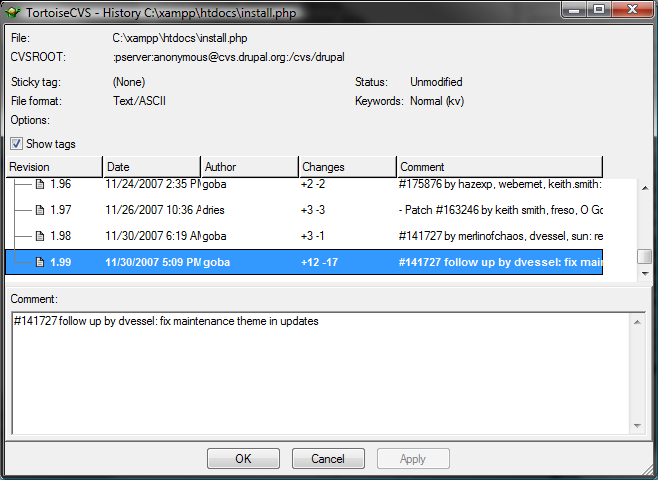
keith.smith commented@nancyw: I can't speak to the best way of doing this in Tortoise, but here's how I sometimes do it. If I am unsure about what I'm working with, I often maneuver into a directory (that's under revision control) and right click on a file. Choose CVS and then History. The history (revision comments) for the file will be displayed, but more importantly, the Sticky Tag will also be displayed a few lines down from the top. For a HEAD checkout, this will be (None). I've attached a screenshot that I made while looking at the CVS->History of update.php.
Comment #15
nancydruThanks, I see the directory I've been working with says "(none)" while the latest checkout shows "DRUPAL-5--1-1". Both show all my change history, but the latest one does not actually include them.
Comment #16
dww@nedjo: THANKS! It's awfully nice to get appreciation like this. ;)
@nancyw: again, the newer files in your po directory were committed to HEAD, not DRUPAL-5. i'm not sure why you're surprised by this.
side note: just because the file gets upload to the issue queue as "de_44.po", doesn't mean that's what it should be called in your po folder. ;) the files are just supposed to have the language code (de.po). you almost always have to rename the things you download from the issue queue before you can directly commit them.
Comment #17
nancydruThanks. I wondered about that. I really don't know much about translation since I only speak English. I thought maybe this was a more recent change in translations. I'll fix the file names as I get everything else straightened out.
Derek, I really do appreciate the time you're investing to educate me on this. Hopefully someday I can repay you.
Comment #18
drewish commentednancyw, with TortoiseCVS right click, select the CVS submenu, then click "Update Special" and it'll let you choose which tag you want to check out.
Comment #19
dwwnancyw: I already said how you can repay me: improve the docs. for extra credit: help enlighten others who are confused by helping with the support issues... ;)
Comment #20
nancydruYou got it
Comment #21
(not verified) commentedAutomatically closed -- issue fixed for two weeks with no activity.