I am getting this error when I try to upload a file from the OG group
..filedepot/groupname
"You must select a valid folder" << after upload complete
A few days ago I could create a folder from the group context and then add files but now I am getting these errors:
Displayed on screen:
An AJAX HTTP error occurred.
HTTP Result Code: 500
Debugging information follows.
Path: /filedepot/ajax/newfolder
StatusText: Internal Server Error
ResponseText:
In error logs
[Wed Apr 24 17:53:32 2013] [error] [client 71.207.247.194] PHP Fatal error: Call to undefined function message_subscribe_process_message() in /profiles/commons/modules/contrib/commons_notify/commons_notify.module on line 50, referer: .../filedepot/tool-build-frederick-energy-fep01-housing
Oops looks like something else broke this. Also get it when creating groups now.......Looks like this one might be and OG error, but the first part wasn't working before this error cropped up.


Comments
Comment #1
blainelang commentedSome of those errors are clearly Commons related. When your uploading the file from filedepot - have you selected a folder before submitting the form?
Comment #2
markbannister commentedThe file folder location just says "top Level Folders"
This time I clicked the the folder drop down first (only the one choice available) and it did seem to upload but now files or folders are not displaying for the group context. ( Only Display Organic Group Root Level Folder is checked)
The url returned to after uploading files is ../filedepot/folder/0 << shows no files or folders
../filedepot/folder/ << shows nothing
../filedepot/ << shows nothing
Cleared browser cache, cleared drupal cache (drush cc all)
Just checked in IE and it displays files but not in OG context (shows all files folders or nothing) and during upload in
I'm not seeing any files in privatefiles/filedepot (but folders are created)
Can't create an new group to test right now because of other PHP errors which I will try to get straight before doing any more testing.
Comment #3
Antoine_k commentedYes it seems related to commons notify.
It's obviously a duplicate of #1979604: Call to undefined function message_subscribe_process_message
Comment #4
markbannister commentedOK cleaned up the other issues.
Firefox 20.0.1 behavior:
in Group context ..filedepot/test-group-5 shows only "Top Level Folders" in directory list as it should but when I try to upload a file I get the "You must select a valid folder" message. The only folder showing in the drop down it "Top Level Folders".
It will allow me to create a new folder and add files to it
Outside of group ..filedepot/ I still only see the group context directory.
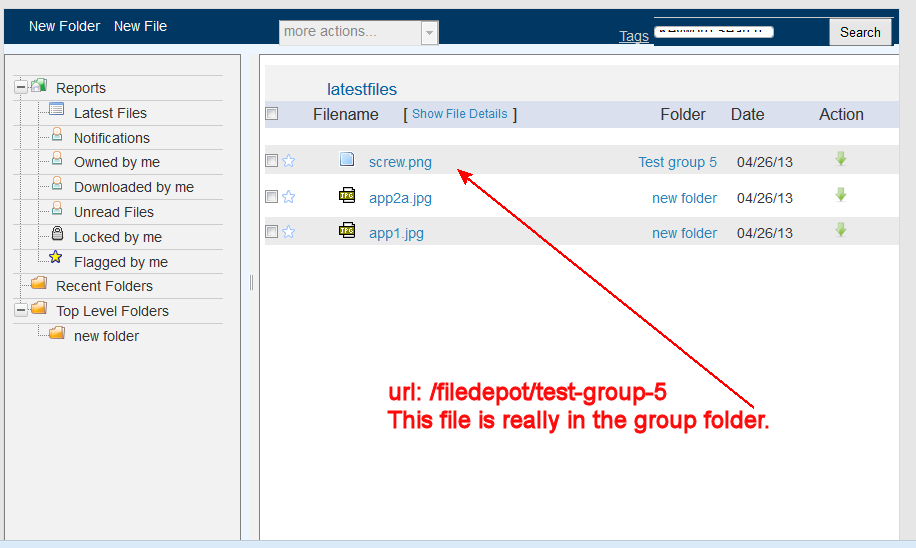
After adding a file in IE I see this:
The folder hierarchy seems messed up. "screw.png" is in the group folder and the other two files are in "new folder"
In IE 10
In group context I see all folders of all groups, same view I get without group context but at least the hierarchy is correct.
Comment #5
markbannister commentedAnyone have thoughts on this? I'm going to have to move on to something else to use with OG otherwise. Been looking at IMCE with http://drupal.org/node/280426 via sandbox project http://drupal.org/sandbox/PascalAnimateur/1924884.
Comment #6
markbannister commentedBehavior changed. Same now in IE, Firefox and IOS/IPAD
cleared all drupal caches, cleared browser cache. No change
Went to admin/content and listed only filedepot folders. Looked a a couple, and added a file to a folder via /node/32/edit
Next display of filedepot changed. I see all group folders and the file list shows all files in all folders. Clicking a folder displays its content correctly.
Showing OG content displays the exact same way /filedepot/groupname displays all folders and all content.
Comment #7
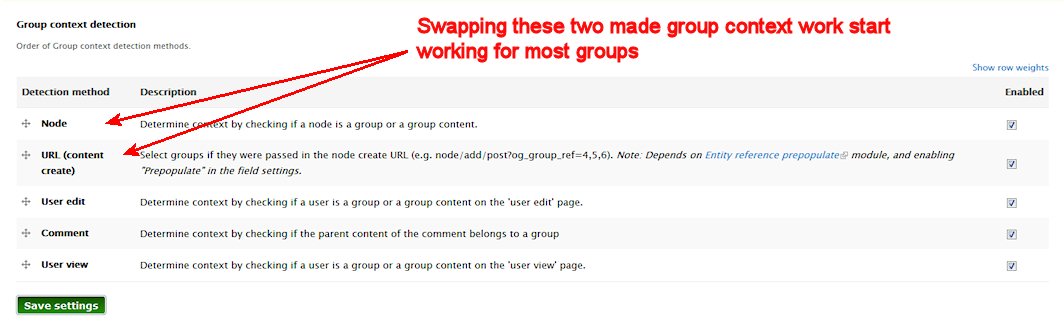
markbannister commentedCould the settings in admin/config/group/context effect this at all, perhaps the order the context is processed?
Comment #8
markbannister commentedUsing Developer Tools in firefox I am also seeing these errors:
[09:15:06.082] not well-formed @ /filedepot_ajax/getleftnavigation:2
[09:15:06.120] not well-formed @ /filedepot_ajax/getfilelisting:2
[09:15:06.160] Use of setAttributeNode() is deprecated. Use setAttribute() instead. @ /sites/all/modules/filedepot/js/nexpro.js?mmg7q2:152
[09:15:57.836] not well-formed @ http://dev1collaboration.injection-moldings.com/filedepot_ajax/search:2
OT: Wow the developer tools in FF are really handy! Lots of info in one spot!
Comment #9
markbannister commentedIt appears the order in admin/config/group/context of the context makes a difference.
After swapping the order of two contexts the group context started working for most groups (not all). Trying to list all folders still does not work.
Comment #10
markbannister commentedUpdate after a good bit of playing.
With "Only Display Organic Group Root Level Folder" checked in permissions
While on a group page going to "example.com/filedepot" displays the correct content within the context of the group I was viewing. Latest files, etc take their context from the group context and work properly also.
This does not work (perhaps this is a WAD and I just misunderstood)
example.com/filedepot/mygroupname << mygroupname is ignored and the context comes from group last visited.
I still cannot add files to the top level folder (which is actually the autocreated group folder of course). I can create a subfolder (which gets placed correctly) and then I can add files to that. The display when uploading a file does not allow me to select "Top Level Folder" but only shows the sub-folder.
To see all the files in the top level and sub-folders I have to click the sub-folder, then the top level folder name shows up in the right pane and I can click that to see all files/folders.
If I uncheck "Only Display Organic Group Root Level Folder" I can add files to the these folders and they show up properly.
When I look at the permissions for the autocreated group folder it does not have any group permissions (I guess that is correct)
So I still cannot add to the autocreated group although some of the context seems to be getting through to filedepot.
Other suggestions:
PS: OK I know I'm going on and on but I really like this file manager and want it to work. :)
Comment #11
markbannister commentednoticed this as well (I updated to dev version also)
I unchecked "Only Display Organic Group Root Level Folder"
From a group page go to example.com/filedepot
All group folders are listed but I can only see the contents of the group I was viewing before opening filedepot. The url changes to example.com/filedepot/folder/26 etc but I don't see files in any other folders.
Latest files shows files from other groups.
Comment #12
markbannister commentedAny thoughts on how I might debug this?
With "Only Display Organic Group Root Level Folder", the only thing that is not working is the display of the group folder.
Latest files shows correct files
Adding a new folder adds folder to correct group folder
Clicking "Top Level Folders" does not display any files. File display stays on "Latest Files"
If the group folder contains sub folders it displays correctly in the file display and I can click the sub folder, THEN the correct parent folder displays in the bread crumb above the file display area. At that point I can click the bread crumb and get the group folder contents to display.
So really the only thing that does not seem to work is "Top Level Folders" . Everything else has the correct context.
Comment #13
Yuri commentedI confirm that this issue still exists and is not resolved..
Issue seems to be that files cannot be uploaded to the automatic created folders for Organic groups.("you must select a valid folder") etc.
Maybe blainelang can have a look here, its about an important functionality of this module.
Comment #14
stevehutchison commentedI'm getting the same issue as well. To workaround it, whenever I create a a new group I'm manually create a folder in filedepot with the same name. Then users are able to upload files. Would be good if we didn't have to do this though.
Comment #15
blainelang commentedI have looked at this just a couple months ago on a clean commons3 installation. What version of commons3 are you using and have you installed other file or permissions related modules?
Comment #16
markbannister commentedI'm on Commons7.x-3.0 all up to date.
I've wondered about permission issues, that seems to make a lot of sense.
I don't think I have any other permission type modules installed, except for what commons and OG has.
Also, I have no issues with permissions we I view all folders (not limited to specific OG group)
Comment #17
stevehutchison commentedI'm running Commons 3.2 with Common-notify disabled. No other file or permissions related modules installed.
Comment #18
_timpatrick commentedI think I have fixed the issue. Can you check out the following patch?
I also updated dev so this patch will appear in dev tomorrow when the build gets re-generated.
Comment #19
markbannister commentedpatch #18 working for me so far.
Admin vs user -- I though that might have been it at one time but then thought I had eliminated it as an issue.
Great! Thanks! I can start rolling this out now
Comment #20
_timpatrick commentedComment #21
_timpatrick commentedGreat glad it's working