

 Come together with the global Drupal community in Rotterdam, 28 Sept – 1 Oct 2026. Sessions, contribution, connection, and Early Bird savings until 8 June.
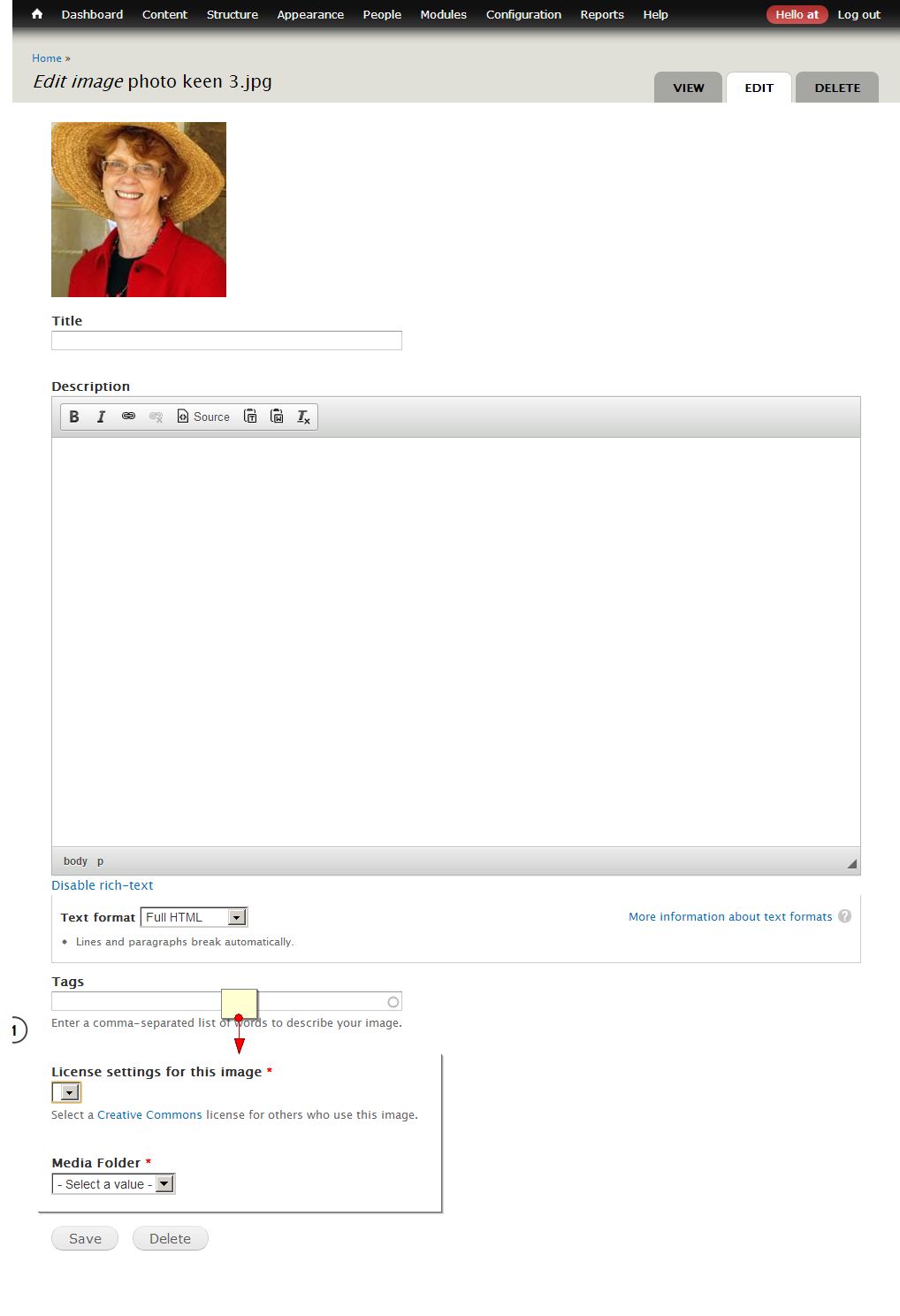
In Drupal 7.22, I can't save /media/xxx/edit because the "License settings for this image" field is required but the dropdown is empty and therefore impossible to choose a license setting.
Screenshot: http://easycaptures.com/fs/uploaded/627/9111628379.jpg
Questions:
How do I add some license settings?
Is it possible to edit and add additional fields, such as alt and title fields? There is no content type for media in /admin/structure/types
I went to a different D7 site and there were license settings prefilled. So apparently the site in question is defective.

Comments
Comment #1
Aleet commentedany help?
Comment #2
devin carlson commentedIt sounds like you are using the Media Gallery module. Media does not provide any content licence functionality.
Comment #3
Aleet commentedYes, of course I'm using Media Gallery. This is the issues queue for the Media Gallery module, is it not?
There are other active issues for license settings bug: https://drupal.org/project/issues/media_gallery?text=license+settings&st...
I uninstalled Media Gallery but now Title and Description fields are gone. Can't edit anything.
Would you please tell me what should I do next?
Comment #4
leramulina commentedSame problem. Subscribe.
Comment #5
rocbrook commentedSame issue here, can't upload images because the license field is required but is empty. I can't make the field not required nor can I delete the field because it says the "License settings for this image is locked"
Comment #6
gaellafond commentedSame issue here
There used to be an option:
admin/config/media/file-types
which allow us to configure the fields for each file types; image, video, audio, etc. That's where the license can be configured. Since that menu is gone, I don't know where to go to configure it...
Comment #7
gaellafond commentedThe edition form to modify the file types has moved under the menu Structure > File types
admin/structure/file-types
According to the field, the values are determined by _media_gallery_get_field_license_values
I will see what can be done to fix this.
Comment #8
gaellafond commentedThe function _media_gallery_get_field_license_values is defined in the module Media Gallery. In order to be able to see the field's values, the module Media Gallery must be enabled. If you upgrade the module Media to the latest version (7.x-2.x), you MUST also upgrade the module Media Gallery (7.x-2.x).
1. Install dependencies
The latest version (7.x-2.x) have new dependencies:
* file_entity
* views_tree
* views_bulk_operations
* entity
2. Enable modules
* file_entity
* views_tree
* views_bulk_operations
* entity
* Media
* Media Gallery
3. Run update.php
Once all those modules are installed and enabled, and the latest version of Media Gallery is enabled, run the DB update to complete the module installation:
http://your.drupal.site/update.php
4. Clear all caches
It would also be a good idea to clear the cache:
Admin > Configuration > Performance
/admin/config/development/performance
Click the [Clear all caches] button
The values of the field License should be visible after all those steps.
If you want to add a license to the list (when the default values ARE visible), you need to modify the file media_gallery.fields.inc. The values are hardcoded in it.
File: media_gallery.fields.inc
Line: 306
Function: _media_gallery_get_field_license_values
The format is simple: 'key' => 'Label',
If you add a value or modify a key, you will also need to modify the theme file.
NOTE: This method has been design to be overwritable in your own theme, but if you do, it wont call your function when the method is called by AJAX, which is the case most of the time. The only solution is to modify the file in the Media Gallery module itself.
File: media_gallery.theme.inc
Line: 535
Function: theme_media_gallery_license
All the CSS classes are defined in the CSS file:
File: media_gallery.css
Line: 222
I changed the status of this issue to fixed, feel free to re-open it if that doesn't fix it.
Comment #9.0
(not verified) commentededited some words for clarity
Comment #10
tjtj commentedI have this issue without using the media gallery. I am using Media 7.x-2.0-alpha3 and flowplayer 7.x-1.0-alpha1+1-dev. I upload a movie, and after a few screens am presented with a requires license field that is blank and cannot be selected. I cannot figure out where this is coming from.
Comment #11
csc4 commentedIt isn't fixed if there's a hard coded list which doesn't include Public Domain or other reasonable values - surely the answer can't be hacking the module in order to edit the values in the field???
Comment #12
javier2233 commentedOnce media gallery was enabled, issue resolved
Comment #13
ivnish