

 The 2026 Drupal Business Survey is open. Your response will help shape the future of the Drupal business ecosystem.
Hi there.
It seems, that IMCE sends back always the absolute URL of the image (sth. like server/folder/drupal/files/image.jpg..). Is there any possibility that IMCE just gives back the /files/image.jpg-path?
I'm developing an IMCE-CCK field (will be contributed the next days) and wrote a manually filter for this. But I think this is not the best way.
Thanks a lot for IMCE.
Greetings from germany
Michael
| Comment | File | Size | Author |
|---|---|---|---|
| #2 | imce-absolutepath.png | 22.11 KB | mhuebl |

Comments
Comment #1
ufku commentedimce does return relative paths. however if you use the path to create an image on the fly and then read its src, then it will give you the absolute path. are you doing something like that?
Comment #2
mhuebl commentedHi ufku.
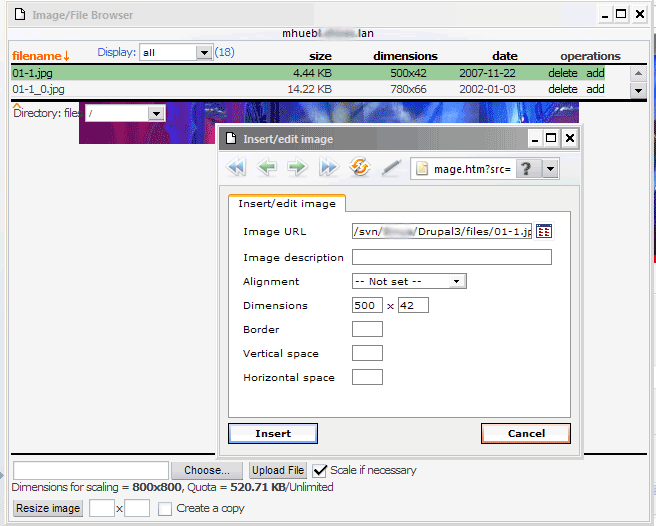
I'm not really sure what you mean. I just call the IMCE over the TinyMCE. Choose an Image and click on "add". Than it gives me the absolute path. I add you a screenshot.
Ok, the path /svn/xx/drupal3/files/x.jpg is not the "real" absolute path which is of course sth. like http://localhost/svn..
But it's also not the real relative path, which is /files/x.jpg.
thanks for every hint.
Comment #3
dman commentedYou are aware that ANY path beginning with a / is not a 'real' relative path at all?
That always means "from the root of the server" .. not the subdirectory you happen to have Drupal in.
But IMGE, and the browser, have to know what the real path to the image is, and in this case it is that deep in your subdirectories.
There is a bigger issue, that I've not yet seen resolved about linking to files this way, so I know what you want, but AFAIK, there are no WYSIWYG editors that can do the 'right' thing here.
You are probably finding it makes it a pain to develop test sites in subdirectories :-). Yup. Explore making some subdomains or alternative http ports if this is a problem for you.
Maybe img_assist will do it, as it has the ability to repair links on the outgoing filter, rather than embedding them as HTML like your wysiwyg does.
Comment #4
mhuebl commentedOk, sorry for my bad knowledge about real and unreal relative paths :-)
And you're right. Developing in subdirectories might be not the best practice, but I think most of us do it..without setting a subdomain for every project. And it's definitely worst case, if the "unreal" relative path is written in the database.
In my CCK-module I fixed that problem with the following code:
Do you see any disadvantages of this code? If not, maybe that's something to improve IMCE?
Comment #5
dman commentedI agree that saving the full path (server-relative) in the DB is a problem. Even an annoying design decision.
I wish it didn't, but the work-arounds to 'correct' the problem for embedded links and src in the text are messy. CCK etc is OK to do that to because the file path sits on its own and can be tweaked. For IMCE however, you'd need regular expressions etc - to put the full path in on edit, take it out on save, and put it in again on view. Ick.
I agree you should be able to safely develop in subdirectories, it's a bit of a problem.
Comment #6
ufku commentednow it's clear.
Considering IMCE as a file browser used by WSYIWYG editors, yes there is only one choice for IMCE, which is to return the server-relative path. The real relative path may work but only in the main page of the site(i mean the path "file/x.jpg" works in http://domain but not in http://domain/node/1).
and mhuebl, while handling file paths you should consider the private download method which converts file paths to /system/files/(path relative to the file system path). And if clean urls is not enabled the file path will be something like /?q=system/files...
as a result the returning path would start with url('system/files') OR basepath().file_directory_path() depending on the file download method, and the rest is safe to save in db for reversing this process to create the file URL.
Comment #7
Thomasr976 commentedI have a similar problem when I converted my test site from Drupal 5.3 to 5.7. See http://drupal.org/node/227800
Maybe I am not understanding the above thread, but I don't see a solution for this. What should one do? thanks for your attention to this.
Comment #8
dazweeja commentedHi ufku, are you sure about this:
"Considering IMCE as a file browser used by WSYIWYG editors, yes there is only one choice for IMCE, which is to return the server-relative path"
If you use TinyMCE, say on a page like http://domain/?q=node/1/edit, and upload/add an image with IMCE, it returns the server-relative path into the "Image URL" input field as you would expect. If you then manually edit this path, removing everything up until "files/", and then press the "Insert" button, TinyMCE still inserts and displays the image correctly. So that seems to suggest that there is no problem returning a real relative path to TinyMCE.
There is no problem using a real relative path on other Drupal pages as well. For example, if you use the theme_image() function in a template, which is generally good practice anyway, the real relative path works fine because of this line in that function:
$url = (url($path) == $path) ? $path : (base_path() . $path);
This is why I have been modifying the output from IMCE to create real relative paths from the server-relative paths because they are far more useful to me in this format. It seems this is the case with others too.
By the way, thanks for all your work on this module. It's really very useful and I'm sure a lot of people appreciate your work.
Comment #9
ufku commentedyes, you are right only if the clean urls is not active.
what if you decide to use clean urls in future?
"files/foo.jpg" works in "/?q=node/1/edit" but not in "/node/1". on the other hand,
"/files/foo.jpg" works in both pages.
That's why IMCE must return a server-relative path in order to keep consistency between clean and non-clean urls.
Comment #10
dazweeja commentedThe future is here now ;) I just tested it with clean urls activated and it works fine with TinyMCE. Tested in both Drupal 5.3 and 5.7.
The reason being that TinyMCE automatically converts the real relative path into a server-relative path when you click the "Insert" button on the "Insert/edit image" popup. You don't need IMCE installed to test this - just type a valid relative image path like "files/foo.jpg" into the "Image URL" text input field of the "Insert/edit image" popup and click "Insert". As far as I can see there's no problem with the IMCE module returning a relative path to TinyMCE. As I mentioned before, theme_image() automatically adds base_path() to relative paths when necessary as well. Doesn't seem to work with FCKEditor though but I've just submitted a feature request with them to add this behaviour as I think it's a good idea regardless - it's very confusing to new Drupal users to know when to write "files/" or "/files/".
Comment #11
fletchgqc commentedHi, not sure if this is relevant but when I select a photo from the server I would like to IMCE to return /images/xyz.jpg instead of what it currently does: /sites/all/files/images/xyz.jpg (using D6).
I have created a symbolic link on my filesystem so that /images links to the above directory.
Is there any way I could set this up?
Thanks
Comment #12
dman commentedSymlink sounds like a good first half of a solution.
Did try adjusting the imce browse root to point at your new symlinked path? You may need to apply this to the /files dir, not just /files/images
Comment #13
fletchgqc commentedThanks but where do I adjust the imce browse root?
Comment #14
fletchgqc commentedI think I'm sort of hijacking this thread with something that is not sufficiently related. So I created a new issue for my query instead: http://drupal.org/node/269250
Comment #15
shadid commentedHi. I'm also facing the same issue than Michael (mhuebl). Moving the site from a development configuration (in a subdirectory) to the hosting server breaks the images links.
Is there any work around for this issue?
Thank you.
Comment #16
tahiticlic commentedSame here...
Comment #17
lejonsson commentedI also find this very irritating, now I have to edit the path returned frpn IMCE and remove everything above "sites/default/files..." (in my case I get "/~userfolder/sitefolder/sites/default/files..."). If I do not edit the URL, the server-specific path will be saved and that makes picture links fail when moving the site to an other server with a different server-specific site path.
Comment #18
lejonsson commented"This is why I have been modifying the output from IMCE to create real relative paths from the server-relative paths".
Can you explain how you have done that, of have you just done it by hand for each image path?
Comment #19
lejonsson commentedMore discussions and closures in http://drupal.org/node/448240
Comment #20
sinasquax commentedPlease test this patch (http://drupal.org/node/540694) if you want relative path (and use pathologic module to avoid any paths problem in content)
Comment #21
lejonsson commentedWith Pathologic, the problem with not being able to properly resolve true relative file paths goes away. Then I believe the case we have made about IMCE is still valid, and the above patch provides an excellent solution which I think should be made part of the official IMCE.
Comment #22
Leeteq commentedComment #23
ufku commentedComment #24
tatude commentedHi,
Could someone explain why I get absolute URLs when using FCKeditor with IMCE in Drupal 6? Where is the problem -- in FCKeditor? I have chosen not to use absolute paths in IMCE.
FCKeditor seems like the best working companion for IMCE, but the absolute URLs are really an issue, and using Pathologic module just for reinterpreting them seems pointless if there is another way.
Thanks.
Comment #25
lcampanis commentedGuys I can see a lot of frustration here and in another duplicate post about the iMCE path. Seriously iMCE's job is to return the declared path and then insert it into the content of the editor. After that it's up to you to adjust the path based on your installation.
If you happen to move your installation to another folder, subdirectory, whatever, then just use this:
Some notes:
Aight?!
Have fun ;)
Comment #27
glottus commentedI tried the solution in #26, but I also have issues with relative links to other types of documents breaking, and can't figure out how to replace paths for both src= and href=
Adding the same replacement line once for each type seemed to work at first, but certain images placed on the page in Views footers and such were then broken, and I couldn't figure out how to fix that either, even by adding in the "/drupal/" prefix to the path that the script above is intended to then strip out.
Perhaps that is because of the order in which data is processed? I really don't know how each element is rendered through the templating system, so the above seems to work, but at the expense of other links/images which HAD been working!
Comment #28
tjtj commentedI think this might fix my problem. I have subsites in my main htdocs directory, each with its own drupal. But IMCE puts all the uploaded files into the main site's drupal rather than the sub site's drupal.
However, I do not know where to put your php code.
Thanks,
Jim
Comment #29
glottus commentedI should have posted back here once I found a much better solution: the pathologic module (once I understood the proper method of ordering the rules for it) did a really nice job of correcting all the links (for any of my multiple istallations and for both src and href links) - and this issue became moot.
I also updated the pathologic documentation to explain a bit better the need for ordering the paths correctly in its configuration.
Comment #30
ufku commentedComment #31
akki123 commentedHi
Here is my setup
/var/www/drupal/mysite/
pathologic module is installed to correct clean url so if I access mysite.com/node/1 then my image src sites/default/files/images/img1.jpg works for both mysite.com and mysite.com/node/1
I disabled all access to mysite.com/user url so user can not login or view url ( it doesn't exist for user )
so all admin can access mydrupalserver.com/drupal/mysite/user
Now if I select image in IMCE then I get sub directory path included in image path,
so I get /drupal/mysite/sites/default/files/images/img1.jpg
which works fine for this url mydrupalserver.com/drupal/mysite/node/1
but not for mysite.com/node/1
If IMCE can give relative url sites/default/files/images/img1.jpg then it will work for both.
Please do not suggest some work around ( input filter ) , this is
shouldIMCE issue.Thanks
Comment #32
akki123 commentedWork around solution to this issue.
In file imce/js/imce.js line no. 765 ,
Change this to
Now this will give internal relative urls like sites/default/files/images
This option can be added on configuration page of IMCE - admin/config/media/imce
under common settings like absolute URLs
Comment #33
ufku commentedsrc="sites/default/files/images/img1.jpg" in mysite.com/node/1 page would point to "mysite.com/node/sites/default/files/images/img1.jpg", which will be incorrect.
Please stop opening the issue as the current behavior is the right one.
Comment #34
torbs commentedCouldn't this be solved with a base tag?
<base href="<?=base_path();?>" />Comment #35
akki123 commentedUse pathologic module to correct such urls.
It seems you are not using clean urls.
Comment #36
mikeaja commentedPost #25 works (for Drupal 6 and 7), but most people will probably need to change the 2 occurrences of 'files' to 'sites' in the code shown.
And........ as good and as helpful #25 is, it is not a solution to the original issue. It is a fix for those that come here who can and willing to modify code.
More generally, I think the arguments for why this is not a bug are slightly missing the point. If we consider this WYSIWYG, then it is a bug. Adding the image through IMCE is taking it from a single location. So all further displays of that image should retrieve from the same location, wherever it is accessed. This is what base_path is for. It has nothing to do with HTML '/'. We are thinking here of system admins who add the image by selection, not by writing HTML code.
To be honest, this seem obvious to me.
I'm not suggesting anyone should fix anything, and #25 does the job. But it is a bug based on how file / folder selection in IMCE works, if it is to be considered WYSIWYG..
Comment #37
ufku commentedPlease do not change the status.
Comment #38
yoyoz commentedMy solution is to use the template.php file. I have added:
(thalasso is my sub directory)