

Closed (fixed)
Project:
Backup and Migrate
Version:
7.x-2.x-dev
Component:
User interface
Priority:
Critical
Category:
Support request
Assigned:
Unassigned
Reporter:
Created:
20 May 2013 at 23:12 UTC
Updated:
28 Nov 2025 at 09:10 UTC
Jump to comment: Most recent, Most recent file

Comments
Comment #1
vzsze commentedI see the same issue.
Comment #2
aitala commentedOddly, I have another site on the same server - with a very different selection of modules - where the 7.x-2.7 version of the module seems to work just fine.
Comment #3
AlanAT commentedYes, I had the same problem after updating to 7.x-2.7 - reverting back to the previous version fixed the problem, that is Backup and Migrate could find the Default db again and the backup ran OK
Comment #4
alh commentedI have the same issue after upgrading. Reverting to previous version.
Comment #5
dhalbert commentedAs the OP notes, "SOURCE" shows as "missing" in the table of profiles. Creating a new profile also shows "SOURCE" as "missing".
Comment #6
invisibleink commentedmaybe related? similar issue
Comment #7
aitala commentedI don't think so because I have two different D7 sites on the same shared Apache server - one site has an issue with the module, one does not. And they both use the same MySQL server.
While they don't use the same set of modules, they are not massively different.
Eric
Comment #8
zmove commentedaitala. Are you sure both websites are running 2.7 version.
I tested that on 3 different websites on 3 different hosts. I have that problem with all of them.
Regards,
Alex
Comment #9
MGParisi commentedI have two exact setups on the same hosting company. 1 works the other does not.
Comment #10
dhalbert commentedThose of you with similar setups where one works and the other doesn't, could you compare the contents of the backup_migrate_* db tables and see if there are interesting differences?
Comment #11
aitala commentedThe only difference I see is the one that works with 7.x-2.7 did not have compression enabled and the one that failed had GZip compression enabled.
Eric
Comment #12
ddec commentedExactly the same problem here. Installed version 7.x.2.7 and the 'Backup from' select stayed empty causing the error described above.
Reverted to the previous installed version on my development machine (was version 7.x.2.4) and everything was working flawlessly again.
(Before, i did a reinstall, cleared the cache, but problem stayed the same)
Comment #13
ronan commentedThis has to have been caused by the following commit: http://drupalcode.org/project/backup_migrate.git/commit/ef90a5a7ed97464f... which was merely intended to do some error checking so that the module wouldn't choke when a broken or missing db was defined. Either I screwed something up with the error checking, or there is some error which isn't preventing Drupal from accessing the db but is causing the main db to be unavailable to Backup and Migrate.
I've attached a patch that reverses that 1 commit. Can people having this problem try it on the latest dev and tell me if it is indeed the cause of the issue.
Comment #14
dhalbert commentedI applied your reversal patch, and backup_migrate works again. The connection attempt in
_db_get_connectionindestinations.db.incis throwing an exception in your newly addedtryblock. I added adebug($e)in the catch and have attached its output (sanitized). I haven't tried to work through the changes indestinations.db.mysql.incyet to see what's provoking this.Comment #15
scottrouse commentedI can confirm that the patch in #13 almost resolved the issue described. Nothing else seemed to resolve it (clearing cache, cron, rebuild registry, disable/uninstall/reinstall module, etc).
EDIT:
I spoke too soon. The source reappears, but I'm unable to back up with drush. Not sure if this is related, though, since I can now backup via the UI.
Comment #16
scottrouse commentedSetting this back to needs review since my RTBC was a bit premature.
Comment #17
vzsze commentedPatch from #13 resolves the issue for me.
Comment #18
jordan8037310 commented#13 fixed this for me.
Comment #19
BartT commentedAny estimate on the release of an updated module? Sorry, but I am a newbie and do not know how to apply a patch (even after reading the "How to apply a patch" article).
TIA.
Comment #20
elegantsolutions commentedUnless there is a feature that you have to have, the easiest solution is to go back to the earlier version by going to the bottom of the project page and look for "View all releases". Download the previous version from there till there is a fix.
Comment #21
aotus commentedThis bug should be be flagged as a 'known issue' against the 2.7 release to warn others that their backups might fail
Comment #22
ronan commentedI've rolled back the offending code in dev. I have no idea how the MySQL connection could be access denied but still actually works. If any body has any idea what might be happening here I'd love to have more info.
Comment #23
scuba_flyNot sure what's wrong
I run some multicore websites ( basically they are all the same with different content but do have the same modules enabled, use the same codebase and use the same database server ( different databases for most part ).
On about half of the websites I get the error missing db on the other half it just works fine...
Cleared cache on all sites just to be sure.
Only thing I can think of is a different setting or something??
very strange.. hope this helps...
Comment #24
scuba_fly@ #11
I have multiple sites (looked at 2) ( same codebase, db server etc ) both use Gzip compression as backup setting one works the other doesn't. Think we can exclude GZip compression as the cause.
Comment #25
ronan commented@scuba_fly: are you still having issues with the latest dev release from june 14 or later?
Comment #26
Screenack commentedI experienced this issue with backup_migrate 7.x-3.x-dev. Uninstalled the BAM tables, set up "from scratch" still had error. Ran patch #13, restored BAM functionality.
Comment #27
crutch commented...apologies this is for 7.x-2.7 and not dev version.
Could not run restore because the source 'db' is missing.
Could not perform the restore.
Strange this error only occurs on 1 of 5 sites running off the same code base in both dev and live environments.
---
to add: just noticed on live environment that after upgrade, the dropdown box, "Backup from..." is blank, where on dev environment it = "Default Database"
only on the one site that is causing an error.
---
Under "Destinations" the "Default Database" is not listed on live but listed in dev.
so when importing database with phpmyadmin, it still does not correct the issue on live site
Comment #28
ingojo commentedI also need to report that backup is not working because "db" is missing. I see this error in version 2.4, 2.5 and 2.7. After installing the patch the error message changes a little bit to "Could not run backup because the source '' is missing." I also tried the "dev" version. There I get some different error. Is there any workaround for this issue. The settings.php file has the right path to the SQLite DB.
Comment #29
psegarel commentedSame error with 7.27. Works in my local environment, doesn't work on the live site. Exported the local database & imported it onto the live database, error remains!
Moving to 7.3.dev fixed the error
Comment #31
crutch commentedye ol de-automation
Comment #32
skamble commentedI have same issues. source db is missing. restoring version 7.x-2.5 resolved my issue.
Comment #33
nimbfire@gmail.com commentedI've been through the same issues.
On a new blank drupal installation, the Backup and Migrate module could not find the db.
Then I uninstalled and installed again, but it didn't find again.
So, a changed the password of the mysql user, and it worked.
It showed some warnings, but I believe its related at multiple times I tried to restore the db.
The old password had some 'strange' characters that may be the cause of the problem.
The old password: Tn@t+VzQl3MP
I've using the 7.x-2.7 version
(sorry for my english)
Comment #34
crutch commentednice find nimbfire! Your english is good :)
This corrected my issue also by changing the password to common characters.
This also explains why it works in local development using username "root" with no password and it does not on live site using a password.
The old password I was using for the one site that was not working: hrf=TNo}+!+I
Common characters of yours and mine is the "+" character.
Comment #35
Wtower commentedI experience the same issue. Clean Drupal installation with Backup & Migrate 7.x-2.7. My password does contain the character '%'.
Comment #36
juliakoelsch commentedI'm also experiencing this issue. I have 7.x-2.7 installed. The patch in #13 also worked for me.
Comment #37
anybodyPassword containing characters "+" or "!" don't work either!
Comment #38
karolus commentedFound the same issue on one of my sites, but couldn't replicate the issue on 4 other sites running the module. It may have to do with the password character issue mentioned in above posts. Also tried flushing the caches, running update.php, and even deleting the 7.x-2.7 version of the module and reinstalling. I got it fixed by installing the latest dev module (7.x-3.x dev). As soon as I had installed it, and run the DB updates, all was good again.
Knowing that dev releases still need to be run by the security team, is there any ETA on when 7.x-3.x will be live?
Comment #39
omvaishnav commentedThis version of backup & Migrate resolved my problem also, you should try it. -> https://drupal.org/node/686904
Comment #40
kenorb commentedUpgrade or patch from #13 fixes the problem.
Comment #41
frank hh-germany commentedI have the same Problem.
I work with Commerce Kickstart 2.9
#39 has fixed the Problem. It works fine.
Greetings from Germany
Frank
Comment #42
kenorb commentedComment #43
Krakott commentedTo nimbfire (post #33) > THANK YOU SO MUCH !! your solution was right, it worked for me. Just had to change the password in sites/default/settings.php and of course on mysql database and ^^miracle ^^ !!
Comment #45
simone960 commentedI encountered the same db missing problem, after applying the latest dev as @ronan #13 committed the patch. Confirmed it works and everything is back to normal. Thanks @Ronan !
Comment #46
alifspb commented#39
thanks it work for me :)
Comment #47
Anonymous (not verified) commentedlike #34 , #35
An update from 7.x-2.7 to 7.x-3.x-dev did not resolve the problem.
Returned to 7.x-2.7 and created a password without '&'.The backup works.
Comment #48
frankdesign commentedChanging the DB password worked for me too. My password contained the + character which prevented it from working. Just to note
*and=can be used in a passwordComment #49
ckoharj commentedI have 2 sites both running 7.27
Works on one site and not the other. Tried changing the password the same as the site that was working and that did not solve the problem.
The configuration and destination are the same on both sites.
Comment #50
crutch commentedchange the password to not include special characters to see if works
Comment #51
Pramod Edathil-1 commentedThanks in advance.....
Comment #52
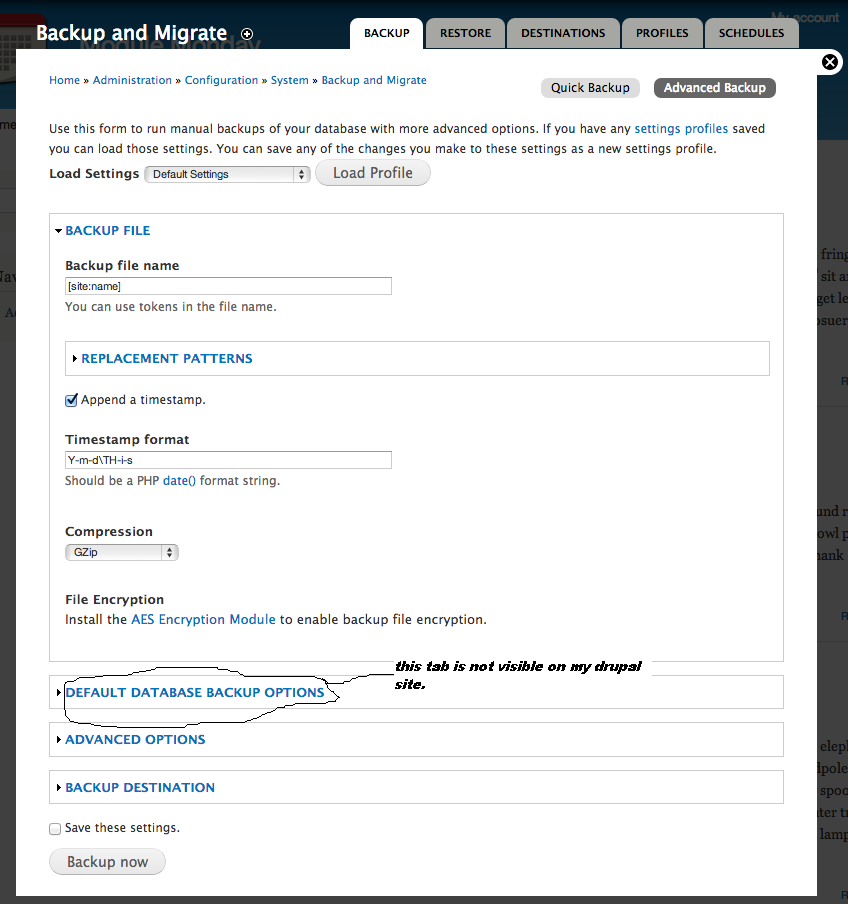
crutch commentedTry nimbfires post #33. That tab won't show because the default database is missing.
Comment #53
jax commentedFYI, the only thing that's needed is to urlencode the parameters:
Comment #54
aotus commented#53 doesn't work for me
Comment #55
ronan commented@Pramod Edathil this should be fixed in the 2.x-dev. Please try that before reopening this ticket.
Comment #57
enomertens commentedHi all,
Can confirm #34 and #35... "backup and migrate" 2.7 .... has issues with the + sign in db password.
Same here
Kind regards,
Eno
Comment #58
ivnish