1. hit "Split summary at cursor"
2. uncheck "Show summary in full view"
3. hit "Join summary"
4. enter a few lines of body text
5. hit "Save".
Where did the text go? How would I know? How would someone else know?
And even worse: if I edit the page again the text is right there, labeled "Body". How confusing.
Confusion happens as well if you put step 4 first.
The problem is that the option "Show summary in full view" is invisible, and to view the option setting you have to perform an action on the content ("Split summary at cursor").
Solution: always show "Show summary in full view".






Comments
Comment #1
catchReproduced. This is critical.
Comment #2
Steven commentedThe "(don't) show summary in full view" option makes little sense for auto-generated teasers, because the location of the auto-generated split is not predictable. This behaviour does not get any better simply by making the checkbox always visible: there was a reason for hiding it in the first place.
The better solution would be to force the checkbox to TRUE when it is invisible, taking care to remember its previous state should you decide to do a join/resplit operation.
Comment #3
Steven commentedComment #4
gábor hojtsy? There is no summary/teaser, unless you split the summary/teaser, so there is no reason to clutter up the interface with controls about stuff which you don't have, right? I know this was deliberately designed this way, so let's step back a bit and think this through.
Comment #5
catchSounds sensible to me.
I'm assuming cross-posting set this back to normal, I strongly believe this is a critical bug - disappearing text is going to freak people out.
Comment #6
gábor hojtsyI deliberately set this to normal, as this behavior was by design and is in all the betas and development versions for months now. Anyway, I'll let others judge the criticality.
Comment #7
gaele commentedBy design? Perhaps it was just overlooked.
I like Steven's solution.
Comment #8
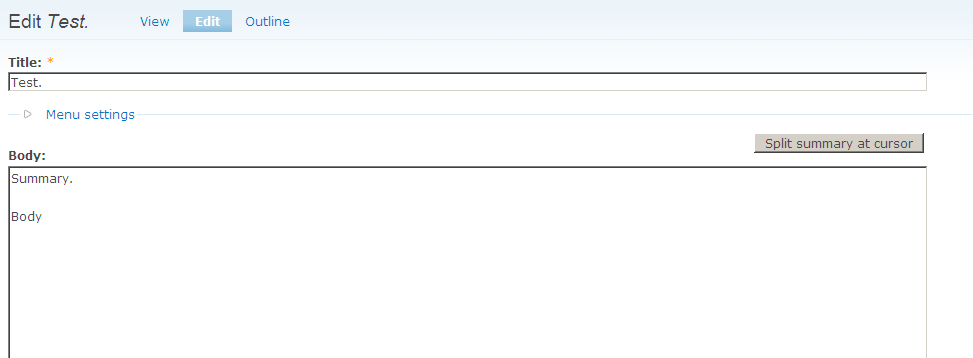
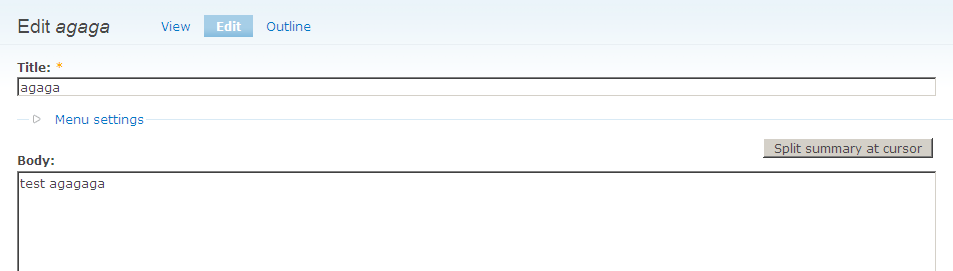
catchThis is how the node/view and node/edit pages look after the steps described by Gaele.
As you can see, you end up with text in an un-split body field, which is not shown in the body on node/view because it's actually the "summary".
Comment #9
gábor hojtsycatch: thanks for the shots. Now I see what's the problem at hand. So you set to not show the summary in full view, then merge with the body and submit, which leaves you with an empty body. Hm.
Comment #10
shunting commentedHowever see comments here for conceptual problems with teaser leading to usability concerns.
Comment #11
theborg commentedThis node body gets an empty string when the summary is not splitted, the teaser_include checkbox is not marked (or invisible) and the length of the body is the same as the lenght of the teaser. This is the case when the node has been commited before.
This patch checks the real existence of a teaser when the checkbox 'Split summary at cursor' is empty.
Comment #12
theborg commentedComment #13
gpk commentedThanks theborg ...
But unfortunately it doesn't work when the teaser_include checkbox is cleared, then hidden (Join summary), and the main body is longer than the teaser length setting defined on the Post settings page. In this case, node_teaser() correctly returns the shortened version, and all 3 if conditions are met, and hence while the full page view in this case is not blank, the teaser is nonetheless excluded from the full page view.
Instead we could I think do a test in node_teaser_js() and if $form['#post']['teaser_js'] is not set then force the teaser_include checkbox to take the value corresponding to "checked" i.e. something like $form['#post']['teaser_include'] = 1.
Comment #14
theborg commentedThis patch uses teaser.js to toggle the use of summary.
When the summary is not splitted sets the teaser_js textbox value to an empty string so the
function node_teaser_jsreceives an empty teaser.Comment #15
quicksketch#14 doesn't seem to make a difference in solving the problem. It seems that even though the teaser is empty, if the 'Show summary in full view' checkbox isn't checked the text still disappears.
This patch is an update to #14 that makes it so if the text areas are in the 'joined' state, then the 'Show summary in full view' checkbox is always checked. Upon splitting the text areas, the last state of the checkbox is restored.
Comment #16
catchJust tested this on FF2 and IE7 - works great on both. Leaving at review for another browser but otherwise should be RTBC.
Comment #17
theborg commentedTested on Safari, followed the steps to reproduce the bug and it works ok!
Comment #18
gpk commentedThere is possibly still a problem if JS is not enabled. In this situation the checkbox is always visible, you can enter a post longer than the defined teaser length (Post settings) without inputing the <!--break--> delimiter, clear the checkbox, and hey presto! on full page view you are missing the (automatically generated) teaser.
Also if you enter a post shorter than the defined teaser length then you revert to the "blank page" case in full page view, but OK in teaser view.
This is like the situation about which Steven said
except that of course the checkbox *is* visible.
What would make sense in this case? Ignore the checkbox?
Comment #19
chx commentedComment #20
shunting commentedgpk:
Also if you enter a post shorter than the defined teaser length then you revert to the "blank page" case in full page view, but OK in teaser view.
+1
Comment #21
shunting commentedI filed an additional splitter behavior bug report. I didn't feel it was the same issue, since the cause and consequences are different -- but I could be wrong. Feel free to consolidate.
Comment #22
catch@gpk - probably the checkbox should be simply hidden with a #value taken from whatever the status is in the db (to avoid the settings getting changed when multiple people with and without js edit the same node).
That means you'd only get the checkbox at all when you have js, and use the splitter.
Comment #23
theborg commentedThis is going to be the Nightmare before Christmas case. Please review with care because there are some quirks activating and deactivating js.
This patch is a combination between #11 that was taking care of not using js, and #15 that checks the summary when the node is not splitted.
Also I deleted the carriage return that js code was inserting to solve http://drupal.org/node/202567, so please test usability on that because I don't know if breaks some functionality.
Should the summary checkbox be hidden when js is not active? I think that is useful even without js. Comment on that also, please.
Comment #24
theborg commentedComment #25
catchOK with js enabled I'm unable to break this however hard I try.
If I have a break tag inserted by the teaser splitter then in firefox, IE7 and IE6 with js disabled the checkbox works fine. This seems completely sane to me. I did stuff like disabling and re-enabling js between previews and page refreshes and previews - and didn't hit any problems at all.
The only issue I found was - if I manually insert a break tag in non-js mode, then the checkbox is still ignored whatever I do. I see no way to fix this cleanly. I think this could be a followup patch though since it's minor compared to the issues we currently have - only covering a small number of users.
Could do with Safari testing and another run through in case I missed a permutation. I also missed the original issue where this went in, (and use hard cck textfields for teasers on my main live site) so someone with a bit more background on it would be handy as well. At this point it's more concept than implementation apart from the manual break tag no-js edge case.
fwiw deleting the carrage return doesn't seem to have made any difference - I still get line breaks, and it'll still split a p tag across lines.I missed a hunk failure - reapplied on clean install and indeed the newline is no longer inserted, so p tags or anything else split don't get broken in the database.
However, I think that should be dealt with in it's own issue though - not critical imo - and Steven was specifically against removing those newlines. Also #202567 is a dup of #159981.
Marking to needs work so that particular bit can be left out, otherwise it'll just complicate this.
Comment #26
catchComment #27
theborg commentedThanks a lot catch for your testing!!!
Divide and conquer
Two patches, one goes here with the original
'\r\n\r\n'in it. The other goes to #202567 without.Comment #28
catchOK now tested in FF2, IE7, IE6 (Win2k), Safari 3 beta XP and Opera. The splitter is broken in Opera with or without the patch - new issue coming up. Everything else works beautifully.
If anyone can test on a non-windows platform to double check that'd be great. As far as I'm concerned this is RTBC otherwise.
Comment #29
quicksketchTested in Mac: FF2, Safari 3, Opera, and PC: IE7. All works fine.
This updated patch makes a css change and adds a clear-block class to make teaser.js work with Opera.
Comment #30
theborg commentedTested on linux sles. It works ok, marking RTBC.
Comment #31
JirkaRybka commentedFF 2.0.0.6 / Linux Mandriva: Theming still OK, works as advertised.
http://drupal.org/node/202682 was probably duplicate in the Opera bit, but leaving that one open until that's confirmed.
Comment #32
catchI can confirm that #29 fixes things for opera as well. So we should mark #202682 as duplicate as soon as this is committed - was only opened to avoid cluttering this before RC, but no harm fixing it here of course.
Comment #33
gpk commentedWhile the latest patch fixes the problem described in the 2nd paragraph at #18 (the blank page case), the problem described in the 1st paragraph still exists (see below). It is essentially the same as #13, and arises because the code used to fix the 2nd paragraph is largely the same as that used in patch a at #11.
So the outstanding problem is:
See further comments above.
Comment #34
theborg commentedThis problem can be seen as a help to the non-js user to decide when not to show the auto-generated teaser, as I said in #23:
.
You can revert it editing the node again and checking the box.
Comment #35
shunting commentedQuery:
Has anyone tested splitter behavior on a node created with drupal_execute? I'm getting some weird behavior with mine, but maybe that's just me....
Comment #36
gpk commented@ theborg:
Yes, ...
I'm inclined to agree that the checkbox is useful even without JS. Showing the checkbox only if you have JS enabled is likely to cause confusion IMO since two posts that look identical on the Edit page could render differently in full page view depending on whether the hidded checkbox is checked or not.
>You can revert it editing the node again and checking the box
Indeed, but this behaviour is likely to be viewed as a bug by many users (as per Steven's original comment about the checkbox making little sense for auto-generated teasers). More significantly, with no JS the behaviour w.r.t. posts with auto-generated teasers changes awkwardly when post length crosses over the teaser length setting defined on the Post settings page. Below this length you get the full post both in teaser view and full page view. As soon as you hit the threshold, if the checkbox is not checked then suddenly the full page view will only display the part of the post after the teaser. And if the post is then edited with JS active, the full page view will regain the full content including the teaser, which is inconsistent.
Of course if you have specified the <!--break-- delimiter manually (or it has been inserted using the JS version of the page) then the checkbox works absolutely as intended.
I can see a way through this Nightmare before Christmas based on some of what we already have and also adding a couple of lines to the node_teaser_js() function, though probably a bit different from what I suggested at #13 above. I also think we may need to use the Description attribute of the Body form element to provide a little on-page help (perhaps with a link to the node module help page, if we can add some info on teasers there in this post-D6-RC1 era). On the plus side, the end result may actually be simpler (famous last words ... ;-) . I'll try and get round to this tomorrow, unless someone else gets there first!
Thanks for all your input on this issue.
@ shunting:
No. It is just behaving like a non-JS browser? If so then you may have hit the problems/concerns with the non-JS functionality described here.
Comment #37
shunting commented@gpk #31 re drupal_execute:
This code:
Yields a node full page with [Add content here.] visible and a Split Summary at Cursor button.
And the nifty thing is that this:
puts [Add content here.] into the (putative) "summary" and sets the button to Join and checks "Show summary in full view". Data driven! Sweet!
Note for anyone else testing drupal_execute: There's a documentation bug in drupal_execute; that module_load line has to be there. See this report.
(This is from drupal-6.0-rc1)
Comment #38
gpk commentedI'm not quite sure if you are saying that this is weird or not ...! If it works for you then great :-)
How the form looks when generated depends on the relationship between teaser and body. Drupal generates the non-JS version of the form initially, and then JS (if active) modifies it.
Comment #39
shunting commentedgpk
I'm saying it works exactly as expected (my expectation, in any case) and integrates as expected with the BREAK comment.
On another note, if you have a minute: Can I have a "review of the bidding" on the carriage returns that are added? After all the discussion and the patches, I'm totally confused about what they are supposed to do, and even whether they are still supposed to be doing whatever it is that they do. Thanks in advance.
Comment #40
shunting commentedAnother testing question:
Has anyone looked at splitter behavior after a node is submitted via blog API? I'm experiencing some oddness. To my simple mind, if teaser and body data is in the database, and there's no checkbox for viewing (or not viewing) the summary, content should be rendered, but no. But maybe it's just me. Regardless, as in the blog api module:
Isn't displaying any data at all, with a very short (putative) summary, and no BREAK in the data. In fact, there isn't even any data passed to hook_filter.
UDPATE For whatever reason, this works as expected after automatic submission a la Blog API:
Where "as expected" means I have a body and a (redundant?!) teaser value in the database, and a teaser displayed with Show summary in full view checked
Comment #41
gpk commentedRe. carriage returns: hope to attend to this in the other topics e.g. http://drupal.org/node/159981 when I get a chance. Thanks for your in-depth testing over there by the way.
Re. blog API problem: I've not used this, but you seem to be saying that blog API is not working as is but needs the additional line in the code? Looks like a separate bug ...
The behaviour looks to be because http://api.drupal.org/api/function/node_submit is on the one hand a form submit handler for the node edit/create form and also can be used in isolation (such as by blog API). Although the default value for the teaser_include checkbox on the form is 1 (i.e. checked), there is no such default value when creating a node via node_submit(). So while your workaround seems to works for your purposes there is I think a question about whether a default value for teaser_include should be stored per content type and/or whether teaser_include should be forced TRUE for automatically generated teasers. Probably the latter. Obviously closely related to this issue but a separate one I think.
Comment #42
shunting commentedI'm not saying that there is a bug in Blog API. It is working as expected FOR ME (but I have to admit I'm a little unclear on what the expectations for teaser/summary/trimmed posts are; see the permathread on conceptual issues...)
(Start blue sky: I have to admit, as an old XML hand, that node types are looking a lot like document types to me, except with structured arrays instead of markup, and that one probably could think about a generic solution for administration that consolidates how various components get attached to different node (document) types, including not only teaser, but "read more", maybe comments. Basically, setting up the machinery to store teaser_include by node type seems like a lot of work, just for teasers. Maybe the CCK project is already doing this, though. What is not a field, after all? End blue sky.)
What I expected to happen, and did happen after my workaround above is:
1. Post is autogenerated using Blog API approach as modified above for a precedent.
2. Body and teaser values both appear in data base properly split
3. Teaser displayed
4. Show summary in full view checked.
So the user arrives at the post and nothing seems odd. Maybe there are more requirements than this, but that's enough for my purposes.
(I found "teaser_include" really confusing. Include in what? Would teaser_attach (if true, attach teaser to post) be better, if that's what it does?)
I don't know about forcing the teaser to TRUE for autogenerated content. Somebody's not going to want that, and call that a bug. I think this is a job for the administrative interface. In general, I think we should take the attitude that whatever can be created manually, can be created automagically, since it's manual creation that will form user expectations).
Comment #43
gpk commentedComment #44
gpk commentedOK here's a new patch based on patch e at #29.
To handle the problem cases where the user doesn't have JS, I've removed the change to http://api.drupal.org/api/function/node_submit/6 and instead added a new #after_build function to the body field (in http://api.drupal.org/api/function/node_body_field/6). This seems to play nicely with the earlier JS mods, and is heavily based on the existing http://api.drupal.org/api/function/node_teaser_js/6.
As far as I can see, with respect to the checkbox we now have essentially the same functionality with and without JS.
I've also modified a couple of comments to clarify what we mean by an automatically generated teaser (I'm reserving this term for the case when the <!--break--> delimiter is *not* present in the node body).
The patch file itself is a bit of a hack I'm afraid :-P but should be OK...
Comment #45
gpk commentedReworded a comment in teaser.js, otherwise identical to #44.
Comment #46
catchOk this works perfectly for me - with and without JS. Tested in FF2 and IE7.
Could do with one more review but as far as I'm concerned it's RTBC now. My one concern would be that we're post string freeze but are adding a string in non-js mode. Since this is critical, I guess an exception could be made? Otherwise I think we could probably lose the message and do it silently if it's too late for new strings.
Attached patch just fixes windows line breaks and associated patch file nastiness to make it apply easier, don't credit me if it's committed.
Comment #47
gábor hojtsyHm, maybe I am misdirected about what became the final goals of the patch, but tested a few things:
NON-JS:
- Created a node and had it contain "
foo<!--break-->" only. Asked to *not* show summary in full view. Full view is empty.- Likewise if I have "
<!--break-->foo" as the text, the summary chekbox is forced to be checked (but no message is displayed about it), and the teaser view is empty.JS:
- Show summary in full view checkbox seems to work as expected. Only shown when teaser textarea is visible.
CODE:
- "This check is for non-JS users: if JS is active then it is used to enforce the same condition." sounds awkward. The check is for non-js users, but used for JS users as well for the same?
- "Pass value onto preview/submit" and "Pass value back onto form" sound odd (and lack a dot at the end)
- Why name "node_teaser_include_no_js" as is, when it is a sister function to "node_teaser_js"? Why not merge the two under a better name, or if that is deemed a no-no API change, have a better name for the no-JS version, which runs for JS pages as well. Uhm.
-
Comment #48
theborg commentedTested on FF2 and IE6 (carefully with css negative magins) with and without js. It works perfect for me.
If someone can do some tests on Safari and see how it looks on Opera?
Comment #49
theborg commentededit: cross-posted with Gábor.
Comment #50
catch@Gabor:
I'm getting completely different behaviour in non-js mode with this patch.
///- Created a node and had it contain "foo" only. Asked to *not* show summary in full view. Full view is empty.
I get a drupal set message* in this case on node submit, full view shows the text, and when I go back to edit the node, the checkbox has been re-checked:
*
You specified that the summary should not be shown when this post is displayed in full page view. This setting has been ignored since you have not defined a summary for the post.///- Likewise if I have "foo" as the text, the summary chekbox is forced to be checked (but no message is displayed about it), and the teaser view is empty.
It seems like you have "foo" in both cases, one time you can uncheck the checkbox, the other you can't? Could you clarify? Also my teaser view has the text regardless of what I do (again, as expected).
A quick summary of what I think the intended behaviour is now:
in js mode, if you disable show summary in full view but then merge teaser and body, it rechecks the option when it's hidden to avoid empty node/view pages when someone has joined their teaser and body back together (since the entire body can end up in the "summary", and hence not shown).
in non-js mode, it ignores the status of the checkbox if you don't have a berak tag in your body (since no break tag means no separate summary). If you have the break tag then it works fine.
This covers both the case of creating a node in js mode, then editing it in non-js mode, or if you just create the node in non-js mode (previous iterations of the patch didn't do this, I guess there's flag set somewhere about the "split summary" that never got set in non-js). IMO this is very, very important in order to have consistent behaviour between the two different modes.
Back to needs work for the code style but I think functionally this is fine (unless I'm missing something).
Comment #51
gábor hojtsySorry for the confusion guys, I did not check my comment formatting. This was my non-js experience:
- Created a node and had it contain "
foo<!--break-->" only. Asked to *not* show summary in full view. Full view is empty.- Likewise if I have "
<!--break-->foo" as the text, the summary chekbox is forced to be checked (but no message is displayed about it), and the teaser view is empty.Comment #52
catchQuick addition to say I've test the js mode in Opera and Safari 3 (XP) - both fine.
Comment #53
catchAhh, now I see. I didn't check those two possibilities, thanks for clarifying!
foo<!--break-->- this is exactly the same patched as unpatched. It's also doing exactly what it's supposed to technically, except that many people use the<!--break-->tag to force their entire body as the teaser.<!--break-->foo- again the same behaviour patched or unpatched. To be honest I can't think of a valid use case for this, and the only think that seems odd is the checkbox setting being forced, but it doesn't make any difference in terms of display.I think these could be probably be left to a followup issue since non-js didn't ought to be critical, or might even be "by design", and the patch doesn't affect the behaviour.
Following on from #47 - no time to re-roll this at the moment but would suggest just removing that comment and changing the function name to node_teaser_no_break_tag() (couldn't think of anything shorter that's also descriptive).
Comment #54
gábor hojtsyShouldn't there be a message displayed in non-JS mode, when I get the forced checkbox? Is the checkbox forcing an artifact of this patch? If it is, then I think it definitely should be fixed here.
Comment #55
catchGabor, I'm getting the checkbox forcing without the patch in non-js mode.
As far as I can tell, the "summary" mode was only triggered in js mode in the original code - and it simply ignores the checkbox in non-js whether it has
<!--break-->tags or not. So non-js users can't change the setting, at all.What the patch does is unforce the checkbox if there's a summary( by checking if there's a break tag - and something appearing before it) - that's the only change in non-js mode I think, along with adding the warning when the checkbox is forced and there's no break tag at all.
This isn't directly related to the original issue, but it's still a bug I think, and having the behaviour consistent seems sane to me.
Comment #56
gábor hojtsyAll non-JS checks:
1. I don't get any checkbox unforcing anytime.
2. I get checkbox forcing with the message from the patch when I have a long body but no break tag, and I had the checkbox unckecked.
3. I also get a checkbox forcing when I have
<!--break-->fooand an unchecked summary checkbox. But I get no message with the forcing. (I also don't understand why this forcing ever happens at all).4. The state of the checkbox is unchanged, follows what I choose when I have
foo<!--break-->orfoo<!--break-->barin the textarea.Seems like 3 is a bug here.
Now onto the JS tests:
5. I have a long body all in the body textarea, I do not choose a teaser split. Because it is long, the system decides on a teaser split automatically, and it always treats it as part of the body. I can only assume this is intentional. So if someone does not break the teaser intentionally, the teaser will always be part of the body.
If all the above are intentional behavior as you intended, then 3 is left as a bug here and the code cleanups requested earlier.
Comment #57
gpk commentedOK thanks chaps will have a look...
Comment #58
gpk commented@Gabor:
1. :-)
2. :-)
Re. 3, from what catch says this also happens in the unpatched case (#55). That would make sense, because the code I added in the "strangely named" :-P function should not cause this - it explicitly uses === operator to avoid this problem ... but I didn't test it I guess ;-) Also since you don't get the warning drupal_set_message then something other than this patch must be causing it.
From memory, this is probably happening when the form is built - I'll have a look at that code. Basically, the checkbox state is not stored in the database but is determined from the values of the teaser and body. Probably the case with empty teaser has not been accounted for.
4. :-)
5. Yes this is the default behaviour, the same as in good old D5 - the default teaser/trimmed post is the first part of the main body and is shown in full page view. As Steven said a few metres above at #2,
I'm inclined to agree.
Leaving code style issues for L8r.
Comment #59
gpk commentedUpdate:
There are 2 further edge cases similar to 3. in which an unchecked checkbox gets checked on preview/submit:
- body consists of <!--break-->, and
- completely empty body
The first shouldn't be a problem to fix.
Do we care about the 2nd? It should be possible to fix on Preview, but to fix it on Submit would be non-trival because in this case the same data is currently stored in the DB irrespective of this setting (i.e. both teaser and body fields in {node_revisions} are empty string), hence when loading the node you basically can't tell whether the checkbox was originally checked or not. For consistency's sake I therefore suggest we opt *not* to fix this very edge case on Preview either.
Comment #60
gpk commentedAlso original problem 3. occur when JS enabled:
--> use the button to "split summary", uncheck the checkbox, and put something in the 2nd textarea only
Similar problem also if both textareas left empty.
These will be fixed by fixing 3.
[edited]
Comment #61
gpk commentedSilly me, the completely empty body case at #59 is just another case where the break tag is missing ... easy to fix ...
Comment #62
shunting commentedgpk:
Yes, we should care about #2.
1. Plenty of blog posts are "quick hit" sentences that are shorter than the default teaser length.
2. In testing, I was testing with very short posts -- why take the trouble to make a long one? -- and the resulting behavior was really hard to understand.
Thanks so much for your hard work on this.
Question: Why do we use a COMMENT instead of a SPAN with a class? Flipping the class from inline to block could make all the carriage return stuff go away, could t not? Or is there a subtlety I am missing?
Comment #63
gpk commentedThanks,
Re. your question, I guess that belongs in the other topic ... but the question still remains of whether CRs are forced or not (it's not a technical issue so much as an interface/usability issue).
Comment #64
gpk commentedOK here's patch h complete with CR-LF, uglier than I'd like and the comments and other code issues very much need sorting out but I've had enough for today :-P
Before applying the patch, try the following: with JS enabled, split the body, leave the teaser blank, clear the checkbox and put something in the body, and hit Preview. Magically the box gets checked again ... This corresponds to Gábor's point 3, but with JS on. The only reasonably quick solution to this was to add another "warning" message, which you will see if when you apply the patch.
OK now apply the patch ...
Comments
=======
I had to add some extra logic to function theme_node_preview()* since that wasn't working properly in the edge cases we are concerned with (with JS on just try splitting the body and putting content in the teaser but not the body). In the most extreme edge case (where both teaser and body are specified by the user to be the same and the box is *not* checked) for some reason I made both the "trimmed" and "full" versions show on preview ... it made sense at the time!
The only other change is to the logic of the function currently named node_teaser_include_no_js() - the "if" tests are a bit more careful now and there is an additional case to cope with.
Have a play and see if the behaviour feels sensible, especially for new Drupal users. I'm not 100% convinced by this, but it's late, and it does at least give us a consistent solution and something we can shoot at! All comments welcome... Z z z z .. zz . z
[* corrected 4 Jan, 2008 16:34 GMT - previously said "node_preview()"]
Comment #65
catchOK reproduced empty summary behaviour with js unpatched.
Patched with js:
The dsm() looks good.
Patched without js:
Most of it seems sane, except I'm not sure why we don't get "trimmed and full" on preview with
foo<!--break-->- it just shows Preview for me. IMO, it should be consistent with other previews and show an empty body - since that's what there is, and that's what people will see if they visit the node. Also bear in mind that modules can add plenty of other text and non-text fields which determine teaser/summary and full view content, and we'll be previewing that as well.Not sure about negative margin, it can be very inconsistent between browsers, and there's no comment to say why it's there. dvessel just provided a patch for this, using padding, independently: http://drupal.org/node/204756#comment-677853 I'd go for that approach (and with the associated comment) - assuming it works the same since I didn't yet test it.
Leaving at CNR to get more eyes on this, these are minor niggles and functionally I think it's there except for that one Preview case.
Comment #66
catchThinking about it more, it should definitely always have "trimmed and full", so back to CNW, but this is so close now.
Comment #67
gpk commentedThe idea in D5 and earlier was that you get both versions if they are different. If trimmed is the same as full then you only get one. I think this has a certain logic. Only problem is that it wasn't working properly yin D6 ... and still isn't ... darn ... :-P just give me a moment ...
Comment #68
catchahhh, consider me someone who never previews his posts in real life...
Comment #69
gpk commented>consider me ...
;-)
Think I have it working as I intended now, finally :-), patch to follow L8r after re-rolling or whatever one calls it.
>The dsm() looks good.
??? sorry, no comprendo
Re. the neg margin CSS for the .js, that was added at #29 by quicksketch:
I'm out of my depth on this, s.o. else will have to advise.
Comment #70
gábor hojtsydsm() is drupal_set_message() in short
Comment #71
dvessel commentedThis bit right here should be avoided:
It makes assumptions about how high the inner contents will be. If anyone wanted to change the size of the inner contents there can be overlaps.
I found that "padding-top: 1px" prevents the bug also but it shouldn't cause any side affects.
Comment #72
gpk commentedThanks dvessel.
Here's a new patch.
1. system.css updated as per dvessel's suggestion immediately above.
2. The behaviour of the unchecked checkbox with JS both active and disabled is, I hope, finally, logical.
3. I've slightly improved the 2 dms()s.
4. I think I have taken on board all code style suggestions. One of these concerned a couple of comments I'd actually copied from node_teaser_js(), so I've updated them there as well.
The #after-build function is now called node_teaser_include_verify(). I've not combined it with node_teaser_js() since each has a different and specific purpose. (The latter *is* only needed when JS is active.)
I wonder if node_teaser_include_verify() would be better implemented as an additional _validate handler? I'm no expert on FormsAPI so I've not attempted to convert it to one. For me, it was easiest to do it the same way as node_teaser_js().
Comments welcome ...
Comment #73
catch1. The padding works, but we no longer need
class="clear-block"(which is detaching the button 2em from the body now the negative margin has gone).2. w00t!
3. Those strings look good to me.
I'll leave someone with some fapi fu to comment on the rest.
Rather than mark as CNW, I've attached a new patch minus the clear-block and windows line breaks.
I did a quick test with and without javascript on FF, and with js on IE7, Safari 3, Opera (XP). Seems functionally perfect now, so just code style really.
Comment #74
gpk commentedThanks catch for all your extensive testing and those improvements. Hopefully we are nearly there!
Comment #75
catchquick note - #73 wasn't a proper re-roll, just a text editor edit, so one hunk may come up as already applied since - and + are identical now. Shouldn't affect testing but I had neither time to do a full re-roll, nor knowledge to hack the patch file more comprehensively.
Comment #76
catchJust tested myself and #73 applies and works fine.
Comment #77
gpk commentedChanging title to reflect more closely what this issue is about.
Comment #78
catchActually it's not quite right. Even without the display-block, I still get 1em gap between the button and the textarea.
This is easy to fix by re-applying the negative margin, and off the top of my head I can't think of an alternative. Tested this on FF/IE7/Opera:
Leaving at CNR since this still needs review and has no effect on the substance of the patch.
Comment #79
catchCross posted, resetting title.
Comment #80
scor commentedquick reroll to remove the fuzz.
Comment #81
catchOK this is how it looks with and without
margin-bottom: -1em; on FF2 XP.Comment #82
scor commentedPersonally I don't think the button should be 'attached' to the textarea (except maybe in some case depending on your theme). but we need more opinions on this. In any case, that can be tweaked in the CSS of the theme...
Comment #83
catchSo I discussed this with scor on irc, and we decided that the slight gap between the textarea and the button/checkbox is a matter of taste (i.e. he likes it, I don't). It's also something that's trivial to modify at the theme level, so I think we're better of leaving #80 as is, avoid complicating things later as dvessel notes, and people can still close that gap if they want to themselves. So this removes all remaining issues here, and I'm marking it RTBC.
Comment #84
gábor hojtsyThanks, massaged the code comments a bit and committed this fix. The committed patch attached:
- formatted and edited the code comments on node_teaser_include_verify
- renamed $msg to $message in that function, as we are not keen on abbreviated variables
Thanks for all the hard work!
Comment #85
gpk commentedYay, a good team effort all round!!
Thanks Gábor for final improvements.
Comment #86
keith.smith commentedTypo in code comment.
Comment #87
gábor hojtsyCommitted, thanks.
Comment #88
gpk commentedOK while we are at it! (A couple of full stops missing in comments and some whitespace that shouldn't have been there. Really must fix my editor :-P)
Comment #89
gábor hojtsyCommitted, thanks.
Comment #90
Anonymous (not verified) commentedAutomatically closed -- issue fixed for two weeks with no activity.
Comment #91
gpk commentedHaving tested it now, #40 (http://drupal.org/node/201667#comment-668493) looks like a bug http://drupal.org/node/216890.