Closed (fixed)
Project:
Fivestar
Version:
5.x-1.9
Component:
Code
Priority:
Normal
Category:
Support request
Assigned:
Unassigned
Reporter:
Created:
20 Dec 2007 at 16:36 UTC
Updated:
14 Jan 2008 at 03:44 UTC


Hi,
First and foremost - thanks for contributing the module.
I've a question and would I'd appreciate if you can address it, I'm not sure that it's a fivestar issue though, maybe the view module or garland theme are the "owners".
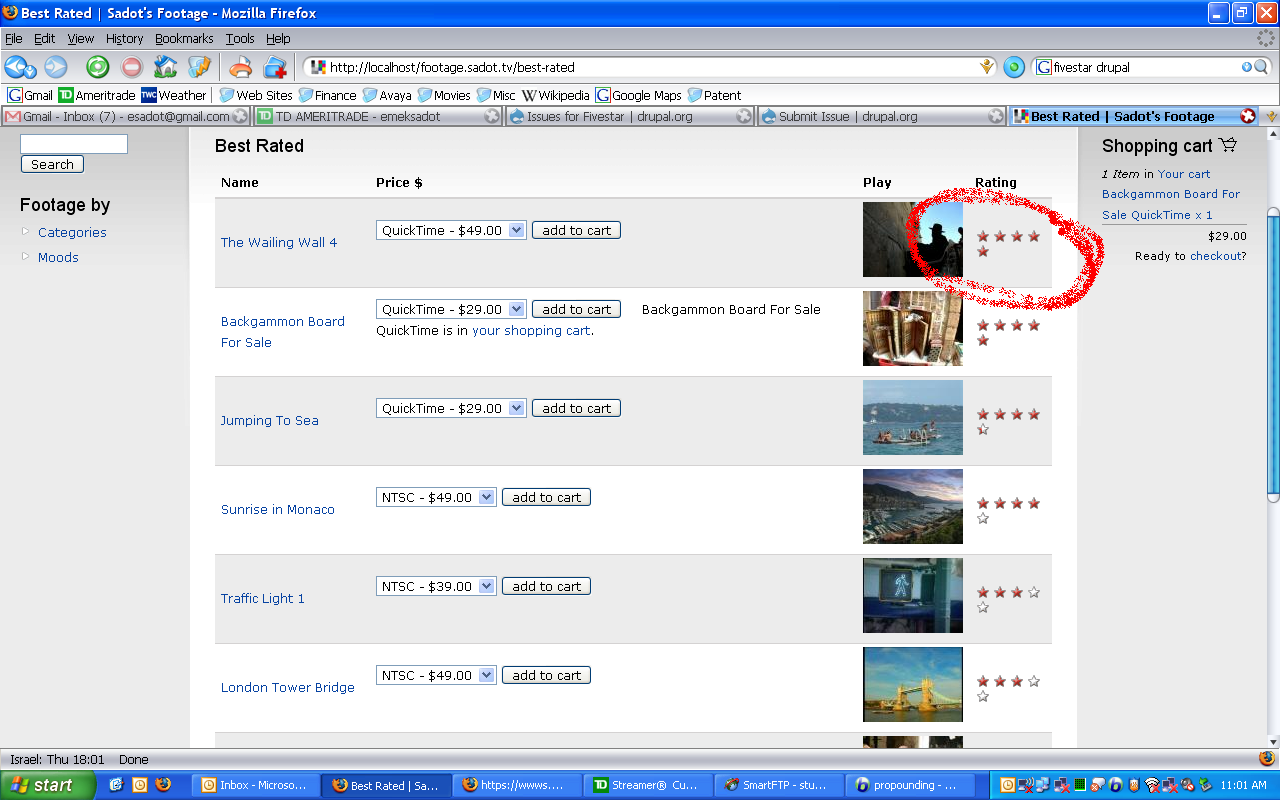
At any rate, the "VotingAPI percent vote result (average)" field is wrapped around in a view report, and I wonder if that can be fixed. Please see attached.
Regards,

Comments
Comment #1
quicksketchI suppose Fivestar would be the best candidate for fixing this problem, but I think fixing it the module would add an unnecessary amount of CSS to the module. The problem is Fivestar doesn't provide a hard-coded width for its widgets, so if placed in a narrow area, it will wrap like you see in your screenshot. Because I don't want to hard-code widths for every fivestar widget with every number of stars (1-10), I'd suggest fixing this in your theme instead.
Add something like this to your theme's style.css file.
This should make it so the static display is always 90px wide, preventing the warping issue you describe.
Comment #2
esadot commentedThanks quicksketch, is surely did the trick :), and I support your argument for not embedding a solution within the module. While we're at it, may I asked two more questions?
- first, can the widgets' size be controlled at the view report? meaning, if I could have reduce the widgets' size, I'd have save precious real estate (and change the fivestar-.widget-static width from 90px to say 70px.
- second, currently the "Your vote:" and "Current rating:" are vertical positioned, could it be changed to horizontally?
Many thanks in advanced,
Comment #3
quicksketchSure, both of these are CSS changes also. I'd *highly* suggest reading up on CSS from http://www.w3schools.com/css/
You can target the width values within a specific view by using specific targeting in your CSS:
This is now the default in the 1.11beta release. I'd love it if you could try it out and see if it meets your needs.
Comment #4
quicksketchComment #5
quicksketchComment #6
esadot commentedThanks quicksketch, I've tested 1.11beta release and the new features are great and much needed, though I'm afraid the release is not mature enough.
First a general comment if I may: in my opinion an upgrade version should not change the behavior of the existing one. 1.11 release introduces two features: horizontal display and star labels, both are active by default. I think that both should be disabled by default. I'd think that people wouldn't appreciate changes in their site behavior after an upgrade, but would appreciate utilizing these new features to customize their site.
A few comments, the permutations are vast thus i haven't test them all:
- When "Display labels on mouse over checkbox" is on:
a. in firefox the widget "flicker" when hovering, in IE6 the address bar at bottom right corner "flicker".
b. the wording Okay, Poor, etc. appear twice beneath the average when hovering "your rating".
c. in IE6 next text doesn't have the required spaces "Your rating: 4Average: 4(3 votes)".
I haven't had the chance to test the css yes. Thanks anyway.
Regards,
Comment #7
quicksketchThanks esadot, most of the problems you've reported have already been fixed since the beta (1 and 2) was released. Please don't flood a single issue with multiple bugs, rather open new ones after checking that someone else hasn't already filed the same bug. Thanks!
Comment #8
quicksketch