Hi,
I installed Image Assist with TinyMCE.
I also follow all steps in INSTALL.txt.
I change [sites/all]/modules/tinymce/plugin_reg.php ...add lines....
Configure input filter andso on andso on....
set user rights...
I have the problem that I cannot upload and choose images in the popup-window but when I press insert, nothing happens.
(As Administrator)
It also nothing helps, when I change between Filtered HTML and Full HTML modus, when adding inline image.
I also try IE6.0 and Mozilla/5.0 (X11; U; Linux i686; de-AT; rv:1.8.1.5) Gecko/20070715 Iceape/1.1.3 (Debian-1.1.3-1),
but it does not work in both browsers.
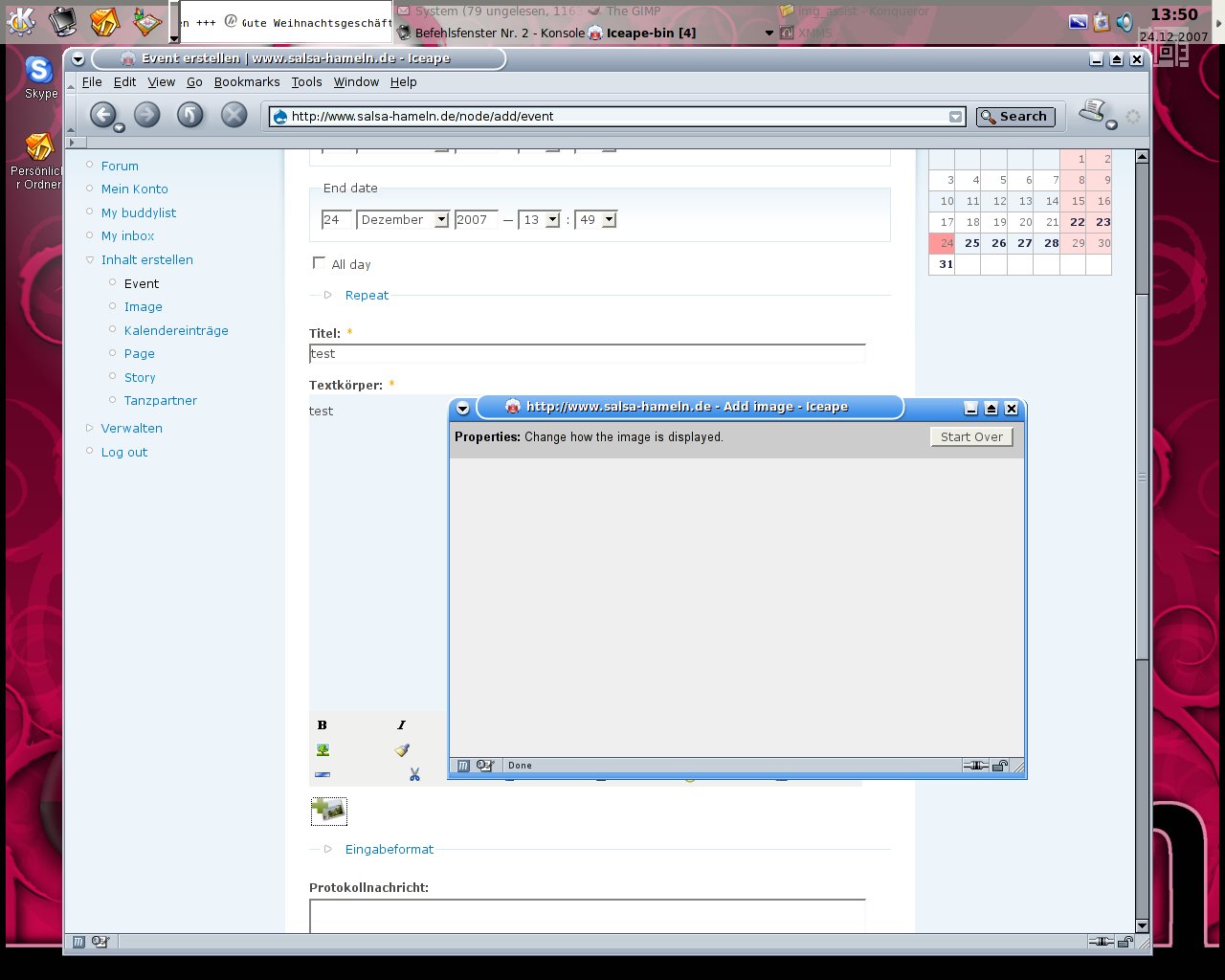
When I choose in POPUP the Image, I press INSERT and then the POPUP gets grey and there is only:
Properties: Change how the image is displayed.
and a button with:
START OVER
I made a screenshot which I attach.
I dont know howto fix this.
Maybe someone can help me, I will provide all informations what you need.


Comments
Comment #1
courtney commentedHi,
I'm having the same exact problem. After selecting an image and clicking on the 'insert' button, I am shown the same blank box as in the attached screenshot.
I am using img_assist 5.x-1.5 and image 5.x-1.6. This started happening after upgrading the img_assist and image modules to their latest versions.
Thanks,
-Courtney
Comment #2
xav commentedHi,
my problem is a little different. I'm using TinyMCE 5.x-1.9, Img_assist 5.x-1.5, and I copied the drupalimage from img_assist to tinymce, and tweaked the php.
My problem is that the "Add image" window appears, I can navigate through the images, but when I click on an image I just see a little progressbar flashing in the corner, and nothing else. Nothing appears in the editor.
I have attached a screenshot taken at the very moment I click on a photo.
Help !
Xav
Comment #3
xav commentedHi again;
I think I have found something: img_assist tries to access the translated image size, which obviously doesn't exist (my site is in french): instead of looking for mayotte_p7200246.preview.jpg it looks for mayotte_p7200246.Aperçu.jpg and it fails. I found that by looking at the HTML generated for the "Add image" window.
Could someone tell me where in the code I should patch that quickly, before waiting for another version ?
Thanks,
Xav
Comment #4
xav commentedOK, sorry for the noise: I found the problkem was in the Thickbox module. I just deactivated it, and now everything works perfectly.
Hope that helps,
Xav
Comment #5
sunPlease ensure that you have updated to the latest official releases of Image and Image assist modules and report back if you still encounter this bug.
Comment #6
realityloop commentedI am experiencing this on a site using Image 5.x-1.8 and Image Assist 5.x-1.6 which are at the time of this message the recommended versions.
When logged in as user 1 the source code of the popup is as follows:
On further inspection this appears to be related to some interplay between FCK-Editor and image assist:
http://drupal.org/node/245484
I have tested in IE and the image assist window loads as expected.
In Firefox the popup window has a javascript error:
initLoader is not defined fckeditor (line 1)
onload(load )
Comment #7
realityloop commentedChanges made in FCKEditor module have fixed this for me
http://drupal.org/node/233791
Comment #8
realityloop commentedChanging status as per previous comment
Comment #9
Anonymous (not verified) commentedAutomatically closed -- issue fixed for two weeks with no activity.
Comment #10
HorsePunchKid commentedI'm having this issue with the latest versions of image and img_assist. I also tried the latest dev snapshot of img_assist with no luck. I'm not using FCKEditor or any other fancy editor; just a plain textarea. It could still be a conflict with another module. It seems that both Firefox 3 and Opera 9.5 are failing on the line in img_assist_textarea.js:
myDoc = window.opener.document;Firebug gives me this error message in reference to that line:
Permission denied to get property Window.documentAny thoughts? I suspect it's some kind of module conflict because even a previous version of img_assist known to work is no longer working.
Comment #11
HorsePunchKid commentedIt turns out the page with the textarea (node/add/...) was coming from https://example.com/ due to securepages, but the img_assist page was coming from http://example.com/. The fix was to list
img_assist/*in the securepages settings.Comment #12
daniel-san commentedI'm getting the same similar situation. The image assist icon on the bottom of the text area for a blog entry works great. But the one on top is not working as described above. I am looking for the "securepages" that you are describing and not finding it. What section of the admin area will I find this list. Thanks
Dan
*UPDATE* - found fix myself
In the Image Assist administration page, I changed the "Display Image assist on text areas:" to "Show only on the listed text areas" and left it at:
edit-body
edit-comment
That solved the situation of having two Image Assist icons on a blog post entry page. Now there is only one below the blog text area and it works great for all authenticated users.
Comment #13
kjeldahl commentedI also hit this problem when integrating with the meteor library for real-time streaming. Removing the meteor stuff removed the problem, and since I'm not currently using the meteor stuff I haven't looked further into it.
Comment #14
Anonymous (not verified) commentedAutomatically closed -- issue fixed for two weeks with no activity.