

Closed (won't fix)
Project:
Fullname field for CCK
Version:
5.x-1.5
Component:
Code
Priority:
Normal
Category:
Feature request
Assigned:
Unassigned
Reporter:
Created:
5 Jan 2008 at 09:00 UTC
Updated:
14 Sep 2010 at 21:50 UTC
Jump to comment: Most recent file

Comments
Comment #1
rconstantine commentedThe README clear states that you can override the theme function and the CSS file as you wish. I don't mean to be short, but that about says it.
Comment #2
bomarmonk commentedI am sorry that I didn't refer to the README specifically, but that does seem to be one way to go. I can also hack the module output, which seems just as reasonable, since either way, I'll have to maintain my own custom files for this... maybe it would still be ideal to let CCK somehow handle the field label? I simply may not be in tune with the reasoning for having the Fullname module output its own field labels. There may be very good reasons, so I'm sorry if I am bringing something up that has already been dealt with. Thanks again for your patience with my trouble reports.
I suppose some of these issues are usability requests (someplace in a gray area between feature requests for UI and a low grade bug). However, some of these issues make me ask some questions about this module's purpose. If it's easier for me to set up last name, first name, and middle name fields separately with CCK, what is the purpose of this module? Maybe my problem is my expectations here: I am expecting a plugin that works rather seamlessly with existing CCK features, and allows me to more easily include a "full name" into my content type. I like the idea behind this module, but I think its relevance is somewhat dependent on ease-of-use.
Comment #3
rconstantine commentedHmm. I really don't understand some of what you're talking about, so if you'd like to elaborate, I'd like to try and understand.
First, the reason there is the 'Legal name:' label as well as the bold-faced label from CCK is for when you want to display both the legal and preferred name, though now that I think about it, I may have forgotten to implement that. Perhaps I do need to modify the theme function to only display the label when both names are shown. What do you think about that? If you write/modify the code, I'd be glad to look at it for possible inclusion.
With that said, you could very much have up to 5 CCK text fields to capture names, but each would have its own label and would take up whatever space your other text fields take up. Additionally, they would be stored separately, managed separately, and would need to be retrieved separately by modules that want to use the values. These are some of the reasons why I wrote this module. Through theming and CSS, this one field can be made to look a lot better than five fields can. Mostly, I needed this for my Handshake module.
The thing you said that I'm mainly confused about is this comment:
What is not seamless here? Also, what is difficult about including this field in your content types?
Comment #4
bomarmonk commentedI am simply referring to the complication with field labels that the "full name" module presents to an end user. While on the surface, having the module automatically create the field label, "legal name," seems user friendly and automatic, it also seems to create a conflict with CCK's normal and flexible way of dealing with field labels. It's not a huge deal to either hack the module or modify the CSS to resolve this, so I guess I'm simply pointing out a small usability issue (my initial report above had to do with my use of the content template module, where you really don't have the option of theming out this particular field label).
I think it would be more user friendly to let CCK handle the field label if a user checks something off on the settings page. And if not, CCK should not produce a second field label which creates confusion (this may happen only in the case of using the fullname as the node title; I'm not sure). Anyway, I like this module for all of the reasons you mention above: it seems like a more efficient way to deal with full names. Thanks again for work on this and sorry if some of my posts seem a bit nit-picky. I hope this post clarifies why I have posted this feature request.
Comment #5
rconstantine commentedI can see the value of allowing the admin the ability to label the name as s/he wishes.
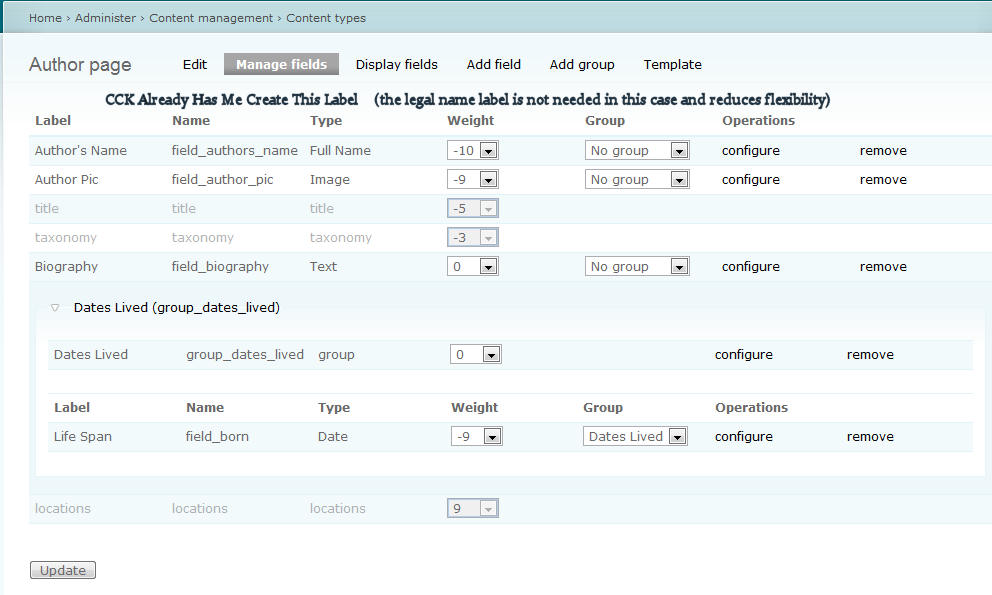
I would be interested to see via screen shot what specifically you don't like. Care to attach one?
Comment #6
bomarmonk commentedHere is a screen-shot that shows how CCK already supplies a label for my full-name-field. It seems that allowing someone to label the field using CCK's labeling system would be the way to go, since they could always supply "legal name" as well as Author's name (in my case). That way you avoid redundancies. But perhaps I am missing something. Hopefully the picture helps you see my usability issue better. Let me know.
Comment #7
njbagger commentedI have to agree with bomarmonk, prepending "Legal name" or "Preferred name" to the field is redundant information, which would be great to have the possibility to suppress.
Comment #8
jonfhancock commentedI concur on this one. The extra label is more of an interference than a feature.
Comment #9
rconstantine commentedAgreed. Will change in the next release. Patches welcome - should be easy, but I just don't have time right now.
Comment #10
kulfi commentedCould you explain how to remove the 'Legal Name' using theme overrides?
For example I have it listed in a view and the generated HTML looks like:
I can't think of a CSS selector that would allow me to display:none; the 'Legal Name' text?
Comment #11
denisgre commentedI was able to remove this by searching for the text string "Legal Name: " in the cck_fullname.module file. There are two instances of this. I left the output statement with a blank (i.e.
t('').since I am a total PHP novice. I don't know if this is the easiest way of resolving this but it seems to work.Comment #12
rconstantine commentedNo longer supporting D5 version.