

I need to display an image or at least an icon next to the headings of two of my content panels. Right now, they are dynamic: if you take a look at these two pages you will see what I mean:
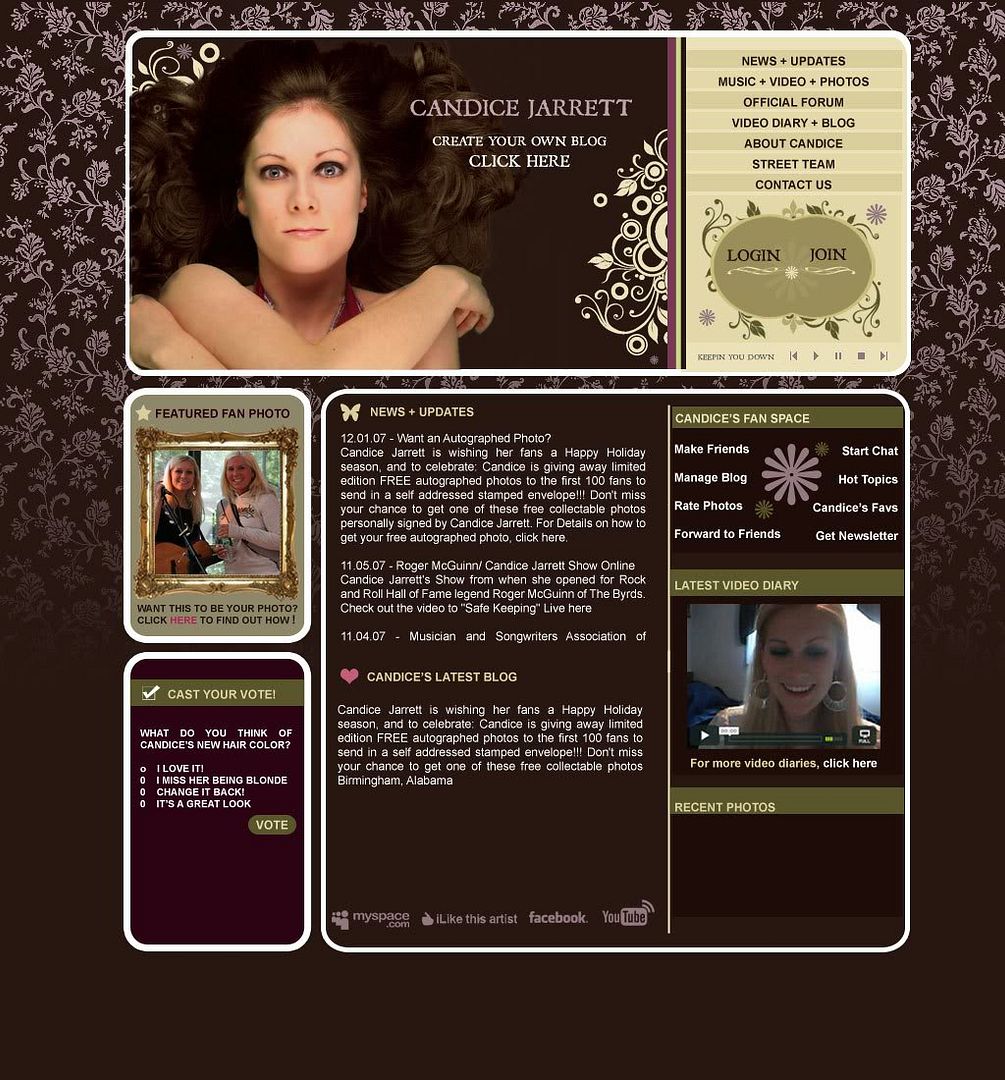
Here's what it's supposed to look like: http://i83.photobucket.com/albums/j303/candicejarrett/PREVIEW_4.jpg
Here's what it currently looks like: http://www.candicejarrett.net
See where it says "News + Updates" and it has a little butterfly icon next to it? Below it in the center it says "Most Recent Blog" and it has a little heart next to that... and to the left it says "Poll" and it has the icon along with the green bar behind the words...
I used Arial for the font because it's web friendly and I would like to display the actual text and not an image of the text... it will help file weight a teeny bit and will help my SEO to have the text... but if I can't just place an icon there... if the whole thing needs to be an image I can do that too.. it's just important I get the icon in there :-)
So, I just need to know how to style the individual pieces so that they can:
1. display the little icons next to them (three different ones for three different modules)
2. be able to put the green bar behind the poll module and make a custom "vote" button
Thank you so much for answering my questions! I really appreciate you taking the time to read this.
Cheers,
Candice

Comments
Block titles
Presumably those are blocks?
Since Drupal 5, it's been possible to override block titles with blanks.
Put your custom headings, including the images, into the page template.
I do have drupal 5.6... how
I do have drupal 5.6... how do I override the block titles with banks? Is is a setting through the admin panel or is there code I have to input/ remove?
Thanks for answering!
Got it!It is in the admin
Got it!
It is in the admin panel... I put < none > in and it took the tag out... thank you!!!
Site structure
Hi Candice,
The poll is indeed, a block. The header can be styled with
as a default for all such polls; or
for just this one. (If you are using firebug 4 firefox, it will be easier to see why those rules work.)
The News and Blog are a bit different. At the moment, you have two nodes, one for each, with all items written one after another. The ‘Drupal way’ is to have a node for each item. If you enable the blog module, you can create a story for each News item, and a blog for each (you’ve guessed it) blog entry.
Having the different content types enable you to keep the two distinguishable, and you can create other node types if needed.
I mention this now because it will affect how you theme the pages.
The default home page would then show a list of items of both types mixed together. You could distinguish them by copying
node.tpl.phptonode-blog.tpl.phpandnode-story.tpl.php, then edit them to include an <img> tag for the appropriate icon.If you want two blocks with links to the latest items of each type, this is possible, but will be themed with the same technique as for poll, putting the icon next to the block header in
block-blog.tpl.php.Hope this doesn’t make everything too complex – it’s easier to think of it now.
Poll block
You could copy
block.tpl.phptoblock-poll.tpl.php, then edit it to include an <img> tag for the appropriate icon (and put the title back).Hi Zeta-Zoo
Hi again Zeta-Zoo!
Thanks for telling me this now... I'm really glad you did so that I can fix it at the start rather than after I've spent hours trying to sort it out later! Thank you!
It is very complicated and I've read over your response about 12 times trying to wrap my head fully around it. I'm coming up with a problem: I tried to enable the blog and then go back to the news story I made to change it's category... when I use the drop down is says "Blog (disabled)" even though I enabled the Blog feature in the module section.... what do you think could be causing this?
I dealt with the poll's header and found a solution... I hard coded the header into the left bottom module since it is never going to change and was planning on doing the same for the other titles.. "News + Updates" and "Candice's Latest Blog"... so that the titles will always stay the same even though the content will be dynamic. I hope this doesn't cause me problems later... I can't forsee any right now, but I am brand new at this.
I'm going to keep trying to enable the Blog module... I'll post here if I get it, but it's looking bleak for the home team :-)
Thanks again!!!!
Candice
PS. You wouldn't by any chance know how to make a custom submit button for the poll would you? I mean to replace the exsiting button with an image... thanks again for all your help!!!!! :-)
Content types
Firstly, Blog, story, page etc. are content types: categories is something else entirely (Taxonomy). I haven’t seen a drop-down with blog in it: what page is this on?
I think you would have to create a new blog item and paste the contents in. I think it would be least confusing if you used the story content type for news items, and the Blog content type for blog items.
If the box is ticked next to blog on the modules page, then it’s enabled.
hard-coding shouldn’t be a problem now but is less flexible.
I don’t think it is possible to theme a button into anything else: You could investigate http://drupal.org/project/advpoll.
Well, your way is definitely
Well, your way is definitely the better way... about hard coding it verses creating the new node.tpl.php pages. It's IMPOSSIBLE to hard code the titles for both nodes because it outputs the content one directly after another, it is impossible for me to give the blog a title and icon by "hard coding" it onto the template because I'd have to get down to the database level...
BUMMER!!!!
I've been trying to create the node-blog.tpl.php page... and I copied the code exactly from node.tpl.php.... but it shuts the whole thing down upon save. Do I have to delete the original node.tpl.php file and replace it with the node-blog.tpl.php and node-story.tpl.php pages pages??? Or do I have to link to the new node.tpl.php pages from somewhere else in the file directory?
Thank you so much again for helping me. Doing it the right way is much harder, but I know it'll be worth it!!! :-)
node-blog.tpl.php is not a
node-blog.tpl.phpis not a page – it’s a file. Just make a copy with a new name, then edit it.the whole page? computer? … internet?!!! Don’t worry, it’s still working at this end.
You should have all three
node[-*].tpl.phpfiles. Refer to http://drupal.org/node/17565 .You wouldn't by any chance
That can be done fairly easy with css. for example:
#edit-vote {
width: 111px;
height: 22px;
text-indent:-5000px;
background:url( image-url ) no-repeat;
border:0px;
}
Adjust to your image dimensions, the negative indent is just there to hide the text.
- Andi
Yes, you are right.
I must admit I hadn’t tried. You could also use;-
To get it into the right place.
This should get rid of the gap.
yeah, it's fun how much you
yeah, it's fun how much you can do with css backgrounds.
Actually I'd use that method for the icons, too, instead of putting img's into the tpl files.
That way the only file you have to edit is the style.css
(@Candice)
For example, to get the icon & background in the poll-block:
or something like that. add some padding-left to the header-text, so it doesn't overlap.
- Andi
THANK YOU SO MUCH!
Thank you so much for all of your wonderful advice here! I haven't had a chance to work on my site in a few days, and did a little bit last night. I'm going to try to implement the things you have said... thank you so much for taking the time to answer my questions.
To answer from earlier: it would shut down the whole site and told me I had an error... I think on line 23. It didn't display my content or styling... just turned it into a white page with the text stating the error. So, I deleted the file... and my site came back up.... but the problem persists so I'm going to try it again tonight and see if maybe I missed something or copied it wrong....
I'm also excited to try to make the poll button/ submit buttons fit into my style! Thank you so much. Tres cool. :-)
I'll keep you posted on how it turns out, thank you so much again! Sorry it took so long for me to respond to this, and thank you for taking the time to answer my questions!
Cheers,
Candice
Thanks Zeta and Andi! I was
Thanks Zeta and Andi! I was able to make the tpl.php files for the poll, story, and blog and I adjusted the look of my vote button! Thank you both so much!!! :-)
Candice
Suggestions
Hope you don’t mind me suggesting a few enhancements;
Then apply
class='centre-block'to the outer table. (you can use american spelling if you must;-)Fix the background. Trouble is that ‘floated’ and ‘non-floated’ elements ignore each other, to an extent.
Then apply
class='img_only'to the first cell (td) of the nested header table (with your image), this will line it up properly with the second cell.Hey!!!
Not at all!!! Suggest away!
LOL - I will probably stick to the americanized spelling just for consistency sake... although I do chronically spell the word "Theatre" instead of "Theater".... ;-)
If you don't mind me asking, what browser are you using? Thank you so much for the pointers above!!! It was driving me nuts looking at how terrible my site looks in Firefox... with everything pushed to the left like that.
As far as that spry gallery goes, right now I've got the thumbnails in an iframe from that sub page that I actually got the spry gallery to load in and pull the images correctly... but taking this sneaky approach out which won't allow me to really do what I wanted with it (the whole light box thing...) Though I'm not giving up just yet! ;-) But I do think I'm going to end up putting in a module request for it sooner or later and see if anyone over there has got something.
Thank you so much again for the formatting info above!!!!! :-)
WOOO!!!
Thank you so much again Zeta, it now is centered in Firefox!!! I don't know how it looks in IE6 yet, that will be my next hurdle ;-)
You are AWESOME!!!!!!!!!
PS.
I didn't have the heart to change it from "centre" - so my css is feeling a bit European now. ;-)
How the Canadians cope…
… I’ll never know.
Firefox, of course! It’s so much easier, in the long run, to develop for a browser that complies with standards, and then deal with the inconsistencies of IE, than to attempt to – you end up needing two horses. Also, it allows you to use firebug, an extension, which tells you everything a developer could wish to know, and allows you to modify the css, seeing the effect immediately.
I don’t know anything about spry, but there are pages in the handbook detailing how to implement a gallery using Drupal modules, including lightbox.
You’re welcome!
LOL !!!
LOL!!! I think the Canadians cope with a combination of great beer, hockey, and some of the greatest bands of all time ;-) I actually only live a few hours from Canada... it's strange that because of my accent, went I went to the UK last March, everyone would ask me if I was Canadian. I guess most people think Americans all have a southern accent. Not the case. ;-)
You've definitely got a point about FF... trying to work backwards from ie 7 was hard for me... also, I tested my site on a friend's laptop with ie6, and it's a mess. I'll be tackling that soon....
I've got another theming question (I'll post here, but also start a new thread)...
I want to give my forum a completely different theme as the rest of my site.... do I have to throw it in a sub-domain to do this? or can I create a file that will help me push it to a new theme? Right now I've got that big header image, I want the forum to come up in a separate window and loose the header/nav altogether.
If you can point me to a tutorial... or if you have any advice, I'd really appreciate it! I'm looking at the advance forum module now... and it's looking pretty complicated, but I'm going to be sifting through it tonight. If I use that mod, will it let me loose the main page.tpl.php styling?
Thanks again!!!! :-)
Candice
Forum theme
No sub-domain needed: There are several ways to do this.
If you just want no header, and your header is a block in a region, you can disable the block on certain pages: admin/build/block » configure.
Or you can build a new page.tpl.php just for forums: call it page-forum.tpl.php, see http://drupal.org/node/104316 similar to the bit about node.tpl.php earlier in this thread.
There are other ways, using contrib. modules see http://drupal.org/project/Modules/category/73, to invoke completely separate themes for parts of your site.
Happy theming,
Nick