

Closed (fixed)
Project:
Hierarchical Select
Version:
5.x-2.0-rc4
Component:
Code - Taxonomy
Priority:
Normal
Category:
Support request
Assigned:
Reporter:
Created:
24 Feb 2008 at 12:02 UTC
Updated:
15 Apr 2008 at 22:15 UTC
Jump to comment: Most recent file



Comments
Comment #1
wim leersFor version 2, somebody convinced me that having "<none>" present at all times, even when it's a required form item.
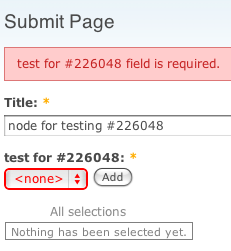
The reasons? Consistency, and formost: to avoid confusion. Suppose the "<none>" option is not present. Then something will be selected by default. The user might overlook this, and without realizing, he would have selected something that's not applicable. When "<none>" is automatically selected, this would trigger a validation error, forcing the user to think about his choice.
Comment #2
breaddawson commentedi see.
but i found even if i choose and turn "Required" on, then submit ,then nothing happened.
I just successfully inserted one node!
and when i checked it out, i found the first vocabulary was automatically added!!
for example, i have "a->a1", "a->a2", "b->b1"
then "a" was automatically added if i choose
why?
Comment #3
wim leersHm. Will try to reproduce.
Comment #4
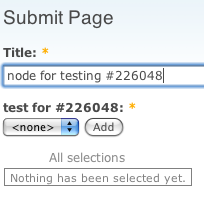
wim leersI can't reproduce this. See the attached screenshots.
Comment #5
breaddawson commentedi've got several screenshots below. and i wonder that it's bit of similar to another thread posted by me(auto add one term when using multi-select http://drupal.org/node/226076)
i'm using drupal 5.2 and several other modules, for example , CCK 5.x-1.6-1, Category 5.x-1.1, will they conflict this module?
Comment #6
wim leersPlease disable the Category module. That module is likely to do weird things.
Your other issue is indeed a duplicate of this one. It does contain a valuable screenshot of your HS settings though, and I just compared it with the settings of my test: the settings are identical. So probably this is the Category module causing that problem.
Comment #7
breaddawson commentedi've disabled the Category module and all the other modules except for CCK, HS, & Drupal Core
but the problem was still there
maybe i should debug it and give u more useful information..but i don't know how...
Comment #8
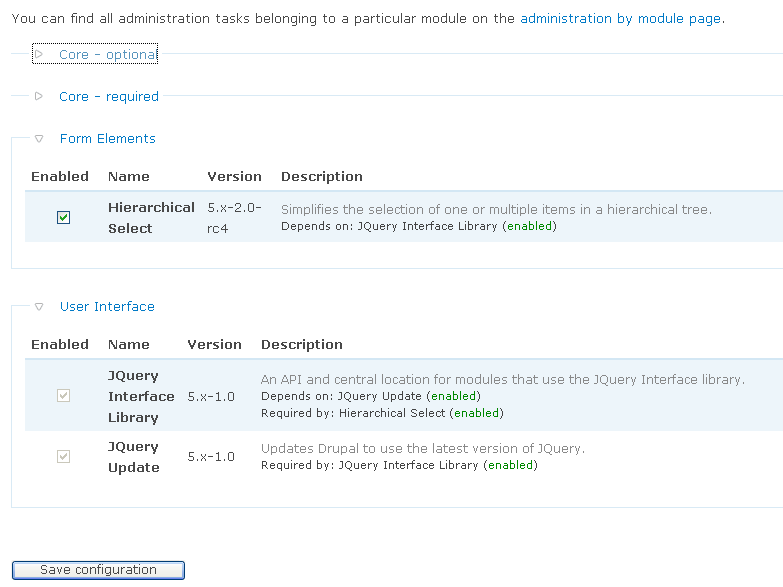
breaddawson commentedi've installed a pure Drupal 5.2 and only enable HS and JQuery Interface Library 5.x-1.0, JQuery Update 5.x-1.0
the problem remains...both the "Required" Problem and "Multiselect" Problem remains..
maybe it's caused by jQuery?
Comment #9
wim leersI can't reproduce it. Are there any other details I should know? Is this a live site? If it is, please use my contact tab to send the login details (+ ftp login details as well, if possible).
Comment #10
breaddawson commented:(
i'm using PHP 5.2.3 and mysql 5.0.41 ,the web server is Apache 2.2.8(win version)
i don't have a web host...:(
do u have one? so i can upload my files, u can test then delete them
Comment #11
wim leersI'm sorry, but I really don't have time for that at the moment.
Comment #12
breaddawson commentedi've sent the login in info of live site to u via your contact...
Comment #13
wim leersI've logged in to your site and I've seen it happen now, even when all the other modules you had installed are disabled.
Trying to reproduce this locally now.
Comment #14
wim leersHah!
It seems this is the new default behavior since Drupal 5.7… But I can't reproduce it on my Drupal 5.x-dev site. (which is Drupal 5.8-dev in fact.) So it seems it's specific to your site. Perhaps you modified core?
I've disabled the HS module now and you'll see that "a" is selected by default in the normal select.
Note that it only happens when the vocabulary is required. Multiple select is not the right condition to reproduce this.
Comment #15
breaddawson commentedno, i haven't modified the drupal core
i've tested it on a pure 5.2 and the problem remains
i've installed 5.7 again and i found the bug gone
so i think maybe it's drupal's bug?
i knew that if u disable HS and checked "Required", Drupal will get rid of by default, so the problem i mentioned would not appear
maybe it's done for hide the bug(if u choose none and submit, actually the first term will be choosen )?
Comment #16
wim leersWell if the problem disappears by installing Drupal 5.7, then install 5.7?
Comment #17
breaddawson commentedokay...i'll use Drupal 5.7...
Comment #18
cialog commentedSorry for re-opening the issue as i can duplicate the bug.
The versions are core 5.7 and hs 5.x-2.x-dev. My node type has two categories attached that are both handled
by hierachical selection.
The setup ist identical except one of them is required and the other is not. Both are multi-select (maximum of 2 selections allowed)
Both get the default option "none" added which should'nt be necessary for the required category.
When you save the node with no selection (eg "none") then there will be no validation error. Instead for the required category the first entry in the list after "none" gets selected automatically. (while the behavior of the non-required category is as expected)
Comment #19
wim leersThat's not a bug. It's by design. As soon as you've got at least one entry in your dropbox, "" is preselected, meaning that you don't *have* to select anything else, and that if you submit the form as-is, that nothing except for the items in the dropbox will be saved.
The lack of validation error you describe, assuming that nothing was in the dropbox, seems like a bug. However, I'm currently working on version 3 of HS and from now on that's the only version I support. Please try the HS 3 development snapshots – they're very stable (but they're ATM not yet visible, wait 24 hours).
Closing this issue again. If you can still reproduce the bug in HS 3, please open a new one! :)