

Closed (fixed)
Project:
Drupal core
Version:
11.x-dev
Component:
user system
Priority:
Normal
Category:
Feature request
Assigned:
Unassigned
Issue tags:
Reporter:
Created:
2 Mar 2008 at 22:50 UTC
Updated:
16 Dec 2023 at 14:28 UTC
Jump to comment: Most recent, Most recent file
 Show commands
 changes


Comments
Comment #1
dmitrig01 commentedReal patch this time
Comment #2
dmitrig01 commentedThere is a bug and this is a bug in jQuery - .clone doesn't clone input values
Comment #3
webchickThis feels like it's missing something like a notification of what just happened. I accidentally typed "zbs" and the entire screen went away.
Maybe something like:
Clicking "refine your search" would bring the entire page back.
Also, there's no indication that typing in that box will filter the results. The label is "Permissions"... how about "Filter by keyword:"
Comment #4
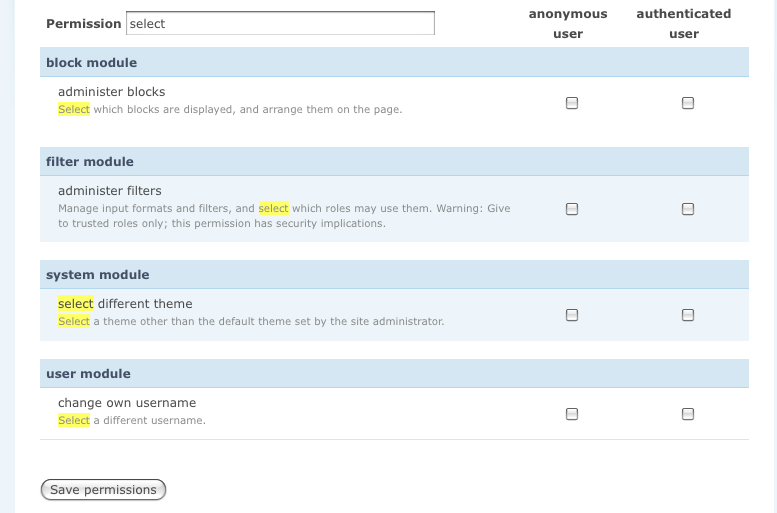
dmitrig01 commentedNew patch; There's a nice "empty" screen and it now highlights the term searched for in the permissions.
Also, it only searches titles. I can add 2 lines of code for it to search descriptions too, so opinions?
Comment #5
birdmanx35 commentedI haven't actually tested this patch, but I think it should take into a few issues right now:
- It seemed really slow when you showed it off today.
- The highlight should definitely be something more definitive, like red or bright green. Not pale yellow (Jimmy, who is sitting besides me, suggests seeing what the CSS file uses so it adjusts properly).
- Definitely add searching of the descriptions.
Overall, a huge +2, if it's implemented properly.
Comment #6
Crell commentedYellow is the conventional highlight color. Green I could see, but red means "error", which this isn't.
I'm also +1 on searching descriptions, too.
I haven't noticed a performance problem myself, but I didn't benchmark it.
Comment #7
keith.smith commentedShouldn't the interface strings present in Drupal.userPermissionSearch (and possibly others) be run through Drupal.t()? Possibly these need to be themable as well but I admit to not looking closely at that.
Comment #8
anders.fajerson commentedBug: after scrolling and when it's inside the sticky tableheader it breaks when the list has been filtered down and the sticky table header is removed. I can see the rational of having it next to "Permissions" in the header, but instead of dealing with that edge case it migh be a better option to put it above the header. Or maybe hide it when the sticky tableheader is initiated.
There should be a label, either inline (e.g grey text which disappears when clicking inside the textfield) if inside the tableheader, or a standard label if displayed above.
To increase performance, don't filter on every key down, just after a specified delay, e.g 300ms. Core autocomplete does this.
This kind of filtering could be useful on the modules page as well. Nice work!
Comment #9
moshe weitzman commentedreminiscent of http://acko.net/blog/jquery-menu-scout. that became a patch and then a contrib module named 'menu scout'. perhaps borrow some ideas from there if applicable.
Comment #10
catchLike it, a lot. Definitely nice to have this work on descriptions - people will search for something they remember which may well be in there. Haven't tested the patch yet, but I saw the demo and it looked like fine work.
Comment #11
Gurpartap Singh commentedHere's my submission based on #4.
- Common value between the actual and sticky table header. Shouldn't this be handled by tableheader.js (Possibly this is a bug like on node and user administration pages having a checkbox in header).
- Filter by description as well as highlight.
- Added mouse up event.
- Case insensitive search, using "i" flag for regular exp. match.
- Hide Save permissions button, when no permissions are displayed.
One thing I encounter with this patch is about highlighting. Type "administration" and administ part of administer will also remain highlighted. This one arises from the two if()s for the title and description. Have to put time elsewhere, so will put the rest as needs review state.
Comment #12
Gurpartap Singh commentedHere's a screenshot for an overview of the feature.
Comment #13
cwgordon7 commentedThe "No permissions were found" text needs to be translatable.
Comment #14
gábor hojtsyBarry has a similar patch which is going to be a Drupal 5/6 contrib module AFAIR, which he used in his 3 minute web 2.0 demo, to quickly filter the module list down. So it would be great to have this as a generic filter script. Video: http://blip.tv/file/856641/ (look at around 3:00 for that feature)
Comment #15
bjaspan commentedFYI, the module I wrote that Gabor is talking about is called Modulator. Currently it is just a filter for the modules admin page, but I also want to change the modules page from a list of checkboxes to a list of icons for installing, enabling, disabling, and uninstalling modules without having to submit the form. Haven't gotten to that yet, do not know when I will.
I intend the module's functionality to be a patch for D7 core but needed for my Launch Pad demo on D5 first. :-)
Comment #16
dries commentedbjaspan, aren't both wishlist items independent? We might be able to commit them as separate patches.
Comment #17
gábor hojtsyDries: I think, these might be possible to generalize to a widget which would be useful elsewhere in Drupal as well. A live search widget for tabulated data. It might not make sense to generalize it, but these two seemed very similar to me from the looks (did not check the code, esp that Barry's code is not yet available).
Comment #18
dmitrig01 commented@Gabor – Konstantin and I talked about this about Drupalcon.
The widget would be hard. Here's the challenge, I hope you understand.
Supposed you are searching this table cell:
<td>Testing<strong>(some code)</strong></td>So you search for
Testing. It highlights so it comes out like this:<td><span class="highlight">Testing</span><strong> (some code)</strong></td>But. What if you search for
ing<strong>?<td>Test<span class="highlight">ing<strong></span>(some code)</strong></td>That's invalid HTML. But. If you search the .text(), then the HTML gets stripped.
Now, you say, "Let's try something here: search the .text() and inject it back into the HTML somehow".
So it will search
Testing(some code)What if you search for
ing(some?That's what we need to figure out, I have no idea.
Comment #19
catchdmitrig01 - who's going to search for
ing<strong>though?Comment #20
bjaspan commented@#17: The code for my module search is available and has been for a while: it's the Modulator module in contrib. No releases yet and I have not created a project page for it. Also, I don't claim the good is any good; it was a quick hack for the Launch Pad demo. But it *is* available. :-)
Comment #21
dmitrig01 commented@catch I don't know, but it's possible :D
Comment #22
catch@dmitrig01: and is the only issue that you get invalid html while filtering? I really don't see this as a reason to hold this up.
Comment #23
dmitrig01 commented@catch more practical problem: You search for ron (part of cron), and get
<st<span class="highlight">ron</span>g>Comment #24
chx commentedNot easy. But then again, not that hard either. Just a bit of string juggling and a mighty preg_split to prepare for the search.
Comment #25
dmitrig01 commentedSo here's an explaination for what the above does.
You want to search for "llo test" within the HTML
hello <em>test</em>, and you want to highlight the resultng string.There are three ways:
(a) Search within the HTML string.
This is bad because you get this:
he<span class="highlight">llo <em>test</span></em>, which is invalid html.(b) Search within the stripped string
This is bad because you get this:
he<span class="highlight">llo test</span>, which makes the formatting disappear for some reason.(c) Search the way we do it
It's really really complicated but it works, and doesn't have the other deficiencies.
Comment #26
chx commentedSo the complicated way with much less optimization (which clouded a lot of things) and much more self-describing variable names.
Edit: that optimization was needless micro-optimization of trivial arithmetic so it's not detriment to performance to remove them.
Comment #27
dmitrig01 commentedRe-rolled with chx's code included (but ported to JS) and documented.
Comment #28
dmitrig01 commentedand a demo
http://dmitrizone.com/229193.mov
Comment #29
dmitrig01 commentedoops contained cruft
Comment #30
webchickI would like someone from the UX team to chime in on this patch. If this UI construct is found to be desirable, I would also like to see this abstracted out and added to some of our other 'mammoth' pages (notably, ?q=admin and ?q=admin/build/modules).
Comment #31
catchI've added this to http://groups.drupal.org/patch-spotlight
Tried the demo and it's very nice, I also agree this'd be good to abstract out as a general js table filtering pattern for other pages.
Comment #32
catchI get malformed patch at line #508 when applying this, also looks like it needs to be made to work with uppercase letters - 'A' leads to 'no permissions found'.
Comment #33
sunSearching for permissions? That doesn't sound like the right answer to the underlying usability problem.
I mean, when do users have to search? I guess they want or have to, if the total result set of all possible options is too large, or if the answer is yet unknown. Drupal permissions, however, are pretty limited. Of course, there are many permissions if one installs a bunch of contrib modules. But then again, users would probably want to view them grouped by meaningful topics, rather than searching for arbitrary strings. For example, we could re-use the existing grouping by package name, just like we do on admin/build/modules. And we could display permissions of recently enabled modules separated/first, in front of all other permissions.
Comment #34
Bojhan commentedI had a quick talk with yoroy, about this there are one main concerns :
You need to know what you are looking for
This is very efficient for those who know exactly what they are looking for and even if you dont, just filling out a couple words would probally already show up your result. However if you happen to have a high ammount of modules, this might not scale well - because you cant overview if you dont know exactly how to word it, would autocomplete on sites with a lot of modules be possible / help ?
Apart from that the contrast is just right (aesthetics less on descriptions). We might need to rewrite some of the text, as some of it is non-descriptive of what it is actually about - but that can be adressed in a other issue. Also typo's and shortcuts, if its aimed at efficientcy its worthwile to look into.
Other then this, I and yoroy like it. Even though though some concerns, it can be added to core.
On the notion of using it elsewhere, sounds good, but you have to concider that on this page the task is to find a specific permission, while on other pages there might be a more important goal, that should be adressed by the search.
sun: We are avoiding an underlying usability problem, but thats more concernd with the broken workflow of installing a module then with this screen. It's obvious that for beginning users, this functionality might not apply (would have other search pattrens) - but this seems aimed at intermediates/experts.
Comment #35
alpritt commentedI'm not sure if I think this is a good idea or not.
As Bojhan says this is clearly aimed at the intermediate/expert crowd, so if there is a consensus that this is going to be useful to the kind of people who will read this issue then I think it is fine. We will, of course, have to make sure it doesn't confuse beginners, but we can probably accomplish that easily enough.
However, while it looks like it might be useful, I'm not totally convinced it will be in practice. You already have a search function built into your browser; I know it doesn't _filter_ the search, but do you really need it to actually filter? Does search highlighting not do the job?
In my opinion this addition would need to be justified a lot more.
Comment #36
Bojhan commentedWell the search in the browser (the same case, without filtering results) requires the user still, to scan the whole page for highlights (in firefox's case, click next) - which makes it quite inefficient. We can just test it with beginners and possibly also intermediate in a usability test - to find out whether it really confuses.
Alpritt not sure if your using firefox, but that's where search is quite broken for these kinds of lists.
Apart from that its important to differentiate from known-item seeking (information that you know how its called) and want-to-be-known-item-seeking when you don't know exactly how its called but plan to find it by looking at the content. In which case a filter like this, is faster and easier then firefox search.
Comment #37
catchI use ctrl-f on the permissions and modules pages most of the time. Especially on the modules page (where I hope we could apply this next), it's completely broken due to having module names showing up in dependencies - so in some cases could take ten or fifteen clicks to find. As such I think this is a worthwhile improvement.
Comment #38
alpritt commentedIf it will be able to deal with that scenario, I believe this is a good enough reason to have this feature.
Responding to webchick's comment, I don't think it would be appropriate for /admin. The modules page and the permissions page are by their nature long lists of things, so it makes sense to search through them. While /admin is a long list of things too, by its nature it shouldn't be. There are better ways to fix that page.
I'd love to see this work on such things as long lists of content; although I'm not sure how practical that is considering the paging. It's out of scope for this issue, but I wanted to throw it out there anyway.
Are we intending to abstract it in this patch?
Comment #39
dave reidOoh, this would be very useful for the modules and permissions page. Subscribing.
Comment #40
dmitrig01 commentedRerolled, this works.
Comment #41
dmitrig01 commentedComment #42
dmitrig01 commentedHere's with the header Filter: as suggested by the usability team.
Comment #43
dmitrig01 commentedScreenshot of the difference

Comment #44
katbailey commented@dmitrig01 there are other things in this patch besides the permissions page changes - vertical tabs and user settings page picture support stuff. I'm assuming those aren't supposed to be in there...?
Comment #45
katbailey commentedWow - the logic of the Drupal.userPermissionSearch function is awesome :-) Makes my head spin
I would just make a couple of minor changes, mainly in the comments, which I will do if you reroll the patch without the other changes I mentioned above. Also, seeing as there's so much in that one function, is there a case for abstracting it out into separate functions? I guess that's just a question of style, maybe not so important.
Comment #46
sun@katbailey: You successfully made yourself ineligible to RTBC this issue! :-D
PNW until someone understands the logic who is not a jQuery ninja.
Comment #47
dmitrig01 commentedHere's the proper patch.
Comment #48
cwgordon7 commentedI was reading through, trying to make sense of the javascript, when I noticed that both of these lines need a period at the end of them:
Also, tab on the following line:
Now back to the javascript itself. The logic is a little tricky at times, but I think that with the abundant comments, I can follow at least the basics of what it's doing. However, I think it might be easier to understand if the giant scary Drupal.userPermissionSearch function were to be split up into several smaller functions. That way, I could look at a nice clear central function and then look at any of the specific functions it calls without having to be concerned about the rest of them.
Also, maybe some kind of html nesting would make the process easier? That seems to be the reason behind a lot of the function's complexity.
Comment #49
katbailey commentedHow about something like this, i.e. separating out the chunk highlighting magic from the main function that scans through the rows...
Either way, this is a terrific piece of functionality and it would be awesome to get it in :-)
Comment #50
dmitrig01 commentedHere's how i'd do it
Comment #51
katbailey commentedOK, here's a new patch. @dmitrig01 I reverted that changed line
previousModule = $(this).show();back topreviousModule = $(this);because it was causing a js error (previousModule.hide is not a function) and it seems to work perfectly well like this.Comment #52
dmitrig01 commentedThis won't work. Search for "block", select the contents of the textfield, and type "content" (don't ever delete anything). previousmodule.show worked for me.
Comment #53
katbailey commentedYep, you are right, I've just changed it and I'm no longer getting that error, don't know what that was about
Comment #54
chx commentedI think this is fine with working only if JavaScript is there. Drupal works without JavaScript but with reduced functionality already. You can not resize a textarea without JS for example. Autocomplete does not work. This piece is similar.
Comment #55
dmitrig01 commentedMore docs
Comment #56
dmitrig01 commentedreal patch
Comment #57
dmitrig01 commentedHEre's a test module.
Comment #58
dmitrig01 commentedbetter test module.
From basic testing with this module, the number of roles matters very little, what matters is the number of permissions.
Comment #59
dmitrig01 commentedI'm optimizing it
Comment #60
dmitrig01 commentedHere we go. This is quite fast. It works (not too fast, but it works) with > 500 items. PHP wouldn't let me test with 1000 table rows :-(
Comment #61
dipen chaudhary commentedWhen I type in "Administer", "Posts", "Select" I get no permissions found, where as it correctly filters words like "block", "actions","cancel" and numerics like 2,1 etc.
There are permissions defined with words Administer, Posts etc.
Comment #62
dipen chaudhary commentedUpdate, I typed in capital A in Administer, It takes in small "a".
Comment #63
dmitrig01 commentedSorry, thanks for testing. Fixed (about 10 character difference)
Comment #64
dmitrig01 commentedwith working zebra striping (a bit *too* much optimization :D)
Comment #65
aclight commentedMinor typo:
s/permisison/permission
Comment #66
dmitrig01 commentedFixed. incremental_filter_access_control-229193-66.patch
Comment #67
dries commentedThe last patch in #66 doesn't seem to work for me (Javascript errors). I'd like to test it out because I'm wondering how it is different or better from my browser's built-in search. My browser provides local search with high-lighting already. Curious!
Comment #68
dmitrig01 commentedFixed. sorry about that.
Comment #69
dmitrig01 commentedfixed for real
Comment #70
dmitrig01 commentedfor real real
Comment #71
yoroy commentedJust noting we have a similar ui-pattern in /admin/build/path, but with a submit button and a page reload.
Go ahead making this work for permissions first, would like to see the filter on /admin/build/path work in a similar way in a followup.
Two different versions of (nearly?) identical functionality is not helping us smoothen the user experience.
Comment #72
chx commentedThe fundamental difference to the path admin page is the amount of path aliases. Not even the biggest site will have thousands of permissions but any big site definitely will have hundreds of thousands of path aliases. So making the two filters different actually make sense.
Comment #73
webchickActually, isn't that more of an argument to NOT do crazy in-line XHTML highlighting on some pages and not others, since there will be some pages that we can never do it for but users won't understand why?
Comment #74
bennybobw commentedI'm coming in a little bit late to this one, but the jquery bug seems like a showstopper to me. Why not add a name or a class to the search box and add something like this to the keyup callback --
Also, maybe I'm missing something, but I don't see where the delay to the keyup cb is happening in the latest patch in #70.
Comment #75
dries commentedI think this looks nice, but it is not spectacularly better than my browser's search. It's quite a bit of code for a small improvement. How do other feels about this? I'm undecided.
Comment #77
senpai commentedI've used the Firefox find-as-you-type feature on the permissions page since, well, as long as I can remember, and it's never failed to find what I'm looking for. I most often do a search for the name of the module, as in 'user module', just so I can avoid scrolling down the page for two whole minutes with my mouse wheel.
While I love the idea of this Filter By: feature, and I don't think it needs to be degradable in the least, I think that it would be faster for experienced users to simply use their browser's find-as-you-type. Having said that, if a user doesn't know about the features of the browser they use because they think that AOL is the internet, then having something like this in core is a great thing.
Biggest question? What's the real usability problem this widget is trying to solve?
Comment #78
Bojhan commentedSenpai see #34, I think the notion of "browser" as replacement for functionality in Drupal core is kind of silly. Although we know this functionality in our browser, I think alot of users don't. Looking at the usability test we did in Baltimore only 1 out of 11 persons used the browser it's search.
Comment #79
catchWhere this would be really useful is on the modules page - where CTRL-F gives you completely useless results due to dependencies and requirements listings. If we could search on just the human and machine readable name for the module, and get to the specific row, it'd massively improve that page. Some modules end up listed on that page 30 times and CTRL-F becomes useless - only something like this which can inspect the specific HTML we output can get past that.
I also think it's completely fine for this to just degrade to the page as it is now - same as sticky table headers.
Comment #80
senpai commented@Bojhan in #78: I think that I'm saying exactly what you're seemingly contradicting me for, so I rather suspect that we're both talking about the same thing here. Cheers!
Now, I asked what the real problem is. The one that this new widgety thing is trying to solve. You pointed me to comment #34, where you said
So lets get down to the root of the matter. We need a filtration system in order to find what we're looking for on the 12 Mile Long Permissions page, right? Whether it be a Filter By: widget for beginners or a browser find-as-you-type like Dries suggested, we're all really just looking to narrow down our options before making the requisite adjustments.
But what if we could have arrived on this page with the prescribed permissions from, say, the Buddylist module already pre-filtered? Would that not allow a user to follow some inline, lead-me-by-the-hand help text link and come straight here to make the adjustment?
What I'm getting at is that if this is going to become core worthy, i.e. more than a replacement for a browser's inline search, it should have the ability to parse an %arg from the URL that allows the admin/user/permissions page to pre-narrow the user's choices by filling in the Filter By box for them. Ya know, in case they came here by way of a help text link. And if they didn't, well, they're free to use the Filter By box to narrow things down like a professional web developer might; all DX like and stuff.
Comment #81
skilip commentedShouldn't this be a behavior which could be applied to all tables? E.g.: by adding a classname js_sortable to a th?
Comment #82
chx commented#396478: Searchable modules page
Comment #83
kkaefer commentedThis patch is based on #396478: Searchable modules page. You need to apply both patches.
Note: this patch changes theme_table to allow multiple tbodys (which is allowed by the spec). This is needed for grouping multiple permissions and associating them with a module. Without this, the headers would stay visible while filtering.
Comment #84
mcrittenden commentedComment #86
eigentor commentedDid not actually install the patch, but am a bit doubtful this can really cut it. For the permissions page, I have been using the filter permissions module http://drupal.org/project/filter_perms since here we also need a filter by user. Not sure if it makes sense to combine the both approaches.
Comment #87
Encarte commentedsubscribe
Comment #88
Bojhan commentedThis is 8 stuff
Comment #89
klonos...subscribing.
Perhaps this should be realized as a contrib module that'll find its way to D8 when its time. In the meantime being a contrib module (like Module filter) will get us valuable usability feedback.
I don't know if there should be a reusable, generic search/filter API upon which other various ,separate modules (like module filter, permission filter, log filter etc) will be build. I surely like the concept a lot and already cannot live without Module filter pretty much like I cannot live without Admin menu.
Comment #90
Bojhan commentedLets get this in. I am opening it for review again.
Comment #91
casey commentedPatch in #83 is dependant upon patch in #396478: Searchable modules page.
Patch in #83 also contains code for allowing multiple tbody's. I suggest we handle those changes in #31535: Allow table row groups in table.html.twig and template_preprocess_table().
Comment #92
Bojhan commentedNothing to review..
Comment #93
klonosShould we close this in favor of #1475204: [META] Provide a generic search/filter UI interface pattern for listing pages that aims at providing a generic, consistent and reusable solution for various admin pages?
Comment #94
Bojhan commentedNot sure, thats the UI - not the code.
Comment #95
Encarte commentedhttp://drupal.org/project/filter_perms really works good on D6, maybe it wouldn't be a bad idea to concentrate efforts in porting it to D8, maybe even getting it into D8 core?
As to #1475204: [META] Provide a generic search/filter UI interface pattern for listing pages it sounds great (planned and global UI) but also like one of those issues that goes on and on for four years without getting fixed (kind of like this one...)
Maybe http://drupal.org/project/filter_perms would work like a fast fix and #1475204: [META] Provide a generic search/filter UI interface pattern for listing pages like a long-run quality approach. Anything in between could mean putting efforts in something that is neither simple neither definitive.
Comment #96
klonos@Encarte: Filter permissions looks great, but it's specifically factored for the permissions page. I don't know if its code could be reused in other admin pages too. I was thinking more about Instant Filter (that also does the filtering with AJAX magic).
@Bojhan: yeah, that issue is mostly about the UI, but it is a meta issue and it was discussed there that in order to have a consistent UI across all/most admin pages (plus to avoid code duplication), we should use the same code in a form of a reusable API upon which (instant)search admin forms would be build. So it's not focused only on the UI part.
Comment #97
kiphaas7 commentedJust to make something clear: no AJAX in Instant filter - it gets all of its information from either pre-set JavaScript variables or the HTML itself.
Comment #98
corey.aufang commentedFast Permissions Administration maintainer here.
When I made the FPA module, my goal was to make a pure javascript filter that would work for any html table.
Most of the functionality in the FPA module is independant of being on the permissions page, and I think it could be easily re-engineered to be usable on any page.
I was originally going to make the same script also work for the modules page, but the Module Filter module seemed to do a nice job already.
If you look at the top of the .js file in FPA you'll see where it had been designed to be more generic and have configurable settings passed in.
Also, since FPA core functionality is a completely JS solution, the page works correctly even with no/broken js.
Comment #99
kiphaas7 commented#98: does your code use .each() to loop over table rows in order to filter? Do you use some sort of cache where you loop over to filter?
basically the technique you're using determines if it will be performant on mobile :).
Comment #100
corey.aufang commentedWhen you do the actual filtering, no, it uses dynamically generated CSS using attribute selectors which offloads the hiding and displaying of fields to the browsers CSS engine.
There is a preparation step where it iterates through the table and grabs the .text() of the configured elements and sets the attributes that you then later filter on. This could be done instead server side as part of the theming function to remove time needed for filter prep.
Currently it uses *= selector so it doesn't work on IE8 or below, tho there could be compatibility mode using code from a previous version of the script that did iterate over all the elements using a "for in" loop.
Comment #101
corey.aufang commentedI just did some testing on a mobile and there didn't seem to be any major loss in performance that could be attributed to JS.
Most of the delay was the fact that I had about 15 Roles and 500ish permissions.
Also, since its CSS based, you're at the mercy of the CSS engine on that machine, which I don't think you can get much faster than.
One thing that might help it seem faster is to add in a 200-500ms delay before filtering on mobile since right now every keystroke initiates a CSS regen and page reflow, which isn't too troubling on desktops, but is on mobile.
Comment #102
kiphaas7 commentedYeah, you definitely want to debounce it. I'll try to test run it later on my phone.
Being able to filter down ~1000 rows without any problems would be a requirement for a general solution. But the css attributes is a nice technique!
Comment #103
corey.aufang commentedHere is a static test with ~1100 rows:
http://www.m29.com/fpademo/index.1k.html
Comment #104
kiphaas7 commentedTested it on an iphone 4 and a nexus 7 tablet.
I had some very noticable slowdowns while typing (as in: the text I typed only showed up a second or 2 later) on the iphone 4, similar to what I experienced when I used instant filter on my phone (though your script seems to be faster than I recall from instant filter; no hard data to back that claim up). Also, it took a really long time to render the 1100 table rows, which is unsurprising.
Nexus 7 had only minor slowdowns. Rendering was also much faster. Much more like the desktop, but again, unsurprising with the tegra3 quadcore.
Comment #105
andypostThere's a filter for modules page so better to inherit here the same
Also permissions page theme should gone with #1938938: Convert theme_user_admin_permissions() to table #type
Related issue #1973330: Fast Permissions Administration and D8 and core
Comment #106
klonos#1475204: [META] Provide a generic search/filter UI interface pattern for listing pages
#1757618: Add Instant filter functionality in D8 core.
#1279652: Add title search feature on the node listing admin page
Comment #107
k4v commentedHere is a quick solution for the permissions page. I just duplicated the js code from system.modules.js to user.permissions.js.
Then we would have the same functionality in at least three places (also in views_ui.listing.js). Would be a probably a good idea to refactor this...
Comment #108
k4v commentedoops.
Comment #109
k4v commentedComment #112
k4v commentedWouldn't it be a good idea to include some jquery plugin for this and use it everywhere?
I just googled: https://sunnywalker.github.io/jQuery.FilterTable/
Comment #113
chx commentedIsn't our more specific?
Comment #114
dawehnerWell, the problem is that we reimplement that filter functionality in multiple places, already, sadly.
But in general I think its worth the effort, because, especially on non-english backends its impossible to find the permissions you need :)
Comment #115
corey.aufang commentedIf we're going to implement filter on the permission page, I would suggest not using a pure JS solution as performance can be severely affected when you have many rows, such as when you have many content types x fields.
I ran into this issue with early versions of Fast Permissions Administration and resolved this by using a hybrid approach using JS injected dynamic CSS.
The gist is you create HTML attributes of the text that you want to search on in the permission table render function, then use JS to create CSS that you inject into the page to leverage the CSS engine to hide and show rows.
The CSS uses *= attribute selectors to match partial text.
This solution is more involved, but has far fewer client side performance problems.
This link http://www.m29.com/fpademo/index.1k.html shows the general technique. It is using a intermediate version where JS adds the attributes on page load, but the actual filtering event generates the CSS as outlined above. The latest version of FPA for D7 generates the attributes server side.
Also, one thing that is frustrating is not being able to see the system name of a permission on the permissions page. This is really useful for developers as not all permissions are documented as well as they should and it can be useful to find out where a permission is really being used.
I only bring this up because the amount of content to filter on the permissions page can be an order of magnitude greater than either the module list or the view list.
Comment #116
kiphaas7 commentedA, potentially, more scalable solution would be to create a virtual grid, like slick grid uses for example:
https://github.com/mleibman/SlickGrid/wiki
If I remember correctly you pretend to have a scrollable area wich houses all the rows, but you actually only render the ones that are in your view screen. The downside is that you need to have somewhat predictable table row heights, but considering that drupal already has some standardised styling for tables, that might not be a big issue.
IMHO the slickgrid library is too large for Drupal needs, and also not supported atm, but the idea of virtual grids entices me. Especially with mobile performance in mind (because when loading 1000's of rows at initial page load and during scrolling can slow things down considerably).
Comment #117
corey.aufang commentedStandard table styling yes, but none that pertains to constant height. We would have to hide overflow to get a fixed height. This would still have the issue of having to iterate and manually apply visibility to all of the matching elements.
Based on your idea, we could also use CSS nth-child() selectors to implement virtual pagingI was hoping this would work, but I found that the required selector ":nth-match()" is not supported yet.We might actually get a big performance improvement by changing the permissions table to
table-layout: fixed;, which would allow the browser to not calculate column widths dynamically. I believe this dynamic width calculation is a large part of the performance problem as the whole table has to be rendered to determine the final width of each column. Changing to fixed might actually allow the browser to do some of the same performance enhancements that the slickgrid technique would perform, as it then only has to worry about row height, after you've actually scrolled down that far. In fact, I'm going to look into implementing this in FPA now.Comment #118
kiphaas7 commentedStandard table styling yes, but none that pertains to constant height.
True, but fixed heights did happen for the module page. So something similar could happen here. But that might be a much more involved change.
Comment #120
lpalgarvio commentedComment #121
webchickNoticed there was activity happening in #2763719: Add provider selection to Permission page. which reminded me of this issue. This would still be a great thing to have.
Comment #122
webchickComment #126
larowlanThese need to use
[]now instead ofarray()I think these will need updating for the new JS coding standards,
this looks like code from the module filter? There are no details elements on the permissions page are there?
And .package-listing sounds like it's from there too?
Comment #128
savkaviktor16@gmail.com commentedRe-rolled
Comment #129
idebr commentedIn 8.4.x all javascript development was moved to *.es6.js files. The javascript changes will therefor have to be moved to the appropriate es6-file.
Comment #130
andypostFor es6
Comment #133
anavarrePatch in #128 still applies cleanly against 8.8.x
I've gone ahead and moved the JS changes the the ES6 file. Hopefully I haven't broken anything and the Yarn generation worked well. I tried to update the pre-ES6
vartoletandconstwhen it applies and also to fix several ESLint warnings. Someone please review as IDK what I'm doing 🤷♂️.As for the PHP, I think it's better we try and stick to how we're doing things for the Extend page so I've ensured
#title,#placeholderand#descriptionare as similar as possible.Comment #134
jrockowitz commentedBelow is a video of the patch from #133
This is an awesome improvement. I use this type of JavaScript filter throughout the Webform module's UX.
I think similar to how the Extend filter works the 'Module name' header/grouping should be displayed when filtered permission is visible. Otherwise, an end-user may get a very long list of permissions without the context of which module each permission is applicable to.
Comment #135
webchickShowed this off at the UX meeting today, and there were hearty +1s all around.
Two quick points of feedback, however:
On the Modules page, the corresponding Package names are also displayed when filtering the list down, to add an element of visual hierarchy/splitting up long lists. We should do the same here, and display the permission's corresponding header above.
For example, filtering for "ad" would yield:
Secondly, we're missing at least one of the niceties from the Modules page JS which is accessible text to notify people that the list has changed. In other words, we need something like this from https://git.drupalcode.org/project/drupal/blob/8.8.x/core/modules/system...
This is needed to pass accessibility review.
And finally, as far as abstracting this code out into a generic JS component used from both the Permissions *and* Modules page, talked to @jrockowitz about that. He said that he does something similar in Webform and while it's possible to genericize this behaviour, it's definitely not a piece of cake, so we should likely do that in a follow-up vs. continuing to block this nice 11+ year issue. :) (A framework manager might decide differently, but that was our take FWIW.)
Comment #139
nod_Comment #141
anybodyHis last comment was 2009 ;) I think we can reset this. BTW there seem to be still relevant ideas for further improvements in #1765576: Redesign the permissions page.
But I'd vote for finalizing this first of all.
Comment #148
narendrarComment #149
narendrarComment #150
smustgrave commentedTesting MR 4564 on standard install of 11.x
Confirmed the search box appears as expected.
Searched for Block name, mobile description and got results
Clearing the box though with the X did not reset the page.
Comment #151
narendrarComment #152
gábor hojtsyI tried this MR on a drupalpod. It could not install due to some composer issue, so I pulled the diff and applied manually. The filter shows up but does not work but that may be due to how I tested it (I cleared caches to make sure the aggregated JS is refreshed but that did not help). Since it did not work for me, I can only provide feedback on how it looks. The field description (under the field) is IMHO not needed (it is also not entirely grammatically correct). I think the field label though can be shown at all time like on the extend page. That would mostly bring them in line. The fieldset I am not sure why is present on the extend page, maybe for more contrib filters? Do we expect that to happen here?
Comment #153
narendrarChanges done as per 152:
I was not sure where to add the css for permissions page and for now I have done it at the same place where it is done for modules. This can be suggested in review. Thanks.
Comment #154
gábor hojtsyDoes the module page has fieldset like CSS or an actual fieldset to contain potential contrib filters?
Comment #155
narendrarIt has fieldset like css.
Comment #156
smustgrave commentedConfirmed my issue from #150 has been resolved.
Also was checking the drupal-live-announce region and that was updating correctly.
One think I'm not sure about is if a CR is needed.
But rest looks good!
Comment #159
lauriiiIt looks like we already have a follow-up for making this functionality more generic so that we don't have to keep duplicates of this (this is now third copy of this code). We could also convert some of the classes into data-attributes as part of that.
In terms of accessibility, usability, and technical implementation, this is identical to the pre-existing implementations. Therefore, I think this is good to go.
Committed b1eddcb and pushed to 11.x. Thanks!
Comment #161
lauriiiComment #162
benjifisherI am setting the status back to NW, and adding issue tags, for a change record and a release-notes snippet.
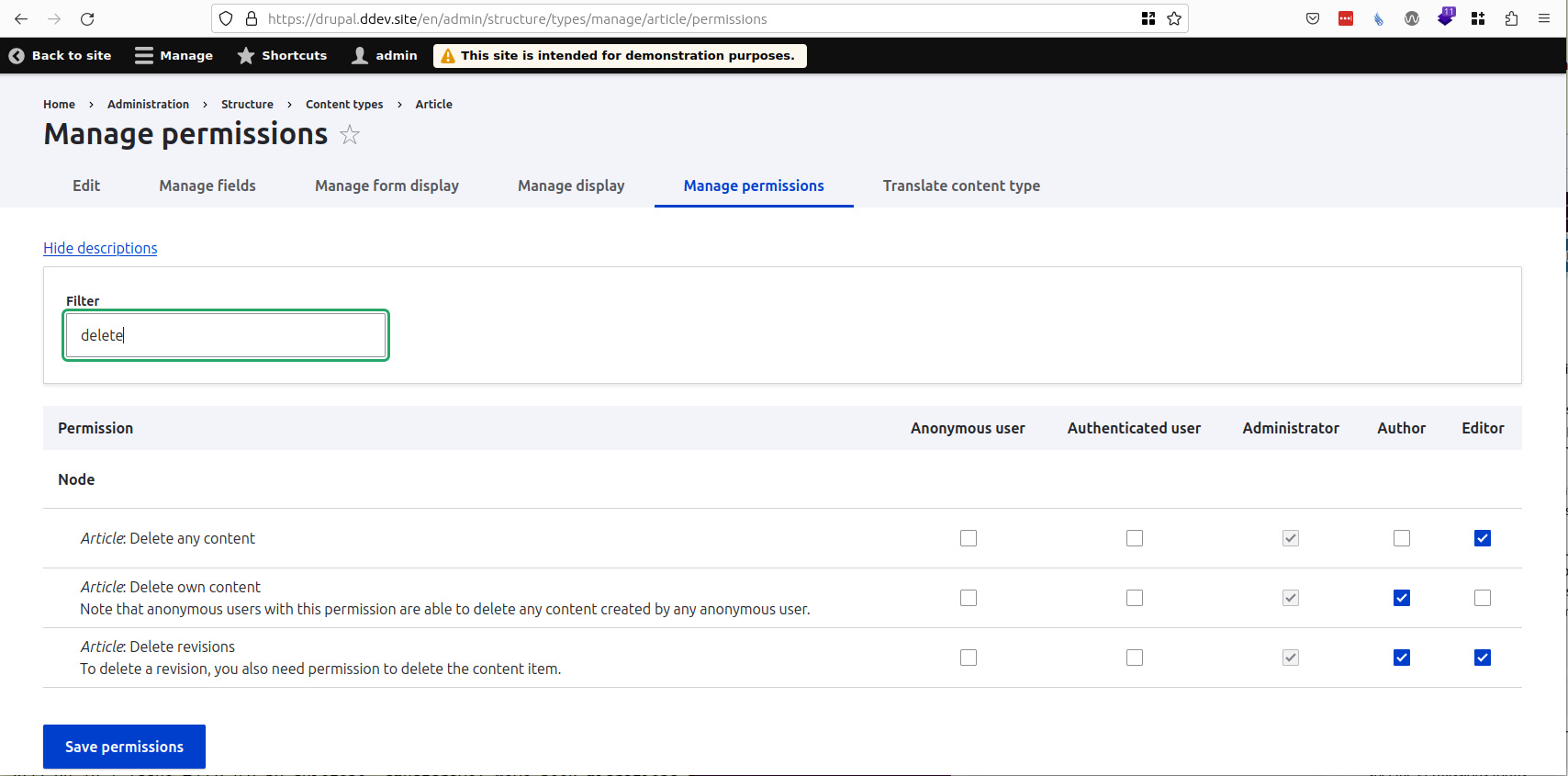
This will go a long way towards making the Permissions form more manageable. I also notice that the filter appears on the module-specific and bundle-specific Permissions forms. For example:
Comment #163
narendrarComment #164
lauriiiI don't this needs an actual release note since this was only tagged to be mentioned in the release highlights. The release highlights are separate from the actual release notes, and is more focused on marketing aspects, i.e. promoting what's new in a specific release of Drupal.
Comment #166
ressaGreat improvement, this makes handling permissions so much easier, thanks!