Closed (fixed)
Project:
Date
Version:
5.x-2.0-rc
Component:
Code
Priority:
Normal
Category:
Bug report
Assigned:
Unassigned
Reporter:
Created:
11 Mar 2008 at 20:35 UTC
Updated:
3 Jul 2008 at 22:14 UTC


hi!
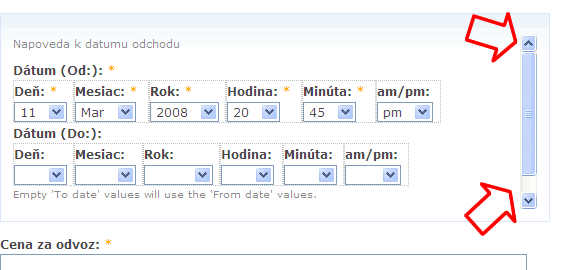
the new design of date CCK field (cca a week ago it was ok) is shown with a scrollbar on right side (wrong height for date field probably)
and date CCK fields are not properly alligned in opera browser. (In IE 7 and FF 2 it is ok)
A screenshots are attached.
thanks
Igorik
http://www.somvprahe.sk
| Comment | File | Size | Author |
|---|---|---|---|
| layout.gif | 6.86 KB | igorik | |
| scroll.gif | 12.72 KB | igorik |


Comments
Comment #1
karens commentedIt hasn't changed in the last week, I suspect you are comparing it to the 5.1 version, where the css was quite different.
This needs a css fix and I'll gladly accept patches. I probably won't have time to get to this for a while unless someone posts a patch.
Comment #2
threexk commentedI see this problem in FF 2.0.0.14, but not in IE 7.0.5730.13.
Disabling the "overflow: auto" style for class fieldset-wrapper in system.css will fix the problem. This is not really a solution though.
This issue may be related to http://drupal.org/node/237521. My plan now is to set up a test site with the field and try to get some CSS gurus to take a look (not being one myself).
Comment #3
threexk commentedHere's my workaround:
1. Theme input form and add div tag around date form field. e.g., class="therapy-date"
2. With CSS, target fieldset-wrapper within that div and set overflow: hidden. e.g., .therapy-date .fieldset-wrapper { overflow: hidden !important; }
For what it's worth -- I poked around the DOM page in Firebug. I don't know what I'm doing, but it says scrollHeight for the fieldset-wrapper is 105 and the clientHeight is 85. The difference probably explains the presence of a scrollbar. However, everything contained within the fieldset-wrapper has clientHeight 85 so I don't really see how Firebug calculates scrollHeight 105.
Comment #4
karens commentedI played around with this and found that it is the collapsible fieldsets that are adding the phantom extra space that adds the scrollbars. If I make the fieldsets non-collapsible there is no problem. I tried a few different things and finally made a small change in the css that would add some extra space when the field form is inside a collapsible fieldset that seems to work.
Comment #5
threexk commentedStill see this problem in FF 2.0.0.14 after manually updating the three CSS lines from CVS date.css. I can post a screenshot plus Firebug display of the styles if that'd be helpful.
Note: The html.js lines added end in ')' instead of '}'
Comment #6
threexk commentedFor good measure I updated from CVS instead of making the changes manually and confirmed the problem is the same.
Comment #7
karens commentedWhat happens if you fix the }? I'm looking at it in FF 2.0.0.14 and it looks exactly right and also looks fine in IE7.
Comment #8
karens commentedIf you still see a problem, try increasing the 16px to a slightly larger number. That was enough to fix it for me but maybe some screens need a little more.
Comment #9
threexk commentedAt 22px, the scrollbar disappears. This causes a lot of empty space below the field, though. Maybe instead of making the fieldset bigger, the contents need to be made smaller?
I think it would be fair to call this fixed with a change to 22px, but I wonder if there are screens where even 22px is not enough. Also, I will want to open a new issue for the extra space below the field.
Thanks Karen for your help.
Comment #10
threexk commentedUpping the font size brings the scrollbar back, for what it's worth.
Comment #11
karens commentedThe extra space below the field is from padding in the collapsible fieldset, which is coming from the core css, so I don't see any way to do anything about that without overriding core's css. If you put a border around the date field's div you can see that the extra space is outside the date div, not inside it.
If it's fixed for me at 16px and fixed for you at 22px, I suspect it's not going to take more than that to fix it for other browsers.
Comment #12
karens commentedThe other alternative is to get rid of the collapsible fieldsets, which means if you have multiple date fields they will all show up.
Comment #13
threexk commentedInterestingly removing 'clear-block' from
<div class="container-inline-date clear-block">solves the problem for collapsible fieldsets without any other modifications. Unfortunately, when a date field is not within a fieldset removing 'clear-block' from its div causes subsequent fields not to be cleared. e.g., if I have a date select list then a CCK text field, the text field shows up to the right of the select list instead of below it.I will try to gain a better understanding of CSS and see if I can come up with a more robust solution.
Comment #14
threexk commentedA CSS expert took a look and said that sometimes clearfix (the method used by Drupal to clear floats, implemented by clear-block) has problems with height, having to do with the :after pseudo-element. He or she suggested the "clearflow" method of clearing floats as a possible solution:
http://www.trending.us/2008/04/30/clearflow-another-way-to-clear-floats-...
I tried clearflow out by replacing clear-block's properties with clearflow's properties, and it worked great -- no scroll bars. So, I was thinking of making a patch to define clearflow in date.css and replace Date's references to 'clear-block' with 'clearflow'. How does this sound?
I also opened an issue on Drupal about the possibility of replacing clear-block with clearflow in core: http://drupal.org/node/272209. I'm sure it won't work for some reason.
Comment #15
karens commentedIf it works and doesn't break anything else, I'm all for it :)
Sure, roll a patch so we can get it into the code where it will get tested in a wide variety of browsers.
Comment #16
karens commentedShoot! I just read your link and it says it doesn't validate. That's going to be a problem -- we have users that need the css to validate to meet accessibility standards. I'll have to think more about this...
Comment #17
threexk commentedDid you see this:
Adding an extra file just for this issue would be ugly, but perhaps better that the code is ugly than the display. Maybe there's a better way still...
Comment #18
threexk commentedUpon second thought, I don't see how this solves the validation problem because the IE-specific stylesheet would still fail validation.
Comment #19
threexk commentedThink I have a fix: in defaults.css under .clear-block:after, change content: "." to content: " ". That's it!
Apparently Firefox uses the invisible period from the clear-block in calculating the scroll height. Alternatively, you can use font-size: 0 and leave content: " "; The following post clued me in to this:
http://perishablepress.com/press/2008/02/05/lessons-learned-concerning-t...
I should probably submit a patch on core. Practically, though, this probably won't make it into another Drupal 5 release so maybe Date could override.
(Tested in Firefox 2.0.0.14 and IE 7.0.5730.13.)
Comment #20
karens commentedGood find! And it seems to work fine. This will certainly not get into Drupal core in D5 or probably even D6, so I added a date module version of the css and switch to using that for the date fields.
Comment #21
Anonymous (not verified) commentedAutomatically closed -- issue fixed for two weeks with no activity.