Closed (fixed)
Project:
Drigg
Version:
5.x-1.23
Component:
Code
Priority:
Normal
Category:
Bug report
Assigned:
Unassigned
Reporter:
Created:
19 Mar 2008 at 23:25 UTC
Updated:
8 Jul 2008 at 13:42 UTC
Jump to comment: Most recent file


Whereas all other content types work with Mailhandler like a clockwork, drigg/scoop content type gives out the following error...
(and the scoop is not printed)
* warning: Invalid argument supplied for foreach() in /home/example/public_html/sitename/modules/node/node.module on line 521.
* warning: implode() [function.implode]: Invalid arguments passed in /home/example/public_html/sitename/modules/node/node.module on line 525.
* user warning: You have an error in your SQL syntax; check the manual that corresponds to your MySQL server version for the right syntax to use near '' at line 1 query: SELECT n.nid, n.vid, n.type, n.status, n.created, n.changed, n.comment, n.promote, n.sticky, r.timestamp AS revision_timestamp, r.title, r.body, r.teaser, r.log, r.format, u.uid, u.name, u.picture, u.data FROM node n INNER JOIN users u ON u.uid = n.uid INNER JOIN node_revisions r ON r.vid = n.vid WHERE in /home/example/public_html/sitename/includes/database.mysql.inc on line 172.
I would happily use a custom content type constructed with CCK, but drigg module can only work with its own default 'scoop' content type.
| Comment | File | Size | Author |
|---|---|---|---|
| #12 | screenshot_of_the_problem.png | 65.69 KB | drupalina |
| #12 | drigg_settings_for_URL.png | 6.9 KB | drupalina |
| #12 | node_drigg.png | 58.1 KB | drupalina |
| #12 | node.png | 41.51 KB | drupalina |
| #12 | node_revisions.png | 23.9 KB | drupalina |




Comments
Comment #1
mercmobily commentedHi,
I have never ever used MailHandler.
I am not sure what's going on. However, it really looks like Mailhandler is doing something "funny" with the node, as it's not passing anything in the associative array for the conditions.
Can you please:
1) Write a VERY detailed list of step to reproduce this problem
2) Submit a bug to MailHandler, explaining that the Drigg node type won't work?
Hopefully, the MailHandler's developers will be abe to give me hints on what to do.
Bye,
Merc.
Comment #2
mercmobily commentedHi,
Poster disappeared. IT doesn't look like there's a big in mailhandler.
Closing this bug. Sigh.
Merc.
Comment #3
mercmobily commentedHi,
Setting as "Active", as Drupalina is back.
However, unfortunately I very much doubt we can do something about it... we'll see.
Merc.
Comment #4
drupalina commentedhi,
yes, I've been trying some combinations so as to get Mailhandler to work with Scoop content type -- (so that people can submit articles even when they don't have access to the website).
One of workarounds that I'm trying to get to work now is similar to what was described here: http://drupal.org/node/223640 -- getting a CCK text field and loosing the "Scoop description" field.
I'll report on how it goes when I've tested it thouroughly.
In the meanwhile, if anybody knows what could be the cause of this clash between Mailnadler and Scoop content type, please post it here.
thanks
Comment #5
mercmobily commentedHi,
Drupalina, have you submitted this to the Mailhandler people as well?
Can you send us a link to the issue there?
Can you please also post a PRECISE list of instructions on how to reproduce this?
Bye,
Merc.
Comment #6
mercmobily commentedHi,
Drupalina, can you please play with this a little bit more?
I have never used Mailhandler, and I don't have a pop3 address to test it.
It _really_ looks like something is calling node_load() without any parameters, which is very strange.
If you provide a POP3 login/pass and *exactly* how to reproduce this, I will give it a go.
Please make sure you try one last time with the latest version of MailHandler.
Bye,
Merc.
Comment #7
mercmobily commentedHi,
Drupalina, I asked you to submit this to the MailHandler people... I noticed that it didn't happen.
There is only so much chasing up I can do for such a minor issue...
It's here: http://drupal.org/node/245739
Please write there which version of MailHandler you used, and report back with any news.
Merc.
Comment #8
drupalina commentedhi,
Sorry for not responding to this earlier. I thought I did post an issue there about a couple of weeks ago (simultaneously with this one).
I have been toying around with various combinations to get this to work, and been making some (though not full) progress. That's why I didn't want to post untill I have at least some sort of result.
How to reproduce this issue:
1) On your Drupal-5.7 and Drigg-23 site install the latest version of the Mailhandler (5x-1.2)
2) Set up an e-mail address (this will be the address where the e-mails/scoops will be sent to)
3) Additionally install the following small helper modules:
http://drupal.org/project/mailsave (enable Mailsave & Mailsave to CCK Imagefield)
http://drupal.org/project/unwrap
http://drupal.org/project/safehtml
(you can set up the Access Controls, but for account 1 it shouldn't be important)
4) go to /admin/settings/filters .
In your default filter check "unwrap filter", "safehtml filter", "Link filter" and "URL filter". Leave "Line break converter" unchecked. This is because email systems add lots of extra line breaks and we need those to be ignored.
5) Now go to /admin/content/mailhandler and Add a mailbox > add your specific mailbox settings:
for e-mail address, enter the e-mail address that you've set up in step (2) : i.e. submit@drigg.org
you can leave the second e-mail address blank
Folder: INBOX
POP3 or IMAP MAilbox: choose POP3
mailbox domain: mail.drigg.org (or whatever)
Mailbox port: 110
Mailbox username: submit@drigg.org
Mailbox password: XXXXXXXXXXX
Extra commands: /notls
Mime preference: HTML
Security: Disabled
Send error replies: Disabled
Form header: [leave empty]
Default commands: [enter the following the box]
status: 1 (1 means it's Published)
promote: 0 (0 means not promoted to front page)
type: drigg
taxonomy: [Politics] (or whichever *Category* you wish. Note: my *Tag* fields are not required. Only Categories are required)
comment: 2 (2 means comments are allowed Read/Write)
language: fr (if you don't have different languages, then ignore this line)
Signature separator: [leave this field empty]
[Checked] Delete messages after they are processed?
Cron processing: Enabled
Input format: Filtered HTML (or whichever you have as default or preferred for e-mailed scoops)
Then go to /admin/content/types/ and add a cck imagefield called image to the scoop content type (this assumes that you have CCK and Imagefield enabled)
Now to test, send an email (with picture attached) to the_e-mail_that_you@have_set_up_in_step_2.com from the email address linked to user1 of the website. Go to /admin/content/mailhandler and click [retrieve] you should see the following message
"Mailhandler retrieve successful: 1 messages for the_e-mail_that_you@have_set_up_in_step_2.com" > then go to http://YourDomain.com/upcoming/newest > and there should (in theory) be your article and image.
[there are no relevant entries in the Logs]
-----------------------------
Now... I have the same settings set for Blog, Story, Scoop(drigg) and other content types. All but Scoop behave as they say they should. If the above settings are adopted the scoop is indeed coming through!!!
BUT
1) in the Upcoming section of my drigg website it will only show the Title and story info with EVF, but it displays no teaser, and instead only shows the "Similar stories" list instead of the teaser.
2) the Title is not linked to the actual story's node (note: in drigg settings my scoop titles link to their nodes, rather then external links).
3) The only way I can get to that articles full body is by clicking the link in the "Best scoops" block ... which means that at least partially drigg is working with mailhandler.
4) The image sent as an attachment with the e-mail, will have disappeared (while with other content types sent in through the mailhandler the images are displayed perfectly. But I guess we already know about this clash with immagefield from before)
For now, if we can sort the points 1 and 2 that would be really cool.... and then we can worry about image being lost in another issue.
Thanks Merc
Comment #9
mercmobily commentedHi,
About 1): No idea. For some reason, MailHandler is not getting the node to create a teaser. Strange.
About 2): What are the links like? More importantly, can you please tell us what gets stored in the DB, for *good* stories and for *mailhandler* stories? If you don't do that, I can't help much... I will need to know, for those TWO nid, to know what's in these tables:
- node
- node_revisions
- drigg_node
Also, what happens if a story is duplicate? (That is, you send a story with the same URL...)? The DB won't allow two Drigg nodes with the same URLs. This is an index constraint. Maybe THAT's when the ugly error in the original post happens? If the answer is "yes", then I am afraid Drigg will never actually be able to support MailHandler because of its strict constraints about URLs. In fact, now that I think of it, I think this might end up having to be the case, because any module which saves nodes automatically will need to run drigg_url_exists($link), and generic import/adding modules never will.
This has a 99% chance to be a "won't fix" -- sorry. However, I seem to have learned something from it.
What would be GREAT, would be to be able to FAIL a node save according to certain constraints. What Drupal (not Drigg... Drupal!) needs, is a way for node modules (like Drigg) to have a say whether a node can be saved or not.
In Drupal 6, I noticed that they added:
But that's not enough: if presave fails, the save will still go ahead. At that point, 'half' the node will already be in the DB (the part in the tables 'node' and 'node_revisions'), and the last bit necessary to Drigg to function (the part in the table 'drigg_node') will not be stored.
I will probably end up marking it as "won't fix", but I will add a feature request for Drupal so that maybe Drupal 8 will have something like that.
Merc.
Merc.
Comment #10
mercmobily commentedHi,
Added this:
http://drupal.org/node/245791
Without this feature in Drupal, pretty much none of the modules which save nodes will ever work with Drigg unless they were specifically thought for Drigg.
This is also true for node_import, unfortunately.
Bye,
Merc.
Comment #11
mercmobily commentedHi,
I looked more at the code, and I can sadly confirm that this will need to be a 'won't fix'... until Drupal offers a way of checking the contents of a node from node_save().
Sorry...
Merc.
Comment #12
drupalina commentedHi Merc,
Sorry for reopening this, but based on what you said in #9, I get the suspicion that this might just work!
In my drigg settings users _don't have to_ submit the URL (See the attached screenshot drigg_settings_for_URL.png. Scoop content type is used for both posting the links to external articles, as well as (and predominantly) for posting own original articles -- Maybe this is lame, but Drigg is the only module in Drupal that seems to have a properly functioning "Promote to front page" feature, while that feature in Voting Actions module is not working and there's nobody to fix it ... while there is a pile of people desparately waiting for module maintainers to wake up).
Moreover, there is noway that users can send a URL via a mailhandler. Mailhandler can do the following: convert the e-mail title into the node title (Scoop Title); convert e-mail body into the node body (Scoop's Description); and with imagefield and mailsave modules, convert the attached images into embedded images. Logically, there is noway for people to submit URL via e-mail (and I don't require it). So basically, at least in theory, as long as I don't make URL a required field, those scoops should be comming through no probs ... and they do come through! The problem is how they are being displayed page.
From what I understand, Drigg module is checking for duplicate URLs during the submission process. But *IF* there is no URL address submitted and if the URL field is not required (or disabled), then logically speaking it should NOT be checking for duplicate URLs. Do you think this could be the glitch that is causing this strange problem?
The scoop nodes are already comming through... so that's already a good sign. And as you can see in the screenshot_of_the_problem.png, in some instances the titles do point at the nodes (see the links in "Best scoops" block)
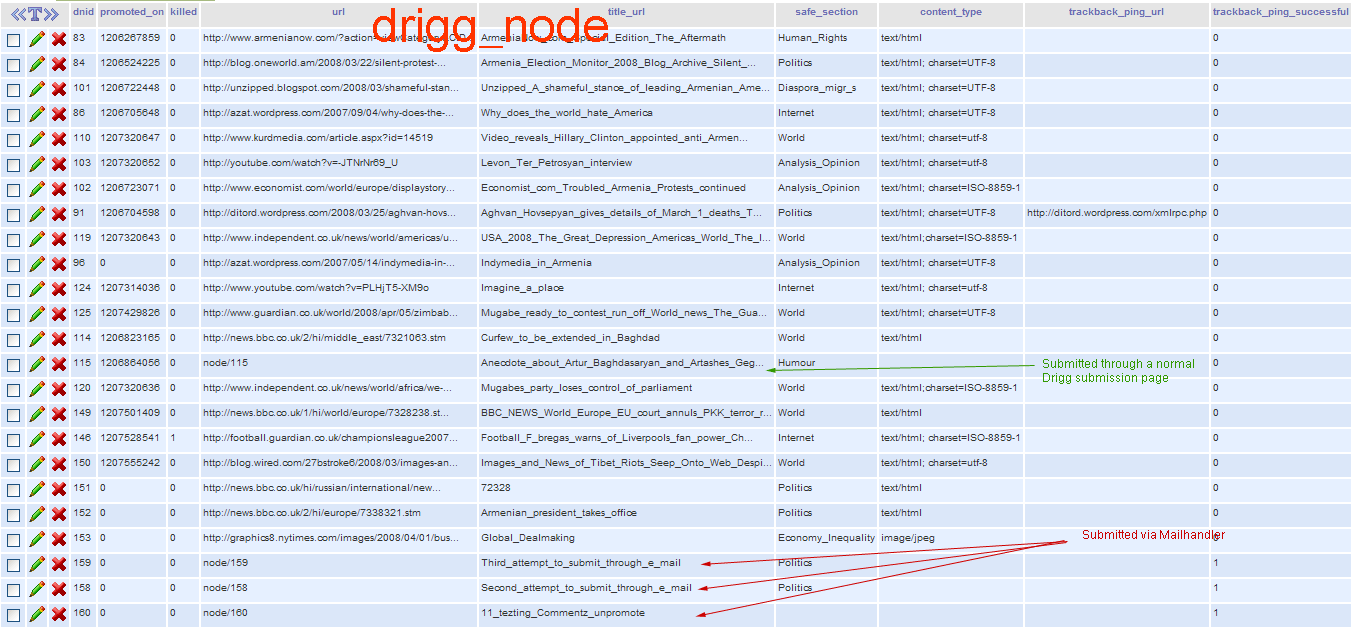
As for the question of teasers, I've attached the 3 screenshots of drigg_node, node and node_revisions (as you asked) . As you can see in drigg_node.png screenshot, there is nothing extraordinary happening to the scoops submitted via the Mailhandler (it's the same as the non-URL scoops submitted via a usual submission form).
If you want me to send you more screenshots or information please let me know.
I get the feeling that the solution is closer than it seems.
Comment #13
mercmobily commentedHi,
Drupalina, you were right about reopening the issue. Mailhandler CAN work if you turn off the URL thing. It's still a little fragile (meaning that if people try adding URLs, it won't really work), but that's OK.
I *know* why the link is not showing up! I am glad I have Drupal experience... The reason is because the theme check if the $teaser is set. So, this is basically a side effect of MailHandler not creating the teaser!
This seems to be a mailhandler issue: once the "teaser issue" is fixed, the link will appear, the teaser will appear and we'll all be happy!
Drupalina, I am afraid I cannot install MailHandler. Do you have any idea why the teaser is not getting created? Can you ask for support to the MailHandler people?
As a TEMPORARY measure, if you change line 275 of mailhandler.module FROM:
if (!$node->teaser) $node->teaser = node_teaser($node->body);
Into:
$node->teaser = node_teaser($node->body);
Does it work?
Bye.
Merc.
Comment #14
drupalina commentedHi Merc,
I changed the line 275 as you said -- it didn't make any difference: the scoop came through but still without the teaser and the title didn't link to the node.
BTW, Mailhandler creates teasers and title-links with no problems when I tell it to create other content types (blog, story, and other custom content types... and images get nicely embedded in with imagefiled)... but for some reason this is not happening when I tell it to create "drigg" content types.
But I think I have some minor clue!!! (I'm gonna play around with filters and formats... so far I've been sending HTML e-mails, which are fine in all other content types, but might not be cool with Scoops) ...
Comment #15
drupalina commentedHi,
I think I'm slowly getting somewhere, and I'm getting more convinced that the glitch is on Drigg's side.
I've sent an Plaintext e-mail (no HTML, no attachments), and the teaser was printed, and the title is linking to the actual node!!!! (happy days)
BUT... the teaser and the node came out all as a continuous pile of text -- no paragraphs!
This doesn't happen with other content types, which gives me a clue that drigg content types is pretty fixed in terms of it's input formats. Don't forget that Mailhandler relied on other small modules, which are basically filter modules. My default input format is "Filtered HTML" (for all roles) ... and to that I have added a variety or permitted tags and other filters (HTML filter, Lightbox G2 filter, Lightbox filter, Save HTML, URL filter, Unwrap filter). I left Line break converter and PHP evaluator unchecked as per Mailhandler recommendations.
[Note: Unwrap filter and Safe HTML filters are essential for Mailhandler]
In my drigg settings, scoop input format is also set to "Filtered HTML" ... but here's my question: when you were designing that aspect of drigg, did you set "Filtered HTML" to mean Drupal's default "Filtered HTML", or did you allow for the possibility that other custom filters might get added to those?
Now the obvious question is: Why doesn't "drigg" content-type accept HTML e-mails???
I think if we can answer this question, then it will all be downhill from there.
Comment #16
mercmobily commentedHi,
OK, this is really something I am only able to do after the major code reorganisation...
Drupalina, do the following:
1) FIND:
// Force the file format for that revision
db_query("UPDATE {node_revisions} SET format=%d WHERE vid = %d", variable_get('drigg_format_id','0'), $node->vid);
ANd "comment it out. That is, add a "#" at the beginning of the command:
// Force the file format for that revision
#db_query("UPDATE {node_revisions} SET format=%d WHERE vid = %d", variable_get('drigg_format_id','0'), $node->vid);
2) FIND:
$form['format'] = array(
'#type' => 'hidden',
'#default_value' => variable_get('drigg_format_id',''),
);
And comment it out, which means it will become:
# $form['format'] = array(
# '#type' => 'hidden',
# '#default_value' => variable_get('drigg_format_id',''),
# );*/
And add this instead, right underneath it:
$form['format'] = array(
'#type' => 'value',
'#value' => variable_get('drigg_format_id',''),
);
PLEASE test your site first... please make sure that the field "format" in node_revisions is correct (that is, it's the format you set as default).
This change will make Drigg more flexible to different content types. I am not sure this is a good thing... but I guess it will make it uniform to other node types!
Please test this ASAP.
Merc.
Comment #17
mercmobily commentedHi,
P.S.
This will be added to the next, __major__ release of Drigg if it works...
Comment #18
drupalina commentedI have no clue what those replacement codes are gonna do (and what I should be watching out for), but I'll test it right-away...
The goal is to be sure that users can send whatever format of e-mail ("Plain text", "Rich Text", and especially most commonly used "HTML") and the system must make them into Filtered HTML format Scoops.
I'll report on the test , hopefully soon (but it could also be tomorrow)
In the meanwhile, here are some updates on various combinations that I've been trying:
1) When I send a Plain Text e-mail, the scoop Title in the teaser will link to the node, and the Teaser text will be printed
2) When I send Rich Text e-mail, the scoop Title in be will linked to the node, and the teaser text will be only a reprint of the title text.
[in both cases, it is set to Filtered HTML; Line-break converter is on; Safe HTML filter and Unwrap filter are disabled]
3) When I send HTML e-mail, the old problem is there (no title linking, no teaser)
4)Now... here's the real bummer... when I switch everything (Default input format, Mailhandler and Drigg) to Full HTML, and send the HTML e-mail, it nearly breaks the site in a way that I've never seen before: it changes the colours of the hyperlinks, node width ... In short, it styles the website after the style of the e-mail. (this occurs with drigg content type only) -- I mean you can actually see pieces of broken HTML codes at the begining of the node ... some kind of brackets that were not closed properly.
5) Then I enable the Safe HTML filter (essential to Mailhandler) and send out an HTML e-mail (Drigg, Mailhandler and the default input format are of course set at Filtered HTML, which now includes the Safe HTML filter). Results: same as in (3)
Following point 4 and 5, could it be the case that somewhere in drigg code there's something that generates bad html?
--------------------
also: in phpMyAdmin I looked at node_revisions, and "format" defaults appear as follows:
Type: int(11)
Collation: [doesnt show anything]
Attridutes: [doesn't show antything]
Null: No
Default: 0 (is this correct? My default input filer is "Filtered HTML". Shouldn't this be "1???)
Extra: [doesn't show anything]
-----------------------
I'll report on the code changes test soon (even though I still can't see any visible difference that it made, and it may take a day or so...)
Thanks!!!
Comment #19
mercmobily commentedHi,
There is absolutely nothing in Drigg that will cause bad HTML. This is a template issue.
However, the modifications I gave you will probably fix the "format problem".
Please let me know...
Merc.
Comment #20
drupalina commentedHi,
when you say "this is a template issue" - do you mean it's related to the theme? The problems are all the same in drigg_theme.
I've made the changes to drigg.module (version 23) you asked in #16 -- all the problems mentioned in #18 and earlier still persist all the same.
I couldn't find any visible changes to Drigg. Was I also meant to change anything in Drigg settings?
Comment #21
mercmobily commentedHi,
At this point, Drigg is behaving -- format-wise -- like ANY other module. There is no "forced" format anymore (which is what could have caused the trouble).
I didn't mean to say "theme issue"... it's more a module-related issue. The theme simply prints "$contents" in page.tpl.php. What's happening here is that bad HTML is being pumped into the node by the converter, and that sort of kills the rest of the page...
I think it was good to fix the "forcing the format" issue in Drigg. However, now I see really, honestly no difference between Drigg and any other module... and MailHandler now really ,really should work.
Merc.
Comment #22
mercmobily commentedHi,
Since Driggi s fixed, and this now sems to be a format/formatting issue, marking this as fixed...
Drupalina, I suggest you play with the input formats a lot, until you get it right.
Bye,
Merc.
Comment #23
drupalina commentedThanks, Merc...
I wouldn't call it fixed just as yet...
I haven't replied in last couple of days precisely because I still have this problem (unlike with other content types)... so I'm still trying various formatting variations to get this to work in the new 24 version.
I will report back when I have more progress or clues!!! (I'm not sure when. This could take ages)
[somehow I'm starting to get the suspicion that the root cause of this is very similar if not identical to the problem we have with the imagefield]
Comment #24
mercmobily commentedHi,
I don't think the problems are related.
However, this is now purely a presentation problem -- not something we can cover in the module's bug queue, sorry :-(
Merc.
Comment #25
Anonymous (not verified) commentedAutomatically closed -- issue fixed for two weeks with no activity.
Comment #26
Saganesque commentedForgive me if I have the etiquette wrong. I've reopened this one because I'm having a problem analogous to or the same as the original post. I don't use Drigg and I didn't see anything in the follow-up posts that I could make sense of. So here it is:
I'm trying to use mailhandler to get Yahoo!-like functionality out of my website. However, any data that is sent to my website (typically a comment to a group forum post that has been mailed to a site user) immediately produces a mailhandler error like this:
"No Data!!!"
and then the php errors cited in this issue's Description field begin to appear. I have posted the details here:
http://drupal.org/node/264946#comment-912023
Please take a look at that link, as I think there may be some good info there for diagnosing the problem. My guess at the moment is that after retrieving an email, mailhandler is parsing the data badly somewhere immediately after the "no data" error, and when the database is populated, bad data is going in there somewhere, perhaps because an unhandled delimiter is causing the data to spill over into the wrong db fields?
Comment #27
sikjoy commentedSaganesque:
This queue is for Drigg related issues only.
You should submit your bug report in the Mailhandler issue queue.
--sicjoy