

 The 2026 Drupal Business Survey is open. Your response will help shape the future of the Drupal business ecosystem.
BUEditor works great on my dev server here on my pc. When I install it on the clients server at bluehost.com, the buttons do not display above the text areas. I can find no differences between the installations. I'm at a loss as to what to check next. Any ideas on where I should start?
| Comment | File | Size | Author |
|---|---|---|---|
| #4 | default_buttons_dev.jpg | 110.69 KB | jdcllns |
| #4 | default_buttons_prod.jpg | 85.26 KB | jdcllns |


Comments
Comment #1
jdcllns commentedDev server:
MySQL 4.1.22
PHP 4.4.6
Web server Apache/1.3.37 (Win32) PHP/4.4.6
Production
MySQL 5.0.45
PHP 5.2.5
Web server Apache/2.2.8 (Unix) mod_ssl/2.2.8 OpenSSL/0.9.8g DAV/2 mod_auth_passthrough/2.1 mod_bwlimited/1.4 FrontPage/5.0.2.2635
The only differences I've found so far.
Comment #2
ufku commentedIf your download method is public check if a js file is included under FILES-PATH/bueditor/
Check if that file can be accessed directly by typing the address in the address bar. http://host/FILES-PATH/bueditor/...js
The files under FILES-PATH/bueditor are scripts that contain the buttons of the editor. If these files are not web-accessible your buttons will not load, even if the scripts seems to be loaded in the page source.
If you manually(by ftp) created the FILES directory and its subdirectories, you are probably having an chmod issue. You should make sure FILES-PATH/bueditor is readable by everyone, and of course writable by php.
Comment #3
jdcllns commentedThe setting for site/drupal/sites/all/modules/bueditor/
Read Owner Group All
Write Owner
Ex Owner Group All
Both scripts:
site_url/drupal/sites/all/modules/bueditor/bueditor.js
site_url/drupal/sites/all/modules/bueditor/library/default_buttons_functions.js
display in the browser when typed into the location bar.
Comment #4
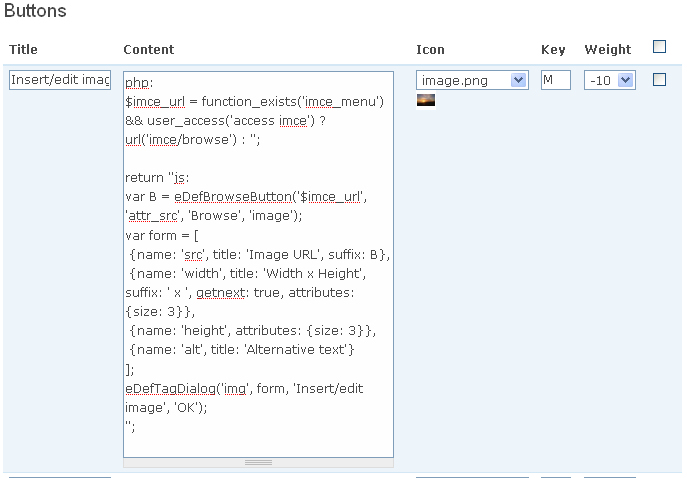
jdcllns commentedAlso, the Content fields of the default editor on the production server are different from those of the dev server. See attached screen captures.
Comment #5
ufku commentedYou should have checked the files/bueditor directory, not modules/bueditor directory :(
In files/bueditor there should be at least one js file named something like 3fd013918043e51179132f8db5f5b34f.js
Check them.
The latter issue was a PHP5 issue where php buttons were being saved executed. This was fixed in 5.x-1.1. Are you sure you are using the latest version?
Comment #6
jdcllns commentedSorry, I totally misread what you typed. There are, in fact, two java scripts in the files/bueditor dir. Both give me "403 Permission Denied" when I browse to them. Both their permissions are:
Read Owner Group All
Write Owner Group
Ex (none)
Drupal's status report tells me that it's running under PHP5.2.5.
Comment #7
jdcllns commentedI finally got it to work by setting the Executable attribute on the "files" folder to ALL. Now everything appears to be working fine. I knew it had to be something that simple, but I just couldn't find it because everything else is working perfectly. Thanx for your time an patience.
Comment #8
ufku commentednice.
Comment #9
Anonymous (not verified) commentedAutomatically closed -- issue fixed for two weeks with no activity.
Comment #10
yan commentedSame problem here: The buttons don't show for the user role they are assigned to. After reading this issue I checked the /files folder and noticed that there wasn't a "bueditor" folder inside, i.e. no .js files. I created the folder manually setting read, write and execute permissions - nothing changed. On my local server I didn't experience this problem. Any more ideas? I'm using Drupal 5.7 with BUEditor 5.x-1.1.
Comment #11
ufku commentedmake folder permissions 777 for both files and bueditor.
Comment #12
As If commentedThanks yan & ufku. I also had no bueditor folder in files. #10 and #11 did the trick. This was a fresh install of bueditor 6.x-1.2 under Drupal 6.12.
What are the circumstances that cause this folder to not be created in the first place? My files folder was already 777.
Comment #13
ufku commentedIf you use 6.x then you shouldn't have any problems with bueditor folder because 6.x does not use it.
You may have "js" or "css" folder problems as drupal uses them for storing aggregated files. Try disabling js and css aggregation under performance settings.
Comment #14
As If commentedOk, then this is getting weirder. First, the above steps worked for me on D6. But today, the editor buttons have stopped appearing again. And I don't use CSS or JS aggregation. Diagnosis, doctor?
Comment #15
ufku commentedProvide more symptoms, please.
Look at the source to see if bueditor scripts are loaded. Any js errors?
If you find out that it's a bug open a new issue with a relevant title and project version.
Comment #16
As If commentedbueditor/bueditor.js and bueditor/library/default_buttons_functions.js are both loaded. No js errors evident. The buttons appeared after I created the (unnecessary?) folder mentioned above, then stopped appearing the next day. There may be some theme issues involved since I have been working on the templates. Will open a new issue for the D6 version if I find out anything useful...