This issue is not specific to Drupal v6.2 it was present in v6.1 and has been described in two threads. http://drupal.org/node/227791 and http://drupal.org/node/245853.
This problem appeared suddenly after the Feed aggregator had been working for several days. The time of the last successful feed was shortly before the site was taken offline using Site maintenance. Even though the site was put back online the feeds have not worked.
I have gone back to Site maintenance in v6.1 and put the site offline, cleared the cache, and back online and tried this again after updating to v6.2 without resolution of the problem.
I wonder if one of the settings changed when the site goes offline is not being reset when going back online?
I have created and used info.php to check my server settings.
It may well be something else but after hours trying to solve it using the ideas others have put forward without success I thought I would share this thought.
Any help would be appreciated. Thanks.
Izzy


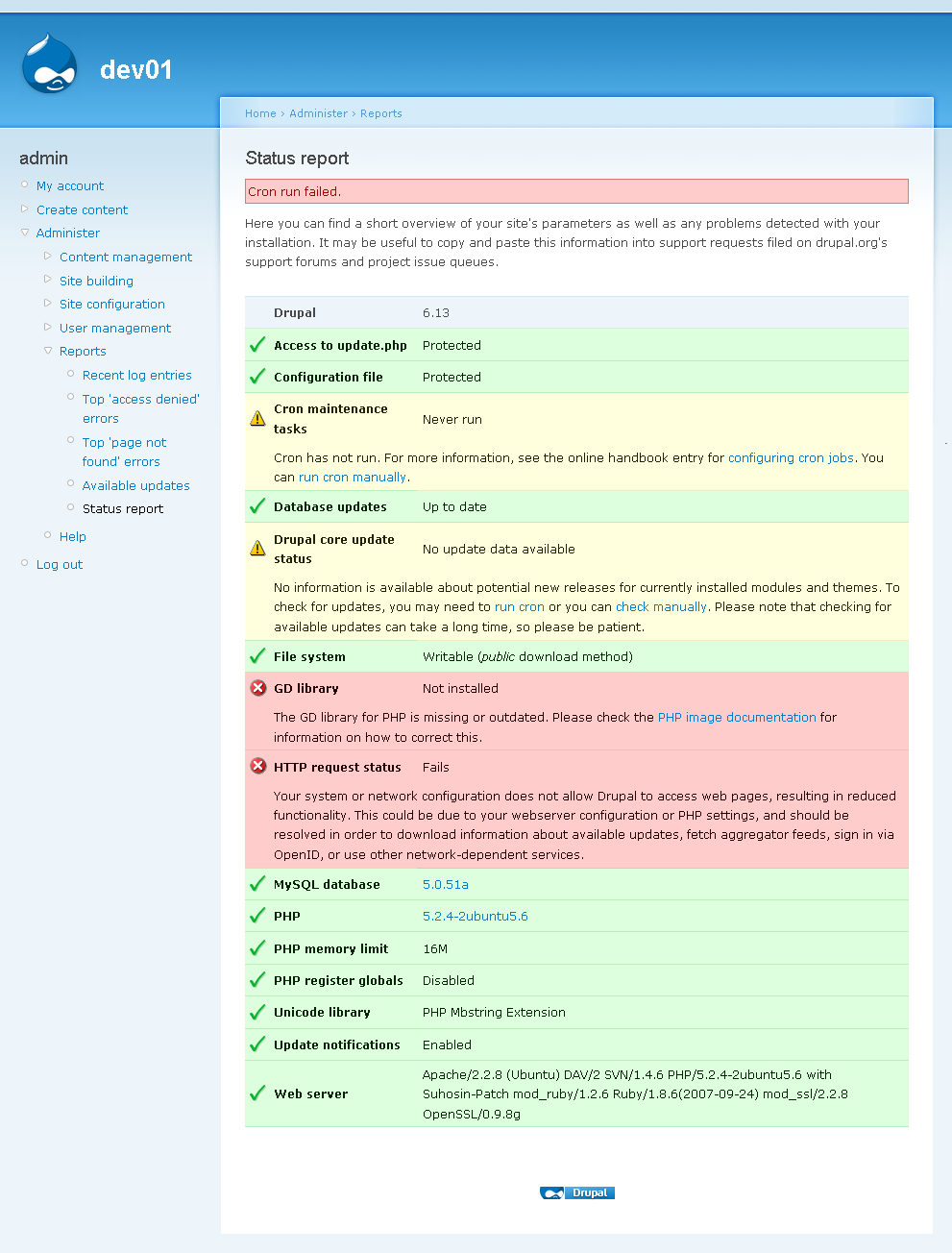

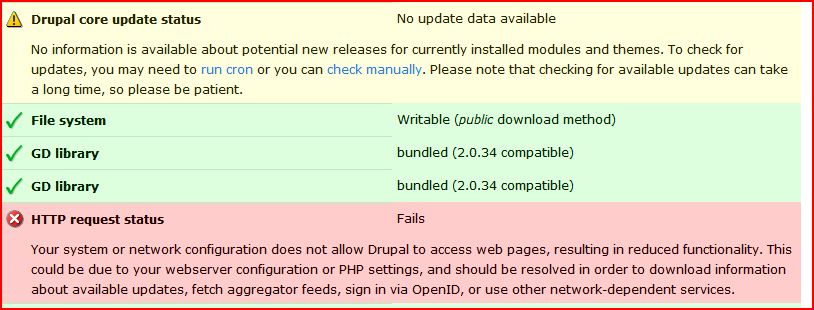
Comments
Comment #1
izmeez commentedMy humblest apologies to everyone.
I have discovered that my problem with the HTTP request status fails was a result of the .htaccess redirect to a secure site. When I commented out the .htaccess redirect lines the problem was resolved. I then removed the comments and was still able to update the feeds. I will keep an eye on this over the next few days and see if there is anything else I can learn.
Sorry for raising unwarranted concerns. I hope others did not spend too much time pondering my problem.
Thanks,
Izzy
Comment #2
age3141592 commentedWell I think there is still a problem here. And it has to do with the error recovery in drupal_http_request in common.inc for version 6.
The code in question is:
if (!$self_test && variable_get('drupal_http_request_fails', FALSE)) {
$self_test = TRUE;
$works = module_invoke('system', 'check_http_request');
$self_test = FALSE;
if (!$works) {
// Do not bother with further operations if we already know that we
// have no chance.
$result->error = t("The server can't issue HTTP requests");
return $result;
}
}
which tries to recover in the event that a request has failed previously. This snippet then calls check_http_request:
function system_check_http_request() {
// Check whether we can do any request at all. First get the results for
// a very simple page which has access TRUE set via the menu system. Then,
// try to drupal_http_request() the same page and compare.
ob_start();
$path = 'admin/reports/request-test';
menu_execute_active_handler($path);
$nothing = ob_get_contents();
ob_end_clean();
$result = drupal_http_request(url($path, array('absolute' => TRUE)));
$works = isset($result->data) && $result->data == $nothing;
variable_set('drupal_http_request_fails', !$works);
return $works;
}
which tries to do a http request on admin/reports/request-test and there-in the real problem lies, at least for me on my hosting service. You see, I'm using godaddy free hosting that places some js on each page. So when this recovery routine tries to kick in because of some past failure, it never recovers because of the following clause: $result->data == $nothing.
I was able to correct my problem by removing the failing check ($result->data == $nothing). But this brings up whether or not checking admin/reports/request-test is a reliable solution to the problem being solved. I propose that instead a file hosted on drupal.org should be used for the recovery check.
Comment #3
imdatsolak commentedI had the same problem, the reason was that I had a password-lock on the website (Basic-Auth via .htaccess-file) while I was working on the website.
When I swithed Basic-Auth off, everything worked fine. So your explanation with system_check_http_request is exactly what happened.
It seems, Drupal first checks whether it can connect to itself. In case it can't, it stops trying to connect to remote servers. That's something I'd say is a bit weird, because in most cases, the website should be blocked via basic-auth anyway while in development mode.
Comment #4
izmeez commentedWell, I appreciate that you two are looking at this closely but you are above my head.
I am still looking for a way to keep the feeds working when I have .htaccess redirecting to SSL.
The lines I have in .htaccess are:
SSLOptions +StrictRequire
SSLRequireSSL
SSLRequire %{HTTP_HOST} eq "mysite.com"
ErrorDocument 403 https://mysite.com
When these are commented and the redirect inactive the feeds work. When I remove the comments and activate the redirect the feeds fail.
I thought it might be improper for me to have this showing as a bug report so I changed the status to "closed" and posted this question as a new topic.
As someone new to the Drupal community I would appreciate any help and guidance. Should the status of this thread be kept open?
Thanks,
Izzy
Comment #5
age3141592 commentedIzzy,
If you feel like hacking the code a bit, do this:
Edit common.inc and in function drupal_http_request() comment out the recovery code. That is:
// Try to clear the drupal_http_request_fails variable if it's set. We
// can't tie this call to any error because there is no surefire way to
// tell whether a request has failed, so we add the check to places where
// some parsing has failed.
/*
if (!$self_test && variable_get('drupal_http_request_fails', FALSE)) {
$self_test = TRUE;
$works = module_invoke('system', 'check_http_request');
$self_test = FALSE;
if (!$works) {
// Do not bother with further operations if we already know that we
// have no chance.
$result->error = t("The server can't issue HTTP requests");
return $result;
}
}
*/
This will prevent the recovery code from running, but will also allow all http requests to be attempted. In my opinion there is no harm in doing so.
Then add the following line so that the flag gets cleared:
variable_set('drupal_http_request_fails',FALSE);
You *could* add it right after the code that was commented out, but that would defeat the purpose of the flag. Probably a better place for it would be in the success path of the code in this function. Try putting it before these lines at the end of the function:
  $result->code = $code;
  return $result;
}
So you would get at the end of the function something looking like:
  variable_set('drupal_http_request_fails',FALSE);
  $result->code = $code;
  return $result;
}
Let me know if you try it out and if it works for you.
Comment #6
Nick Urban commentedMy HTTP requests were working fine, until one day they stopped.
This had been driving me crazy, because I thought it was a problem in the module I was developing, until I noticed that the update status wasn't working either.
I set drupal_http_request_fails to 0, and now it all works again!
I did a little poking around, and it turns out the requests fail because the site has HTTP authentication enabled. You have to login before you can view anything. So when system_check_http_request looks at $result->data, it finds an error message (Authorization Required), and the check fails.
So, for anyone using HTTP authentication, system_check_http_request breaks drupal_http_request. I don't see why that part of the check is necessary in the first place, but even if it does something useful, there has to be a solution that doesn't kill people's otherwise healthy http requests.
Comment #7
izmeez commentedI cannot comment on your findings. But I have found that the problem I was encountering was indeed related to redirecting to an SSL site.
I am using .htaccess and when I commented out the redirect and entered the site with http: the feeds worked.
I also found when I then went back and removed the comments so the redirect was active to the https: site the feeds would work but stop doing so after several hours.
I repeated the same steps and found the same results.
Shortly after that I added Google analytics and the problem went away.
I am not sure if the problem would have gone away anyway after the short span of a day or two if I hadn't added Google analytics but I haven't bothered to remove that and test again.
Izzy
Comment #8
alauddin commentedI think the problem might be related to sqlite install not working.
I noticed on my server the HTTP request status fails and yum not working due to sqlite issue at the same time.
This suggest the http request are not working due to the sqlite issue.
here is the error on yum command
Warning, could not load sqlite, falling back to pickle
here is what I have on my Red Hat EL4
> rpm --query yum python python-sqlite sqlite
yum-2.4.2-0.4.el4.rf
python-2.3.4-14.4.el4_6.1
python-sqlite-2.3.3-1.el4.rf
sqlite-2.8.17-1.el4.rf
working on finding a solution and will let you know if that fixes this http error.
If anyone else has any ideas on how to update this sqlite prob please do post.
Comment #9
alauddin commentedok, I got the HTTP request status fails issue fixed.
It had to do with my BIND going out of whack
if you run a nslookup command like so, and you get the following ..then Bind is working fine.
> nslookup google.com
Server: 127.0.0.1
Address: 127.0.0.1#53
Non-authoritative answer:
Name: google.com
Address: 64.233.187.99
Name: google.com
Address: 72.14.207.99
Name: google.com
Address: 64.233.167.99
If the nslookup gives error than you need to fix bind - start by checking these 2 files
1) /etc/sysconfig/network
mine looks like this.
NETWORKING=yes
GATEWAY="168.X.X.X"
HOSTNAME=yourservername
and file
2) /etc/resolv.conf
which looks like this
nameserver 127.0.0.1
nameserver 165.x.x.20
nameserver 165.x.x.21
nameserver 168.x.x.x
I just added the 'hosting' provider ips for nameserver as backup (165.x.x.20/21)
Comment #10
keith.kennedy commentedI'm getting this message in the STATUS REPORT...
HTTP request status Fails
Your system or network configuration does not allow Drupal to access web pages, resulting in reduced functionality. This could be due to your webserver configuration or PHP settings, and should be resolved in order to download information about available updates, fetch aggregator feeds, sign in via OpenID, or use other network-dependent services.
I looks like there are different views in this post. I was wondering if someone would post their ideas to this proplem in very plain speak. I'm a newbie!!!
Thank you,
Keith
Comment #11
Jorge Campo commentedI had the same issue...until I realized I had my webpage in "maintenance": > settings> site-maintenance
As soon as I put the web online again I got rid of the problem.
Hopefully this is Keith's case.
:)
Comment #12
ged3000 commentedThat fixed it for me to. As a suggestion/bug fix - could the status report be set to say "It looks like you're running your site in offline mode. Try switching it to online and back again, which might fix the problem"?
(Putting my site back into offline mode does not re-trigger the problem)
Comment #13
Jorge Campo commentedYou read my mind. Even thought it is clear once you know, you tend not to associate one issue with the other since time has passed. It will be nice to add a comment similar to the one you propose.
The current message only tells you there is a problem but not a single suggestion is given. I was almost ready to call my hosting provider thinking that it was "their" problem.
It seems it takes a little bit of time to recreate the issue if you get into maintenance mode.
Perhaps there are other issues involved with this matter but I do agree with ged3000 that a short suggestion in the status report won't hurt and can avoid some headaches.
Comment #14
pauldawg commentedThanks everyone for saving me the headaches. I only spent an hour researching this and none of my hair has been pulled out. I turned off my HTTP authentication as you suggested and it works now! I agree that this probably is due to some unnecessary steps being done in the HTTP check, but I haven't decided if I want to hack anything yet...
Comment #15
thomas23@drupal.org commentedage3141592, thanks for your guidance.
I experienced this failure in D6.2 like others described. Only I don't even have agregator enabled but I guess it started after installing openidurl and/or facebook_auth. But even after uninstalling _and_ removing the directories this persisted.
I also played around with permissions for guests/anonymous and maintenance permutations but to no avail.
Only after I did what you suggested (variable_set... put to end of that function) and running cron manually all was well. I even could put common.inc back to what it used to be and running cron seams to work, still.
To me it seams as if drupal "locks itself out" once this situation has occured. So, though I'm new to drupal, would consider this a bug (even critical?). I'll keep an eye on it and come back here.
Thanks again!
Comment #16
cyberpoint commentedYou're a hero! That fixed it for me! I was doubly puzzled (nay, tripply puzzled) because I'm running several copies of Drupal (various rev levels) on the same ISP and this was only affecting one of them. Weird, or what?
Thanks again.
edit:
This was supposed to be in reply to:
age3141592 - April 19, 2008 - 12:43
But it simply appears at the bottom of the page out of sequence...
edit 2:
Well, what can I tell you? It worked, my site checked Drupal for updates, there were none, everything looked tickety-boo, and then a few minutes later I've got the same problem back again, big pink window saying HTTP request status fails.
Great.
Comment #17
shreyankg commentedhi all,
I tried all those but they didn't work...
I later figured out my problem. My site couldn't connect to itself, the link in the cron was broken as i had moved my site to a different directory.
Updating crontab, everything is fine...
Regards,
shreyank.
Comment #18
Anonymous (not verified) commentedOK, I could spend ages trying this lot out to make my site check for updates.
What I need is a 'dummies guide' to fixing this problem.
Any volunteers?
Comment #19
thomas23@drupal.org commentedWell, karlcw, it's really not that hard. I'll try my best:
If I recall correctly the only thing I did was:
common.incin your drupal directory and open it with your text editor of choise (not word or wordpad, texteditor!)function drupal_http_request((for D6.2 it should be line 416)Now you need to paste in the following line just above
$result->codeso now the last three lines read:
//) and save it to your server again.On my site drupal somehow only needed this flag cleared (i.e. set variable
drupal_http_request_failstoFALSE) so it runs without complains ever since. If the update script does produce errors after you did the last step, i.e. comment out, maybe you might need to leave that line in place until 6.3 fixes this (or which ever version it will be), i.e. don't do the last step.Hope that helped,
cheers.
Comment #20
lammertsm commentedThe fix to add -- variable_set('drupal_http_request_fails',FALSE); -- to common.inc doens't work for me.
The problem with HTTP request status fails on my site occours out of the blue. Site works great for a few weeks.
This weekend it stops working, nothing changed.
What went wrong.
Comment #21
marcelesser commentedFor those that don't understand it yet, here is an explanation of this bug:
- Drupal wants to make an HTTP request; it calls system_check_http_request().
- That function does three things:
* Makes an internal call to get admin/reports/request-test
* Makes an external call (via HTTP to itself) to get admin/reports/request-test
* Compares the two; if they match, it returns true.
The problem is that the external call might not be same result. If you put admin behind authentcation, or insist on it being SSL or your server can't resolve to itself, or any number of other things that can happen very, very easily without HTTP requests actually failing, Drupal will insist that you fail.
I also don't understand why all that mess in drupal_http_request() is necessary when the cURL module is so widely deployed. Additionally, why is it hitting a page in the admin section when it could easily just hit a /ping and check for an HTTP 200/301/302 response?
Comment #22
jcwatson11 commentedI just upgraded to drupal 6.3. This issue was happening for me before the upgrade, and it's still happening now. I had hoped it would resolve it, but it doesn't.
I just verified that the issue as marcelesser describes it is exactly what is happening on my system. Of course I want the admin section behind authentication. Duh! Who doesn't. And since drupal isn't going to submit your admin user name and password to itself when making the request, there is about zero likelihood that this will work on any real production drupal installation.
For me, even the solution to use variable_set('drupal_http_request_fails',FALSE) doesn't work. And I don't know why. Very frustrating.
Comment #23
Agilealan commentedI'm in same boat as JCwatson EXCEPT, I never had issue in 6.1/6.2...Only after upgrade to 6.3. Also tried marcelesser solution with no impact...??
SORRY! IT's a non-issue when you get out of maintenance mode as mentioned above....
Comment #24
faqoff commentedHi, the same problem here upgrading from 6.2 to 6.3. As other user says on this comment http://drupal.org/node/227791#comment-860911 "update check manually" fixed the problem and after that the status report was clean.
Comment #25
damien tournoud commentedThe bug is also in Drupal 7, so bumping release.
Here is a patch for D6 and D7 that implements a bypass of the check. Because
system_check_http_request()is used in several places in core (in OpenID, in Update, in common.inc, etc.), the bypass must be right inside that function.To test:
$conf['assume_http_request_works'] = TRUEat the bottom of your settings.phpComment #26
stringkarma commentedI have restored functionality using the patch, however the status reports that "http request status fails." As I said I am able to check updates so I think all is working, just would look better if I could reset the error message.
Comment #27
andypostPatch from #25 works but it need work because loop in system_check_http_request - drupal_http_request
Suppose problem caused by aggregator or system_check_http_request
debug: (if drupal_http_request_fails set to TRUE)
drupal_http_request(http://drupal.org/security/rss.xml) $self_test: false
system_check_http_request()
drupal_http_request(http://www.drupal.ru/admin/reports/request-test) $self_test: true
system_check_http_request() $works=false (but
Aggregator: error.. The server can't issue HTTP requests
system_check_http_request()
drupal_http_request(http://www.drupal.ru/admin/reports/request-test) $self_test: false
system_check_http_request()
drupal_http_request(http://www.drupal.ru/admin/reports/request-test) $self_test: true
system_check_http_request() $works=false
system_check_http_request() $works=false
Comment #28
David Stosik commentedHello,
Well, my hosting service doesn't allow loopback connection, thus, the HTTP Request fails (in the same way, I can't use normal cron). Is there any mean to get this working again?
Thanks.
David
Comment #29
moshe weitzman commentedThis fixed a problem I have now in my hotel room. Thx.
Comment #30
physcab commentedHi I am a newbie to these forums.
I have received this error in my status report. I have read this discussion and others related to this error. Also, nearly everything that has been suggested has been tried to no avail.
I've:
- Taken my site "offline" and put back into "online" mode and ran cron in the status report --- Error still
- Applied the patch as discussed in #19 -- Error still
- Taken out the modules which I thought were affecting it (OpenID and OpenX Manager) -- Error still
I'm not sure what else to do, other than uninstall OpenAds, OpenX. My OpenX database and drupal database are different names, and different from my site names. I haven't tried the BIND thing as suggested in #9, but I'm not sure what that does or how it would help.
I also don't have aggregator. I got this status report error right after I installed and configured OpenX (which runs on a different directory--its not in the same one as my Drupal installation) so maybe that might be the error?
I've also added my other databases to the settings.php file, but I haven't called them, nor do I know if thats whats affecting the HTTPRequest.
I would appreciate any feedback!! Thanks in advance.
**EDIT** So magically, I re-activated my OpenX manager (after having disabled it before above), and put in the new criteria to link to my OpenX server, and BAM NO ERRORS!! I am so confused, but whatever, I'm happy :)
Comment #31
damien tournoud commentedRerolled #25 with fixed documentation and an additional clearing of
drupal_http_request_failsdo deal with the edge case described in #27. No real functional change, so back to RTBC as per #29.Comment #32
dries commentedThe by-pass is cute but does not fix the problem for 99% of our install base. Less than 1% will know/understand that they can flip a magical variable. I'd like to see us make the code more robust, rather than adding a variable. I don't think this is an adequate/complete solution.
Comment #33
fractile81 commentedIf the code itself is being revisited, might I suggest that the admin/reports/request-test page returns JSON (using
drupal_json();) instead of HTML? This should help prevent some hosts from injecting HTML into the page since it will no longer be text/html. This assumes that the code revisit doesn't do away with this check.It's also worth mentioning that in researching this error I found that I hadn't enabled OpenSSL on my PHP installation (openssl.so or openssl.dll). Once I enabled this setting, I was able to get this check to work properly (I have anything under /admin forced to SSL).
To sum up the other errors I've read in this issue, the check will always fail when:
Whitelisting the URL during maintenance mode would clear up that last problem (I have no clue how easy that would be), but feels like a hack. The server-level authentication is a tougher nut to crack.
Comment #34
drupal centric commentedI'm using Drupal 6.4 and even with the above #31 patch applied I'm still getting the error. Not keen on hacking core modules but it's an important time for the site I'm working on. Seems strange that's it's been going on for that past 3 releases of Drupal too :(
Comment #35
arhak commentedsubscribing
Comment #36
Anonymous (not verified) commentedI've tried the above patch and I'm still getting the error.
I'm very much a Drupal novice and I'm very unsure about patching core files etc.
Please help!!!
Comment #37
dave reidTossing an idea out there. What if we changed the url that drupal_http_request uses to test itself to the url http://example.com/ that's provided via RFC 2606. That way this wouldn't fail if a site is in maintenance mode?
Comment #38
drupal centric commentedThis fixed the problem for me :)
http://collectiveidentity.net/node/13
Comment #39
rdhenry commentedThx physcab,
I was running through all the different possible causes and solutions. Thankfully I tried yours too. It worked. I think my HTTPRequest issue was initiated when I enabled parts of the Devel Module. I was pulling my hair out, un-enabling those parts of the Devel Module, and attempting the various fixes ... then I read your post. I immediately re-enabled the portions of the Devel Module and the HTTPRequest Error was no longer reported in my Status Report. THX for posting your process. I might not otherwise have made the connection!!!
Comment #40
neocary commentedI need help please..I am really at the end of my rope on this.
I am getting the "Server can't administer HTTP requests" on feeds. I am on a clean install of 6.4 with Aggregator 6.4
I have as suggested (don't freaK) hacked common.inc with dreamweaver and changed it so it reads:
variable_set('drupal_http_request_fails',FALSE);
$result->code = $code;
return $result;
}
put the site offline then put it online, logged on and off and manual ran of Cron. Still no feeds.Nothing works..It has been at least six hours of troubleshooting..please help-anybody
Comment #41
JuliaKM commentedThe fix at http://collectiveidentity.net/node/13 solved the problem for me as well.
Comment #42
neocary commentedThanks for the reply JuliaKM but thats the fix I tried and no luck
Comment #43
Andrew Schulman commentedSubscribing
Comment #44
neocary commentedThis note is for anybody on Godaddy under the freehosting plan who experienced a loss in feeds once they upgraded from 6.2 upward.
I have spent WEEKS on this issue and can say that NOTHING works. Hacking core won't work. the countless suggestions won't work in these nodes won't work
All related posts on what clearly is an existing problem
http://drupal.org/node/227791
core hack suggestion & patch (which users report may not work):
http://drupal.org/node/245990
Collective Identity in depth discussion and walk thru of core hack
http://collectiveidentity.net/node/13
Moving over to Acquia won't work..None nada none works. This is an issue that for whatever reason is just being ignored as a Service Provider problem and not a Drupal problem.
Comment #45
allella commentedI found that my Nameservers weren't resolving domain names (in particular updates.drupal.org) to IP addresses. Correcting the name server issues immediately fixed the Update Status fetch problems, Cron failed, and HTTP request status fails message for me.
More detailed explanation and fix info for my case.
Nameserver issues may explain some of the odd "it works on minute and not the next" scenarios other sites have experienced.
Comment #46
jamesoakleySubscribing
Comment #47
kenorb commentedI had similar problem: The feed ... seems to be broken, because of error " The server can't issue HTTP requests".
After added two options in php.ini:
allow_fopen_url = On
allow_url_fopen = On
It worked!
I've used http://drupal.org/project/http_request_fail_reset for reseting drupal_http_request_fails flag.
P.S. On heartinternet server.
Comment #48
kellyllek commentedI'm running locally and just about to move my site online for the first time. I had just enabled the"Open ID" feature to test it, but it would not work, (I assumed because of the local install). I turned OpenID off,but now I have this same error above and no abiliity to check avaiable updates. It just times out to a blank page.
Does it have something to do with Open ID then? there are so many replies to this thread with so many ideas I'm not sure where to begin. I'm hoping to wake up tomorrow with an answer! Thanks.
Comment #49
kellyllek commentedThe attached is what is showing up on the status page, so I assume this is the same issue as everyone else? I'm running locally using WAMP, and if I click "run cron" it returns with "cron run failed". If I "check manually" it times out to a blank page.
Sorry I edited the "issue settings"; I think I was not meant too? I'm still a total nube and will be for a long while. I don't understand many of the solutions above and I'm not sure where to start. Any help appreciated.
Comment #50
ksenzeeKelly, this thread is definitely getting hard for non-developers to follow. Let me explain... no, there is too much. Let me sum up.
Summary for non-developersProblem
Comment #21 is a good description of what's happening (at least to most people here; some people are having problems that look similar but aren't related). It's a feature that was added to keep Drupal from wasting its time checking outside websites if it can't even reach a page on its own site. Unfortunately, it doesn't work perfectly, and when it fails, all the features on your site that depend on Drupal checking external websites fail. Update status fails, aggregator quits adding new feeds, and so on.
Solutions
There are a few possible solutions in the thread. Try them one at a time. If one thing doesn't work, *undo your changes* and try the next thing.
Hope that helps someone. In the meantime, for everyone's information, the issue status should stay at 7.x-dev. It might seem sensible to change the issue status to the issue you're seeing the bug in, but bugs get fixed in the current development version first, and as soon as they're fixed there they're backported to the stable version. So just because you're experiencing the bug in 6.x doesn't mean you should change the issue status.
Comment #51
ksenzeeHm. I'm noticing my issue status changes disappear on preview. Guess I'll go looking for an issue on that. :)
Comment #52
kellyllek commentedksenzee, thanks very much for putting it all together. It's literally taken 8 straight hours of researching and messing around to be back on track.
As far as the 3 fixes: First, if I dropped the HTTP Request Fail Reset folder into the modules folder I'd instantly lose access to the entire admin. So that didn't work.
2nd, It took at least two hours to figure out how to run a 'patch' on Windows Vista. I'm not sure I succeeded in editing the Path Variable right or running the patch correctly, but I went though them motion and Vista gave me the idiot screen when I applied it and when I removed it, so hopefully it I did it correctly. However, the patch did not work.
3rd. Editing the common.inc file as prescribed at http://collectiveidentity.net/node/13 did work! I only comprehend what was happening on an extremely low level. I could be wrong but I think 6.8 did now includes some of the suggested code in the common.inc already, just not the final line to get rid of the current red flag.
And since everything is back to normal I was able to install and enable the HTTP Request Fail Reset module.
As a newbie it's very daunting that some of this is so hard to figure out. I'm just crossing my fingers and hoping I'll get a grip on everything. Now that this issue is resolved I'm about to put my first site on live. Thanks again for your everyone else's help.
Comment #53
chx commented#37 has the right idea. Next time, you guys will beta test and then this won't be repeated. There are way more configurations out there than the small army of core developers has.
Comment #54
mikl#53: Indeed, but could this not be a problem for intranet solutions etc., where the webserver is not allowed to connect to the Internet (ie. example.com), but needs to connect to a Solr server…
Comment #55
dww#53 needed work since:
A) The admin/reports/request-test menu item was still being created even though it's no longer used.
B) The PHPdoc comment on system_check_http_request() was lying. ;)
Try this on for size.
p.s. I hope this is most of the solution for #222073: Update Status causing Drupal to run very slowly and related duplicates.
Comment #56
dwwArgh, the patch, dww, the patch! ;)
Comment #57
dries commentedI have committed this to CVS HEAD. Changing version to Drupal 6 so we can try to backport this.
Comment #58
dwwThanks for committing, Dries!
FYI: #56 applies (with offsets) to the end of DRUPAL-6--1 branch, too, so no backporting per-se is necessary.
Comment #59
dave reidWow...I am very glad this made it in! Thanks to everyone that helped in this issue. This should really help down on the confusion over http_request fails. Now there's only one answer to those problems, simply "You server cannot make requests to other websites." :)
Comment #60
chx commentedComment #61
gábor hojtsyHm, read through the issue, and it is indeed seems like we should rather check an external domain given the various ways the local checking could fail (redirects, interactive authentication, added content to the page). Checking example.com might not be the most polite thing, but I have no better idea either. We can possibly assume that example.com is a neutral party, and will not collect information on failing Drupal hosts or whatever. Using drupal.org would probably be considered a hidden phone-home feature.
Committed to Drupal 6.
Comment #62
senpai commentedGoba, ask Dries and Jay if they'd be willing to deploy an Acquia server that's only job is to serve up a 4k file to Drupal sites that are requesting it. It could be considered a phone home feature if d.o hosts this server, but if a corporation does it, and all that's publically accessible on that server is a "hello drupal" index.html page? No problem.
You could even consider it an extension of the heartbeat system built into Acquia Drupal, but this one's for installed sites who just need to know if the world is still out there. It has a totally unique domain name like http://www.whois.net/dnr/index.php?d=drupalhttprequest&tld=com, and exists only to serve a single file to the sites that need it.
Comment #63
damien tournoud commentedAre you kidding me? This is insane: it's better to have a corporation run that server?
Plus: This change breaks every pure-intranet install in the planet (that could need to access intranet resources using HTTP but doesn't have access to the internet). This is a significant part of our user base, perhaps more significant than the one trying to run Drupal on crappy shared hosts.
Plus: Have anyone asked whoever operate example.com if they are willing to receive this extra traffic?
Comment #64
damien tournoud commentedThis is a cleaner approach:
- There is no need to try to clear the flag at each call of drupal_http_request(): this can't do any good if the server is totally unable to make external connections, and provoke the issues described here if loopback testing doesn't work for a reason.
- There is no need to manually call system_check_http_request() whenever a request failed: the modules doesn't do anything useful with that information anyway.
So we:
- set drupal_http_request_fails directly in drupal_http_request() whenever a network error occurs *and* unset it as soon as a connection succeeds
- show the status of the variable in the system requirement (always, not only when the update module is enabled... why the hell was it the case?)... and allow the admin to request a retest to clear the variable manually
- allow the admin to bypass the local check if it doesn't work, by setting a variable in its settings.php file... an error is still displayed on the status screen, but the re-test link simply clear the variable
Comment #65
damien tournoud commentedBumping to critical, as I really don't want this to be released as-is for 6.
Comment #66
dries commentedI think this is a step in the right direction. I'm not 100% about setting this variable for every drupal_http_request() that fails. Imagine we use this on d.o where we have hundreds of feeds in our aggregator. The variable might be flip-flopping quite a bit. Or imagine that the last feed in the list of feeds would consistently fail because the RSS feed no longer exists ...
Comment #67
lameei commentedI have used all the tricks but nothing works.
what I did :
1.http://collectiveidentity.net/node/13
2.Tried to apply the patch #64 but got error with TortoiseSVN
3.Read all (i think) topics related to this "Unable to fetch any information about available new releases and updates" thing.
I have downloaded the files needed for patching from the host and then tried to apply the patch with TortoiseSVN but got error.
Will somebody tell me what should i do?
Comment #68
fractile81 commented+1 to all of these, especially the ability to override the check. I like that the check exists, but on my production site I don't want it to suddenly stop working (which it has) because of a momentary network flap. I'd take the last bullet a step further and have the option to bypass the check entirely -- in how my site is setup, I honestly don't care for the extra off-site check, especially when I have my cron job firing frequently enough to close any of the potential data holes.
Comment #69
lameei commentedI feel so stupid... you know guys... the patch is for D7 but I'm using D6.8....
anyway is there a solution for D6.8?
Comment #70
David_Rothstein commentedDamien's patch definitely makes a lot of sense.
Here is a reroll with some changes in response to Dries's concern about the flip-flopping variable... It seems to me that although we need to set the variable to TRUE in the case where drupal_http_request() fails, we actually don't need to set it to FALSE when drupal_http_request() succeeds, right?
The reason is that with Damien's patch, the only way we are using this variable anymore is to print a warning for the site admin; we are no longer ever using it to actually block HTTP request attempts. That should mean that the only place we ever have to try setting the variable to FALSE is inside system_requirements() -- i.e., as a last check before we decide to show the site admin the error message -- and I have consequently moved it there.
This won't work in the case of someone who has set the bypass variable in settings.php, but on the other hand... why are we even bothering to try doing the check in that case? The whole point of someone setting that variable is that they don't want Drupal to try checking things for them, so why show them the error message and force them to clear it by hand every time there's a network outage? Instead, for people who have that variable set, I've just put in a simple REQUIREMENT_WARNING that informs them that Drupal will not be doing any checking for them.
I think this all should work, but hopefully I haven't missed anything important... it's a tricky area of the code :)
Comment #71
gábor hojtsyOne of the original problems with checking that the output of the local request check is empty is that when your (crappy) host adds some JavaScript to your page (to display ads for example), the data we get is not as-is we generated from Drupal. So we cannot just check for that exact information. We can check for whether something was in there which we know we generated.
Also, as far as I understood, a variable like "drupal_bypass_http_request_check" was ruled out in the name of solving the problem itself instead of letting people opt out of a buggy check. So I am not sure why Damien and you are adding that in. Granted, there are many other conditions on top of added JS where this check could fail (redirects, interactive authentication, and so on), but this sounds quite hackish. If we are to go this way, I'd suggest making it a real setting, which you can toggle with a simple checkbox (yes, a new setting still sounds better to me then this hack for D6 even).
Comment #72
damien tournoud commentedMy latest patch used drupal_js() to generate JSON instead of HTML. We should be safe.
The difference with my previous attempt is that we now have this documented in the interface. If for some reason, the test doesn't work for you, you can set this variable in your settings.php, but that's not recommended.
The only effect of this is to remove a warning in the status page, anyway.
Comment #73
gábor hojtsy@Damien:
(1) The point was that the output might be modified by your host, so you cannot just check for exact matching.
(2) A documented hack does not become valid because it is documented IMHO. I've seen quite some people who are worried by warnings on their status page. You can distinguish "important" warnings and less important warnings, but for more people, they are just scary warnings, which need to be resolved (especially when you are a beginner site on a crappy host, see (1)). So then it would not be a good idea to suggest hacks right in core.
Comment #74
pwolanin commentedAlso, a site set up with http auth will send a 401 - but your site can make http requeta. Can we not just rely on $result-code being set or being some subset of values?
Comment #75
damien tournoud commentedThe whole point is that no host should modify
text/javascript. If they do, we have bigger issues on our hands.I agree that this is still not a perfect solution.
Comment #76
pwolanin commentedPer discussions in IRC with Gabor and Damien, I'm re-rolling to just check that we get a response code >= 100 and < 600
Comment #77
pwolanin commentedComment #78
pwolanin commentedoops - I reverted part of the desired changes in system.install. Here's a better D7 version + a D6 version.
Comment #79
David_Rothstein commentedThis looks like a good plan. It will also work with the site is in maintenance mode (which was not true of the previous patch).
I rerolled this to fix a minor problem (unclosed parentheses) in the error message.
One remaining problem might be that the new instructions to put
$conf['drupal_http_request_fails'] = FALSE;in the settings.php file will not work if Drupal tries to make a different HTTP request (earlier in the page load) when the requirement checking is happening, since in that case the variable will be overwritten. I'm guessing that's pretty rare, but just wanted to point it out -- the solution would be to put the separate bypass variable back in there, but I don't know if it would really be worth it.Comment #80
pwolanin commentedFixes parens issue and also capitalization issue in code comment.
Comment #81
pwolanin commentedRegarding the fact that the override could not work as desired in rare cases: does it really matter? The point of the override is just to suppress the error message. I think we could probably even omit the override instructions from the message...
Comment #82
pwolanin commentedDavid also points out to me that the change breaks the D6 interface translation. Here's a D6 version that doesn't change that string.
Comment #83
pwolanin commentedwhoops - bad boolean logic - should be all AND
Comment #84
David_Rothstein commentedIn particular, Peter is referring to the boolean logic inside system_check_http_request()... we caught it while trying to actually test out the earlier patch, but totally missed it on an earlier visual review, oops :)
So, I tried testing the newest patch (the D6 version only) and everything seemed to work fine. I "faked" an inability to make outgoing HTTP requests and confirmed that this triggers the error message, and that the error message goes away as soon as I restore the ability. I also tried it with site maintenance mode on and it works fine there too.
Ideally, it would be great for someone who was experiencing problems with this in the "real world" to test it too and see if they get any false positives... but this definitely seems good to go and is a big improvement over the current code.
Comment #85
dries commentedThe patch in #83 seems a lot cleaner to me, is more self-contained, and gives people the appropriate error message. I've committed this to CVS HEAD, but I'm happy to keep this conversation going.
Comment #86
gábor hojtsyCommitted to Drupal 6 as well. Thanks!
Comment #87
kenorb commentedI've applied #83 for 6.8 and it's working without problems. Thanks!
Comment #88
gábor hojtsyUsers at http://drupal.org/node/359049 report that they see HTTP request problems in 6.9 which they previously did not encounter in 6.8 and before. Let's see what comes out of that.
Comment #89
lameei commentedwith using the "HTTP Request Fails Reset" module the HTTP request status fail message is now disappeared but drupal is not able to fetch the updates yet!!!!
Comment #90
David_Rothstein commentedI'm reopening this because based on http://drupal.org/node/359049 it seems like there are still a fair number of people who get the error message when they shouldn't. (If they saw it in Drupal 6.9 but not 6.8, that's probably only because we are now doing the check more often than before, due to using
variable_get('drupal_http_request_fails', TRUE)rather thanvariable_get('drupal_http_request_fails', FALSE)as happened at some point during development of the patch. Therefore, the check is now performed on visiting the admin page even if an outbound HTTP request never failed before... not sure if that is the right behavior.)Anyway, based on something that is mentioned in the discussion above, as well as at http://drupal.org/node/346929#comment-1202042, it seems like there could be some hosts with firewalls that allow HTTP requests to the outside world but not to the server itself. If so, it seems like that would explain the problem?
Not sure the best way to improve things in that case. Maybe inside system_check_http_request(), we could try hitting http://www.example.com (or http://drupal.org) as a backup, only in cases where the self-test fails?
Comment #91
gábor hojtsyI think at least we should set the fail flag to FALSE each time a HTTP request works. We do not ever set it to FALSE if something ever failed and a local HTTP request is not possible, even if outside requests are.
Comment #92
damien tournoud commented... and default to FALSE in the requirement check. There is no real point in testing something that works.
Comment #93
pwolanin commented@Damien - the FALSE default should only trigger the check once - i.e. the first time
We use variable_set() not variable_del(), so generally the default will not be used.
Comment #94
damien tournoud commentedWell, except if the check always fail. In that case the variable will never, ever, be set to FALSE.
Comment #95
andypostThis way is wrong! Fail possible in different cases and modules!
Much better to store each request status...
I see no reason to stop check for updates If aggregator fail when fetches some feed. Next ... some requests should be scheduled but forced this way leeds to tables with pending requests and there statuses and possible with blocking same requests a-la cron
hook_check_http_request can pend a request in queue or check it's status
In most cases only one fetch per request so this call can be direct (but if takes longer then request we got nothing)
All other operations (request to fetch remote site) should be batched to cron.
Aggregator already holds this functionality so why other modules works different?
Comment #96
damien tournoud commented@andypost: please read the code. What you are saying makes no sense to me.
Comment #97
andypost@Damien Tournoud: I read all code in modules and your patches...
I talk about wrong approach which was chosen!
Wrong way is store result of some http-request in ONLY ONE variable which status talks about of NOTHING (in current D6 release 'drupal_http_request_fails' means - SOME of http-requests fail)
according #66 (flip of public variable) each request should be separated and processed
Suppose this should be much different:
1) 'drupal_http_request_fails' should be removed at all (or used as counter)
2) as #73 "warnings on their status page" really Wories and talks nothing to admins
3) every module should produce own interpretation of result code (for example update can show not only "no updates checked" but "check for updates fail at H:i)
Why not?
UPD: Ability of php to make requests depends only on 'allow_url_fopen' config derective all other situations is cases.
Comment #98
jan.n commentedHi everybody,
this issue exists since quite some time and it's solution is being discussed - fine, no problem. But it seems that other issues depend on this one:
#329212: Update Status Module hangs admin functions in 5:10 and 5:12
#303243: Admin pages can't be opened if update_status enabled
admin/reports/updates shows Internal Server Error or white screen of death
cron hangs when update-status is enabled
Update-Status does not find any updates
This seems to happen to all kinds of drupal versions from 5.x to 6.x and even to 7.x... Postings on different forums say this often happens on shared hosting accounts. Some even say they did neither changed anything to their install, nor did they change something on the database side...
Can someone, anyone please tell me if these issues are _really_ interlocked with this HTTP_REQUEST problem?
If so, I'd be really glad to provide as much information as possible to get this fixed...
Regards
Jan
Edit: As I don't see _any_ error message saying that HTTP_REQUEST does not work I assume it's something else.
Looking at admin/reports/updates now sometimes shows HTTP ERROR 500 and sometimes SOME modules are checked for updates, while some still show "unable to fetch ..."
Comment #99
kjv1611 commentedI can confirm on D6.9, shared hosting, that it seems these 3 are related. Ever since upgrading to 6.9 from 6.8, it seems I keep having the issues with cron hanging b/c of Update_Status, and Update_Status hasn't been able to update since. I did rebuilt the same site for this installation when upgraded to 6.9 b/c of other issue(s). The HTTP request status fails just happened a minute or so ago, so it could just SEEM to be related...
Comment #100
jastraat commentedI am also getting the HTTP request status fails message in D6.9 - after the upgrade. (These same sites were not giving the error in D6.8.) I have update notifications disabled. allow_url_fopen is 'On' When I run wget against http://drupal.org, I get a response. However, when I run wget against the URL of one of my sites, it connects but then I get the following error:
HTTP request sent, awaiting response... Read error (Connection reset by peer) in headers.
I tried manually resetting the drupal_http_request_fails value in the variables table, but it gets reset to the failed value as soon as I browse back to the site. Any thoughts?
Comment #101
kjv1611 commentedA follow-up on mine. My site is hosted with anhosting.com (midphase.com), and after talking to support, they found that drupal had been blocked on the firewall somehow, and they took drupal off the block list. Now the updates work fine, cron runs fine, but still get the HTTP request error. Also, the PHP value, allow_url_fopen = On. I haven't tried clearing the table values yet for the update/http status, and am hoping to look at that today.
Comment #102
jan.n commentedFollow-up: IMHO it can't be the FW at my hoster, since SOME updates are shown while others are not, look at the attachment...
Comment #103
kjv1611 commentedWell, the webhost I use - great support, midphase, is still trying to find a solution. If there's anything I can brag about this host for so far is their customer support. If you just email them, they are "johnny on the spot" with trying to get your problem fixed - whatever it is! And it seems they just go to whatever lengths are necessary. I thought 1and1 was pretty good, but anhosting (midphase) has gone far and above what 1and1 did in the past... though I'll still say 1and1 was good as well, just this one is better.
Anyhow, just posting to say that if I get it sorted out on my site - what the cause is - whether by myself or the web host, I"ll be sure to post it here in case it helps with figuring this apparent wide-spread issue.
Comment #104
kjv1611 commentedMy situation, at least, has now been cleared up. The issues were 2fold, at least:
1. Server's firewall had blacklisted Drupal a few times (finally they white-listed it, so no more black list)
2. I had to clear the HTTP request status flag from the MySQL table (not sure which one). I didn't manually remove it; rather, I followed these steps:
1. disabled update status module
2. Ran cron
3. enabled update status module
4. ran cron
Now the problem is fixed (Drupal 6.9)
Also, the 2 fopen variables are set to "On" in my php.ini file, in case that's a piece of the story.
This thread has some interesting information on the same topic: http://drupal.org/node/359049
Comment #105
sunI'm not really sure whether this is related to this issue at all, but I experienced the same issue like the screenshot in #102 shows - module update information was only partially fetched.
Comment #106
daniel-san commentedTested #104
Having this same error message in 6.9. Tested by running steps in comment #104 and it took away the error.
Comment #107
jastraat commentedOur issue turned out to be caused by the server's firewall. Port 80 was blocked for outgoing traffic directed back to the server.
Comment #108
jan.n commentedSadly this can't be the cause, at least for my case, look at #102...
Comment #109
greg.harveyWhile you're reviewing the situation with HTTP requests, please see this issue - Drupal 6.9 breaks sites that use the Shared Sign-On module:
http://drupal.org/node/370234
webchick pointed out this issue - I was going to start considering a separate solution, but since this issue is still open, I guess it makes sense to at least raise the problem here so it can be considered as a part of the wider HTTP request issues everyone seems to be experiencing.
Please let me know if it is better to continue in this issue or try to create a patch in the other one.
Comment #110
yasheshb commentedwe had a similar problem today.. our isp changed their dns servers and we had to update our /etc/resolv.conf files. our simplefeed curl was breaking down
and so was drupal update status check.
so we restarted our machine -
$ shutdown -r now
and it worked fine.
yashesh
Comment #111
ogi commentedI tried many things mentioned in this issue and forums but the only one that resolved the issue was using the following in
drupal_http_request:instead of just
$uri['host']. It seems that something is broken with dns resolving with fsockopen - the host is localhost! I filedPHP Bug 47437.
The system is Drupal 6.9 / PHP 5.2.6 / Apache 2.2.10 / Windows XP Pro SP3.
Comment #112
jan.n commentedJust read the PHP bug report: The issue filed was due to a Windows config issue so it was no php bug.
Can someone please check *nix systems if there's the same problem with IPv6?
thx
jan
Comment #113
domineaux commentedSame old problem.. just installed the Drupal 6.9 on Wampserver 2.of
I messed around with the firewall, but not quite sure to change.
Had no issues on my webserver, just the local server. Then of course that may have all changed by now. LOL
Anyway, I tried a few of the fixes listed above. No change.
Has this ever been finally resolved? It would be nice to know.
I don't know how important this actually is, but the drupal install sure runs slow on the local server. My computer is Quad 6600, 4 gig of low latency ram, Nvidia 8800 GTS video card,vista 64bit OS...effectively a kick butt gamer computer that runs like a rocket.
I know with my localserver on my computer Drupal should perform a great deal faster than the GOMER computer my hosting is using for my sites, Celeron 512,etc. That is not the case...far from it.
Comment #114
eric02138 commentedHi -
I just upgraded from D6.9 to D6.10 on my development box, and now I'm getting this problem, too. Thing is, the patch already seems to be in place. This could be a network issue, but I don't think so - I don't remember seeing this error previously.
Comment #115
dohboy commentedHello,
I just set up a brand new installation of drupal 6.10 on ubuntu and I was plagued with this error. The symptom was a long delay when generating a status report, and then the long descriptive but unhelpful error message.
I patched common.inc as follows to get a better idea what it was trying to do.
This added the error URI into my apache error.log so I could see what was going on.
In my particular case, it was trying to simply access itself (http://www.mysite.foo) except my web server is in a DMZ with a private ip address. www.mysite.foo resolved to the public (outside) IP address of my server which was on the public side of the firewall. The result was the server was trying to hairpin a connection to itself through the firewall (a cisco pix 6.x) which doesn't support hairpinning.
The fix? I added '127.0.0.1 www.mysite.foo' to my /etc/hosts file. Fixed it right up. The error_log statement will help troubleshoot what its actually trying to do when it fails, since there doesn't seem to be any easy mechanism to feed meaningful details back to the error dialog.
Hope this helps anyone who is baffled by this wordy but completely unhelpful error message.
Comment #116
David_Rothstein commented@dohboy: What would you suggest that the error message say instead?
Comment #117
dohboy commented@david_rothstein: it would be helpful if the error message contained the URI of the site it was trying to connect to, and the actual tcp error message (such as 'connection timed out').
Comment #118
dig1 commentedSee #119
Comment #119
dig1 commentedref #120
Comment #120
dig1 commentedI first came across this problem when installing Drupal 6.9 and reading this node suggests that it's been a problem for some time. Anyway my experience started with patch #245990 introduced in version 6.9 (http://drupal.org/node/358987).
I run localhost with Vista SP1, Apache 2.2.11, PHP 5.2.8, MySQL 5.1.31.
I can do a clean core install of Drupal 6.0 to 6.8 and have absolutely no problems.
However, when I do a clean core install of Drupal 6.9 I get error 'HTTP request status fails'. The symptom is a long delay when generating a status report, and then the long descriptive but unhelpful error message.
This bug can easily be replicated and it continues into 6.10. I do not feel confident upgrading past Drupal 6.8 at the moment. My PHP skills are fairly basic.
Have others experienced this problem when running localhost on Vista since the ver 6.9 patch?
Any ideas on the best way to resolve the issue without hacking core?
Thanks
Digby
(BTW I read earlier in this thread that issues should be logged as ver 7.x-dev even if they relate to 6.9...)
Comment #121
David_Rothstein commentedIt's sort of mentioned above and definitely mentioned in the corresponding forum thread, but just to be explicit, a workaround for now - that should remove the long delay for people who are experiencing that problem (and bypass the error message while it's at it, although that part's not such a big deal) - is to put the following line of code at the bottom of your settings.php file:
Comment #122
dig1 commentedThanks David, that line fixes it for me so I have now upgraded my localhost to 6.10.
I'll be running my live Drupal websites on Ubuntu Server 8.2 so I hope I don't encounter the same problem there.
Where can I find the corresponding forum thread? I went to 'Forum' - 'Search Forum' - entered bug report node '245990'. However I just ended up with lots of different nodes that mention '245990', I could not find a forum thread...
I want to comment on the thread that whilst there may be some valid technical reason for patch #245990 does the benefit outweigh the problems caused...?
I am keen that Drupal can be adopted by 'the man in the street' but this sort of problem can slow down adoption by non techies.
Thanks
Comment #123
Kevin.K commentedThank you for the "explicit" answer, for those of us who do not "speak" the languages in some of these system files. It immediately got rid of my message!
WAMP on VISTA SP1
Kevin
Comment #124
David_Rothstein commented@Digby: Sorry for not responding sooner... The related forum thread I know about (there may be others) is http://drupal.org/node/359049.
--
I do think it might be time to step back and take a broader view of this whole issue. Basically, whatever purpose the HTTP request checking served originally was gone as of Drupal 6.9 anyway, since at that point we stopped doing anything with it except print a warning message. Since then, we have found:
Because of all that, here is a tentative suggestion (at least for Drupal 7). Rip out all the existing HTTP request checking code and replace it with simple calls to watchdog() from within drupal_http_request(). That would provide sites with a simple log of their requests and failures, along the lines of @dohboy's comment in #117. That should help them diagnose any problems their site might be having.
We could just stop there, but if we wanted to go a little further, we could still try to print something about it in the Status Report. Basically, we could look at their logged history of requests and show them some basic stats. If they aren't making requests at all, or if they are but most are going through, everything is OK, we don't print an error. If their ratio is ridiculously bad, though (like 0 out of 30 drupal_http_request attempts were successful), then we could make it into an error message that warns them they have a problem. This part would only work if their site is using dblog.module, since we'd need to be able to read their logs from the database to check the statistics.
Comment #125
mbelos commentedHi guys, I've posted this on http://drupal.org/node/227791, but I think it will be helpful here.
If you're getting this error on Vista, check your
hostsfile (C:/Windows/System32/drivers/etc/hosts). This problem relates to PHP5 on Vista, where thehostsfile contains the following line:Remove that line, run the following command as an Administrator (
ipconfig /flushdns), restart your browser and try again. For more info, check out this link: http://bugs.php.net/bug.php?id=44335&edit=2No patch is needed in this case!
Comment #126
swalsh commentedThank you mbelos! Works perfect.
Comment #127
David_Rothstein commentedIt's good you've found a workaround for some particular cases, but this is definitely still a bug :)
Comment #128
abhishekjain13 commentedI was getting error for http request fail .. which I able to correct using the above method.
Thanks alot,
Abhishek
Comment #129
justindong commentedmbelos , thank you very much
it solved the problem.... thank you again....
Comment #130
lameei commentedMy host have been disabled the HTTP out bond connections so I was not able to get the available updates. Now they say that they can enable it only for 3 connections and for each connection they need the IP address of the website which should be checked. So for the propose of being able to get the list of available updates from drupal.org what IP I should provide?
Comment #131
dig1 commentedHi
@David_Rothstein. Thanks, #124 shows that you have got a handle on what is happening and what a potential solution is.
@mbelos. Thanks, #125 is a good workaround for Vista.
@David_Rothstein in #127 you hit the nail on the head. A leading piece of really good software should easily be available to lots of people. Vista is probably now the most prevalent desktop operating system in the world and this bug stops Drupal working properly on Vista localhost.
This is a rudimentary bug that needs fixing...if people have to hack their Vista Apache Hosts Files or the Drupal Core Code then they will not feel inspired to use Drupal!
Is it possible for this bug to be placed higher up the radar before Drupal 7 gets a code freeze?
Thanks
Digby
Comment #132
dww@Digby: Bugs can be fixed past code-freeze (hence, we can fix this in D6, too). But yes, it's still critical, I agree.
Comment #133
Brian Tastic commentedI had the same HTTP failure error, a day or two after trying to configure RSS feeds, turning on the core feed aggregator and installing a feed module to put the RSS icon i the browsers' URL.
I followed mini-howto from thomas23@drupal.org's post and the message went away. I'm not technical enough with Drupal to know if I want to try again with RSS feeds if I will come up aginst the same problem and what really caused it in the first place.
Comment #134
lameei commentedNothing for #130?
Comment #135
ged3000 commentedI've had similar issues to lameei (#130/134), and used ip address 140.211.166.6 for the drupal updates website (http://updates.drupal.org/).
I got this using the DNS lookup tool on http://www.iptools.com/, searching for the A value for updates.drupal.org.
Comment #136
kjv1611 commentedSounds like something good to remember in case of any future issues! Thanks for the references.
Comment #137
lhino commentedHi everyone !
I'm new on Drupal and had this problem which bothered me for some time, and made me quite nervous since I could not find a solution in spite of the numerous threads about it. I finally sort of found a solution (sort of) so here's what I did :
I traced the code in function
drupal_http_requestincommon.incusing firePHP, and it appeared thefsockopencall failed. After some googling I came across the PHP 5.2 problem on vista (see #125 here), so just before theswitch ($uri['scheme'])block, I added those lines :And that was it.
Now the funny thing is before I did that, the
drupal_http_requestfunction was called when I clicked on Administer, and now it doesn't bother to go there. The function is called only when I ask for a report. Does someone know if it has something to do with the flagdrupal_http_request_failsbeing set to true or false ?And the really funny thing is I removed those lines to reproduce the problem, but it doesn't occur any more ; which is fine, but weird. I reinstalled drupal twice since (for didactic purpose, not bugs) and had the same scenario.
So I hope the trick can help, but if someone understands what happened I'd be glad to hear about it.
Thanks.
My configuration : Windows Vista Family with WAMP 5 on it, Drupal 6.10
Comment #138
jairah commentedNice, thanks lhino! :D
Btw, you should put a semicolon (;) after "127.0.0.1"
because the result when I copied and pasted it was parse error, when I put the semicolon everything were fine!
Thanks!
Comment #139
lhino commentedOups ! Yeah the semi-colon has to be here indeed.
Did you try to remove the code patch afterwards ?
Comment #140
zyme commentedDNS!
DNS!
DNS!
Comment #141
QuangVan commentedReply to #124
amend, I spent the last 3 hours trying to *fix this bug after upgrading from drupal 6.11 to 6.12
Also what *fix it for me was the
$conf['drupal_http_request_fails'] = FALSE; ---> into settings.php
made the error message go away but hopefully it doesn't impact any modules...
Comment #142
kenorb commentedComment #143
notebene commentedI realize this was a year ago, and you may not be around, but wanted to offer a 'thanks' for posting this, as it ended up being my problem as well. For some reason, the development server they setup for me doesn't use the company's DNS servers to resolve names, so when I ask them to set up some entries for development and test environments, the server itself can't resolve those names, so it can't talk to itself, and the http request fails.
Comment #144
Zonbizoku commentedThanks David.
Worked a treat for me on wamp localhost!
drupal 6.12
wamp
(Apache2.2.11
php5.2.9-2
mysql5.1.33)
vista
Comment #145
Zonbizoku commentedComment #146
AndrejT commentedIn January kjv1611 (#99, 101, 103, 104) wrote how this was solved by midphase.
Now I wrote to the support the solution from #104 and the answer was:
Hello,
I apologize but your server is now blocking outbound port 80 which is the port
HTTP requests are made on. This is because of security vulnerabilities
involved with this. Please let us know if there is anything else we can do to
assist you. Thank you.
--
Best regards,
...
What can I do?
P.S.: Drupal is 6.12
Comment #147
tenx commentedhey andrejt ,
im with the same hosting company.
i will see what they say about that and post back it here
Comment #148
AndrejT commentedHey,
the solution is probably go away from this hosting, because the final
answer is:
======
Hello,
Midphase has disabled outbound port 80 because there are known security issues related to leaving this port open. To look for upgrades for Drupal, you will need to go to drupal.org and check for their posted updates. Drupal is offered through Fantastico, although the only support we offer is the initial installation. Once the code has been installed and modified by the client, it is up to the client to maintain their sites security and keep their version of Drupal up-to-date. Again, if you want to look for Drupal upgrades, you need to go to Drupal.org to see their available updates. Let us know if you have further questions.
--
Best regards,
D.... S.... (I do not post the names, but it is the real communication through ticket support)
Technical Support Representative
Hosting Services, Inc.
======
It depends only from the time, if the administrator disable the port on
your server/PC and you have the same problem. It was for me the best
solution - before this problem occurs - and now it is the worsest
solution.
Comment #149
AndrejT commentedThe problem last five days. I have disabled some modules and the problem went out. I do not know which module (maybe unstable or development version) was the troublemaker, because I have now all modules and more enabled and the situation is allright.
I think that Midphase only false recognised the problem.
Beside this misunderstanding they allow custom php configuration, they install php library if you need it and the policy allow it and I am very satisfied - I hope such nervous situation (possible need of manual verification of update status) do not occur anymore.
Affiliate links MidPhase/Anhosting
Comment #150
tenx commentedFor those who have tried all the solutions suggested here and still got nowhere, you might wanna start disabling some of the modules you have on your site , one at the time , i know it's tedious . For me it turned out that the ADSENSE Module was the problem, i disabled it , then everything worked after that
Comment #151
ChrisP commentedIn my case I found a solution that may work for some. On my server I added the domain to the host file like so.
vim /etc/hosts
Add this to the file "127.0.0.1 www.mywebsite.com mywebsite.com"
This will only work in some cases but it solved the problem for me. Also this will only work if you have access to the host file on your box. It will not work on a shared host service like godaddy.
Comment #152
hass commented+
Comment #153
donnatheimer commentedThank you for comment 137 - finally, after spending two days trying everything posted, the solution was found. I'm on a localhost, trying to learn Drupal and the video that I'm using to learn it is focused on the MAC. By adding the lines to the common.inc file - the error message was resolved.
Comment #155
francewhoaI can confirm this error.
Drupal 6.13 fresh install.
Drupal multisites setup.
Ubuntu 8.04.3 LTS Server.
A few temporary workarounds can be found at http://drupal.org/node/364151#comment-1870186
Comment #156
francewhoaAttaching screenshot for #155 setup information.
Comment #157
mkalkbrennerI ran into the same (or similar) issue.
I have two servers both running drupal 6.14 on php 5.2.11. One is able to "ping" an apache solr installation while the other one is not.
So I debugged the code and ended up at this loop:
It seems that espacially a ping to apache solr (which is a HEAD request with a really short response) has a problem with this loop or feof() under some circumstances.
just for testing purposes I changed the loop like this:
Now the "ping" worked on both servers but of course this change broke other things.
But if I do it the php5 way everything works on both servers:
I attached a corresponding patch for drupal 6.14.
Comment #158
greg.harveyIt might be worth attaching the D6 patch to a new issue and referencing the two issues from one another. Problem with this is it's in as a D7 issue, so we can't even mark it as "needs review", because the test bot will pick it up, chew on it and spit it back at you with a FAIL. =(
Comment #159
dww@greg.harvey: Not if he named the file drupal_http_request.d6.patch -- the test bot knows to ignore stuff like that.
Comment #160
greg.harvey@dww: Oh, cool! I didn't know that trick.... =)
Comment #161
David_Rothstein commented#157 looks very interesting, but I'm not sure how it would solve the overall problem in this issue? I think it might fix a different bug (I've seen before cases where cron.php, for example, totally hangs, and it's likely getting stuck somewhere in drupal_http_request, so this might definitely help with that).
Also, the patch in #157 can't work as is for Drupal 6 (since it needs a PHP 4 fallback), but seems like a good approach for Drupal 7. Can you post it in a separate issue and link to that here?
As for the current issue, I still think the proposal in #124 is the only reasonable thing we can do. Is there consensus on that approach as the only way to "fix" the overall problem?
Comment #162
mkalkbrennerI created a second issue: #617126: drupal_http_request() fails
Comment #163
crutch commentedsubscribe
Comment #164
oldCobolDude commentedDisclaimer: NEWBIE HERE!!
Here we are, a year and a half after the first posting of this thread, and this is still a recurring problem.
I have everything installed on thumb drive, and I am running WampServer 2.0h (for it's PHP5.2 rather then 5.3) and last night I downloaded a fresh copy of Drupal v6.15 for the very first time.
NO MODULES have been added or activated. The only thing I did was turn on the Rewrite module in PHP as to enable Clean URL, and I did.
The error report spotted a problem, and this error message: http://drupal.org/files/issues/http-request-status-error.JPG is the recurring theme.
Apparently it's not FEED and it's not Aggregator, or any other module for that matter.
I have installed the Drupal in a sub-directory off of my root directory http://localhost/sitename/[Drupal here]
There must be something in how the HTTP request is built that is not taking the sub-directory into consideration and therefore does not find itself via HTTP.
Either it's a config issue or something in the common.inc functions.
But since I've not looked at the code yet, I can't yet say for sure.
I bet a simple echo of the http request statement may reveal a clue.
I prefer a more holistic approach than applying a band-aid and bypassing the test of the HTTP request.
Comment #165
sun.core commentedI'm not sure whether this issue actually deserves "critical" priority, since this bug seems to exist in D6, too.
I also have no idea of what's missing to fix this issue by reading the last follow-ups. Would be cool if someone smarter than me would post a summary.
Comment #166
willmoy commentedAs a fresh pair of eyes, I've read (most of) the thread. The best summary is David Rothstein at #124.
The nub of the issue is that Drupal checks whether it can make an HTTP request (in D7 to ) and system_requirements() returns an error if it fails. There are several problems with this:
The test has been around since D6, where it was causing problems for a variety of things and a bypass variable was installed. As Dries said in #32 "I'd like to see us make the code more robust, rather than adding a variable. I don't think this is an adequate/complete solution."
There were a couple of changes around 6.9: http://drupal.org/node/358987, commits at #61 and #85 and #86.
and then those caused problems too: http://drupal.org/node/359049, see #88
Finally, there're quite a few comments on this thread that suggest that if we insist on doing a request to localhost we should define it to avoid DNS problems and thus reduce the support burden.
David recommends:
That makes sense to me. Not only does the test simply not work reliably but I think it's really overzealous. We don't check if your database is nearing the size limit on serial fields or if your filesystem is filling up. We cannot take responsibility for users' servers' configurations. All we can do is fail graciously. At the moment we don't.
Moreover, the watchdog() approach actually helps with diagnosis. Is it a server config problem? A particular RSS feed? Easy to find out this way and a contrib module might be able to tap into that to automatically clean up feed etc., which seems useful.
If we wanted to add an additional level of administrator warning beyond, I would suggest that as well as watchdogging any failed requests, we set a flag that would set a message prompting the admin to review the watchdog logs, which would be undone by any future successful request. But that may be overkill: people will tend to notice if OpenID, update status and feeds stop working.
Comment #167
centralh2o commentedThanks! The directions in #19 fixed the issue for me.
Comment #168
David_Rothstein commentedPlease don't change the issue status just because you found a personal workaround - thanks :)
Comment #169
Nebiyou commented#25: 245990-by-pass-http-check-d7.patch queued for re-testing.
Comment #171
MTecknology commentedAdded this to the end of settings.php: $conf['drupal_http_request_fails'] = FALSE;
Obviously you guys know that ignores this test. But.. Adding that took the load time for certain admin/ pages from >1min to almost instant.
I think this whole piece should be reworked so
1) errors come through MUCH faster
2) the error is accurate
I think #2 was mentioned a few times above, I just wanted to mention it again. I really liked that idea about ping status. Or just curl. If you do curl -I you only get the headers. That should be plenty for this purpose.
Comment #172
l0xin commentedFWIW here's what fixed the issue for me. Going on another comment about a loopback device I added the address of my site to the list of hostname aliases for 127.0.0.1 in /etc/hosts
so from
127.0.0.1 localhost.localdomain localhostto
127.0.0.1 localhost.localdomain localhost myDomain.hereComment #173
francewhoaThanks for sharing l0win. I have added your workaround to the following page http://drupal.org/node/588186
Comment #174
eataudio commentedHi Guys,
I have just resolved this problem and I'd thought I'd share what I found.
Basically - it wasn't Drupal in my circumstance. I am using nginx with php-fpm on a debian system. Drupal was returning the error:
php_network_getaddresses: getaddrinfo failed: Name or service not known.
So PHP was basically failing at DNS resolution completely. It would work fine if I entered an IP address into fsockopen() (or any other function which tried to resolve DNS) but would fail even trying to resolve localhost. It would also work fine from the command line but only when going through php-fpm it would fail.
The problem was with chroot in the php-fpm configuration file. I had chroot'd /var/www/mysite in php-fpm.conf. So php-fpm was looking for /etc/resolv.conf /etc/nsswitch.conf and /lib/libnss_dns.so.2 within /var/www/mysite.
Best solution was to symbolic link these files to my websites chroot. So:
# ln -s /etc/resolv.conf /var/www/mysite/etc/resolv.conf
# ln -s /etc/nsswitch.conf /var/www/mysite/etc/nsswitch.conf
# ln -s /lib/libnss_dns_so.2 /var/www/mysite/lib/libnss_dns_so.2
Restarted php-fpm and all was well!
I hope this helps someone!
Cheers!
Comment #175
eataudio commentedWhoops sorry, changed the status by mistake there :)
Comment #176
mrinal_kanti commentedI am using CentOS 5.4 with SELinux enforcing. I faced the same issue.
# setsebool httpd_can_network_connect 1
Worked for me. It was initially turned off.
Comment #177
jsherk commentedWow, this thread goers back 2 or 3 years!
I have my site setup to redirect to https ... does this cause the error? Does Drupal have hard coded http: somewhere that is causing it to fail on redirect to https: ?
Temporary fix for me was up above:
http://drupal.org/node/245990#comment-1312270
I set flag to false to remove error, but of course there should be a real solution somewhere along the way!
Thanks
Comment #178
michael.k commentedUPDATED: I was incorrect about my fix here so removed the bulk of this distraction. For the real solution, please note Pedro Lozano's posts and patches beginning with: #181.
My fix was to open up iptables (aka the firewall on Ubuntu 9.10) with an ACCEPT entry for loopback by adding this line in /etc/iptables.rules:-A INPUT -i lo -j ACCEPTComment #179
asb commentedI'm experiencing this issue with Pressflow 6.16. Subscribing.
Comment #180
francewhoaThe following temporary workaround fixed it for me http://drupal.org/node/811390
Using Webmin, Drupal 6.16 and Ubuntu
Comment #181
Pedro Lozano commentedI know there are more than one scenarios here but I found a problem with the current code that may cause some of them.
The code calls to drupal_http_request which handles redirects. We dont need to handle redirects here because:
the redirect may go to ssl urls without proper certificates, firewalled urls, unexisting domains, invalid ips,... or who knows where, avoiding to get an http response.
Comment #182
hass commentedAehm no! Linkchecker also use this funktion and it need to work as designed.
Comment #183
Pedro Lozano commented@hass, I don't find where Linkchecker uses system_check_http_request, which is the function this patch is for.
Comment #184
catch#181 looks straightforward, we can't test it with simpletest, RTBC.
We'll likely want to leave this issue open, or open up spin-offs for other scenarios though.
Comment #185
eataudio commented#181: 245990-check-http-no-redirects.patch queued for re-testing.
Comment #186
yesct commentedit's a one line change?
Powered by Dreditor.
Comment #187
catchYes. This doesn't fix the whole issue, since the whole issue depends on environment, and there are many causes for the same symptom, but it's a one line harmless fix which should help at least some cases.
Comment #188
webchickWow, what an epic issue! :)
I committed Pedro's change to in #181 HEAD. It seems reasonable to me; I can't think of a reason it would be desirable to follow redirects from the site's home page when we're only interested in seeing if we got any HTTP headers at all. The only objection I see is from hass in #182, but it seems he is mistaken, and likely thought this was being hard-coded in drupal_http_request() rather than system_http_check()... I can't think of a reason the latter would be called in a link checking module.
Moving down to 6.x for Gábor to take a look. Still applies there with offset. Would be great to get some more testing from folks on 6.x though before pulling the trigger.
Comment #189
Pedro Lozano commentedWoops. The patch was wrong after all. I passed the parameter to url() instead of drupal_http_request. Sorry.
Comment #192
Pedro Lozano commentedComment #193
yesct commentedone line follow up correction?
Powered by Dreditor.
Comment #194
Stevel commentedThis looks good.
Comment #195
dries commentedCommitted to CVS HEAD. Thanks.
Comment #196
catchMoving to D6 for backport.
There are other issues reported here, but for those still experiencing them with this patch applied, I'd put them into separate issues.
Comment #197
andypost'max_redirects' is $retry in D6
http://api.drupal.org/api/function/drupal_http_request/6
Comment #198
Stevel commentedThis looks like a good backport to me, and the parameters are definitely not included in url like the first patch for HEAD above :)
Comment #199
gábor hojtsyCan someone please summarize what's the issue with D6 and how does this patch solve it? Thanks!
Comment #200
Pedro Lozano commentedThis last patch I think it's summarized in #181.
Basically in some setups following redirects in this call may result in drupal thinking that it cannot make http request when it actually can.
Comment #201
Pedro Lozano commentedFor example, if your drupal install is configured to redirect all request to ssl, drupal_http_request will follow the redirect and later it could fail to make the request via https, not returning a valid http response code.
In this case the code would think that http request cannot be made when it actually can, because the first request was made successfully (but returned a redirect code).
Comment #202
ebremer commentedI had this problem on one of my web sites. The site is parked behind a sonicwall firewall which maps Internet IPs onto the internal IPs. The firewall was allowing my sever to connect to any web server except itself, it's public self (IP) that is. The quick fix was to put the web site name into the 127.0.0.1 entry so that when the server made self-references, it would not try to use it's outside ip but the 127.0.0.1 one. There was a nasty hesitation before this fix to which went away after the mod to /etc/hosts
Comment #203
mmilbourne commentedI had this problem also, and I found the solution.
I also had Boost complaining with this error: Boost crawler did not get a 200 response; -49 returned instead.
I had SSL turned on such that when the code url('', array('absolute' => TRUE)) would return an address of my site with https. Then when drupal_http_request() was called it would use fsockopen() using 'ssl:' to communicate. This would return 49 in the errno, and a message of 'Unable to find the socket transport "ssl" - did you forget to enable it when you configured PHP?'
So after investigating that, I discovered PHP wasn't configured to support OpenSSL. Once I re-configured PHP everything is now working fine. I hope this helps someone else with this problem.
If you want to see the errno and message I just instrumented the system.module file like this;
Good luck.
Comment #204
JeffBrower commentedI had this problem just now and it turned out to be that one of my name servers was not reporting properly. Once I ironed out the problem and all name servers were reporting the proper IP resolution for the site with the problem, the problem just went away. If you are having this problem with one site and not others under Aegir or stand-alone servers, check all the name servers that you have defined to your system and make sure that they all report the proper IP address of the fully qualified name of the server (like: hostname.example.com) before going in and change Drupal code.
Comment #205
midur commented#181: 245990-check-http-no-redirects.patch queued for re-testing.
Comment #206
AntiNSA commentedsubscribe
Comment #207
mnicholas commentedThis test can cause a deadlock on systems where a http requests are queued (FASTcgi for example).
Comment #208
gabrielu commentedIn my particular case, I was using a VPS that had by default (as security standard) the PHP option:
allow_url_fopen = Offand after adding in my php.ini file the line:
allow_url_fopen = OnI had my problem fixed.
I am on a CentOS VPS. Hope this helps others in the same situation.
Gabriel
www.ag-prime.com
Comment #209
Stewx commentedIs this patch still required as of v6.19?
I'm not getting a response when using drupal_http_request() on my SSL site in 6.19 (perhaps unrelated to this issue)
Comment #210
rilo commentedIs there a solid solution yet?
I also still get these errors. I am on 000webhost:
status report:
HTTP request status Fails
Your system or network configuration does not allow Drupal to access web pages, resulting in reduced functionality. This could be due to your webserver configuration or PHP settings, and should be resolved in order to download information about available updates, fetch aggregator feeds, sign in via OpenID, or use other network-dependent services.
Modules page:
No information is available about potential new releases for currently installed modules and themes. To check for updates, you may need to run cron or you can check manually. Please note that checking for available updates can take a long time, so please be patient.
Update manually results in:
Unable to fetch any information about available new releases and updates.
Comment #211
gábor hojtsyGreat, committed #197, thanks. Let's open spinoff issues, and DO NOT continue discussions of related issues here. Thank you! (One of those spinoff issues is #617126: drupal_http_request() fails).
Comment #212
timtim commented#70: http_request_status_followup.patch queued for re-testing.
Comment #213
webchickComment #214
David_Rothstein commentedRight, we still need to remove this code altogether, via the plan that was discussed above. That is the only way to fix it for real. The patch committed in the interim was good (because it improved things and was a no-brainer in terms of being able to backport to D6), but it's not a complete solution.
However, in the interest of letting this long, crazy, twisted issue die peacefully, I've opened up a separate issue for that instead :)
#965078: HTTP request checking is unreliable and should be removed in favor of watchdog() calls
Comment #215
marko227 commented#31: 245990-bypass-http-check-d7.patch queued for re-testing.
Comment #216
mikl#215: The patch for D7 was merged long ago, so it no longer applies. Please let this issue rest in peace.
Comment #219
tamlin commentedReply to #21 Posted by marcelesser on July 6, 2008 at 3:39am
Thank you so much for this!!!
Your explanation of what was occurring pointed me strait to a warning I receive when I start apache2 on my Ubuntu 10.04 machine: "
apache2: Could not reliably determine the server's fully qualified domain name, using 127.0.0.1 for ServerName"I googled this warning and found that I simply add a line to the (blank by default) httpd.conf file
ServerName localhostAnd the problem was solved for me!
...
...
Well almost...
The problem was solved on one local site that I had just installed specifically to test this error. However, the error remained on another local site until I had reverted to a backed up version of the database.
What this suggests to me is that part of this error is Drupal somehow saving info for it's HTTP request in the database. This might have been deliberate in an attempt to speed things up rather than performing the HTTP request every time but if this is the case why do the admin pages load so slowly? Some request is still being performed on every load.
It's working for me now so I'll be leaving it here but hopefully this will help others using Apache2 installed on Ubuntu.
Comment #220
tamlin commentedComment #221
ingvarolsen commentedWe solved the problem with "HTTP request status fails" on Drupal 6.19 by putting this line in the end of settings.php.
$conf['drupal_http_request_fails'] = FALSE;
We tried a few other things prior to this but without success
- reinstalling Drupal 6.19 + all modules -did not help
- changing the common.inc file by setting the "drupal_http_request_fails-variable" to false - did not work
- optimizing database (url_alias table) - did not help
Comment #222
mhe06fr commentedThanks to the post #21, I was able to diagnose this error.
My problem was a DNS configuration issue : my server use his own DNS server (bind). I restart it and all is ok.
Matthieu
Comment #223
j0rd commentedI've got a similar issue. I have no idea how to resolve it after working on this all day.
I found a PHP issue queue which is similar:
http://bugs.php.net/bug.php?id=11058
My address is not resolving properly. `dns-get-record('mydomain.com')` returns blank.
I'm using nginx with php-cgi and apc. I'm fairly good with linux, so I've done all the proper testing I can think of.
My IP is in /etc/hosts, I've checked the order of resolution in /etc/nsswitch.conf and /etc/host.conf
The only thing I can think of is php-cgi is not getting at my /etc/hosts because it's CHROOT'd...but I can not find any chroot setting in my config...so I'm stuck on that front.
It seems to work fine via drush
`drush -lMYHOST.com php-eval 'print_r(drupal_http_request(url("", array("absolute" => TRUE)), array("max_redirects" => 0)));'`
My particular problem is in drush_http_request ... fread() returns FALSE and it never populates the buffer. This is because I assume the socket's domain is never resolved.
Comment #224
j0rd commentedMy problem seems to have "fixed itself".
I've done two things.
Removed a dpm() from check_http_request()
and I also did a `/etc/init.d/networking restart` in my Ubuntu.
I did this because in the PHP issue I posted above someone with redhat said to do `service network restart`.
I think that's what did it.
Comment #225
ronline commentedFirewall in my case.
This command has to be executed on linux server side:
SERVER_IP="xxxxxxxxx"
iptables -A OUTPUT -p tcp -s $SERVER_IP --sport 1024:65535 -d 0/0 --dport 80 -m state --state NEW,ESTABLISHED -j ACCEPT
iptables -A INPUT -p tcp -s 0/0 --sport 80 -d $SERVER_IP --dport 1024:65535 -m state --state ESTABLISHED -j ACCEPT
Comment #226
alar commentedre post 221
Thanks @ingvarolsen
---------------------------------
We solved the problem with "HTTP request status fails" on Drupal 6.19 by putting this line in the end of settings.php.
$conf['drupal_http_request_fails'] = FALSE;
------------------------------
New server. New install of Drupal 6.20. And the error message is gone!!
alas the status report now declares
"Unable to fetch any information about available new releases and updates."
Comment #227
fournicknet commentedIzzy,
Thanks for posting this, i know it has been 2 years since you come accross this issue, but while creating a new site i had forgotten to add my .htaccess file with a multi site i just added. This gives me some direction in addressing this issue. Thanks again for posting this.
Fournicknet
Comment #228
jason.fisher commentedI fixed this in a dev environment by adding the site domain to the /etc/hosts file.
Comment #230
Vc Developer commentedRunning:
--Windows 2008 R2 Web Server
--Drupal 6.20
I did other recommended changes I've read in my search for a solution with no success until I did what #115 did with the host file. So, I'm assuming based on everything I did, it maybe a combination of all or some of the changes I made. It's working fine now!
Comment #232
anavarreSubscribe
Comment #233
chissy commentedSubscribe
Comment #234
cooldeeponline commentedAdding $conf['drupal_http_request_fails'] = FALSE; at the bottom of the settings.php file should work!!!
Comment #235
joelbox-mondial-it commentedJust for the record. The "http request fail" error setting is also after a fsockopen. Check parameters passed to the fsock open aswell. Sometimes the cause is a simple url not passed correctly. A better log message would be helpful in a next release..
Comment #236
frankpeng commentedI got this error for a long time and cannot get rid of it for D7. My web server is listening port 8080. Browser visit it at port 80. I use Firewall forward it to port 8080. In my cron, I was using 8080. If I use 80 from external browser, it got the error. Now I use 8080 to reach my server, the error has gone.
Comment #237
superfedya commentedGot the same problem when my site was in maintenance mode.
Comment #238
litvinova_yana commentedHello there!!
After I have deployed the site to Production, they first used simply IP, and some time later DNS was changed. After DNS changing I got a HTTP error in a Status report.
http://drupal.org/node/245990#comment-2741464 helped!!! thanks!!!
Comment #239
litvinova_yana commentedBy the way, you can use not hosts file for informing the server about its newly added domain name, but do it in Apache configuration file. On Ubuntu it is /etc/apache2/sites-available/default
Add ServerName and ServerAlias lines to the file:
ServerName domain.com
ServerAlias www.domain.com
This will also remove the HTTP error in Drupal and will not cause other mistakes, like hosts file can.
Comment #240
drupaler1 commentedi got this error after updating drupal to 7.16 and the system admin solve it as following
drupal install is in devbox.foo.bar/drupal
added a host entry in the hosts file like this
127.0.0.1 devbox.foo.bar
and it worked
Comment #241
krabbe commentedIn my case, using drupal 7.16 in a MAMP developer scenario on mac, I solved the problem by changing the order of the entries in host file.
There are a bunch of domains written like this:
127.0.0.1 localhost dev.domain1.de dev.domain2.de dev.domain3.de dev.domain4.de dev.domain5.deI had problems working on dev.domain1.de. HTTP_request was blocked. Putting the URL to the end of the list made the message on drupal status page going away and my dev project is running smooth, working on it is fun again!
Comment #242
chi commentedThe issue isn't fixed. We only hide the problem with drupal_http_request_fails variable. The issue completely breaks down simpletest framework (D7, D8) and enabling clean urls through the admin interface (D6, D7).
See system_clean_url_settings()
Comment #243
hass commentedComment #244
raulmuroc commentedFixed or not fixed then? @Hass, could you say why you moved again to fixed if people consider is not fixed?
Comment #245
raulmuroc commentedhello????
Comment #246
David_Rothstein commentedPatches were committed here a long time ago, and followups are happening at #965078: HTTP request checking is unreliable and should be removed in favor of watchdog() calls.
Comment #249
jomarocas commentedthis eror its same in drupal 7, where are trail for drupal 7?
Comment #250
jamesoakley@jomarocas - this issue was patched on the 7.x branch of core in June 2010 - which was before the release of Drupal 7.0.
If experiencing something similar to the issue described here, then it won't be this exact issue. I'd suggest you either search the issue queue for something that more exactly fits your problem, or open a new issue, or follow some of the links to spin-off related issues that you'll find peppered throughout this issue.