

Closed (fixed)
Project:
Cooliris (PicLens formerly)
Version:
5.x-1.x-dev
Component:
Code
Priority:
Normal
Category:
Feature request
Assigned:
Unassigned
Reporter:
Created:
14 Apr 2008 at 07:48 UTC
Updated:
8 May 2008 at 10:59 UTC
Jump to comment: Most recent file

Comments
Comment #1
swentel commentedFeature request I was also allready thinking of :)
I think the easiest way to do for me is adding a views handler which exports media rss feeds. I'm not sure when I'll get to this, I'm focusing now on squasing bugs now the first development releases are out. I'll keep you updated in this post!
Comment #2
vanderlip commentedThanks for the quick response and the great module. I will follow the progress here.
Comment #3
mennonot commentedI was going to post a feature request for support for acidfree albums, but it may be that the views handler you describe is the best option. But I'm not sure given the way acidfree works.
Would be simpler just to add an acidfree case to the piclens_create_feed() function?
Comment #4
swentel commentedA first glance at acidfree looks like it's using the views module (at least 5 does, I'm not going to support 4 anymore though), so the views handler looks like the best option for this module too. More news later.
Comment #5
swentel commented@mennonot
I just added acidfree support in the drupal 5 branch. The development package should be updated soon. Feel free to test!
Comment #6
swentel commented@vanderlip
Support for views + imagecache + imagefield has been added.
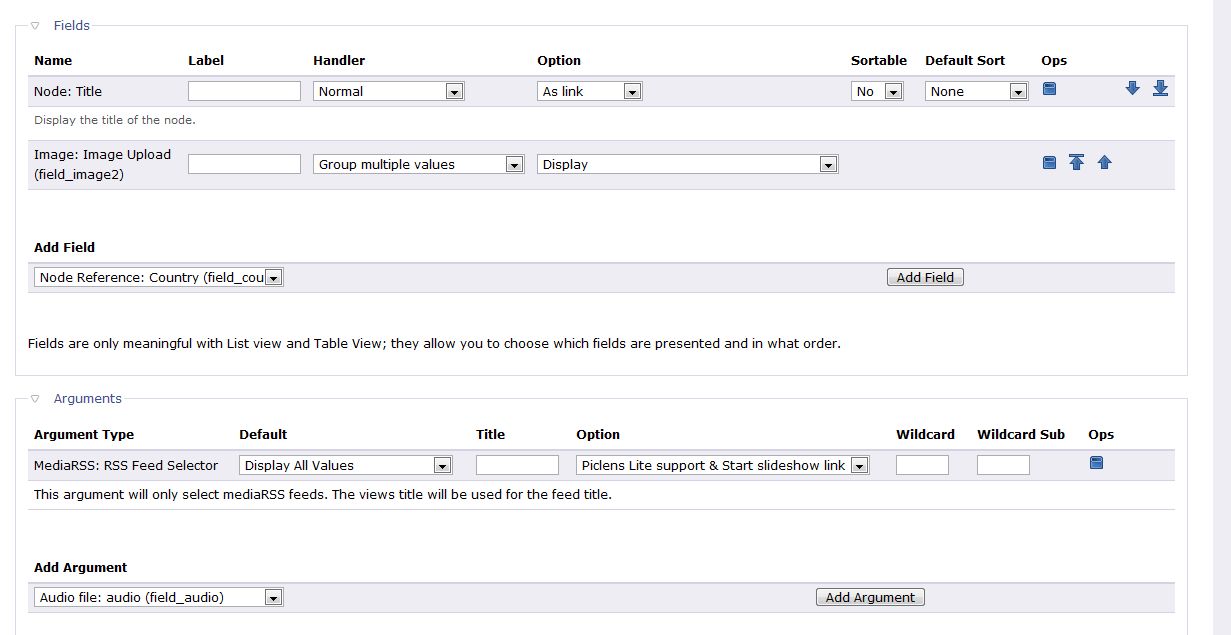
It's quite experimental but a first small test did the job here. This is what I did:
- view type: list
- fields: node title and one imagefield with one of my imagecache presets as an option (this one is used for the thumbnail, I use the original image as display image).
- There is an mediaRSS argument you need to turn on and choose an option for it.
Options are no support for Lite, Lite javascript, add link (although I feel this seems to be a bit obsolete) and link + Lite javascript
I chose the last one of course and when going to my views page, the javascript was there and the link worked perfectly. Hope it's going well for you too.
Comment #7
vanderlip commentedMost excellent!
Thanks a lot for your efforts on this. I just ran a quick test (will do more), and it works!
Give me a couple days to do some more testing, and I will get back with more feedback.
Thanks again.
Comment #8
vanderlip commentedI'm having a couple challenges, and I am not sure if it is me, or the module. As indicated above I got this working per your instructions. When I click on start slide show, I am taken to the the piclens plug-in, all the pictures are there. When I select one it enlarges (as expected) but rarely runs the blue line across the bottom of the image to refresh. Instead it is displaying a "!" in a triangle (warning sign). On some pictures the blue line runs, on others it does not. Sorry, can't seem to make a screen capture.
I am not sure what is causing this. Any ideas?
When I am in the piclens plugin display interface, I am also not able to switch from the "wall of photo's" to the slide show interface.
I have attached a screen shot of my view.
thanks for any ideas you may have. Again, a great module.
-dennis
Comment #9
vanderlip commentedSorry, one more question.
In your instructions in #6 you write,
- fields: node title and one imagefield with one of my imagecache presets as an option (this one is used for the thumbnail, I use the original image as display image).
It was unclear in the part that says "I use the original image as display image". Do you mean that you wrote that into the module or that I should have 2 imagefield fields in the fields section of my view? I ask because currently, If I used a thumbnail imagefield setting as you have described, it uses those thumbnails in the view AND in piclens display, which obviously does not work well.
You can see my view in an attachment to #8
thanks
Comment #10
swentel commented@vanderlip
Thanks for the report. I'm currently testing a complete overhaul of the module (I did a split of supported image modules in separate sub-modules of piclens). I'll do some tests next week (we have a few days off thanks to some holidays), also on a windows machine, because I don't have the piclens browser plugin on a linux machine (quite ironic heh).
I'll report back next week.
Comment #11
swentel commentedJust to let you guys know: first official releases are out and the module has changed a lot. Every supported drupal module is now available as a submodule, so be sure to enable it on the list of modules.
Comment #12
vanderlip commented@Swentel
Just to let you know that your latest May 2, 5.x-1.x-dev update appears to have solved the two issues #8 and #9 above. Originals now appear to load correctly in PicLens. Thanks a lot for resolving this.
- Dennis
Comment #13
swentel commentedclosing this issue
the strategy will be changed for the media rss argument, cf http://drupal.org/node/256126