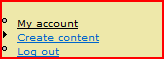
Admin interface behaves exactly as described in README file. I've delegated the administer permission on a vocabulary to a certain role, but that role does not see any extra items it in the nav menu. See screenshot.
I'm pretty sure that made the new item show up in the menu. I've changed the code to force the menu to be rebuilt when the delegation or the menu title changes.
Sorry Nancy but it still doesn't work. Actually I have caching disabled altogether since I'm still in dev.
Have you ever tried the 6.x version to test that it actually works?
By the way on taxonomy_delegate.admin.inc you missed an underscore in line 46. Anyway, with this fixed it still doesn't work for me.
What is the URL that I'm meant to be sent to by clicking on the menu item? I could try entering it directly. I tried copying the path from the admin screen used to add terms to the relevant vocabulary (/admin/content/taxonomy/3/add/term) and was denied access.
Actually, even with caching disabled, menu caching is still active. Several types of caching are always in effect.
Yes, I have tried the 6.x version and yes, it works for me. As a matter of fact, I had to make a small tweak to make it work. That's where the missing underscore came from, and I don't understand why I didn't have a problem with that. I just committed that fix.
Hmm... strange. I get a 404 when I go to that URL (in my case http://localhost/d6/category_admin). Also tried when logged in as administrator and got the same result.
Let's back up a step or two then. When you enable the module, there should be a "Delegation" tab under admin >> content >> taxonomy; is it there? Does it show any vocabulary as delegated? The menu item will also not show up if you don't have any vocabularies delegated to you (even as admin). Delegate a vocabulary to a role and then login as a member of that role. On my test site, the easiest role to test with is "authenticated user".
And, yes, with no vocabularies delegated, I also get a PNF. That's probably good.
AHA! Yes it works if you delegate to "Authenticated User". I have a role called "content editor" and I had delegated to that role. Although the user was a member of the role, it did not work.
So I believe that in principal the module works, but there is something wrong with the implementation of roles / permissions. Try it yourself with another role and see how you go...
At this point I'm out of magic. Unless I can poke around on your site, or you can come up with more information, I don't have any idea why it's not working for you. You have the same code I do.
I may have just stumbled upon the cause of this. There are some annoying "quirks" in the D6 menu system. Try disabling and then re-enabling the module.
Tried it - no success. I think you're looking in the wrong place though if you look at the menus, because the page doesn't work even if I paste the correct URL into the address bar. Therefore it's a permissions issue rather than anything to do with the menu as such.
I am having the same issue and it looks like it is not saving the role properly. I am also using Node Profile. I don't know if that's related. In taxonomy, I save the delegation role to "editor" and when I go back in, it has not been saved. I hope there is a clue there for you.
The correct role names are displayed. Everything appears as I would expect. I select the role that I would like to have delegate it and save. I edit it again and the role is not selected. When I look at the taxonomy_delegate database, it is empty. I would be happy to provide you login information if you'd like to personally take a look at the system.
@MissyM: I'm looking at your site, and your issue is really the same as http://drupal.org/node/228028. The delegated roles are nor being saved. They are not displayed on the "Delegation" tab nor on the Vocabulary edit page.
@fletchgqc: Can you please check this same situation.
@MissyM: Is there anyway you can get your host to get to supported levels of PHP and MySql? Your versions are very old and unsupported. D7 (right around the corner) will require PHP 5.2.5 or higher and MySql 5 (or Postgres 8) or higher.
I don't have any particular reason to question these, but I have other modules that simply did not work right on PHP 4. But when the users updated to PHP 5, all of a sudden they did. Yes, D5 and D6 are supposed to work on PHP 4.3.5 or above and I am trying to figure out why this module doesn't seem to.
Hey Nancy -- I restored my site and updated the module with your fix. It unfortunately didn't work. I left your login info in case you want to look again. I will try to manually add the records if you can tell me what to do. From that I can see if the only problem is the didn't save problem. Thanks --
(first:sorry for my english...)
If you installed Hierarchical Select, I've found an error in its taxonomy sub-module ([..]modules/hierarchical_select/modules/taxonomy.inc). The code "breaks" all other subsequent modules that use the vocabulary editing form. My version is 1.9 (2008/01/19), but the problem persists in the last version available (1.21 - 2008/03/29 in HS 5.x-2.2).
There is an incorrect operation/assignment (+=) for an array: you must change this with array_merge.
(See also http://drupal.org/node/260939)
In my version, the line numbers are 134-135 (function taxonomy_hierarchical_select_form_alter):
(you should move the line that adds ['hierarchical_select_taxonomy_form_vocabulary_submit'] after the merge...)
After this correction, my Taxonomy Delegation run properly.
Ciao; Matteo
Since the 5.x and 6.x menu systems are so different, I'd really like to separate this issue for the releases. The solution for 5.x will not work in 6.x and vice versa.
Of course you would start seeing the menu with what you did. The problem with your change is that users who don't have any vocabularies delegated to them would also see the menu item. That is not the intent.
There may be a better way to do this, but not your way.
I have one user role defined called admin. I delegate 3 vocabularies to it called gallery, tags and newsletter. I have one user in the admin group called John.
When John logs in he does not see the option "Administer My Categories" in the menu. When he goes to the category_admin page it returns a 404.
If I delegate one or more vocabularies to "authenticated user" then John gets the "Administer My Categores" link back and he can administer all 3 of his categories.
I just downloaded version 6.x-1.3 and am running drupal 6.15.
Apologies if I have posted this in the wrong place - I am a newbie.
Any update to this problem would be much appreciated.
In D6, I removed the if($any) check and 'access arguments' from taxonomy_delegate_menu() and added an 'access callback' which calls a new function that returns the count of vocabs that the user's role has been delegated. This gets the menu item to show in the Navigation menu but not the Admin Menu for some reason.


Comments
Comment #1
nancydruI keep forgetting some people don't use the "Navigation" menu and that's where the link would be put. Is that the case here?
Some day I'm going to have to figure out how to add a menu entry in a different menu.
Comment #2
fletchgqc commentedThe README says that it will be put in the Navigation menu.
The navigation menu is the one in the screenshot. The link does not appear there, although it should.
Comment #3
nancydruOkay. Something quick to try while I try to figure this out: Go to admin >> settings >> performance and click the "clear cache" button.
Comment #4
nancydruI'm pretty sure that made the new item show up in the menu. I've changed the code to force the menu to be rebuilt when the delegation or the menu title changes.
Fix committed to -dev.
Comment #5
fletchgqc commentedSorry Nancy but it still doesn't work. Actually I have caching disabled altogether since I'm still in dev.
Have you ever tried the 6.x version to test that it actually works?
By the way on taxonomy_delegate.admin.inc you missed an underscore in line 46. Anyway, with this fixed it still doesn't work for me.
What is the URL that I'm meant to be sent to by clicking on the menu item? I could try entering it directly. I tried copying the path from the admin screen used to add terms to the relevant vocabulary (/admin/content/taxonomy/3/add/term) and was denied access.
Comment #6
nancydruActually, even with caching disabled, menu caching is still active. Several types of caching are always in effect.
Yes, I have tried the 6.x version and yes, it works for me. As a matter of fact, I had to make a small tweak to make it work. That's where the missing underscore came from, and I don't understand why I didn't have a problem with that. I just committed that fix.
It should be going to http://www.example.com/category_admin
Comment #7
nancydruComment #8
fletchgqc commentedHmm... strange. I get a 404 when I go to that URL (in my case http://localhost/d6/category_admin). Also tried when logged in as administrator and got the same result.
Comment #9
nancydruLet's back up a step or two then. When you enable the module, there should be a "Delegation" tab under admin >> content >> taxonomy; is it there? Does it show any vocabulary as delegated? The menu item will also not show up if you don't have any vocabularies delegated to you (even as admin). Delegate a vocabulary to a role and then login as a member of that role. On my test site, the easiest role to test with is "authenticated user".
And, yes, with no vocabularies delegated, I also get a PNF. That's probably good.
Comment #10
fletchgqc commentedAHA! Yes it works if you delegate to "Authenticated User". I have a role called "content editor" and I had delegated to that role. Although the user was a member of the role, it did not work.
So I believe that in principal the module works, but there is something wrong with the implementation of roles / permissions. Try it yourself with another role and see how you go...
Comment #11
nancydruHmm, I created a new user with very limited permissions and it is allowed to do everything, so I have a far bigger headache.
However, yes, the menu item displayed.
Does "content editor" have "administer taxonomy" permission?
Comment #12
fletchgqc commented> Does "content editor" have "administer taxonomy" permission?
No. The idea is to avoid that, right?
Comment #13
nancydruYes, that's the idea.
At this point I'm out of magic. Unless I can poke around on your site, or you can come up with more information, I don't have any idea why it's not working for you. You have the same code I do.
Comment #14
nancydruI may have just stumbled upon the cause of this. There are some annoying "quirks" in the D6 menu system. Try disabling and then re-enabling the module.
Comment #15
fletchgqc commentedTried it - no success. I think you're looking in the wrong place though if you look at the menus, because the page doesn't work even if I paste the correct URL into the address bar. Therefore it's a permissions issue rather than anything to do with the menu as such.
Comment #16
nancydruIt just requires 'access content' which pretty much anyone who is supposed to be on your site would have.
Comment #17
missym commentedI am having the same issue and it looks like it is not saving the role properly. I am also using Node Profile. I don't know if that's related. In taxonomy, I save the delegation role to "editor" and when I go back in, it has not been saved. I hope there is a clue there for you.
Comment #18
nancydruWhen you look at the "Delegation" tab, does it show the correct role name? I don't think Node Profile would interfere like this.
Comment #19
missym commentedThe correct role names are displayed. Everything appears as I would expect. I select the role that I would like to have delegate it and save. I edit it again and the role is not selected. When I look at the taxonomy_delegate database, it is empty. I would be happy to provide you login information if you'd like to personally take a look at the system.
Comment #20
nancydruI guess that would help.
Comment #21
fletchgqc commentedI'm not using Node Profile, by the way.
Comment #22
nancydru@MissyM: I'm looking at your site, and your issue is really the same as http://drupal.org/node/228028. The delegated roles are nor being saved. They are not displayed on the "Delegation" tab nor on the Vocabulary edit page.
@fletchgqc: Can you please check this same situation.
Comment #23
nancydru@MissyM: Is there anyway you can get your host to get to supported levels of PHP and MySql? Your versions are very old and unsupported. D7 (right around the corner) will require PHP 5.2.5 or higher and MySql 5 (or Postgres 8) or higher.
I don't have any particular reason to question these, but I have other modules that simply did not work right on PHP 4. But when the users updated to PHP 5, all of a sudden they did. Yes, D5 and D6 are supposed to work on PHP 4.3.5 or above and I am trying to figure out why this module doesn't seem to.
Comment #24
nancydruAha! I did find a bug in the saving code -- I can't figure out why it works for me, but it does. I'm pretty sure this will take care of the problem.
Fix committed to both -dev branches. This will roll up around midnight GMT (8pm ET). Please try it out.
Comment #25
nancydruComment #26
missym commentedHey Nancy -- I restored my site and updated the module with your fix. It unfortunately didn't work. I left your login info in case you want to look again. I will try to manually add the records if you can tell me what to do. From that I can see if the only problem is the didn't save problem. Thanks --
M.
Comment #27
nancydruDid you use the 5.x-1.x-dev version?
Comment #28
matteo.boria commented(first:sorry for my english...)
If you installed Hierarchical Select, I've found an error in its taxonomy sub-module ([..]modules/hierarchical_select/modules/taxonomy.inc). The code "breaks" all other subsequent modules that use the vocabulary editing form. My version is 1.9 (2008/01/19), but the problem persists in the last version available (1.21 - 2008/03/29 in HS 5.x-2.2).
There is an incorrect operation/assignment (+=) for an array: you must change this with array_merge.
(See also http://drupal.org/node/260939)
In my version, the line numbers are 134-135 (function taxonomy_hierarchical_select_form_alter):
Correct version:
(you should move the line that adds ['hierarchical_select_taxonomy_form_vocabulary_submit'] after the merge...)
After this correction, my Taxonomy Delegation run properly.
Ciao; Matteo
Comment #29
nancydruThank you, Matteo. This could explain a lot because I don't use HS, so I don't see the problem. Did you submit a patch to HS?
Comment #30
matteo.boria commentedPatch(es) submitted.
Sorry for the delay, but I'm a Drupal newbie... "hooks" and "modules" are not so familiar for me.
Ciao;
Matteo
Comment #31
nancydruFabulous. Thanks, Matteo. I won't mark this as a duplicate yet, but we will wait for that issue. http://drupal.org/node/260939
Comment #32
a.mikheychik commentedSo, actually in drupal 6.2 problem with menu item is still relevant.
How I can see, it's connected with this code
When I commented lines with $any menu started to work.
May be problem with dynamic page creation?
Comment #33
nancydruSince the 5.x and 6.x menu systems are so different, I'd really like to separate this issue for the releases. The solution for 5.x will not work in 6.x and vice versa.
Of course you would start seeing the menu with what you did. The problem with your change is that users who don't have any vocabularies delegated to them would also see the menu item. That is not the intent.
There may be a better way to do this, but not your way.
Comment #34
a.mikheychik commentedYes, that's true. So I just add a taxonoy delegate permission to this menu :-)
Comment #35
nancydruThere is no TD permission.
Comment #36
a.mikheychik commentedIt is not a problem to add it. hook_perm() works excelent :-)
Actually its just temporary solution :-)
Comment #37
nancydruI believe I fixed this with #291665: Anonymous users can see a "Administer My Categories" link
Comment #38
PolishBen commentedHi
I don't think this is fixed:
I have one user role defined called admin. I delegate 3 vocabularies to it called gallery, tags and newsletter. I have one user in the admin group called John.
When John logs in he does not see the option "Administer My Categories" in the menu. When he goes to the category_admin page it returns a 404.
If I delegate one or more vocabularies to "authenticated user" then John gets the "Administer My Categores" link back and he can administer all 3 of his categories.
I just downloaded version 6.x-1.3 and am running drupal 6.15.
Apologies if I have posted this in the wrong place - I am a newbie.
Any update to this problem would be much appreciated.
Comment #39
greenbeans commentedIn D6, I removed the if($any) check and 'access arguments' from taxonomy_delegate_menu() and added an 'access callback' which calls a new function that returns the count of vocabs that the user's role has been delegated. This gets the menu item to show in the Navigation menu but not the Admin Menu for some reason.
Comment #40
nancydruI believe #867614: hook_menu is incorrect. fixes this.