

 Come together with the global Drupal community in Rotterdam, 28 Sept – 1 Oct 2026. Sessions, contribution, connection, and Early Bird savings until 8 June.
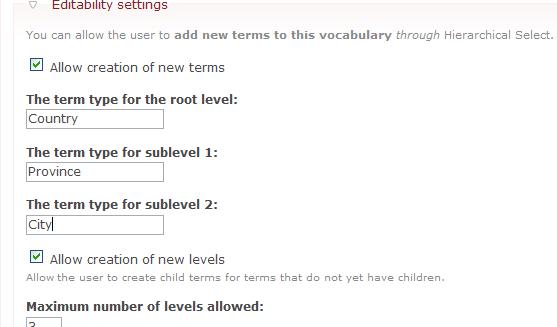
I was under the impression that the label for "create new level" and "create new item" was going to use the level names. So I would expect that a hierarchy for geography would have for the province level:
for the
for the
Thanks
| Comment | File | Size | Author |
|---|---|---|---|
| #4 | createitem.jpg | 45.13 KB | 32940stf |
| #2 | termtype.jpg | 19.61 KB | 32940stf |
| newitem.jpg | 20.75 KB | 32940stf |



Comments
Comment #1
wim leersThat is what the "term types" are for. There's a differentiation between "level labels" and "term types": a level label could be "Choose a Region" whereas the corresponding term type would be "region" (lowercase, if you want a consistent result).
Comment #2
32940stf commentedThanks Wim,
I have set the term types as well on the vocabulary(see atttached jpg). So should I expect to see these values in the select boxes?
Comment #3
wim leersYes, you should see them there. It's working here, so it should work for you too.
Making this a task: I should document this better. If it's not clear to you, then the average user will ask the same.
Comment #4
32940stf commentedInstalled the May18th build I am I still not seeing the term types in the select drop downs however I do see them in the dialog box for creating a new level or item. See attached image
Comment #5
wim leersConfirmed. It seems I was doing it only correctly in some cases. Stupid.
Comment #6
wim leersFixed, now back to the documentation issue. Is "item type", or in the case of Taxonomy, "term type", a good description? Do you have suggestions to make this more clear?
I do want to add a description to the form, something like:
where !item is replaced dependent on the implementation, as mentioned earlier.
Comment #7
wim leersComment #8
Anonymous (not verified) commentedAutomatically closed -- issue fixed for two weeks with no activity.