Closed (fixed)
Project:
CivicSpace Theme
Version:
master
Component:
Styles
Priority:
Critical
Category:
Bug report
Assigned:
Reporter:
Created:
28 Jun 2005 at 05:45 UTC
Updated:
14 Oct 2008 at 01:08 UTC
Jump to comment: Most recent file


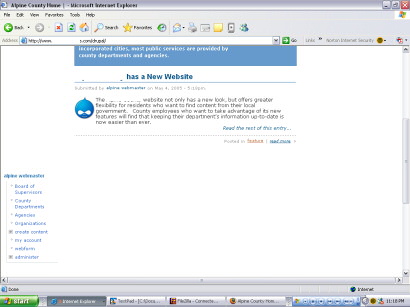
It seems that the left sidebar drops down below the center column with Internet Explorer and the Groundswell theme. The cause may be the calendar block, as it appears that Firefox is able to make the calendar block smaller and Internet Explorer is not able to scale it down-- perhaps resulting in the whitespace?
I know you hate to hear anything about whitespace... I have hacked the event.module to print the days as "S, M, T, W, TH, F, SA" but I doubt this would effect anything. If anything it should make the event block smaller and less likely to push the left-column down.
| Comment | File | Size | Author |
|---|---|---|---|
| #2 | GS_SS_events_block.gif | 18.83 KB | erikhopp |
| #1 | dropping.jpg | 32.79 KB | bomarmonk |


Comments
Comment #1
bomarmonk commentedHere's a screen-shot of the drop-down of the left sidebar...
Comment #2
erikhopp commentedthis is a problem in cvs as well.
it does seems to be the events block that is the culprit.
in WIN XP / IE 6.0
screenshot attached
Comment #3
factoryjoe commentedThis is rediculous. I hate IE.
Can someone try dropping this into visual.css and lemme know how IE feels about that?
.block-content { overflow: hidden; }Comment #4
bomarmonk commentedI did try your suggested fix, but unfortunately, the left column stayed the same. On another note: some of the nodes don't have the left-column dropping, but it definitely occurs on the front page of my site, where the site's mission statement and the calendar block are both activated.
Comment #5
erikhopp commentedthe event block styles are being redone - they are contained in occy's patch here: http://drupal.org/files/issues/modules.css
if you copy and paste that event css in, it will change your styles, but it should fix the problem.
Comment #6
bomarmonk commentedI had already tried the new module.css file, but didn't notice that it solved this issue. I tried it again, just to be certain; the left column still drops on certain pages. This behavior seems to depend on what conent is in the center column. I'll keep checking this thread and the others to see if a solution emerges. Thanks for the suggestion, but it didn't help my particular issue with that darn white-space.
Comment #7
erikhopp commenteda duplicate report was filed here with some more screenshots
Comment #8
factoryjoe commentedI need more specific examples in order to work on this. The proposed solution above should fix wide sidebar issues. Not sure about center column problems.
Comment #9
bomarmonk commentedAfter uploading all of the new changes to the theme, the side-bar no longer drops for me! Great! I'm not sure which fix did the trick, but the latest stuff from CVS seems to be the cure.
Comment #10
bomarmonk commentedNevermind... the changes backported to the 4.6 version have reintroduced the problem...
Comment #11
erikhopp commentedIts old. Screw it!