

 The 2026 Drupal Business Survey is open. Your response will help shape the future of the Drupal business ecosystem.
Hi, i moved my site from servers and I could make everything work except for my chat module. It comes up only with the chat window. People can type in and you can see what people typed only after you typed something. I lost the Users Online section and I can not send private messages.
I think I have a problem regarding AJAX here or some king of php.ini configuration issue but I don't know exactly what it is.
Please help em here!
| Comment | File | Size | Author |
|---|---|---|---|
| #6 | chatroom.jpg | 29.18 KB | simon.j.c |
| #4 | example.jpg | 97.49 KB | mrrjpp |


Comments
Comment #1
simon.j.c commentedI am having the same problem, so you are not alone. I am up to date with all the releases etc. I think this module was working well, when I first installed, but since I use Firefox mostly, I am not certain. I have tried a few simple things this morning, with no success. I will report back if I have any luck!
Here is my Status Report (slight trimmed):
Drupal 5.10
Configuration file Protected
Cron maintenance tasks Last run 12 min 12 sec ago
Database schema Up to date
Drupal core update status No update data available
GD library 2.0 or higher
Job queue There are no queued jobs.
MySQL database 5.0.32
PHP 5.2.0-8+etch11
PHP register globals Disabled
Unicode library PHP Mbstring Extension
Web server Apache
jQuery Update Installed correctly
The current installed version of jQuery is 1.2.6
Comment #2
simon.j.c commentedI have now tested this with IE6 and IE7 and Firefox. Firefox works well.
I notice there is a patch for the 5x-1.x-dev and jQuery 1.2.6- would this be required for 5.x-1.9?
Any direction on this would be appreciated, as this is a great module (in Firefox) and I would like to use on our sites.
Comment #3
simon.j.c commentedReduced from Critical to Normal
Comment #4
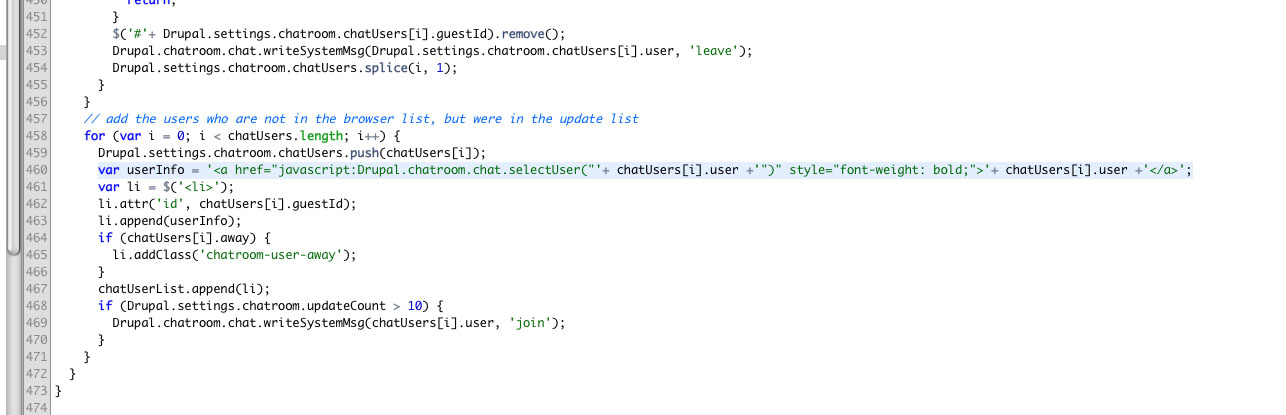
mrrjpp commentedI don't really have time to make a patch now but the issue is definitely stimulated by jquery update. The following will fix the issue:
var userInfo = '<a href="javascript:Drupal.chatroom.chat.selectUser("'+ chatUsers[i].user +'")" style="font-weight: bold;">'+ chatUsers[i].user +'</a>';Replace var userInfo inside of chatroom.js, it is around line 460.
Comment #5
mrrjpp commentedComment #6
simon.j.c commentedMany thanks for your time- it is appreciated.
Tested and the block works again thanks, but the main body is still without names.
I have attached the image with the Block on the left and the main chat window on the right.
Comment #7
webpoga commentedI currently have this problem too. This only happens in IE browsers. The doesn't appear next to the message. Anyone have any idea?
Comment #8
ridolfidesigns commentedI have the same problem.
Comment #9
adamgerthel commentedI've applied the fix, but the block neither the chat works in IE6/7 (the names aren't displayed)
Comment #10
ianchan commentedSame problem for me..
Messages display in the main chat area but are not prefixed with usernames.
This problem occurs in IE7
Does not occur in Firefox 3, Safari 3 (Win), & or Opera 9.62.
Comment #11
mitchell commentedWould someone please roll a patch?
Comment #12
mitchell commentedComment #13
ianchan commentedI may have a solution. It appears to work on Firefox and IE7.
The following fixes the issue for the chat messages window
Around line 299, change:
to
To fix the "Who's Online" chat block,
around line 462, change:
to
Also, at line 524 change
var msgSpan = $('<span>');to
var msgSpan = $('<span></span>');I tried to find documentation on how to roll a patch for Drupal modules but have not found anything as yet.
Comment #14
mitchell commentedhttp://drupal.org/patch/create
If you have questions making the patch, irc would be a fast place to get them answered. Otherwise, feel free to post them here.
Comment #15
rkdesantos commentedsubscribe
Comment #16
adamgerthel commentedThank you ianchan! Works wonders in IE.6 as well
Comment #17
rkdesantos commentedThis seems to help however I get an javascript error (related? not related?) at lines 383 and 406:
and
and the error is:
Comment #18
digidoo commentedsame issue here, subscribing...
Comment #19
pomliane commentedThis version of Chat Room is not supported anymore. The issue is closed for this reason.
Please upgrade to a supported version and feel free to reopen the issue on the new version if applicable.
This issue has been automagically closed by a script.