

 Come together with the global Drupal community in Rotterdam, 28 Sept – 1 Oct 2026. Sessions, contribution, connection, and Early Bird savings until 8 June.
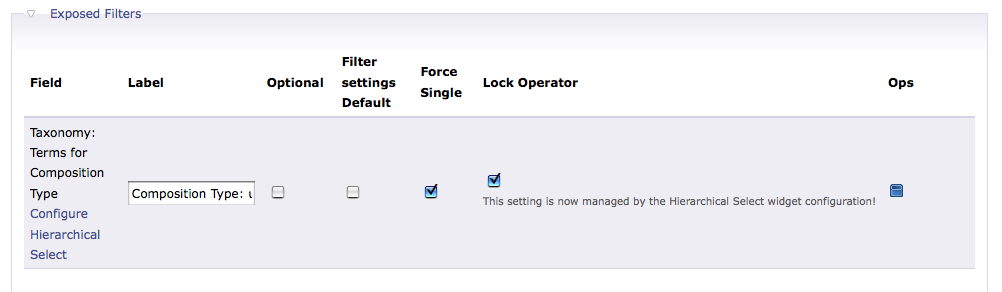
When I have force single selected for my taxonomy view exposed filter the last selection in the hierarchy is lost and not used as part of the filter. When I have Force Single deselected and add the filter than submit, it works fine.
| Comment | File | Size | Author |
|---|---|---|---|
| #3 | view-filter.png | 26.71 KB | anthonym |
| #3 | tax-part1.png | 90.76 KB | anthonym |
| #3 | tax-part2.png | 56.83 KB | anthonym |



Comments
Comment #1
wim leersHow did you configure HS? Save lineage or not?
Force single really does what it says: it prevents the selection of multiple items.
Comment #2
groovypower commentedForce Single is preventing the selection of multiple items, but it is forcing the view to choose the parent of the item I'd like to choose, no matter what the depth of the item is.
HS Setup is for my view:
Save deepest term
Allow the user to choose a term from any level
Display the node count: Enabled
Level Labels is not selected
Dropbox is not selected
HS Setup for the taxonomy is:
Save deepest term
Allow the user to choose a term from any level
Display the node count: Enabled
Level Labels is not selected
Dropbox is selected
Reset selection of hierarchical select: Enabled
Allow creation of new terms on all current levels only
Comment #3
anthonym commentedI've got the same problem here with version 5.x-3.0-rc2 as well. I've posted some screenshots of my settings. If you have a minute please go to this page http://anthonymosakowski.com/compositions and try to choose on of the items from the end of the list. Only parent terms work.
Comment #4
wim leersThanks anthonym, that helped me understand the problem.
I think that I already know the cause: when an item has no items, no callback to the server is made. Therefore, the flat list that's necessary for the Views exposed filter GET form doesn't get updated.
Possible solutions:
- in GET forms, always do callbacks to the server (worse performance-wise)
- update the flat select on the JS side, but only when the hierarchical select changes, not when the dropbox changes.
I'm on it.
Comment #5
mzenner commentedHave the same problem - subscribing
Comment #6
mzenner commented- update the flat select on the JS side, but only when the hierarchical select changes, not when the dropbox changes.
-> can you give some directions in what js file i can do that; i'll try to figure it out
Comment #7
wim leersFixed! mzenner sponsored my work on this, thanks! :)
Comment #8
lelizondo commentedHi, I'm having the same problem but I just can't understand this:
"- update the flat select on the JS side, but only when the hierarchical select changes, not when the dropbox changes."
Don't know what to do really...
Thanks in advance..
Luis
Comment #9
lelizondo commentedOk, so 10 minutes after I posted I figured out.
I was using the 3.0-rc2 version when having this problem, updated to the Ago/22 3.x-dev version and cleared the cache tables, all of them and the problem is gone.
Maybe this could help others with the same problem..
Luis
Comment #10
vlooivlerke commentedOk , Upgraded to the lates dev version and used Devel.module to clear all module cache. But problem still there.
Do I have to clear the tables in my Database, using PHPmyAdmin?
That sounds scary, and I have not done that before. Will Devel.module not do that.
If I have to clear the cache manually, what do I have to do?
Surely i don't have to drop the table but only clear it. Correct.
And there is more than 1 cache table in my drupal install.
Looking for table cache clear info on the rest of drupal site, so may be I can post a link here later.
Thanks
EDIT:)
Ok the devel.module works!
My browser cache was causing the problem.
Comment #11
lelizondo commentedIn my case I cleared the cache tables, all of them.. just do this:
for every table that starts with cache like this:
Comment #12
Anonymous (not verified) commentedAutomatically closed -- issue fixed for two weeks with no activity.