

 The 2026 Drupal Business Survey is open. Your response will help shape the future of the Drupal business ecosystem.
Just want to check whether this has happened to anyone else. I configured one multilingual menu, but assigned the menu items by their respective languages. Some menu A has 4 menu items; 2 in English and 2 for another language. Previously this displays just fine, i.e. when viewing the page in English, just the English language menu items in Menu A are displayed. Similarly, when switching the language of the page to Language 2, just the menu items in Language 2 are displayed. This is good.
But after upgrading to Drupal 6.4, I noticed that some menu items that share the same path shows up in both languages. So let's say one menu item links to "<front>", both the English and Language 2 menu item is displayed. This also happens when linking to an external URL and Views path.
So, when the menu item has the same path, language settings for that menu item is ignored. This is annoying.
Anyone else experienced this? Or have another way on how to do multilingual menu correctly. Thanks.
| Comment | File | Size | Author |
|---|---|---|---|
| #8 | array1-complete-structure.png | 22.99 KB | saml |
| #7 | array1.png | 4.39 KB | saml |
| #7 | array1-details.png | 43.66 KB | saml |


Comments
Comment #1
saml commentedI have the same experience. I installed i18n on a fresh Drupal 6.4.
Comment #2
saml commentedAny update on this?
Comment #3
sharifudinrizal commentedYes, waiting for an update too.. I supposed in the mean time we can workaround this by having a separate set of menu for each language.
Comment #4
AaronCollier commentedI have not had this problem after upgrading to 6.4; it works like it always has. What are your settings for the Multilingual system (admin/settings/i18n)?
Comment #5
saml commentedMine is:
"Content selection mode: Current language and language neutral"
Furthermore on admin/settings/language/configure I have:
"Language negotiation: Path prefix only"
Comment #6
sharifudinrizal commentedSame setting for me too.
Comment #7
saml commentedI tried debugging i18nmenu_localize_tree in i18nmenu.module.
I created a localized (english) menu item named "Home" that got mlid 115 in the database. It does show up on other languages too (Swedish and Finnish in my case) which it should not.
An sql line for the menu item in the menu_links database table looks like this:
I noticed that when the debugger reaches line 98 in i18nmenu.menu:
...then the
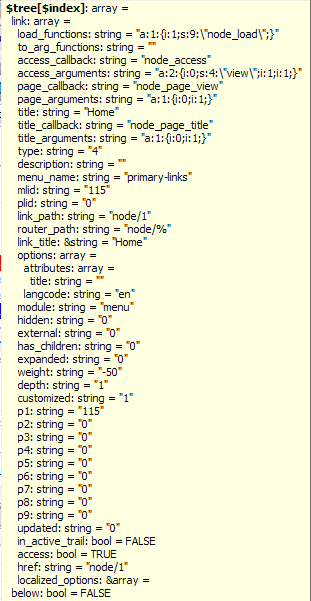
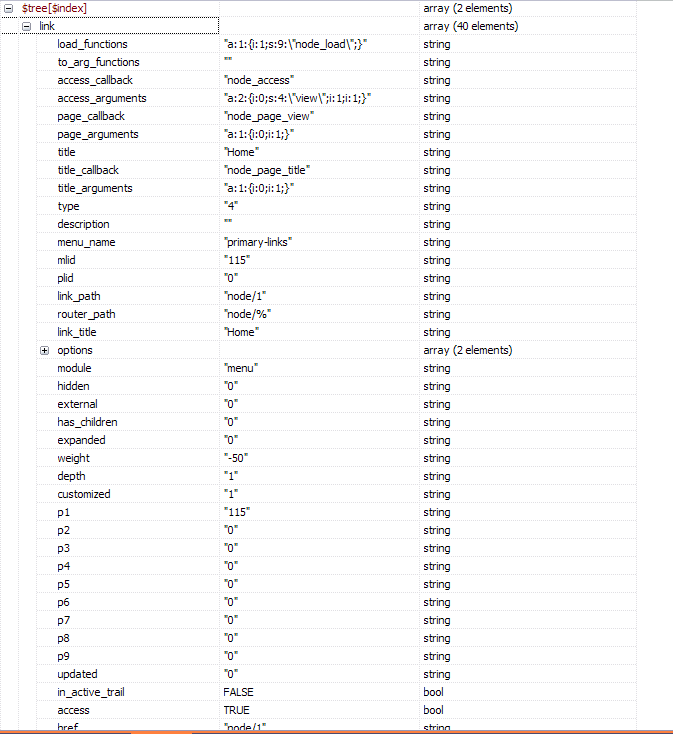
$indexvariable is a string:"49950 Home 115"which seems strange to me, since the $tree variable does not have a key that resembles that. See screenshots for the array structure of $tree, from the watchdog.Does this give any hints?
(I'm no PHP developer really, so excuse me if there are basic concepts of PHP Arrays that I haven't understood.)
Comment #8
saml commentedHere's a better overview of the structure of the $tree array, when arriving at the line of code mentioned above.
Comment #9
saml commentedSorry, I just mis-interpret the watchdog! I was looking at the value of $tree[$index] when I thought it was the value of $tree!
* Doh *
Comment #10
saml commentedNow I got menus placed in blocks to work (Localized menu items are only displayed when the respective languages are chosen, as expected.).
The problem was the module DHTML Menu! I had to delete it completely (disabling the module didn't help).
The problem still applies though to the primary links menu in the theme (It's a bluemarine based theme), IF they point to the same page, e.g. "node".
Comment #11
sharifudinrizal commentedI think the problem remains. If both language translations of menu items point to the same node, Drupal will ignore the language of the menu items and display them both. Still waiting for a fix, though.
Any idea if we can rollback to the previous version of the module?
Comment #12
AaronCollier commentedI have my primary links in a block, and disable the one in the theme, so then I do not experience what you are referring to. I just turned it on in the theme and I noticed the problem (incidentally, I think it's always worked this way; I don't think it's new to 6.4).
So I would recommend disabling the primary links in the theme and enabling the block. You can configure the block to look exactly the same.
Possibly related: #250124: Page to Show Lack of Translation
Comment #13
sharifudinrizal commentedWell, in my case the problematic menu is the sidebar menu, and it is called using blocks, not from the theme. So, still no dice for me.
Comment #14
icouto commentedsharifudinrizal: I've tried, but have been unable to reproduce this bug in 3 multilingual sites. They are all D6.4, using the latest stable beta release of i18n. In 2 sites I've got 2 languages, in 1 site I've got 3. Their settings are all the same:
a) in Multilingual System settings: "Content selection mode: Current language and language neutral"
b) using the theme's own primary menu in 1 site, and menu block in 2
All sites have pages that are defined as belonging to a specific language, or being 'language-neutral'. In all sites, things behave as expected - that is: language-specific pages show up in menus *only* when the user is browsing that language, and language-neutral pages show up on every language.
Could this be a theme-related problem? Have you tried looking at the site just using the default Garland theme?
Comment #15
thomas23@drupal.org commentedI have a very similar problem: D6.4, i18n 6.x-1.0-beta3, 2 langs (en, de), menu block with 2 entries total that have the same url for each lang. I haven't touched the nodes in weeks (most certainly not after upgrading to 6.4) but now changed translation node behind one menu entry and added a translation for the other node linked to by the second menu entry.
Now, when I have de lang (non-default) set the menu block doesn't show any more. Display settings for i18n are "Mixed current language (if available) or default language (if not) and language neutral". Is that the same issue? Am I doing something wrong/missinterpreting settings? What could I do to get this working again (I'm not really into php unfortunatelly)?
Edit: A workaround is to have sepetate menu entries for each page for each language, each lang entry pointing to the same page/url, though, which I wouldn't like to have be doing for every menu entry I have. Let alone someone with a really huge site...
Thanks for your attention! Cheers.
Comment #16
BloodyNO commentedI'm reading this thread with great interest, because I am facing the same problem too. I have tried to use the standard theme Garland, and the problem still arises, so it does not seem to be a theme specific issue.
Later I will look into it and debug it as well.
Comment #17
sharifudinrizal commentedLooks like a fix may not come fast enough, so I've implement a workaround by creating separate sets of menus, one for each language. So the display condition is now on the menu, instead of individual menu items.
Comment #18
icouto commentedAfter many, *many* tries, I have been unable to reliably reproduce this error. Here, however, is what I've found - this may help some: if the multilingual system settings are setup correctly, and the translation of content is done correctly, then menus will work correctly on *almost* all pages. The only exceptions seem to be a few admin pages - such as the 'Translation Overview' page - where, for some reason, these settings are ignored, and the menu items show on both languages. These problems have been reported in a few places, including here:
http://drupal.org/node/307343
And here:
http://drupal.org/node/305379
If the bug that is being reported in this thread is the same as what has been reported elsewhere, perhaps people can add their comments, and tell about their experience in these other threads - in order to help the troubleshooting effort already going on there.
If this bug is different to what has been reported elsewhere, then perhaps someone could give a detailed, step-by-step description of how to reproduce it on a CLEAN instal of D6? - that would greatly help everyone who has been trying to troubleshoot it here.
Comment #19
vesapalmu commentedSteps to repeat this problem with clean Drupal 6.4 installation:
For everything else this works just as it's supposed to. Is this a bug or can't we just configure i18n module correctly?
Comment #20
laiska commentedMight some of the reports be partly related to http://drupal.org/node/313302 ,
I first thought that I was affected by this issue when upgradin from Drupal 5.12 when the language selection of the menu items in the primary menu didn't work. It turns out that multilingual menu features don't work when the theme does not display the menu in a block ie. the primary menu in the upper left corner of the default Garland theme.
Comment #21
jose reyero commentedYes, the issue (and workarounds) are explained in that handbook page.
Comment #23
dandril commented@thomas23@drupal.org:
I was having a similar problem (not sure if it's exactly the same) and found a solution.
The block for my menu was not appearing despite the fact that I had made sure that the block was set to Spanish and the menu items were set to Spanish. The problem was that links were to pages that were in English. The system hides these links and the entire block if the destination pages are not the same language. Since I wanted these pages to display despite the language, I needed to change the language to the pages to be Language Neutral.