Pathauto: generate URL path aliases automatically
The Pathauto module automatically generates URL/path aliases for various kinds of content (nodes, taxonomy terms, users) without requiring the user to manually specify the path alias. This allows you to have URL aliases like /category/my-node-title instead of /node/123 . The aliases are based upon a "pattern" system that uses tokens which the administrator can change.
The aliases are generated when you create content in your site and are based upon the pathauto patterns (placeholders) you specify at:
- For 6.x : Administer > Site Building > URL aliases , in the "Automated alias settings" tab.
- For 7.x : Administer > Configuration > Search and Metadata > URL aliases , in the "Patterns" tab.
- For 8.x : Manage > Configuration > Search and Metadata > URL aliases , in the "Patterns" tab.
Pathauto administration options are available on the following tabs on the URL aliases screen:
- Provide a listing of all the current aliases in the system, as well as the assigned node for the alias and Language.
- Provides the method of entering and changing the patterns used to create aliases. In Drupal 6, 7, and 8 theres several default token patterns provided. Which captures information that can be used from the object.
- For example: author, created, menu-link, or title.
- Provides options for what entity types or listed and how an alias is generated. For example: character case, excluded word, and maximum length.
- Creates pathauto URL aliases for items that currently have no aliases .
- Provides a way of bulk deleting aliases.
Creating path aliases for nodes ( 8.x )
Create your Content types if you are using anything other than ( Article or Basic Page ) to associate the Pathauto to. If you have Content already created and assigned to a Content type, follow the sets titled (Activate) in the set-up below.

Content type - Pathauto added.
Note: You do not need to create a content type named “Pathauto”. We are simply demonstrating creating pathauto patterns for a content type which happens to be named “Pathauto”.

Set -Up:
Ensure the Pathauto module (which also requires Token & CTools (8.x-1.x only)) has been enabled. Processed to + Add Pathauto pattern taking the following steps: Configuration > Search and Metadata > URL aliases > Patterns .

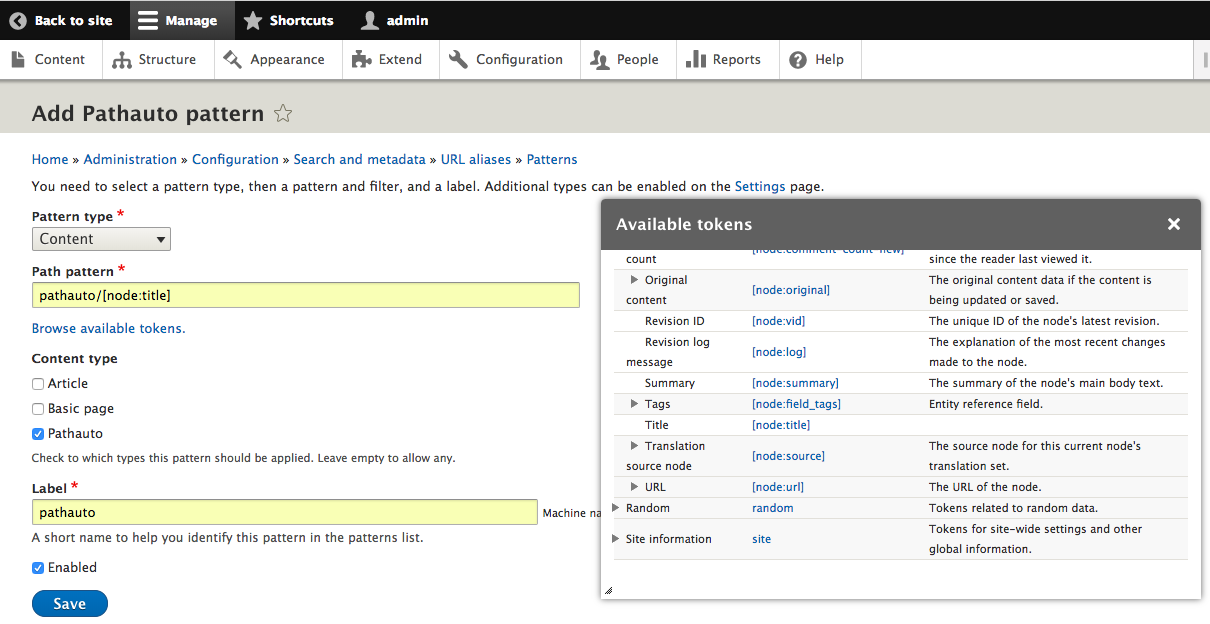
1.) Click the + Add Pathauto pattern , now select Content (because we are adding a path patterns for nodes) from the Pattern type dropdown, for the Path pattern type the Content type lowercase (ex. pathauto/), now click the Browse available tokens link and an Available tokens window will open to the right. Click on the Nodes dropdown to expand the area, now scroll down to “Title” and click the [node:title] . You should now see ‘ pathauto/[node:title] ’ in the Path pattern area. For the Content type select Pathauto (or whichever content type you are creating paths for) and for the Label type pathauto (or whatever your content type is named) lowercase. Ensure enabled is checked and Save
Back on the Patterns screen, you will now see that the Pathauto pattern has been created.

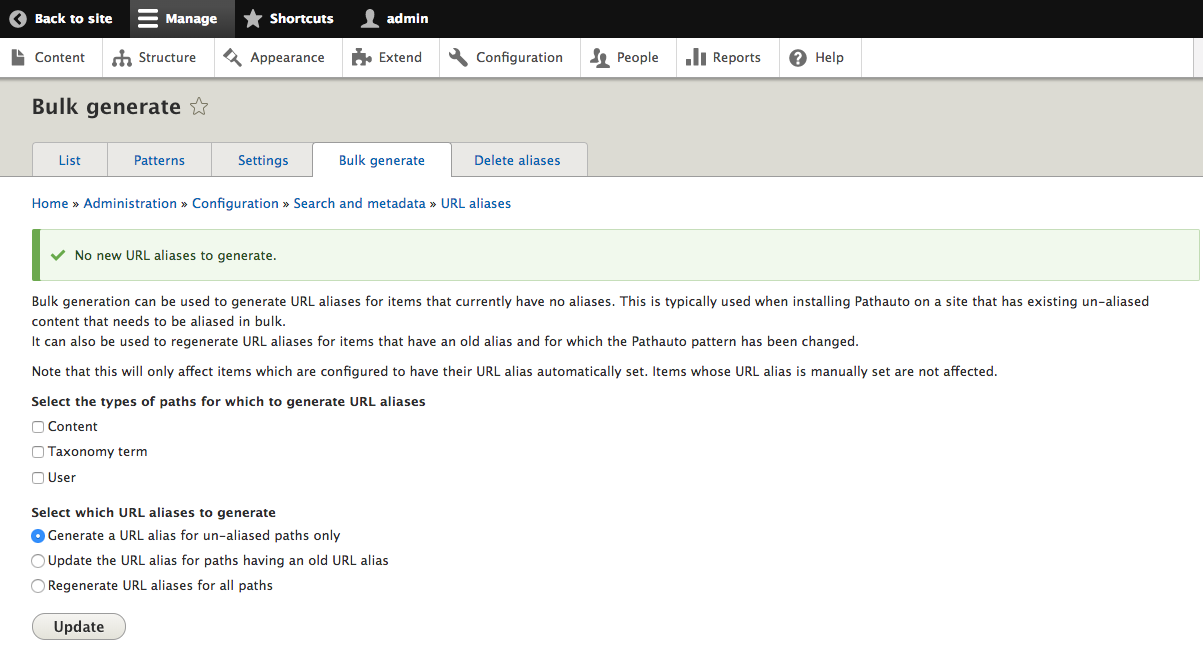
2.) Now select the Bulk generate tab. Check the Content box for the Select the types of paths for which to generate URL aliases and click Update.

NOTE: If you perform this action for a newly created content type, such as the Pathauto content type we created, you will see a message that states “ No new URL aliases to generate. ” This is not an issue. That is because you have no Content created yet.
The List tab will also be empty, because not Content has been created.

3.) We will now create content for the Pathauto Content Type to ensure its working correctly. Follow this path: Content > + Add content > Select Pathauto . Now fill out the content and ensure published is checked and Save.

4.) Now if you proceed back to the URL aliases screen: Configuration > Search and Metadata > URL aliases. You will now see that the List tab has the Content you just created listed.

This completes the pathauto process set up if you haven’t created any content.
ACTIVATE
1.) If you already have Content created for a Content type and Pathauto hasn’t been set-up.

As you can see the Pathauto isn’t being applied to this content item, it’s still listed as a node.

2.) Follow the set-up steps above starting with number one. One thing you will notice as you go through the process is that when you click Update on the Bulk generate screen, all the Content for the new label(s) you create without URL aliases will Generated.

3.) You can go to the List tab to see what content items had URL aliases Generated.
NOTE: It’s only when you have Content, set-up the Pathauto pattern, and do the Bulk Generate will this screen be populated.

4.) Now Click on one of the Alias just generated and the Home page will display the Content item and the URL will reflect the update URL and not a /node/?.
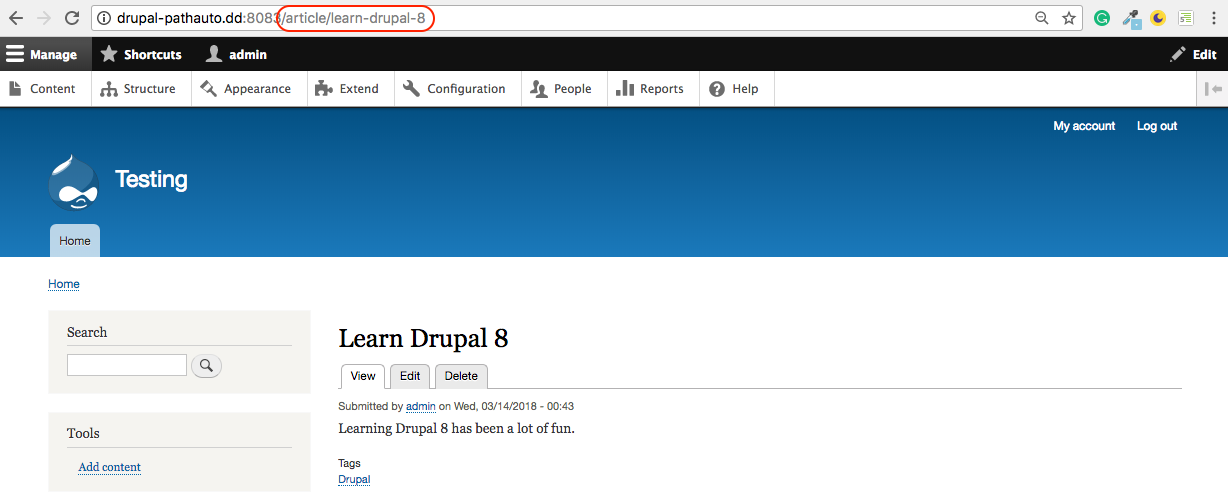
This completes the path auto process set up if you have Content already created.
You can also:
Additional resources
-------------------------------------------------------------------------------------------------------


