

Closed (fixed)
Project:
Views (for Drupal 7)
Version:
6.x-2.6
Component:
User interface
Priority:
Normal
Category:
Feature request
Assigned:
Unassigned
Reporter:
Created:
30 Sep 2008 at 17:18 UTC
Updated:
21 Jul 2016 at 01:48 UTC
Jump to comment: Most recent, Most recent file


Comments
Comment #1
merlinofchaos commentedYou might be getting whitespace due to formatting in the template, though that's kind of unusual.
Comment #2
petiar commentedThanks for reply, merlinofchaos, but I do not use any custom templates for these fields. Or did you mean something else?
Comment #3
merlinofchaos commentedOk, I've confirmed these spaces are coming from whitespace in the formatting of views-view-fields.tpl.php -- and taking out this formatting would really harm the editability of this template. Since not having spaces there is a fairly rare event, you're going to have to override this template yourself and remove the whitespace. It's not ideal, I understand, but the alternative is to make a template that is basically unusable to anyone else.
Comment #4
petiar commentedIf this is going to solve my issue I am more than happy to edit the .tpl file (that is actually what they are for, aren't they?). Nevertheless, can't really find any whitespace in that .tpl file - does it mean the whitespaces are in $field->separator variable?
Re: the rest: I can't really agree that not having whitespaces is fairly rare event - consider comma - this is actually my problem as usually there is no space before comma but there is one after it. Wouldn't be easier to get rid out those whitespaces completely and carry this feature over to configuration? So the separator would not be ",", but ", ". Hope you understand what I mean.
Thanks.
Petiar.
Comment #5
merlinofchaos commentedThe whitespace is coming from the fact that the browser translates a carriage return around a tag as a space. It means that you pretty much have to edit the template and put everything on just one line.
And I'm simply unwilling to publish a template in that state.
Comment #6
petiar commentedNow it makes sense, mate. I absolutely agree with you. I have updated my template and my problem is now solved. Thanks a lot!
Petiar.
Comment #7
Anonymous (not verified) commentedAutomatically closed -- issue fixed for two weeks with no activity.
Comment #8
Screenack commentedWhich template to edit?
I'm having the same problem, where if I say use ", " as a separator, I get " , ". I read the above, and I believe I understood the developer's point, but when I used the theme URL to generate a "Row style output" tpl.php override, (which seems to me to be correct) I was able to modify output in some fashion, but if I changed the entire file into a single, non-carriage returned string, I still got the extra space before the comma.
I love views 2, FWIW.
Update: Fixed
Update I was in the right file -- I ended up taking out all whitespace characters that were between tags, and I took out an 'extra' span element:
<?php foreach ($fields as $id => $field): ?><?php if (!empty($field->separator)): ?><?php print $field->separator; ?><?php endif; ?><<?php print $field->inline_html;?> class="views-field-<?php print $field->class; ?>"><?php if ($field->label): ?><label class="views-label-<?php print $field->class; ?>"><?php print $field->label; ?>: </label><?php endif; ?><?php print $field->content; ?></<?php print $field->inline_html;?>><?php endforeach; ?>Comment #9
merlinofchaos commentedAS stated in #3, views-view-fields.tpl.php
Comment #10
brian_c commentedThere is a third option, which eliminates whitespace while still retaining code readability:
Abandon "template style" PHP coding for this one template (or alternatively, implement it using a theme function), and use "regular style" PHP with print statements for total control of all output. Here is my version of views-view-fields.tpl.php:
Should execute faster too, which can't be a bad thing for a low-level template like this.
Sorry but I have to agree with petiar in #4... commas are extremely common delimiters (if not THE most common), and should never be preceded by a space.
Comment #11
brian_c commentedComment #12
merlinofchaos commentedSorry, I'm not turning a template into a bunch of code for this.
Comment #13
brian_c commentedThat is your prerogative, of course, but mind if I ask why?
Even the theme coding conventions (http://drupal.org/node/1965) only states to prefer "tag style" PHP in templates.
Surely exceptions can be made where warranted? Conventions shouldn't be shackles that prevent real problems from being addressed, IMHO.
Or, how about putting it into a function then, instead of a template, if coding style is the issue?
Comment #14
merlinofchaos commentedSure, it will address your real problem.
And create a different real problem for more people. You can address your problem by refactoring your template. Therefore, there is a workaround. If we make the template difficult for normal people to navigate, then more people will have more problems.
Comment #15
brian_c commentedFair enough, hopefully this thread will help anyone else with the same issue. Cheers.
Comment #16
webel commentedRE-activated because I agree with petiar in: http://drupal.org/node/315360#comment-1041029
I disagree with merlinofchaos that:
I do not see why anybody would usually, by default, want unspecified (as displayed) space before a specified separator (whether introduced by Views alone or as a side-effect of the carriage return on every browser I've tried: Firefox, Opera, Chrome, Safari).
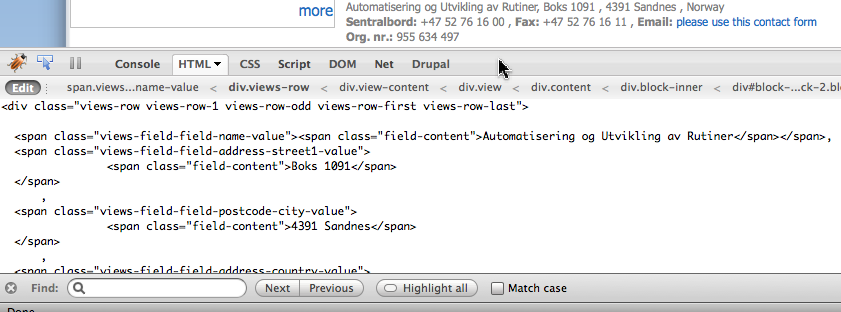
Please see attached image which illustrates the problem exactly.
It shows how, in the live Firebug editor, I have removed the newline from before the comma and after a company name 'Automatisering og Utvikling av Rutiner', so that only it correctly displays with the comma immediately after it, without unwanted white space:
Note how all other inline fields have
' , '. While, I understand the workaround solution, I invite the Views maintainer(s) to again consider a solution in Views that does not have this undesirable side-effect, which I keep running up against over and over.Comment #17
webel commented@merlinofchaos
I have adapted a theme-specific views-view-fields.tpl.php template as recommend. That is one ugly template, and I can understand why you don't want to adopt that as a general, distributed solution (and anybody wishing to is free to as recommended here).
However, from a software engineering and requirements specification perspective, the entire chain of components together (completely irrespective of implementation elegance and appeal), has an undocumented, unexpected, and undesirable side-effect, namely resulting in white space appearing mystically before a separator.
And it undermines the entire notion of a separator.
I think this issue should remain (if at very low priority) at least active in some sense, and "won't fix" is not appropriate. It can be fixed, even if the solution is not aesthetically appealing.
Comment #18
webel commentedBTW with all "unspecified" white space removed from my template, I now use as separator
, , which reflects the complete control over final formatting of inline fields that I consider a basic requirement one should impose on the Views module.Comment #19
webel commentedAnd for the record the result as desired with adapted template is attached:
(BTW This in fact combines 2 mini-views.)
Also of possible interest is the fact that I needed a special field_postcode_city to get the Norwegian format
4391 Sandnesinstead of with a separating comma4391, Sandnesas achieved with field_postcode and field_city next to each other with comma separator, because there is no way it seems to specify no inline separator following a given inline field (on a per field basis).Comment #20
webel commentedSuggestion: could you please at least document this undesired behaviour in the Views UI near the Separator: input field for the Row style: Fields, perhaps even with a link to this issue, or with a remark concerning the template solution, with something like:
Comment #21
merlinofchaos commentedI have data that conclusively shows it's a fairly rare event:
In 2 years, only 5 people have posted about this.
That is rare enough that I am willing to say "use the work around as given."
Comment #22
webel commentedHave read. I have implemented the solution per template. Thanks for your input.
Comment #23
ptoly commentedGood UI design means that it should be difficult to have comma separators with spaces in front of them, not the other way around.
Please add this to your list of statistics requesting that this be fixed.
Comment #24
merlinofchaos commentedYou're right, of course. Good UI design means inconveniencing HUNDREDS and possibly THOUSANDS of users to placate DOZENS.
Oh wait, I mean the other one.
Comment #25
jaydaley commentedThis is a genuine question not picking an argument: Can you explain why it will "make the template more difficult for normal people to navigate"?
That implies that some people can understand and interpret a template file but not php code as given in reply #10, which I find surprising - though of course I don't ever deal with people trying to interpret templates. Thanks.
Comment #26
todd zebert commentedI certainly can't say what is the "right" thing to do, but I searched briefly for this on one project, didn't find this thread, and just suffered the " , " formatting.
I "found" the issue again on my current project, and am glad I found at least a workaround.
I will say that the wording "Inline fields will be displayed next to each other rather than one after another." and "The separator may be placed between inline fields to keep them from squishing up next to each other. You can use HTML in this field." suggest a different result than what actually happens.
Perhaps rewording and mentioning that extra whitespace is a side effect of "tag style" PHP in templates and to check help for more information, then leading to this thread or where ever appropriate.
Comment #27
hillman commentedI'm just getting on converting a CMS I made myself ten years ago to Drupal. Drupal obviously saves a lot of time compared to writing all of my code from scratch, but it feels like it's full of little gotchas like this one that I have to hammer out to make it do what I want, namely, not insert spaces before commas.
I've inserted brian_c's code and so far it seems to take care of the problem. Thanks everyone, especially brian_c.
Comment #28
dhalbert commentedI just encountered this issue in D7. Though I kind of disagree with the "won't fix", I found it easy enough to put a theme-specific copy of
views-view-fields.tpl.phpinto the templates directory in my Omega subtheme. I don't have to change the original copy in the views module.Stackoverflow.com has some suggestions for removing the whitespace from the template function but still keeping it readable. Here's the original template:
You can move the ending
?>onto the next line to close up the white space(I like this best):Or you can wrap the whitespace in comments:
There is a CSS3 proposal for a collapsing white space property, text-space-collapse, but it's still being discussed.
Comment #29
zilverdistel commentedTemplates get cached. Isn't it possible somehow to strip those carriage returns just before they get cached? Thus, the templates stay as readable as they are, but this problem is solved.
Comment #30
zilverdistel commentedreopening, because this possible sollution hasn't come up yet ..
Comment #31
merlinofchaos commentedTemplates do not get cached.
Seriously, if this is a problem for you: Put an overridden template of your choice in your theme, and eliminate the spaces. You suffer a small inconvenience so that the 99% of users who don't care about this don't.
It's not that difficult.
Comment #32
merlinofchaos commentedIn modern Views, another solution is to use tokens, where you can set a bunch of fields to 'exclude' and use a token to write them together, putting the separators in as you prefer.
Comment #33
merlinofchaos commentedIt's also entirely possible that telling Views to not put any markup in at all would also address this problem.
You can also rewrite your fields to include the separator right in the field.
There are lots of solutions.
Comment #34
zilverdistel commentedI do agree with all these per-case sollutions, I really do. I just think (and I don't seem to be the only one) that ideally, an out-of-the-box sollution should be sought after. In order to be able to work on it, at least we need one of the issues concerning this problem to remain open. Changing this into a feature request ... and status to Active (duh).
Comment #35
dawehnerI really doubt that anyone will work on this issue, or commit a patch which makes theming ugly as hell.
Earl gave a lot of solutions which works all.
Comment #36
merlinofchaos commentedUnfortunately, the only "out of the box" solution involves eliminating or destroying the template; we can't just magically make the extra whitespace the template generates disappear, and we can't just eliminate the template.
Comment #37
zilverdistel commentedCan we add some warning about the extra spaces that will be added (due to the way browsers deal with whitespace)? Now the description says
Can we change this to
Do we need to add extra information in the advanced help pages?
Comment #39
DrCord commentedThis issue still exists in the latest views incarnation.
I really like the solution zilverdistel proposes in #37 to make it clearer what is happening, maybe even linking to this thread for more information as well.
I used the solution in #28 to solve this and a template override works fine...but really moving the ending php tags to the next line solves it and doesn't ruin the look or have potential to cause problems for other users like other solutions that cannot be added to the module. This seems like a great permanent solution to actually include in the module.
Comment #40
DrCord commentedI actually even wrapped the separator in a span and things were amazing! :D
Comment #41
alphex commentedI suggest making a copy of the templates to your theme, and removing the sitespaces your self.
Annoying, but a solution.