

 Come together with the global Drupal community in Rotterdam, 28 Sept – 1 Oct 2026. Sessions, contribution, connection, and Early Bird savings until 8 June.
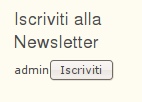
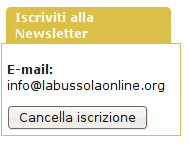
It's happen to me that in the newsletter block the email field doesn't appear...
i.e.
For an anonymous it is hence not possible to be subscribed to my newsletter.
For an authenticated and subscribed user, the field indicating with which email she is subscribed, doesn't appear.
Thanks for your assistance,
Michele.
| Comment | File | Size | Author |
|---|---|---|---|
| #8 | SiteA_admin.png | 4.27 KB | michemon |
| #8 | SiteA_anonymous.png | 2.83 KB | michemon |
| #8 | SiteB_admin.png | 6.34 KB | michemon |
| #8 | SiteB_anonymous.png | 6.76 KB | michemon |



Comments
Comment #1
sutharsan commentedDo you use a taxonomy access control module? And if so, what are the settings for the newsletter taxonomy?
Comment #2
michemon commentedNo I don't use that module.
Comment #3
michemon commentedI use the module Vocabulary Permissions...
Comment #4
sutharsan commentedAnonymous users need access to the newsletter tags. Please explain why anonymous uses have no access to these tags in your system.
Comment #5
michemon commentedThe problem it's the same for all type of users: anonymous, authenticated user, ... all of them have no email box, within the newsletter block.
The difference is that if you are an anonymous user you cannot subscribe to the newsletter (because your email is not available), if you are a registered user you can subscribe to the newsletter, only because your email is already available.
Thanks for your comprehension.
Comment #6
michemon commentedI noted something else, I don't know if may help understanding the problem.
I'm managing two Drupal websites: in one of them (let's say the site A) I have the already explained problem. For the other site (the site B) all is working well for the simplenews module.
But there is a difference between the two sites.
In the site A the newsletter block options (in which I can decide how the block shall appear) are available in the www.mysite.ext/admin/build/block menu after having selected the relevant block.
In the B site the newsletter block is available at the following address www.mysite.ext/admin/content/newsletters/settings after having choosen the relevant newsletter.
Hence the two sites are quite identical for their structure and installed modules, I don't understand the reason of this difference...
Comment #7
sutharsan commentedThe difference is the module version. Authenticated users don't have an email block, by design.
Please focus on the taxonomy access; change it and check the difference for anonymous. If there is a difference, please answer my #4 question.
Comment #8
michemon commentedBoth the site A and B have the same version of the module installed.
Taxonomy Permissions are the same for anonymous and authenticated user.
In any case I also tried to disinstall the Vocabulary Permissions module. But nothing changed.
Here attached I put some screenshot illustrating the problem.
Hoping they could clarify my problem.
Thanks,
Michele.
Comment #9
sutharsan commentedThis IS caused by difference simplenews versions.
Tip: Use 5.x-1.x-dev to get user name and button below each other.
Comment #10
michemon commentedI've installed the 5.x-1.x-dev release, but nothing changed...
Comment #11
michemon commentedWhat can I do find some help ?
Thank you,
Michele.
Comment #12
michemon commentedDear Sutharsan,
sorry for my difficult understanding...
The problem was simply on the Simplenews user permissions!
Now that I have given the authorization to every user to see the simplenews block everything is ok.
Thank you for your assistance.
Michele.
Comment #13
MrGeek commentedthanks;
i was having the exact same problem, and it looks like my Taxonomy Access was set wrong for the particular newsletter that was not displaying - however when i tried to change the TAC access it just hung so i guess my permissions were broke for that taxonomy/newsletter.
I exported the subscription list, created a new newsletter, imported the subscription list, verified the TAC settings, and now the (new) block is displaying properly.
Comment #14
sutharsan commented