

 Come together with the global Drupal community in Rotterdam, 28 Sept – 1 Oct 2026. Sessions, contribution, connection, and Early Bird savings until 8 June.
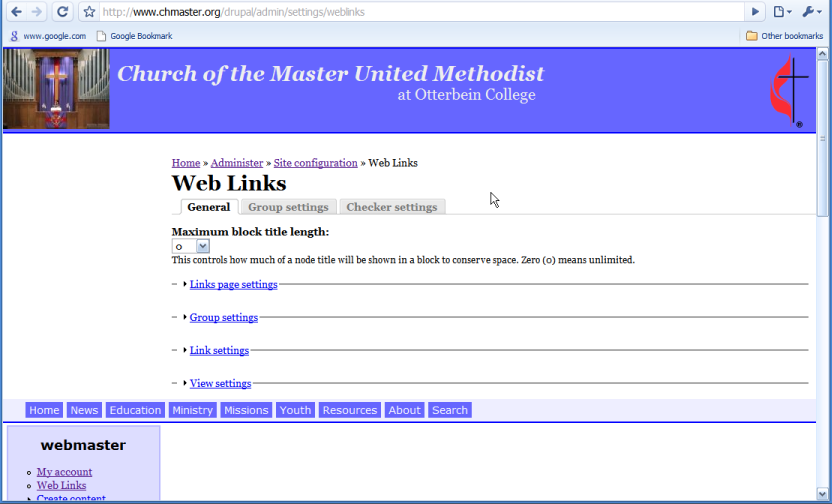
There is no SUBMIT or SAVE button on the General Settings page. How do you save changes to the settings?
| Comment | File | Size | Author |
|---|---|---|---|
| #10 | chrome.png | 80.22 KB | jmbeach |
| #10 | firefox.png | 110.36 KB | jmbeach |
| #7 | Picture 1.png | 12.13 KB | genemcc |
| #2 | Picture 1.png | 48.59 KB | genemcc |
| #1 | weblinks_submit.jog_.JPG | 29.42 KB | nancydru |



Comments
Comment #1
nancydruThe only way that can be is that there are other form errors.
Comment #2
genemcc commentedNo other form errors on the site. Fresh install of 6.6. Any suggestions? Thanks!
Comment #3
nancydruHmm, you're also missing "Field defaults". If you know javascript, try commenting out the start up code at the bottom.
Comment #4
nancydruOh, it might also help to know which version you're using.
Comment #5
genemcc commentedDrupal 6.6
Web Links 6.x-1.0
Sorry - can you be more specific? Which file and which lines should I try commenting out?
Thanks!
Comment #6
nancydruIn weblinks.admin.js, make "function weblinks_setup()" basically do nothing. It might be masking some error messages. Just be aware the page will look different because of this.
Comment #7
genemcc commentedI did that and no change. However, I did try this in firefox and the buttons do appear. So it appears to be a Safari specific issue. I can maintain the first page in firefox but you may want to investigate why it doesn't work in Safari. Thanks for all your help.
Comment #8
nancydruRobert: do you have Safari?
Comment #9
rmiddle commentedNope I haven't checked under webkit that is close to safari but Safari JavaScript sucks so I could believe there are issues with it. Yea get the same issue under webkit/khtml.
Thanks
Robert
Comment #10
jmbeach commentedI just started working with this module and I have version 6.x-1.1 under Drupal 6.6. When accessing the Site Configuration page using Google Chrome (another webkit-based browser), I also do not have the "Save Configuration" and "Reset to Defaults" buttons on the General Settings tab. Like genemcc, I was able to make the changes using Firefox.
Also, using Chrome and my custom Zen sub-theme, the form on the General tab is placed above the navigation bar. The other settings tabs for Weblinks appear correctly in the content-area. I've attached two screenshots, one from Chrome and one from Firefox.
Comment #11
rmiddle commentedjmbeach,
Are you seeing issues in none admin sections?
Thanks
Robert
Comment #12
rmiddle commentedComment #13
jmbeach commentedAre you asking about other module admin sections showing in the incorrect place in my custom theme with Chrome? The general settings tab in Weblinks is only admin section I've had show up incorrectly using my Zen sub-themes.
Jonathan
Comment #14
rmiddle commentedjmbeach,
I just want to confirm that your users are not seeing a problem and that it is only the admin section having a problem. I have confirmed under webkit on my system that it is a problem in the admin section but do see an issue with the blocks or the main weblink pages. Are you just seeing the issue in the admin section or are you seeing it in parts of your site that an anonymous user would see?
Thanks
Robert
Comment #15
jmbeach commentedRobert,
Its only in the Admin section that I have seen the problem and only on the General settings tab (and only in Chrome). The Weblinks blocks appear fine for anonymous users so far (of course, I'm only allowing the Anonymous users to access the weblinks, not create them).
Jonathan
Comment #16
rmiddle commentedjmbeach,
That is what I am seeing as well. I have added something to the front page confirming the issue. WebKit Javascript is a little funky compared to both Firefox and IE. I am guessing there is an issue with the Collapsible code in Drupal and how we are using it and webkit implention of Javascript.
Thanks
Robert
Comment #17
nancydruCan we add a a browser check and skip the collapsing?
Comment #18
rmiddle commentedThis looks to be a Drupal Core issue. One of us need to go though and see if we can figure out the cause and submit a bug report to core.
Thanks
Robert
Comment #19
nancydruWell, let's see. I don't have a browser that this happens on. I don't know JS very much. Hmm...
Comment #20
nancydruThere was a misplaced
</div>.Fix committed to both branches.
Comment #21
nancydru