

 Come together with the global Drupal community in Rotterdam, 28 Sept – 1 Oct 2026. Sessions, contribution, connection, and Early Bird savings until 8 June.
Hi,
I'm not sure if this is a Views issue or an Organic Groups issue but I'm guessing OG; I suppose it could be user error but it seems like a bug.
I'm using the most recent releases (not dev) of OG and Views with Drupal 6. I have created several views and am using menu tabs and it's all working fine. However, when I try to add the og_ghp view to have it render as a tab with the rest - the tabs do not display on that page. I can't figure out the problem. I've tried every scenario I can think of.
Thanks!
| Comment | File | Size | Author |
|---|---|---|---|
| #47 | view.png | 75.95 KB | Kane |
| #43 | view.png | 36.55 KB | Kane |
| #41 | Picture 98.png | 77.21 KB | petednz |
| #22 | Picture 86.png | 33.69 KB | petednz |
| #21 | Picture 86.png | 33.69 KB | petednz |



Comments
Comment #1
sammos commentedI'm changing this to a bug report because I'm pretty certain it's not user error. Thanks!
Comment #2
moshe weitzman commentedYou don't add any menu info for the GHP View. Stay away from this section.
Comment #3
sammos commentedDoes that mean that it's not possible to add views tabs to group home pages then? Or is there some other method?
At this point I've created a workaround: a new view to completely replace og_ghp view and added code to the group.tpl.php file telling it to always redirect to the new view's URL.
Which is fine except that I can't figure out a way to associate the view with the group so that the view's group blocks show up. I've done this with other views using the Organic Groups: Group argument, but for this node since I'm pulling in content from the group node itself, I have to use Node: NID argument, and putting both arguments there just doesn't work.
Is there any other trick you know of for associating this view replacement for og_ghp to pull in the group's blocks?
Thanks
Comment #4
Rosamunda commentedsubscribing
Comment #5
liquidcms commentedsubscribing.. exactly what i need to do.. add tabs to my Group homepage. I actually do have it working; but the tabs show everywhere which is obviously wrong; but maybe an easier starting point.
this is what i have:
- i think i am doing what is in initial post, i create a new view and set:
path = node/%/og/library
menu = menu tab
at first guess i figured having path as community (which works fine for addnig tabs to user page) but doesn't work for groups.
adding tabs to group home page seems like a pretty "obvious" thing to want so hopefully someone can post the solution.
Comment #6
lelizondo commentedsubscribing... with drupal 5.x and views 1 this was really easy as it was some help inline when adding the view.. does anyone has a clue on how to do this?
Comment #7
lelizondo commentedI found http://drupal.org/node/385816, but is there any other way to do this?
Comment #8
Rosamunda commentedThat link is for 5.x version...
Comment #9
lelizondo commentedit works for drupal 6.x but it's not the right way to do it, since that code it's recreating what views/og should be doing without touching the theme..... I'm still looking for a better way to do it..
I'm changing the status since this issue hasn't been solved in my opinion..
Comment #10
liquidcms commentedi agree with lelizondob, #7 is not the right way to do this - you should be able to do this with views as you can to add user profile tabs and any other tabbed collection of content - it's the Drupal way.. :)
not sure why this breaks with OG and not sure why so hard to find a solution when this is such an obvious requirement for a group home page
hopefully should have some time to work on this a bit this week.
Comment #11
lelizondo commentedI'm seeing now that this issue started for version 1.0-rc6 and now there's a 1.x version. I been trying to do this with 2.0-rc-1 .. does anyone manage to solve this with 6.x-1.3? maybe this was solved a long time ago .
Comment #12
lelizondo commentedI found the solution, I had to use Drupal 5.x to read the instructions..
The trick is to use always as the view path:
And that's it, it works.. Tested with 6.x-1.3
Comment #13
liquidcms commentedyup, if you look up at #5 above you'll see that's basically what i posted - but i think the issue is that your new tab(s) will then show on any page that has node/[nid] - which is likely most pages and likely not what you want
ideally you should be able to use community/%/custom (i have pathauto aliasing og nodes to "community").
perhaps custom _menu hook code that does the above but limits if node->type is not og
Comment #14
liquidcms commentedComment #15
lelizondo commentedNo, the tabs won't show up on every page, since you're taking the argument "organic groups"...
Comment #16
Kane commentedHi all, i actually have similar problem. OG - dev and Views - latest.
I have group main page for example www.mysite.com/node/3 (i'm not going to write pathauto alias for better understanding).
This main page is created via default view of og_ghp_ron.
I also have another view with block and page in it. I made it to show members of a current group.
Check attached images: members-block-1.png and members-block-2.png .
And here's a page view which basically loads all members of current group.
See image:members-page-1.png
As you can see it uses path: node/%/members. This path allows to show members tab on every node, but argument (which is the same as in block) hide this tab on every other node except main group page. But i want to load this tab also on group posts node. Of course we can change argument like that:
Change validator to node and choose Group Node and Group Post. (Picture: members-page-2.png)
Well ofcourse this fix load "Members" tabs on Group posts but there's no members. i guess you understand why. If not here's quick explanation:
Members page path is: node/%/members. When we are on Group post page, for example: www.mysite.com/node/4 (Group posts still independent nodes) and when you click on "Members" tab it takes us to blank www.mysite.com/node/4/members.
This page's blank because it takes node id from Group post url and it's not Group Node id.
By the way, on page www.mysite.com/node/3/members any blocks which comes with OG doesn't work, so this is one more problem to solve.
P.S.: It's very possible that i just made some stupid mistakes in my views so that's why they don't wotk properly. I also don't understand all functionality of arguments so it's possible that those mistakes in this field.
Thanks.
Comment #17
moshe weitzman commentedYou guys really ought to use the DRUPAL-6--2 branch where some of these issues are solved. And you can help get the rest solved and released.
Comment #18
Kane commentedI think i need to add also one more thing which is most likely not solvable for now.
Let's say i havethe same path to group main page: www.mysite.com/node/3.
Let's also say that i have pathauto which turns this url to: www.mysite.com/group/flying-monkeys.
Good, now we also have "Members" tab which was described in last post. It's url: www.mysite.com/node/3/members should be www.mysite.com/group/flying-monkeys/members, but thanks to pathauto which create aliases only for well known pages and views pages not included in those "well known pages" it leaves us with: www.mysite.com/node/3/members. And it also means that we can't even change path to remotely user frienly like: www.mysite.com/group/3/members beacuse if we will, "Members" tab won't be in Group main page because of wrong path.
There's module View Alias, but it works only with taxonomy terms.
Comment #19
Kane commentedmoshe weitzman, i have 6.x-2.0 and as you can see problems still there.
Comment #20
lelizondo commentedI also started using 6.x-2.0-rc-1 but I'm not sure this was even a problem with that version. I downgraded because I thought it was a bug, it turns out it was probably a mistake I was making when configuring the view, so I'm not sure it there is a bug.. What I know is that I'm not going to upgrade until the new version it's complete, since version 1.3 it's stable enough and I'm not sure if there was a bug in 2.0
Comment #21
petednz commentedHoping this is the same issue - in D5, as demoed on groups.drupal and extensively promoted in http://drupaldojo.com/files/screencasts/og_panels.mov there was ability to have tabs operating within OGs and this could be implemented simply via the Panel settings using the Panely style settings. (see image)
In my initial usage of most recent OG and Panels I haven't spotted this function -which seems odd since it was a great feature.
Can someone clarify if this feature is still available via the UI for OG Panels?
I do note that if I set up some OG Pages and fail to set one to be the 'home page' then these Pages do show as Tabs, but are not restricted to showing just within the relevent OG, the appear throughout the site including non-OG areas.
Appreciate any clarification you can provide.
Comment #22
petednz commentedHoping this is the same issue - in D5, as demoed on groups.drupal and extensively promoted in http://drupaldojo.com/files/screencasts/og_panels.mov there was ability to have tabs operating within OGs and this could be implemented simply via the Panel settings using the Panely style settings. (see image)
In my initial usage of most recent OG and Panels I haven't spotted this function -which seems odd since it was a great feature.
Can someone clarify if this feature is still available via the UI for OG Panels?
I do note that if I set up some OG Pages and fail to set one to be the 'home page' then these Pages do show as Tabs, but are not restricted to showing just within the relevent OG, the appear throughout the site including non-OG areas.
Appreciate any clarification you can provide.
Comment #23
liquidcms commentedlelizondob - wasn't quite sure what you meant in #15 but i thought about it for about 20 sec.. and hell ya!! that's it. Had to enable the groups node validator under the arg handler for og.. and it now works perfectly.
thanks a ton...
if everyone here is trying to do the same thing (create views tabs for your groups) and haven't sorted it out - i can post a more complete recipe here.
Comment #24
petednz commented"a more complete recipe" sounds very useful - even if it only confirms that we aren't all trying to resolve the same problem
Comment #25
lelizondo commented@liquidcms: if you do, please tell us what version you're using.
Comment #26
liquidcms commentedlatest of everything.. :) but i'll include in recipe.. hopefully do it this weekend.
Comment #27
highvoltage commented"if everyone here is trying to do the same thing (create views tabs for your groups) and haven't sorted it out - i can post a more complete recipe here."
I WILL WORSHIP YOU!!!!!
Comment #28
liquidcms commentedI will try to post a detailed recipe later tonight (hopefully!!), in the meantime, not sure how much use this is.. but here is the export of the view i am using. I use a single view (not the ogh_ view) to create ALL the tabs. Screenshot of group home page is also attached here.
screen of view edit form: http://www.flickr.com/photos/39030197@N05/3590171590/
screen of group home page: http://www.flickr.com/photos/39030197@N05/3590175172/
screen of group blog page (showing tabs, busted breadcrumb): http://www.flickr.com/photos/39030197@N05/3589371001/
Comment #29
liquidcms commentedalso, outstanding issue with my tab pages (and with other pages in group) is the Group Details block goes missing - i think this is covered in another issue though (and my next task to sort out).
Comment #30
Kane commentedI had the same problem with group details block not showing on custom made tabs and i've found solution here: http://drupal.org/node/446098#comment-1642948
At least it works for me.
No idea what to do about titles, and i actually don't use breadcrumbs, so it's not really big problem for me.
Try this patch for breadcrumbs: http://drupal.org/node/422868#comment-1636650
Comment #31
highvoltage commentedWhat ever became of that recipe I wonder?
Comment #32
moshe weitzman commentedComment #33
liquidcms commentedThis is my current Group Home Page Tabs recipe:
(yes, I know screencasts are not exactly permanent; but I think they are pretty close; and so much easier to use than uploading imgs)
Current home page view: http://screencast.com/t/QFoVKK94
I use a std ghp_ view for adding the content on this page; adding different displays for each section (library, blog, bookmarks)
I use another view for ALL of the tabs at the top to go to browser pages for each of the content types: Library, Blog, Bookmarks. Again with a display for each of the tabs.
The export of that view is posted above.
The screen of one of these pages is shown here: http://screencast.com/t/IDf0mIuKo with a couple issues highlighted:
- tokeninzed title shows in breadcrumb
- group details block is missing (general known issue with OG)
- also, my view url is : node/37/og/bookmarks which is not very seo happy
a few shots of the views for building these:
default display: http://screencast.com/t/HJ4sn1xZb7
bookmarks display: http://screencast.com/t/1p1W7YMi
the key points to these views are:
- each display has arg for OG with (as pointed out by lelizondob above) need to state group nodes validator under the arg handler: http://screencast.com/t/RTPhAg5Q
- each display filters on its particular node type
- page display paths are defined for each tab to force them to group together: http://screencast.com/t/J5dwDaDaEzf
I am working on the few issues I mentioned above.
Comment #34
petednz commentedYou are doing a great job helping us here. Can I ask if you would clarify something re the ghp_view. Are you saying the first screencast (Current home page view: http://screencast.com/t/QFoVKK94) is a single 'view' as opposed to a Panel showing several Views? If so any chance you could make my education complete by putting up a screencast that demos how you constructed that?
Comment #35
petednz commentedAnd got to say, I just followed your recipe and it all works - awesome - buy you a beer anytime you are in Wellington NZ ;-)
Comment #36
petednz commentedBut one quick question - on your screenshot your Validator Options you had 'Type of user argument to allow" - I don't see that option - is that only showing on yours because of some other setting you made?
Comment #37
moshe weitzman commentedComment #38
liquidcms commentedpeted, re #34 - i dont use Panels here - and yes, my ghp_ view is a single view but with multiple "block" displays (similar to the groups tabs view). I then just add these blocks to the content region.
re #36 - not sure what you are referring to.. paste a screen shot, or refer to one i pasted.
also, for one of the other issues i was having:
- the token showing in breadcrumb was a bug in views which has been fixed in latest views dev
- but even then the breadcrumb isn't quite right so i used the custom_breadcrumbs module and wrote a little snippet to add a couple groups tokens to use with it (http://drupal.org/node/485980)
Comment #39
petednz commentedRE: screenshot - i was referring to this one - http://screencast.com/t/RTPhAg5Q - on your screen shows a section titled 'Type of user argument to allow" - I don't see that option on the Views screen on my set up - is that only showing on yours because of some other setting you made?
RE: blocks in views - still haven't quite grasped - yes understand the use of blocks but not yet grasped how they get automatically placed in order on the og_ghp_view
Comment #40
liquidcms commentedvalidator options are those defined for the argument Organic Groups (see top of this screen): http://screencast.com/t/D3sQswKDe
i think slightly different now in this screen than previous since i have since upgraded to dev version of Views.
order on the view itself doesn't impact the blocks showing on the page.. under admin/build/block simply add the blocks you want (when you define a views block it will automatically show as a new block in the admin/build/block page) to the "content" region and move them around to put them in the order you want them to appear on your home page.
Comment #41
petednz commentedThe difference is the one indicated in this screenshot - your's had the stuff circled in red. maybe that isn't their in dev version. problem of course is i don't know what i don't know ;-)
Comment #42
highvoltage commentedHmmm, I've been tinkering with the paths to try and get a specific view which is specific to a single group to appear on that group, but I simply don't understand how to set the correct path.
The node/%/og/bookmarks that your view utilizes doesn't really make sense to me. So I can't use that as a starting point. My url structure goes og/[group-name].
Anybody know how I can set a tab for just a single group? I'm lost.
Comment #43
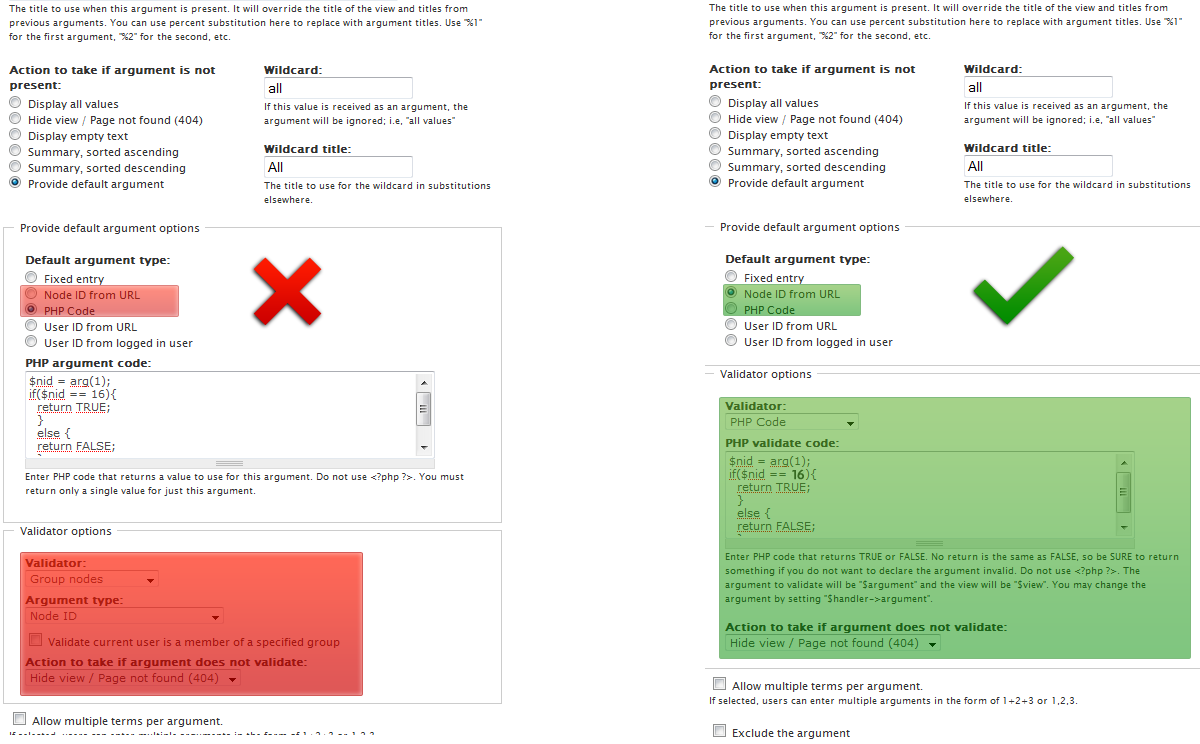
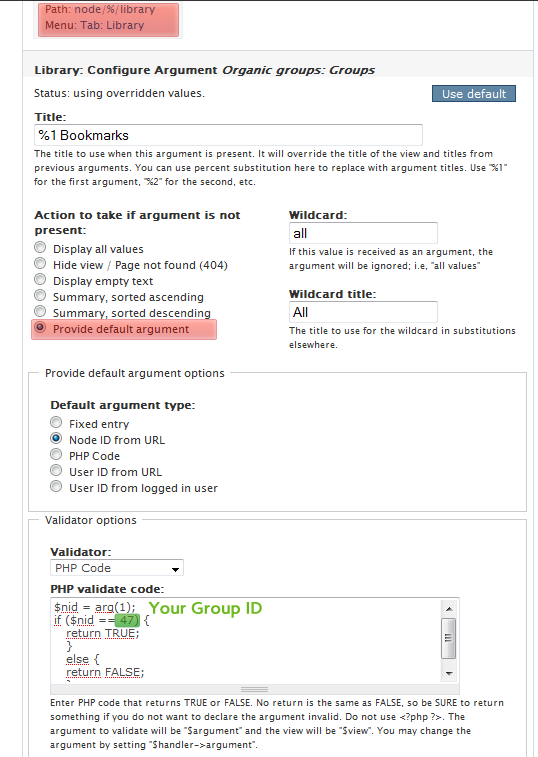
Kane commentedHmm, i think you need to use validator in arguments section of View display. Maybe php code which takes nid from url and checks if it's the same as choosen group id.
Check attached image. Hope it'll work.
Comment #44
highvoltage commentedHey, thanks for your reply. No luck though, sadly. It still appears on all groups. x_x
This is the code I input for the default argument setting, maybe I did something wrong here?
Comment #45
Kane commentedCan you import your view?
Comment #46
highvoltage commentedYes, here is my exported view:
Hopefully it's not something obvious that I should have noticed. x_x
Comment #47
Kane commentedOh, i've found where was your problem. Check attached image.
Comment #48
highvoltage commentedCrap, I knew it was going to be an embarrassing mistake that was messing it all up. x_x
It works now. I can't thank you enough Kane! Your help is really high quality.
Comment #50
itsnotme commentedLove your demo. However, I'm stumped how to force my system to start with the right view. I defined a view "og_ghp_mygroups" and added a page and a path and tab for it, and set it as group start page. However, I always start with the standard river of contents and not the tabbed view (which works fabulously per se!).
Would love to get a tip what's necessary to get the tabbed view as start view.
EDIT: Strange - I exported the view from my local machine onto the server, and there it works automatically!
The group start page has the right tabs showing up (News, Forum, Pages in my case). But it makes me considerably nervous not to know WHY it didn't work locally and why it worked on the server. Guess I must compare my modules statuses or something.